Export Data from Template Fields for Electronic Signature
Award-winning eSignature solution




How to export data from completed documents with airSlate SignNow
Whenever you need to bulk-extract filled-in information from template-generated documents, simply download a CSV report that organizes all the data in a convenient spreadsheet.
Prepare a template and send it for signature
You can either upload a template directly from your device or turn any existing document in your airSlate SignNow account into a template.
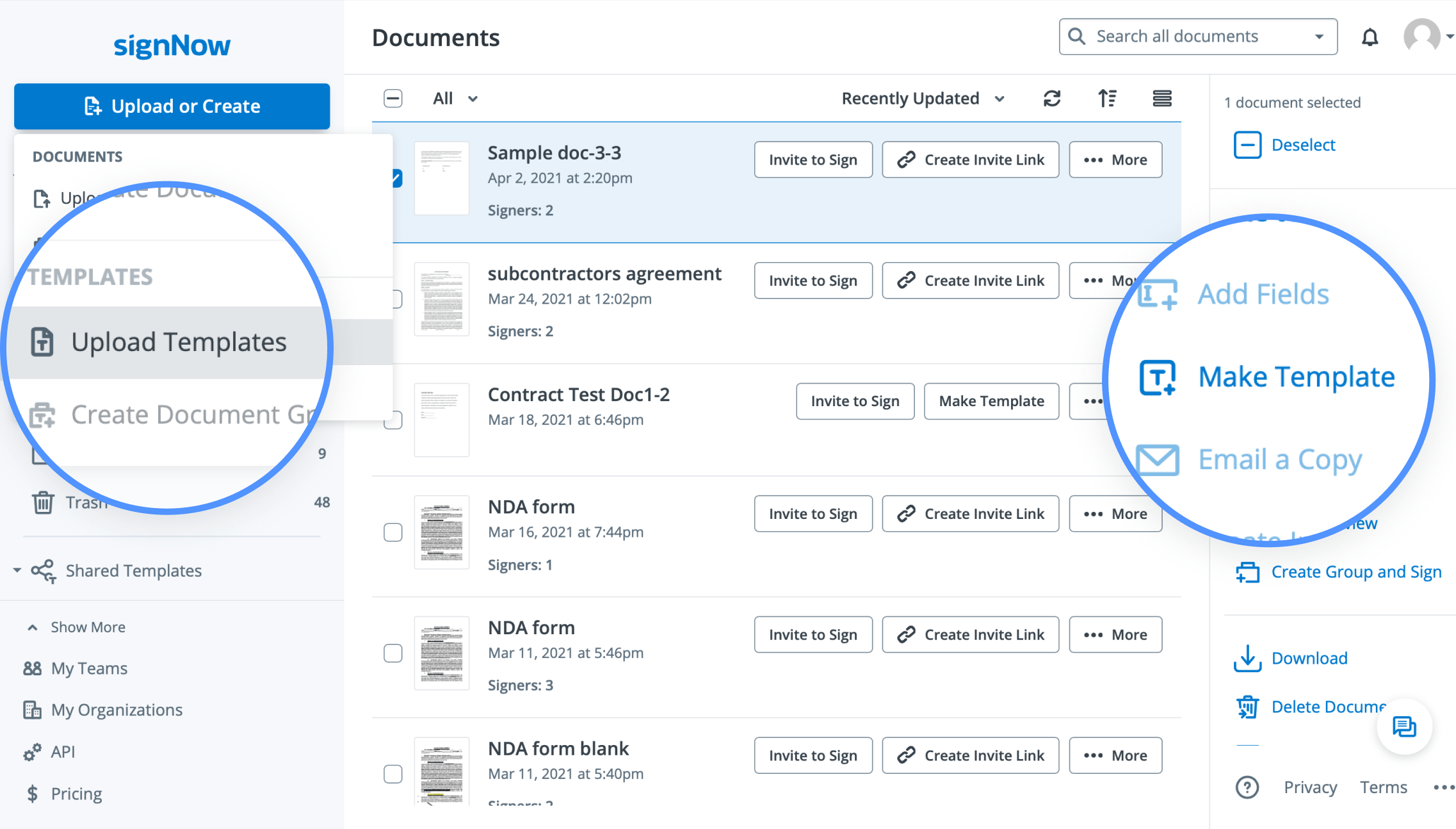
Make sure you add the necessary fillable fields (Signature, Text, Initials, Date fields, etc.), save the changes to your template, and send the document copy for eSignature to one or multiple recipients. Once they fill out and eSign your document, you will receive a notification.
Generate a CSV report
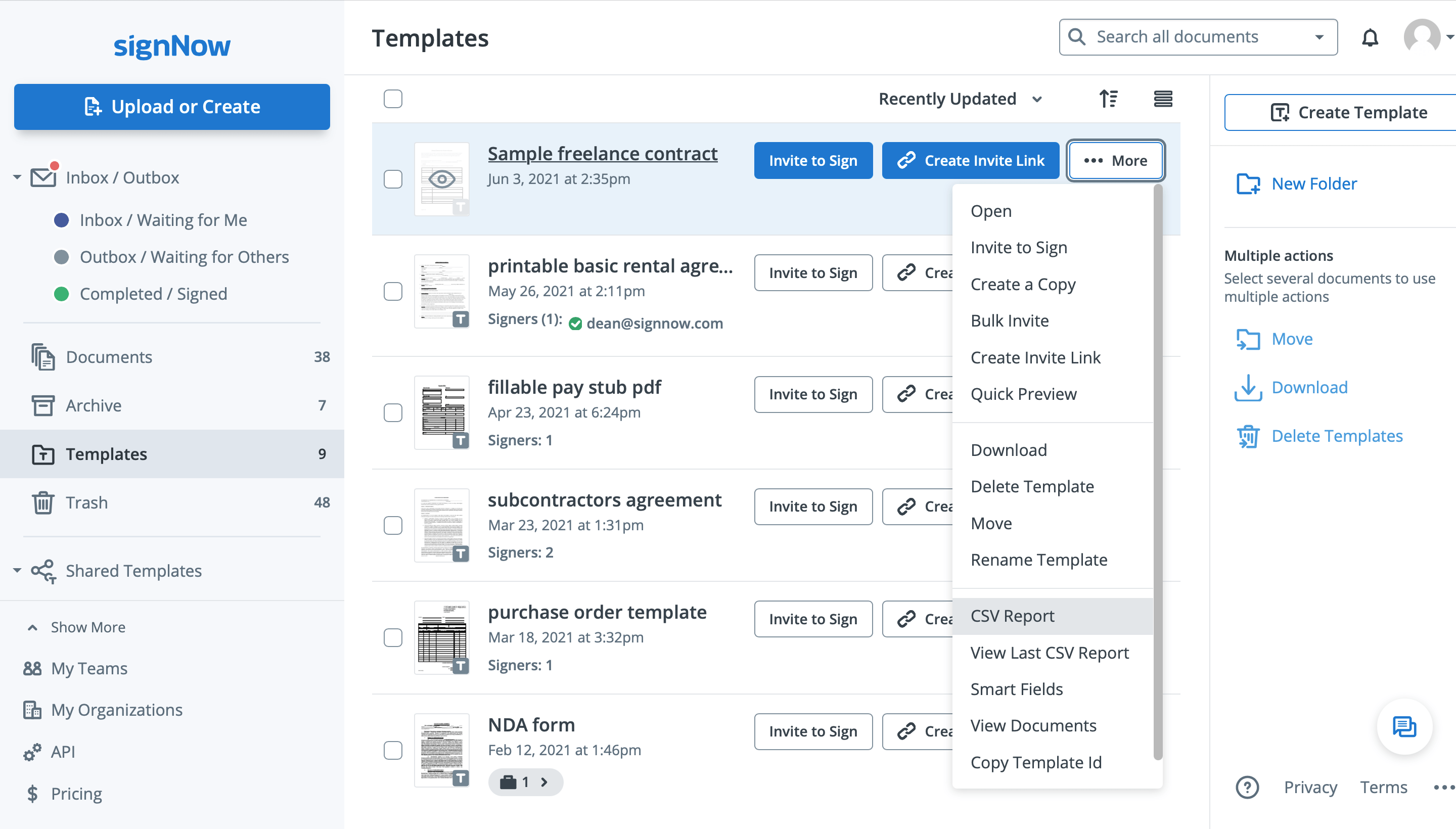
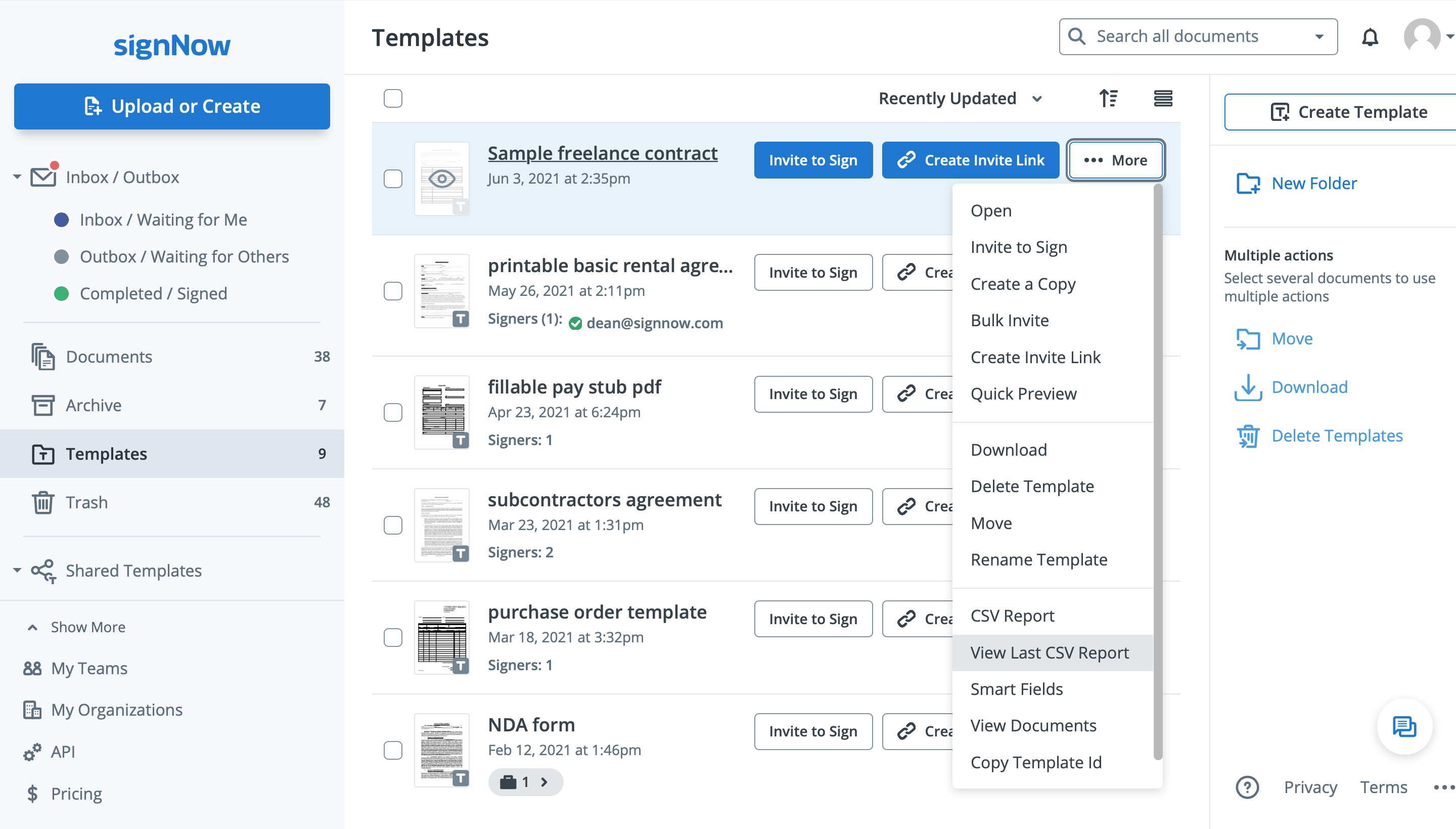
To export data from completed documents, go to your Templates folder, click More next to the template from which those documents were created, and select CSV Report.
Once a CSV file with all the exported data is generated, it will be sent to your email. You can also download your previous CSV reports by clicking View Last CSV Report.
See airSlate SignNow eSignatures in action

Choose a better solution
Take routine paperwork off your plate with airSlate SignNow
Online signature service
Fillable form maker
Document templates
eSignature API
App-native integrations
Ability to export data from template fields
Our user reviews speak for themselves












airSlate SignNow solutions for better efficiency
Why choose airSlate SignNow
-
Free 7-day trial. Choose the plan you need and try it risk-free.
-
Honest pricing for full-featured plans. airSlate SignNow offers subscription plans with no overages or hidden fees at renewal.
-
Enterprise-grade security. airSlate SignNow helps you comply with global security standards.

Your step-by-step guide — export data from template fields
The critical conceptual benefit of the airSlate SignNow eSignature solution for business automation is really a unified information enviroment that extends the company but provides an exclusive bu
How it works





See exceptional results Export data from template fields for electronic signature


How to fill in and sign a document online
Check out the quickest way to export data from template fields. Stay away from paper-based workflows and deal with contracts right from airSlate SignNow. Make ready and send your PDFs from the office or easily work on-the-go. No installing or additional software necessary. All benefits can be found online, just go to signnow.com and make your own eSignature flow.
A brief manual concerning how to export data from template fields in minutes
- Register an airSlate SignNow account (if you haven't registered yet) or sign in with your Google or Facebook.
- Click on Upload and choose one of the PDF files.
- Take advantage of the My Signature instrument to make your signature.
- Transform the template in a powerful PDF with fillable fields.
- Complete your contract and click Done.
As soon as done, send an invite to sign to several people. Get an enforceable deal within minutes making use of any gadget. Check out a lot more features for making impressive PDFs; insert fillable fields export data from template fields and collaborate in teams. The eSignature platform offers a secure workflow and runs according to SOC 2 Type II Certification. Make sure that all of your information are protected and therefore no person can take them.


How to eSign a PDF file in Google Chrome
Are you looking for a service to export data from template fields directly from Chrome? The airSlate SignNow extension for Google is here to help. Find a PDF file and right from your browser quickly open it up with the editor. Add more fillable fields for textual content and eSignature. eSign the PDF and share it safely and securely in accordance with GDPR, SOC 2 Type II Certification and more.
By using this quick how-to guide under, expand your eSignature workflow into Google and export data from template fields:
- Check out the Chrome web store and find the airSlate SignNow extension.
- Click Add to Chrome.
- Log in to your account or create a new one.
- Add a PDF and click on Open in airSlate SignNow.
- Change the PDF file.
- Sign the PDF file using the My Signature tool.
- Click Done to confirm the edits.
- Encourage other participants to eSign by clicking on Invite to Sign and deciding on their emails/names.
Create a signature that's built in to your processes to export data from template fields and get PDFs eSigned in minutes. Leave behind the piles of paperwork located on your workdesk and start saving time and money for extra essential duties. Picking out the airSlate SignNow Google extension is a great convenient option with lots of benefits.



How to eSign an attachment in Gmail
If you're like the majority of, you're used to downloading the email attachments you receive, printing them out and then putting your signature on them, right? Well, we have good news for you. Putting your signature on PDF files with your mailbox just became a lot easier. The airSlate SignNow add-on for Gmail enables you to export data from template fields without the need of leaving your inbox. Do all you need; add more fillable fields and send out signing links in a couple of clicks.
The best way to export data from template fields in Gmail:
- Choose airSlate SignNow for Gmail within the from the G Suite Marketplace and then click Install.
- Sign in to the airSlate SignNow account or make a new one.
- Open your message with the PDF you want to sign.
- Simply click Upload to save the PDF file to the airSlate SignNow profile.
- Click Open document to start the editor.
- Sign the PDF file using My Signature.
- Send a signing links for the other members with the Send to Sign option.
- Enter their email and press OK.
As a result, the other participants will receive notifications telling them to eSign the document. No need to download the PDF file repeatedly, just export data from template fields in clicks. This add-one is suitable for those who choose working on more essential tasks as an alternative to burning up time for practically nothing. Increase your daily monotonous tasks with the award-winning eSignature application.



How to eSign a PDF file on the go without an application
For a lot of products, getting offers accomplished on the go means installing an app on the phone. We're pleased to say at airSlate SignNow we've produced singing on the go faster and much easier by reducing the necessity for a mobile app. To eSign, start your browser (any mobile browser) and try out direct access to airSlate SignNow and all sorts of its effective eSignature tools. Change docs, export data from template fields and much more. No installment or additional software required. Close your offer from just about anywhere.
Take a look at our brief recommendations that teach you the best way to export data from template fields.
- Open your browser and go to signnow.com.
- Log in or create a new account.
- Add or open the PDF you want to change.
- Put fillable fields for textual content, signature and date.
- Draw, type or upload your eSignature.
- Click on Save and Close.
- Just click Invite to Sign and enter a recipient's electronic address if you need other people to eSign the PDF file.
Working on mobile is no different than on a computer: make a reusable template, export data from template fields and deal with the flow as you would typically. In a couple of minutes, receive an enforceable agreement that you can download to your device and send out to customers. But, if you really want an application, download the airSlate SignNow app. It's comfortable, quick and has an excellent interface. Try out seamless eSignature workflows from your workplace, in a taxi or on an airplane.


How to sign a PDF utilizing an iPad
iOS is certainly a well-known operating system loaded with native instruments. It allows you to eSign and change PDFs making use of Preview without having extra software program. However, as great as Apple's feature is, it doesn't provide any automation. Increase your iPhone's functionality by benefiting from the airSlate SignNow iPhone app. Use your iPhone or iPad to export data from template fields and a lot more. Bring in eSignature automation to your mobile processes.
Inserting your signature by using an iPhone has never ever been simpler:
- Select the airSlate SignNow app from the AppStore and set it up.
- Make a new account or sign in with the Facebook or Google.
- Just click Plus and add the PDF you would like to eSign.
- Click on the document exactly where you need to insert your signature.
- Check out other tools: put in fillable fields or export data from template fields.
- Utilize the Save button to make the modifications.
- Send your PDF files through email or using a singing link.
Create a professional-looking PDFs from your airSlate SignNow app. Get the most out of your efforts and job from anyplace; at home, in your office, on a bus or plane, as well as at the beach. Handle a complete document workflow effortlessly: create reusable templates, export data from template fields and work on PDFs with partners. Transform your device right into a potent business tool for executing deals.


How to eSign a PDF taking advantage of an Android
For Android users to handle contracts from their smartphone, they must find and install additional software program. The Play Market is huge and plump with choices, so choosing an effective app isn't too difficult when you have time for you to look through hundreds of apps. To save lots of time and protect against aggravation, we propose airSlate SignNow for Android. Save and modify PDFs, make signing roles, as well as export data from template fields.
The 9 simple steps to amplifying your smartphone workflow:
- Open up the application.
- Log in with your Facebook or Google profiles or create a new if you haven't signed up already.
- Click on + to add a new record taking advantage of your camera, internal or cloud storages.
- Touch just about anywhere in your PDF file and put in your eSignature.
- Just click OK to confirm and eSign.
- Try out far more editing and enhancing tools; put pictures, export data from template fields, make a reusable template, etc.
- Click Save to make changes when you complete.
- Download the PDf file or share it through email.
- Take advantage of the Invite to sign feature if you would like establish & send out a signing link to clients.
Transform the mundane and monotonous work into easy and smooth together with the airSlate SignNow app for Android. eSign and send out documents for eSignature from anywhere you're connected to the internet. Build professional PDFs and export data from template fields with couple of clicks. Created a flawless eSignature workflow with only your mobile phone and boost your overall productivity.
Get legally-binding signatures now!
FAQs
-
How do I create a document template?
Upload your document and click Make Template next to its name. Enter the template name in the newly opened window and click Create Template. You can also upload a template by hovering over the Upload or Create button and selecting Upload Templates.
What active users are saying — export data from template fields


Frequently asked questions
How do you generate a document and apply an electronic signature to it?
How do I add an electronic signature to a Word document?
How do I sign and scan a PDF?
Get more for export data from template fields
The ins and outs of eSignature


Find out other export data from template fields
- Boost your Manufacturing and Supply Agreement ...
- ESignature Legality for General Power of Attorney in ...
- Unlock eSignature legality for Distributor Agreement in ...
- ESignature Legality for Property Inspection Report in ...
- The Legal Power of eSigning General Power of Attorney ...
- Unlock eSignature Legitimateness for Business Associate ...
- Unlock eSignature Legitimateness for Payroll Deduction ...
- ESignature Legality for Non-Compete Agreement in UAE
- Ensure eSignature Legality for Advertising Agreement in ...
- ESignature Lawfulness for Cease and Desist Letter in ...
- Unlock the Power of eSignature Legitimateness for ...
- ESignature Legitimateness for Business Associate ...
- ESignature Legitimateness for Non-Compete Agreement in ...
- Enhance eSignature Legitimateness for Polygraph Consent ...
- Unlock the power of eSignature licitness for Stock ...
- Unlocking the Power of Digital Signature Legality for ...
- Ensuring Compliance with Australian Digital Signature ...
- Digital Signature Legitimacy for Sick Leave Policy in ...
- Enhance Digital Signature Legitimateness for Commercial ...
- Digital Signature Legitimateness for Addressing ...