From prompt to signed, in no-time
Send, track, and manage signatures workflows directly from your AI tools - without leaving your flow.
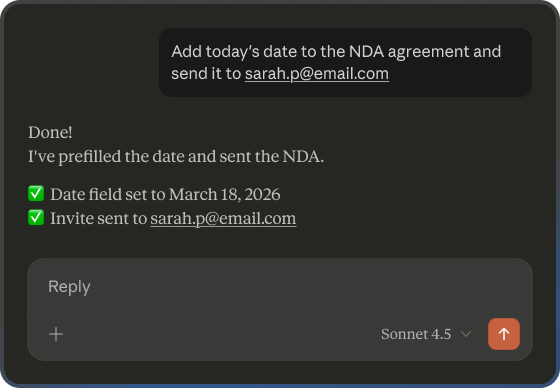








eSignature, powered by natural language
The airSlate SignNow MCP Server connects your AI tools - Claude, ChatGPT, Cursor, VS Code, n8n, Make.com and more - directly to airSlate signNow's eSignature platform. Send contracts, track status, generate signing links, and download completed docs — all through natural language prompts, without touching the UI.

Execute, don't navigate
Go from template to sent invite in a single prompt. No UI, no clicks, no context-switching.

Real-time visibility
Ask "what's pending?" and get instant status across all your documents — no dashboards needed.

Built for automation
Enable your AI agents and workflow tools trigger signing actions autonomously.
Everything your AI needs to run agreements workflows
A full toolset for sending, tracking, embedding, and automating document workflows.
One-Prompt Sending
Create a document from a template and send for signature in a single command. No UI steps, no manual setup.
Real-time status
Check invite status across all documents instantly. Know who signed, who's pending, and who needs a follow-up.
Embedded links
Generate signing links, editor links, and sending views on demand — for portals, emails, or customer-facing apps.
Field pre-filling
Populate document fields with recipient data, amounts, dates, and terms before sending. No manual data entry.
Agent & automation ready
Native MCP format works out of the box with n8n, Make.com, LangChain, LlamaIndex, and custom AI agents.
Edit documents
Instantly get a link for editing a template or a document to match your exact needs, with a drag-n-drop UI.
Three steps. One workflow.
From setup to signed — here's how fast it goes.
Frequently asked questions
Below is a list of the most common airSlate SignNow MCP questions and answers. Just choose a question to view a detailed answer.
- What is MCP and how does it work with airSlate SignNow?
MCP (Model Context Protocol) is an open standard that lets AI assistants like Claude connect directly to applications. The airSlate SignNow MCP server enables AI agents to create documents, send them for signature, pre-fill fields, and manage workflows—all through natural conversation. No coding required.
- Who is this for?
Anyone who wants to run airSlate SignNow signing workflows through AI—teams using assistants like Claude or ChatGPT, developers building apps in VS Code or Cursor, and ops teams automating workflows in n8n or Make.com . It’s perfect for sales sending contracts, HR managing onboarding paperwork, and legal routing NDAs—plus anyone who wants to automate repetitive document tasks with minimal effort.
- How hard is it to set up?
Simple. If you're using Claude Desktop or compatible AI tools, you add the airSlate SignNow MCP server to your configuration using a link, then sign in to airSlate SignNow. It takes about 5 minutes. No developers needed.
- Is this secure?
Yes. The MCP server uses your existing airSlate SignNow authentication and follows the same security standards as our regular platform. Your AI assistant connects through secure protocols, and all documents are handled with the same encryption and compliance measures.
- Is this compliant with e-signature regulations?
Absolutely. Documents sent through MCP have the same legal validity as those sent through airSlate SignNow's web interface or API. All audit trails, authentication, and compliance features remain intact.
- Does this cost extra?
No. airSlate SignNow MCP is currently available on all paid plans at no additional cost. You can also try it with our free trial.