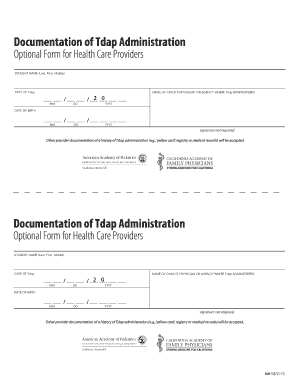
Tdap Administration Form


What is the Tdap Administration Form
The Tdap Administration Form is a crucial document used to record the administration of the Tdap vaccine, which protects against tetanus, diphtheria, and pertussis. This form is typically required in healthcare settings, schools, and for certain employment requirements. It captures essential information such as the patient's name, date of birth, vaccination date, and the administering healthcare provider's details. Accurate completion of this form ensures compliance with public health regulations and facilitates proper record-keeping for immunizations.
How to use the Tdap Administration Form
Using the Tdap Administration Form involves several key steps to ensure that all necessary information is accurately captured. First, healthcare providers should fill out the patient's personal details, including their full name and date of birth. Next, the date of vaccination must be recorded, along with the vaccine lot number and expiration date. The administering provider should sign and date the form to validate the administration. Once completed, the form should be stored in the patient's medical record and may need to be submitted to schools or employers as proof of vaccination.
Steps to complete the Tdap Administration Form
Completing the Tdap Administration Form requires careful attention to detail. Follow these steps:
- Begin by entering the patient's full name and date of birth at the top of the form.
- Record the date the Tdap vaccine was administered.
- Include the vaccine lot number and expiration date to ensure traceability.
- Document the name and title of the healthcare provider administering the vaccine.
- Have the provider sign and date the form to confirm the administration.
- Store the completed form in the patient's medical records and provide copies as needed.
Legal use of the Tdap Administration Form
The Tdap Administration Form serves a legal purpose by documenting vaccination history, which can be essential for compliance with state and federal health regulations. In many states, schools require proof of Tdap vaccination for enrollment, making this form a critical component of educational compliance. Additionally, employers may request this documentation to ensure workplace safety, particularly in healthcare settings. Properly completed forms help protect both the patient and the provider legally by providing a clear record of vaccination.
Key elements of the Tdap Administration Form
Several key elements must be included in the Tdap Administration Form to ensure its validity and effectiveness:
- Patient Information: Full name and date of birth.
- Vaccination Details: Date of administration, vaccine lot number, and expiration date.
- Provider Information: Name, title, and signature of the administering healthcare provider.
- Facility Information: Name and address of the healthcare facility where the vaccine was administered.
How to obtain the Tdap Administration Form
The Tdap Administration Form can typically be obtained from healthcare providers, clinics, or public health departments. Many healthcare facilities have standardized forms that they use for immunization records. Additionally, some states may provide downloadable forms on their health department websites. It is important to ensure that the form used is the most current version to comply with any regulatory changes. If in doubt, contacting a healthcare provider or local health department can provide guidance on obtaining the correct form.
Quick guide on how to complete tdap administration form
Complete Tdap Administration Form seamlessly on any device
Digital document management has gained signNow traction among enterprises and individuals. It offers an ideal eco-friendly alternative to traditional printed and signed paperwork, allowing you to obtain the appropriate form and securely store it online. airSlate SignNow provides all the tools you need to create, modify, and electronically sign your documents swiftly without delays. Handle Tdap Administration Form on any platform with airSlate SignNow's Android or iOS applications and enhance any document-focused workflow today.
How to adjust and eSign Tdap Administration Form with ease
- Locate Tdap Administration Form and click Get Form to begin.
- Utilize the tools we provide to complete your form.
- Highlight important sections of your documents or obscure sensitive information with tools that airSlate SignNow specifically provides for this purpose.
- Create your signature using the Sign feature, which takes mere seconds and holds the same legal validity as a conventional wet ink signature.
- Review the details and click the Done button to save your modifications.
- Choose your preferred method of sharing your form, whether by email, SMS, or invitation link, or download it to your computer.
Eliminate concerns about missing or misplaced documents, tedious form searches, or mistakes that necessitate printing additional copies. airSlate SignNow fulfills all your document management requirements in just a few clicks from your chosen device. Modify and eSign Tdap Administration Form and ensure exceptional communication at every step of your form preparation process with airSlate SignNow.
Create this form in 5 minutes or less
Create this form in 5 minutes!
How to create an eSignature for the tdap administration form
The best way to create an electronic signature for a PDF in the online mode
The best way to create an electronic signature for a PDF in Chrome
How to create an e-signature for putting it on PDFs in Gmail
The best way to generate an e-signature right from your smart phone
The way to create an e-signature for a PDF on iOS devices
The best way to generate an e-signature for a PDF on Android OS
People also ask
-
What does the notifier product discontinued announcement mean for current users?
The notifier product discontinued announcement signifies that the notifier feature will no longer receive updates or support. Current users will need to explore alternative solutions within airSlate SignNow or consider other integrations. We recommend transitioning smoothly to ensure continued document management efficiency.
-
Will there be any changes to pricing following the notifier product discontinued announcement?
After the notifier product discontinued announcement, pricing for the remaining features will remain unchanged initially. However, we may introduce updated packages to reflect the shift in offerings. Customers are encouraged to stay informed about any future pricing adjustments.
-
How will the notifier product discontinued announcement impact existing integrations?
The notifier product discontinued announcement will affect existing integrations that rely on this feature. Users should assess their current workflows and consider integrating alternative tools within airSlate SignNow or third-party applications to maintain functionality. Our support team can assist in finding suitable replacements.
-
What benefits can I expect from the remaining features after the notifier product discontinued announcement?
Following the notifier product discontinued announcement, users can still enjoy the core benefits of airSlate SignNow, including efficient eSigning, document workflows, and user-friendly interfaces. Our commitment remains to enhance user experience through continuous improvement of our essential features. Check back frequently for updates and new functionalities.
-
Are there training resources available for users affected by the notifier product discontinued announcement?
Yes, we offer extensive training resources for users impacted by the notifier product discontinued announcement. These include webinars, tutorials, and documentation that help transition to our alternative features. We're dedicated to ensuring that all users can maximize their experience with airSlate SignNow.
-
What steps should be taken after receiving the notifier product discontinued announcement?
After receiving the notifier product discontinued announcement, it’s essential to review your current use of the notifier feature. Evaluate how this change impacts your workflows and consult with our customer support for alternatives or additional tools that match your needs. Planning your transition will help maintain efficiency.
-
How can I provide feedback regarding the notifier product discontinued announcement?
We value customer feedback, especially following the notifier product discontinued announcement. You can signNow out through our support channels or feedback forms available on our website. Your insights will help us improve our services and tailor solutions that meet user expectations.
Get more for Tdap Administration Form
- Form t480
- Wells fargo letterhead form
- Sprint com fraud 394662291 form
- Eq format
- Issa fitness the complete guide pdf form
- Syndicate bank pension slip form
- 20231019 mod form 5010a dynamic risk assessment
- Early intervention program referral form new york cityearly intervention program referral form new york cityearly intervention
Find out other Tdap Administration Form
- Sign Alaska Plumbing Moving Checklist Later
- Sign Arkansas Plumbing Business Plan Template Secure
- Sign Arizona Plumbing RFP Mobile
- Sign Arizona Plumbing Rental Application Secure
- Sign Colorado Plumbing Emergency Contact Form Now
- Sign Colorado Plumbing Emergency Contact Form Free
- How Can I Sign Connecticut Plumbing LLC Operating Agreement
- Sign Illinois Plumbing Business Plan Template Fast
- Sign Plumbing PPT Idaho Free
- How Do I Sign Wyoming Life Sciences Confidentiality Agreement
- Sign Iowa Plumbing Contract Safe
- Sign Iowa Plumbing Quitclaim Deed Computer
- Sign Maine Plumbing LLC Operating Agreement Secure
- How To Sign Maine Plumbing POA
- Sign Maryland Plumbing Letter Of Intent Myself
- Sign Hawaii Orthodontists Claim Free
- Sign Nevada Plumbing Job Offer Easy
- Sign Nevada Plumbing Job Offer Safe
- Sign New Jersey Plumbing Resignation Letter Online
- Sign New York Plumbing Cease And Desist Letter Free