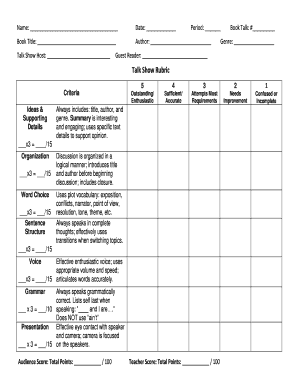
Talk Show Rubric Form


What is the Talk Show Rubric
The Talk Show Rubric serves as a structured guide for evaluating performances in a talk show format. It outlines specific criteria that assess various aspects of the presentation, including content delivery, engagement with the audience, and overall effectiveness. This rubric is particularly useful for educators and students participating in projects that simulate talk show scenarios, allowing for clear expectations and consistent grading.
How to use the Talk Show Rubric
Using the Talk Show Rubric involves several steps. First, familiarize yourself with the criteria outlined in the rubric, which may include categories such as clarity of message, creativity, and interaction with guests. As you prepare your talk show, refer back to the rubric to ensure that you meet the expectations set forth. During the performance, evaluators can use the rubric to score each category, providing feedback based on the established criteria.
Steps to complete the Talk Show Rubric
Completing the Talk Show Rubric involves a systematic approach. Begin by reviewing the rubric and identifying the key areas of focus. Next, plan your talk show segment, ensuring that you address each criterion. Once the performance is completed, evaluators should assess the segment against the rubric, scoring each category and providing comments. This process not only aids in grading but also helps participants understand their strengths and areas for improvement.
Key elements of the Talk Show Rubric
The key elements of the Talk Show Rubric typically include criteria such as content quality, presentation skills, audience engagement, and technical execution. Each element is assigned a specific weight, reflecting its importance in the overall evaluation. For instance, content quality might focus on the relevance and depth of the discussion, while presentation skills may assess the speaker's clarity and confidence. Understanding these elements is crucial for both presenters and evaluators.
Examples of using the Talk Show Rubric
Examples of using the Talk Show Rubric can vary based on the context of the performance. For instance, in a classroom setting, students might perform a mock interview with a guest, utilizing the rubric to evaluate their peers. Alternatively, in a community event, local leaders could host a discussion on relevant issues, with the rubric guiding the assessment of their effectiveness. These examples illustrate the rubric's versatility and its application in diverse scenarios.
Quick guide on how to complete talk show rubric
Effortlessly Prepare Talk Show Rubric on Any Device
Managing documents online has surged in popularity among businesses and individuals alike. It serves as an ideal eco-friendly alternative to traditional printed and signed documents, allowing users to locate the correct form and securely store it online. airSlate SignNow provides all the tools you need to create, modify, and eSign your documents swiftly without delays. Handle Talk Show Rubric on any device using the airSlate SignNow apps for Android or iOS and enhance any document-centric process today.
How to Alter and eSign Talk Show Rubric with Ease
- Obtain Talk Show Rubric and click on Get Form to begin.
- Use the tools we provide to complete your form.
- Emphasize important parts of your documents or redact sensitive details with tools specifically offered by airSlate SignNow for that purpose.
- Create your signature using the Sign tool, which takes mere seconds and carries the same legal validity as a standard wet ink signature.
- Review all information and click the Done button to save your changes.
- Select how you want to send your form, by email, SMS, or an invitation link, or download it to your computer.
Eliminate worries about lost or misplaced documents, tedious form searches, or mistakes that necessitate reprinting new document copies. airSlate SignNow meets your document management needs in just a few clicks from any device of your choice. Edit and eSign Talk Show Rubric and ensure seamless communication at any stage of the form preparation process with airSlate SignNow.
Create this form in 5 minutes or less
Create this form in 5 minutes!
People also ask
-
What are rubrics in tagalog and how can they benefit my business?
Rubrics in Tagalog are tools that help in evaluating and grading performance based on specific criteria. By using effective rubrics, businesses can streamline their assessment processes, ensuring consistency and fairness. This ultimately leads to clearer expectations and improved outcomes.
-
How does airSlate SignNow incorporate rubrics in tagalog into its features?
AirSlate SignNow allows users to integrate rubrics in Tagalog into their document templates, making it easier to assess documents in a culturally relevant way. By incorporating language-specific rubrics, our platform enhances user experience and increases document accuracy. This feature helps in better understanding and utilization of the evaluation criteria.
-
What pricing plans does airSlate SignNow offer for users needing rubrics in tagalog?
AirSlate SignNow offers flexible pricing plans that cater to different business sizes and needs. Whether you are a small business or a large enterprise, you can choose a plan that best accommodates your requirements, including access to rubrics in Tagalog. Each plan provides various features to optimize your document management process.
-
Can I customize rubrics in tagalog within airSlate SignNow?
Yes, airSlate SignNow allows users to fully customize rubrics in Tagalog to fit their specific evaluation needs. You can create, modify, and save different rubric templates tailored for various projects or assessments. This customization ensures that your documents meet your precise criteria.
-
What benefits does using rubrics in tagalog provide for educational institutions?
Using rubrics in Tagalog helps educational institutions provide a clearer framework for grading and assessing student performance. It promotes transparency and helps students understand what is expected from them. Moreover, it caters to a wider student base by ensuring language inclusivity.
-
Are there integrations available for using rubrics in tagalog with other platforms?
AirSlate SignNow integrates seamlessly with various third-party applications, allowing you to utilize rubrics in Tagalog across different platforms. This means you can enhance your workflow by connecting your document processes with your existing tools. Such integrations help in maintaining continuity and efficiency in your business operations.
-
How can I access tutorials for creating rubrics in tagalog using airSlate SignNow?
AirSlate SignNow provides comprehensive tutorials and resources that guide you through the process of creating rubrics in Tagalog. These resources are accessible from our website and are designed to make the process simple and user-friendly. You'll find step-by-step instructions to help you create effective evaluation tools.
Get more for Talk Show Rubric
- Membership data update request form
- French book pdf form
- Anexo ii do memorando circular conjunto no 3 dirben dirat dirsat inss form
- Underline the proper nouns and circle the common nouns with answers form
- Chesapeake public schools physical form
- A20 form
- 1055 scw form
- Film production registration form
Find out other Talk Show Rubric
- How Can I eSign Wyoming Real Estate Form
- How Can I eSign Hawaii Police PDF
- Can I eSign Hawaii Police Form
- How To eSign Hawaii Police PPT
- Can I eSign Hawaii Police PPT
- How To eSign Delaware Courts Form
- Can I eSign Hawaii Courts Document
- Can I eSign Nebraska Police Form
- Can I eSign Nebraska Courts PDF
- How Can I eSign North Carolina Courts Presentation
- How Can I eSign Washington Police Form
- Help Me With eSignature Tennessee Banking PDF
- How Can I eSignature Virginia Banking PPT
- How Can I eSignature Virginia Banking PPT
- Can I eSignature Washington Banking Word
- Can I eSignature Mississippi Business Operations Document
- How To eSignature Missouri Car Dealer Document
- How Can I eSignature Missouri Business Operations PPT
- How Can I eSignature Montana Car Dealer Document
- Help Me With eSignature Kentucky Charity Form