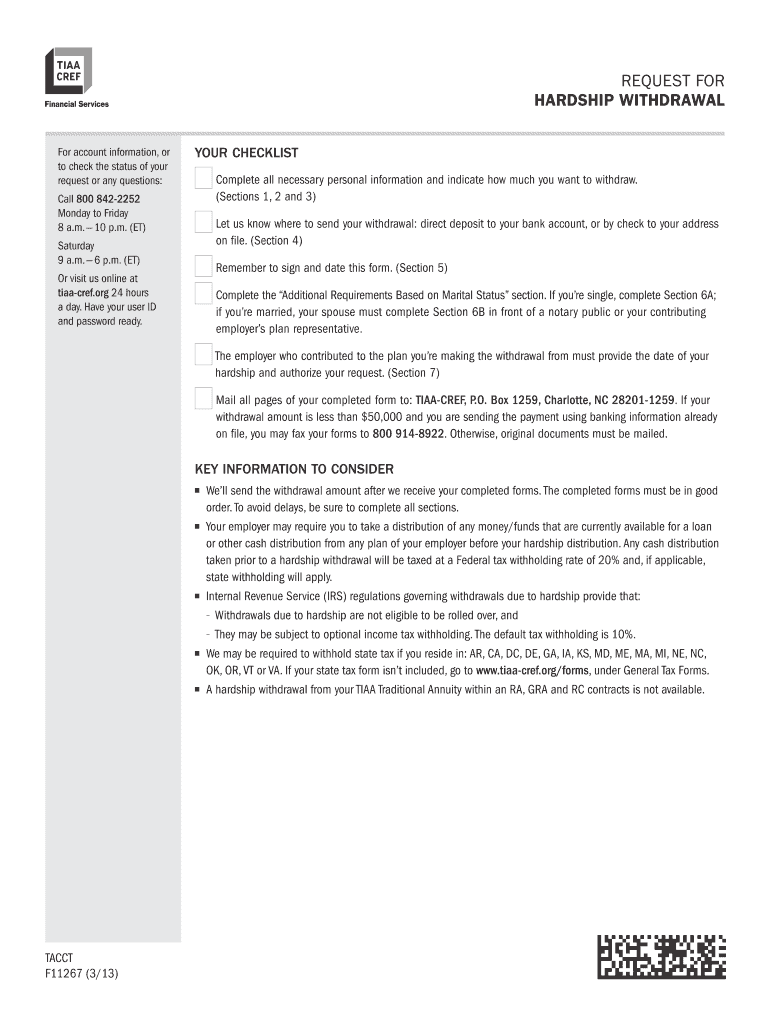
Tiaa Cref Hardship Withdrawal Form


What is the TIAA CREF Hardship Withdrawal?
The TIAA CREF hardship withdrawal allows individuals to access their retirement funds in times of financial distress. This option is available to participants in TIAA's retirement plans who meet specific criteria, demonstrating that they are facing an immediate and pressing financial need. Common qualifying circumstances include medical expenses, the purchase of a primary residence, tuition payments, and the prevention of eviction or foreclosure. Understanding the rules governing this withdrawal is essential to ensure compliance and avoid penalties.
Eligibility Criteria for the TIAA CREF Hardship Withdrawal
To qualify for a TIAA hardship withdrawal, participants must meet certain eligibility criteria. These typically include:
- Demonstrating a significant financial need that cannot be met through other means.
- Having exhausted all available loans from the retirement plan.
- Providing documentation to support the hardship claim, such as medical bills or eviction notices.
It is important to review the specific terms and conditions outlined by TIAA to ensure that your situation qualifies under their guidelines.
Steps to Complete the TIAA CREF Hardship Withdrawal
Completing the TIAA hardship withdrawal involves several key steps:
- Gather necessary documentation that proves your financial hardship.
- Access the TIAA hardship withdrawal form, which may be available online or through your TIAA account.
- Fill out the form accurately, ensuring all required fields are completed.
- Submit the form along with any supporting documents, either online or by mail.
- Await confirmation from TIAA regarding the approval of your withdrawal request.
Following these steps carefully can help streamline the process and ensure a successful withdrawal.
Required Documents for the TIAA CREF Hardship Withdrawal
When applying for a hardship withdrawal, specific documents are typically required to validate your claim. These may include:
- Proof of income loss or reduction, such as pay stubs or termination letters.
- Medical bills or statements if the withdrawal is for medical expenses.
- Documentation related to housing, such as eviction notices or mortgage statements.
- Tuition invoices if the funds are intended for educational expenses.
Having these documents ready can expedite the review process and increase the likelihood of approval.
Legal Use of the TIAA CREF Hardship Withdrawal
The legal framework surrounding hardship withdrawals is governed by federal regulations, which stipulate the conditions under which funds can be accessed. TIAA adheres to these regulations, ensuring that withdrawals are compliant with the Employee Retirement Income Security Act (ERISA) and Internal Revenue Service (IRS) guidelines. It is crucial to understand that improper use of funds or failure to meet eligibility requirements can lead to penalties, including taxes on the withdrawn amount.
Form Submission Methods for the TIAA CREF Hardship Withdrawal
Participants can submit their TIAA hardship withdrawal forms through various methods, including:
- Online submission via the TIAA website, which often provides the fastest processing time.
- Mailing the completed form and supporting documents to the designated TIAA address.
- In-person submission at a TIAA office, if available in your area.
Choosing the right submission method can help ensure that your request is processed efficiently.
Quick guide on how to complete tiaa cref harship withdrawal form f11267
Prepare Tiaa Cref Hardship Withdrawal effortlessly on any device
Online document management has become popular among businesses and individuals. It offers an ideal eco-friendly substitute for traditional printed and signed documents, allowing you to locate the correct form and securely store it online. airSlate SignNow provides you with all the tools necessary to create, edit, and eSign your documents quickly without delays. Manage Tiaa Cref Hardship Withdrawal on any platform with airSlate SignNow Android or iOS applications and enhance any document-related process today.
How to edit and eSign Tiaa Cref Hardship Withdrawal effortlessly
- Locate Tiaa Cref Hardship Withdrawal and click Get Form to begin.
- Utilize the tools we provide to fill out your document.
- Mark important sections of your documents or obscure sensitive data using tools that airSlate SignNow provides specifically for that purpose.
- Create your signature using the Sign tool, which takes moments and carries the same legal validity as a conventional wet ink signature.
- Review the details and click on the Done button to save your modifications.
- Choose how you wish to send your form, via email, text message (SMS), invitation link, or download it to your computer.
Forget about lost or misplaced files, tedious form searching, or mistakes that necessitate printing new document copies. airSlate SignNow meets all your document management needs in just a few clicks from any device you prefer. Edit and eSign Tiaa Cref Hardship Withdrawal and ensure outstanding communication at every stage of your form preparation process with airSlate SignNow.
Create this form in 5 minutes or less
FAQs
-
I need help filling out this IRA form to withdraw money. How do I fill this out?
I am confused on the highlighted part.
-
Is it necessary to fill out form 15G to withdraw PF?
Greeting !!!Below are basic details for Form 15G or form 15HForm 15G or form 15H is submitted to request income provider for not deducting TDS for prescribed income. In that form, declaration maker declares that his estimated taxable income for the same year is Nil.If you fulfill following conditions, submit form 15G / form 15H:1. Your estimated tax liability for the current year is NIL and2. Your interest for financial year does not exceed basic exemption limit + relief under section 87A.Only resident Indian can submit form 15G / form 15H. NRI cannot submit those forms. Also note that individual and person can submit form 15G/ H and company and firm cannot submit those forms. However, AOP and HUF can submit those forms.Consequences of wrongly submitting form 15G or form 15H:If your estimated income from all the sources is more than thebasic exemption limit ( + relief under section 87A if applicable), don’t submitform 15G or form 15H to income provider. Wrongly submission of form 15G / form15H will attract section 277 of income tax act.Be Peaceful !!!
-
Is it necessary to fill out Form 15G/Form 15H if my service is less than 5 years? I need to withdraw the amount.
Purposes for which Form 15G or Form 15H can be submitted. While these forms can be submitted to banks to make sure TDS is not deducted on interest, there a few other places too where you can submit them. TDS on EPF withdrawal – TDS is deducted on EPF balances if withdrawn before 5 years of continuous service.
-
How can I fill out Google's intern host matching form to optimize my chances of receiving a match?
I was selected for a summer internship 2016.I tried to be very open while filling the preference form: I choose many products as my favorite products and I said I'm open about the team I want to join.I even was very open in the location and start date to get host matching interviews (I negotiated the start date in the interview until both me and my host were happy.) You could ask your recruiter to review your form (there are very cool and could help you a lot since they have a bigger experience).Do a search on the potential team.Before the interviews, try to find smart question that you are going to ask for the potential host (do a search on the team to find nice and deep questions to impress your host). Prepare well your resume.You are very likely not going to get algorithm/data structure questions like in the first round. It's going to be just some friendly chat if you are lucky. If your potential team is working on something like machine learning, expect that they are going to ask you questions about machine learning, courses related to machine learning you have and relevant experience (projects, internship). Of course you have to study that before the interview. Take as long time as you need if you feel rusty. It takes some time to get ready for the host matching (it's less than the technical interview) but it's worth it of course.
-
How do I fill out the form of DU CIC? I couldn't find the link to fill out the form.
Just register on the admission portal and during registration you will get an option for the entrance based course. Just register there. There is no separate form for DU CIC.
-
To withdraw PF, how to fill form 15G? Specifically the field numbered "23"
Greeting …I will explain PART 1 of form 15G point wise.Name : write name as per pan card.PAN : write your PAN number.Assessment year: For current year , it is assessment year 2016-17. Don’t make mistake in writing it. It is next to the current financial year. ( No matter about your year of PF withdrawal, assessment year is 2016-17 because you are submitting form for current year ( 2015-16’s estimated income)Flat/ Door/ Block no. : Current Address details .Name of premises: Current Address details.Status : Individual/ HUF/ AOP as applicability to you.Assessed in which ward circle : Details about your income tax ward you were assessed last time. You can know your income tax ward and circle from this link- know your juridictional AO. Just enter your PAN no. and you can find the details.Road : current address details.Area : current address details.AO code : write as per link provided in point 7.Town : current address.State : Current state.PIN : pin code number.Last assessed year in which assessed : Last year generally if you were assessed in last year. 2015-16EmailTelephone NO.Present ward circle : Same if no change after issue of pan card. ( as per point 7)Residential status: Resident.Name of business/ occupation : Your business or job details.Present AO code : as per point 7 if no change in ward/ circle of income tax.Juridictional chief commissioner of income tax ( if not assessed of income tax earlier) : leave it blank.Estimated total income: You are required to enter estimated total income of current year. Do sum of the total income from all sources and tick the relevant boxes.The amount should be from following sources: Interest on securities , Interest on sum other than securities ( interest on FD etc.), Interest on mutual fund units., withdrawals of NSC.Dividend on shares,Estimated total income of the current year should be entered. The income mentioned in column 22 should be included in it .PF income ( if taxable) and other income (business, salary etc.). The amount is taxable income means total income less deductions available.In this column, you are required to give details of investment you have made. For different form of investment different schedules are given.Be Peaceful !!!
-
How do you know if you need to fill out a 1099 form?
Assuming that you are talking about 1099-MISC. Note that there are other 1099s.check this post - Form 1099 MISC Rules & RegulationsQuick answer - A Form 1099 MISC must be filed for each person to whom payment is made of:$600 or more for services performed for a trade or business by people not treated as employees;Rent or prizes and awards that are not for service ($600 or more) and royalties ($10 or more);any fishing boat proceeds,gross proceeds of $600, or more paid to an attorney during the year, orWithheld any federal income tax under the backup withholding rules regardless of the amount of the payment, etc.
Create this form in 5 minutes!
How to create an eSignature for the tiaa cref harship withdrawal form f11267
How to make an eSignature for the Tiaa Cref Harship Withdrawal Form F11267 online
How to generate an eSignature for your Tiaa Cref Harship Withdrawal Form F11267 in Google Chrome
How to generate an eSignature for putting it on the Tiaa Cref Harship Withdrawal Form F11267 in Gmail
How to generate an eSignature for the Tiaa Cref Harship Withdrawal Form F11267 from your smart phone
How to generate an electronic signature for the Tiaa Cref Harship Withdrawal Form F11267 on iOS
How to create an eSignature for the Tiaa Cref Harship Withdrawal Form F11267 on Android OS
People also ask
-
What is a Tiaa Cref Hardship Withdrawal?
A Tiaa Cref Hardship Withdrawal allows individuals facing financial difficulties to access their retirement funds without incurring early withdrawal penalties. This type of withdrawal is designed to provide necessary financial relief in times of need, ensuring that you can manage unexpected expenses effectively.
-
How do I apply for a Tiaa Cref Hardship Withdrawal?
To apply for a Tiaa Cref Hardship Withdrawal, you typically need to submit a written request along with documentation of your financial hardship. It’s important to provide all required information to ensure your application is processed quickly and efficiently.
-
What are the eligibility requirements for a Tiaa Cref Hardship Withdrawal?
Eligibility for a Tiaa Cref Hardship Withdrawal generally includes experiencing a severe financial hardship such as medical expenses, purchasing a primary home, or preventing eviction. It's essential to review the specific criteria set by Tiaa Cref to confirm your qualifications.
-
Are there any tax implications for a Tiaa Cref Hardship Withdrawal?
Yes, while a Tiaa Cref Hardship Withdrawal can provide immediate access to funds, it may also have tax implications. Withdrawn amounts are typically subject to income tax, and if you're under 59½, you may incur an additional 10% penalty.
-
How long does it take to process a Tiaa Cref Hardship Withdrawal?
The processing time for a Tiaa Cref Hardship Withdrawal usually takes between 7 to 10 business days, depending on the completeness of your application and the documentation provided. To avoid delays, ensure all required forms are accurately filled out and submitted.
-
Can I use airSlate SignNow to facilitate my Tiaa Cref Hardship Withdrawal documents?
Absolutely! airSlate SignNow provides an efficient platform for eSigning and managing documents related to your Tiaa Cref Hardship Withdrawal. Our solution simplifies the process, ensuring that you can quickly and securely send and sign all necessary paperwork.
-
What features does airSlate SignNow offer for managing Tiaa Cref Hardship Withdrawal documents?
airSlate SignNow offers features such as customizable templates, secure document storage, and real-time tracking of your Tiaa Cref Hardship Withdrawal documents. These tools enhance your efficiency and help ensure compliance throughout the withdrawal process.
Get more for Tiaa Cref Hardship Withdrawal
- School leaving certificate download form
- Three little monkeys studio santa tags form
- Dwu courses form
- Which is less likely to generate defensiveness mcm301 form
- West edge mobile home park form
- Dd 2945 mar post government employment advice opinion request form
- Esll sponsor form east side little league eastsidell
- Bmc community service form university of colorado boulder
Find out other Tiaa Cref Hardship Withdrawal
- Can I Electronic signature West Virginia Courts PPT
- Send Sign PDF Free
- How To Send Sign PDF
- Send Sign Word Online
- Send Sign Word Now
- Send Sign Word Free
- Send Sign Word Android
- Send Sign Word iOS
- Send Sign Word iPad
- How To Send Sign Word
- Can I Send Sign Word
- How Can I Send Sign Word
- Send Sign Document Online
- Send Sign Document Computer
- Send Sign Document Myself
- Send Sign Document Secure
- Send Sign Document iOS
- Send Sign Document iPad
- How To Send Sign Document
- Fax Sign PDF Online