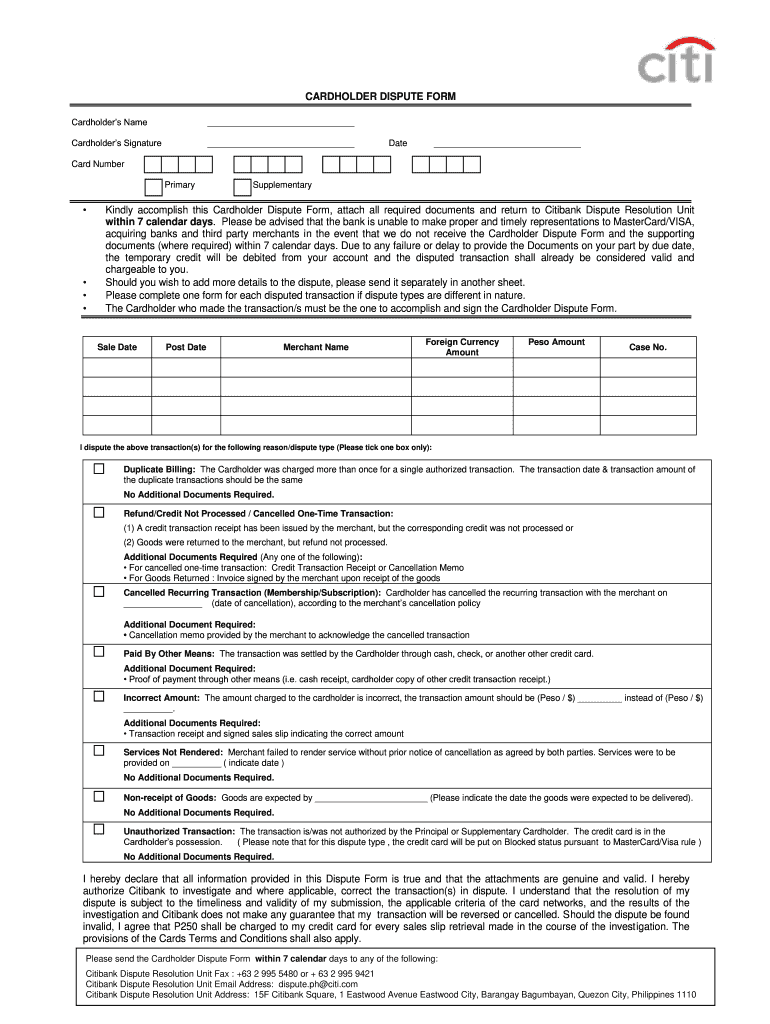
Citibank Dispute Form


What is the Citibank Dispute Form
The Citibank Dispute Form is a document used by cardholders to formally contest charges on their credit card statements. This form allows customers to report unauthorized transactions, billing errors, or issues with goods and services. By submitting this form, cardholders initiate an investigation into the disputed transaction, which is essential for protecting their rights and ensuring accurate billing.
How to use the Citibank Dispute Form
Using the Citibank Dispute Form involves several straightforward steps. First, gather all relevant information, including transaction details and any supporting documentation. Next, fill out the form with accurate information regarding the dispute, including the transaction date, amount, and a clear description of the issue. Once completed, submit the form according to the instructions provided, either online or via mail, ensuring you retain a copy for your records.
Steps to complete the Citibank Dispute Form
Completing the Citibank Dispute Form requires careful attention to detail. Follow these steps:
- Access the form through the Citibank website or customer service.
- Provide your personal information, including your name, account number, and contact details.
- Detail the disputed transaction, specifying the date, amount, and nature of the dispute.
- Attach any supporting documents, such as receipts or correspondence related to the transaction.
- Review your entries for accuracy before submission.
Required Documents
When submitting the Citibank Dispute Form, certain documents may be required to support your claim. These may include:
- Transaction receipts or statements showing the disputed charge.
- Correspondence with the merchant regarding the issue.
- Any relevant documentation that substantiates your claim, such as warranties or service agreements.
Form Submission Methods
The Citibank Dispute Form can be submitted through various methods to accommodate customer preferences. Options typically include:
- Online submission via the Citibank website, which may offer a faster processing time.
- Mailing the completed form to the designated Citibank address for disputes.
- In-person submission at a local Citibank branch, allowing for immediate assistance.
Filing Deadlines / Important Dates
It is crucial to be aware of filing deadlines when submitting the Citibank Dispute Form. Generally, cardholders must report disputes within a specific timeframe, often within sixty days from the date of the statement containing the charge. Missing this deadline may result in the inability to contest the charge, so timely action is essential.
Quick guide on how to complete citibank dispute letter form
The optimal method to locate and endorse Citibank Dispute Form
At the level of an entire organization, unproductive procedures regarding document approval can take up a signNow amount of work hours. Approving documents such as Citibank Dispute Form is a standard aspect of operations in any enterprise, which is why the effectiveness of each agreement’s lifecycle has a considerable impact on the overall efficiency of the organization. With airSlate SignNow, endorsing your Citibank Dispute Form is as simple and quick as possible. This platform provides you with the most recent version of almost any form. Even better, you can endorse it immediately without needing to install additional software on your computer or printing any hard copies.
Steps to obtain and endorse your Citibank Dispute Form
- Browse our collection by category or utilize the search bar to locate the document you require.
- Check the form preview by clicking Learn more to ensure it’s the correct one.
- Hit Get form to start editing immediately.
- Fill out your form and include any necessary information using the toolbar.
- Once finished, click the Sign tool to endorse your Citibank Dispute Form.
- Choose the signature method that suits you best: Draw, Create initials, or upload a photo of your handwritten signature.
- Click Done to finalize editing and proceed to document-sharing options if needed.
With airSlate SignNow, you are equipped with everything necessary to manage your documentation effectively. You can discover, complete, edit, and even send your Citibank Dispute Form all in one tab without any trouble. Enhance your workflows by utilizing a single, intelligent eSignature solution.
Create this form in 5 minutes or less
FAQs
-
Do I have to fill out a form to receive a call letter for the NDA SSB?
No form has to be filled for u to get your call-up letter.If you have cleared the written exam and your roll no. Is in the list, then sooner or later you will get your call-up letter.I would suggest you to keep looking for your SSB dates. Online on sites like Join Indian Army. Because the hard copy may be delayed due to postal errors or faults.Just to reassure you, NO FORM HAS TO BE FILLED TO GET YOUR SSB CALLUP LETTER.Cheers and All the Best
-
Is it compulsory to fill out the iVerify form for Wipro before getting a joining letter?
Yes, you should definitely will the form as you require it for your Background verification else the HR would mail and call every time unless you fill it.
-
Do I need to fill out a customs form to mail a 1 oz letter? Would I put the customs form outside the envelope or inside?
No. There are specific envelopes that are used to identify mail under 16 oz and don’t require a P.S. form. These envelopes have a colored stripe along its borders which indicates to the shipper that it’s an international mail piece.
-
How do I mail a regular letter to Venezuela? Do I need to fill out a customs form for a regular letter or do I just need to add an international mail stamp and send it?
You do not need to fill out a customs form for a regular letter sent from the US to any other country. Postage for an international letter under 1 ounce is currently $1.15. You may apply any stamp - or combination of stamps - which equals that amount.
-
What types of forms can a person fill out to dispute a parking violation that he/she received?
It depends on the issuing authority. The appeals process is typically on the back of the citation. If you are going to write any of the following on the appeal…I didn’t knowI didn’t see the signI was lateI was only there for a little while or anything of that natureDon’t waste your time, short of there being no signs at all. You are going to pay the fine. So skip fighting it and just pay the fine.
-
Why do some forms require you to fill them out in all capital letters?
A2AWith the advent of online form filling, the idea of using all capital letters has probably fallen into disuse. But for most of my life, ALL paper forms have required capitals. This is default mode for handwritten forms, in my experience, and I do it automatically. You are probably a lot younger than I am!It stems from the fact that many people have bad handwriting and the effort of slowing down to use all capitals on a form makes the replies more legible. If the instruction “all capitals” appears on an online document, then it has probably been adapted from an earlier document, which used to carry handwritten replies, and nobody has bothered to change it.And yes, it means everything: your name and address are the the most important items on the form.Just go along with it: it's not an unreasonable request!
Create this form in 5 minutes!
How to create an eSignature for the citibank dispute letter form
How to make an electronic signature for your Citibank Dispute Letter Form in the online mode
How to make an eSignature for the Citibank Dispute Letter Form in Chrome
How to make an electronic signature for putting it on the Citibank Dispute Letter Form in Gmail
How to create an electronic signature for the Citibank Dispute Letter Form from your mobile device
How to generate an electronic signature for the Citibank Dispute Letter Form on iOS devices
How to make an eSignature for the Citibank Dispute Letter Form on Android OS
People also ask
-
What is the Citibank Dispute Form and how do I use it?
The Citibank Dispute Form is a document that allows customers to formally dispute transactions on their Citibank accounts. To use it, simply fill out the form with the required details of the transaction you wish to dispute, and submit it according to the provided instructions. Utilizing airSlate SignNow can streamline this process, making it easy to eSign and send your completed Citibank Dispute Form securely.
-
How can airSlate SignNow help with submitting the Citibank Dispute Form?
airSlate SignNow provides a user-friendly platform to facilitate the eSigning and submission of the Citibank Dispute Form. You can easily upload the form, add your electronic signature, and send it directly to Citibank, ensuring that your dispute is processed promptly. This efficient workflow eliminates delays and simplifies the dispute resolution process.
-
Are there any costs associated with using airSlate SignNow for the Citibank Dispute Form?
airSlate SignNow offers a cost-effective solution for managing documents, including the Citibank Dispute Form. While there are subscription plans available, they are designed to fit various business needs and budgets, ensuring that you can access essential features without overspending. Check our pricing page for detailed information on plan options.
-
What features does airSlate SignNow provide for the Citibank Dispute Form?
With airSlate SignNow, you can access features such as document templates, eSignature capabilities, and real-time tracking for your Citibank Dispute Form. These tools enhance your workflow efficiency, allowing you to manage disputes quickly and securely. Additionally, the platform offers integrations with various applications to streamline your document management process.
-
Can I track the status of my Citibank Dispute Form submission with airSlate SignNow?
Yes, airSlate SignNow allows you to track the status of your Citibank Dispute Form after submitting it. You will receive notifications regarding the progress of your submission, ensuring that you are informed at every step. This feature helps you stay updated and manage your disputes effectively.
-
Is it secure to use airSlate SignNow for my Citibank Dispute Form?
Absolutely! airSlate SignNow employs industry-leading security protocols to protect your sensitive information when submitting the Citibank Dispute Form. With encryption, secure storage, and compliance with data protection regulations, you can trust that your personal and financial data is safe throughout the process.
-
What types of integrations does airSlate SignNow offer for handling the Citibank Dispute Form?
airSlate SignNow integrates seamlessly with a variety of applications, enhancing your ability to manage the Citibank Dispute Form alongside your other business tools. These integrations allow you to connect your document management system, CRM software, and more, creating a cohesive workflow that simplifies your operations.
Get more for Citibank Dispute Form
Find out other Citibank Dispute Form
- eSignature Kansas Plumbing Lease Agreement Template Myself
- eSignature Louisiana Plumbing Rental Application Secure
- eSignature Maine Plumbing Business Plan Template Simple
- Can I eSignature Massachusetts Plumbing Business Plan Template
- eSignature Mississippi Plumbing Emergency Contact Form Later
- eSignature Plumbing Form Nebraska Free
- How Do I eSignature Alaska Real Estate Last Will And Testament
- Can I eSignature Alaska Real Estate Rental Lease Agreement
- eSignature New Jersey Plumbing Business Plan Template Fast
- Can I eSignature California Real Estate Contract
- eSignature Oklahoma Plumbing Rental Application Secure
- How Can I eSignature Connecticut Real Estate Quitclaim Deed
- eSignature Pennsylvania Plumbing Business Plan Template Safe
- eSignature Florida Real Estate Quitclaim Deed Online
- eSignature Arizona Sports Moving Checklist Now
- eSignature South Dakota Plumbing Emergency Contact Form Mobile
- eSignature South Dakota Plumbing Emergency Contact Form Safe
- Can I eSignature South Dakota Plumbing Emergency Contact Form
- eSignature Georgia Real Estate Affidavit Of Heirship Later
- eSignature Hawaii Real Estate Operating Agreement Online