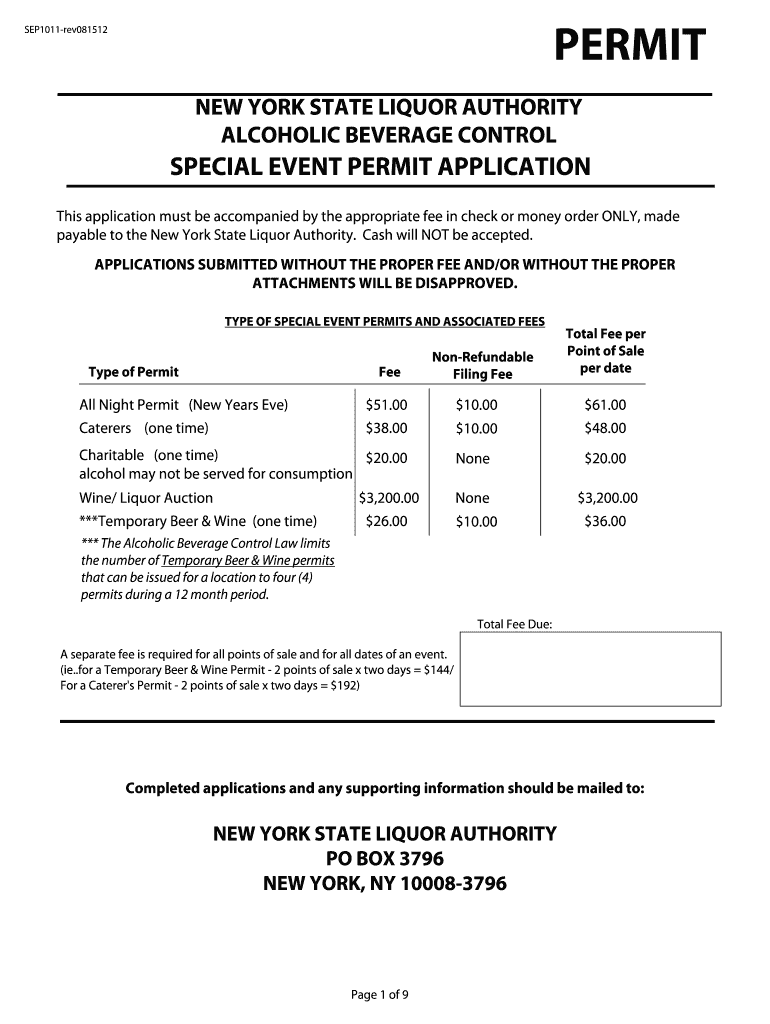
Event License Form 2012-2026


What is the Event License Form
The Event License Form is a crucial document required for organizing various types of events, such as festivals, concerts, and public gatherings. This form serves as an official request for permission from local authorities to hold an event in a specified location. It outlines the details of the event, including the date, time, venue, and expected attendance. Obtaining this permit ensures compliance with local regulations and helps maintain public safety and order during the event.
How to use the Event License Form
Using the Event License Form involves several steps to ensure that all necessary information is accurately provided. First, gather all relevant details about the event, including location, date, time, and any special requirements, such as security or health services. Next, fill out the form completely, ensuring that all fields are addressed. Once completed, submit the form to the appropriate local authority, either online or in person, depending on the jurisdiction. It is essential to keep a copy of the submitted form for your records.
Steps to complete the Event License Form
Completing the Event License Form requires careful attention to detail. Follow these steps:
- Gather necessary information about the event, including the date, time, and location.
- Identify any specific requirements for your event, such as permits for food vendors or alcohol sales.
- Fill out the form, ensuring that all sections are completed accurately.
- Review the form for any errors or missing information.
- Submit the form to the relevant authority, adhering to any submission guidelines provided.
Legal use of the Event License Form
The legal use of the Event License Form is essential for ensuring that your event complies with local laws and regulations. This form acts as a binding agreement between the event organizer and the local government, granting permission to host the event. It is vital to adhere to all conditions outlined in the permit, as failure to do so can result in penalties or the cancellation of the event. Always ensure that the form is submitted well in advance of the event date to allow for processing time.
Required Documents
When applying for an Event License Form, several documents may be required to support your application. Commonly required documents include:
- Proof of identity, such as a driver's license or passport.
- Detailed event plan, including site maps and safety measures.
- Insurance certificates, if applicable, especially for larger events.
- Any additional permits needed for specific activities, such as food sales or alcohol distribution.
Who Issues the Form
The Event License Form is typically issued by local government authorities, such as city or county offices. Depending on the location and type of event, it may be managed by different departments, including parks and recreation, public safety, or special events offices. It is important to check with the appropriate local authority to determine the correct office to submit your application and to understand any specific requirements that may apply.
Quick guide on how to complete event license form
Complete Event License Form effortlessly on any device
Digital document management has gained traction with businesses and individuals alike. It serves as an ideal eco-friendly substitute for conventional printed and signed documents, allowing you to access the correct form and securely store it online. airSlate SignNow equips you with all the necessary tools to create, modify, and eSign your documents swiftly without any hold-ups. Manage Event License Form on any device using the airSlate SignNow Android or iOS applications and enhance any document-oriented workflow today.
How to edit and eSign Event License Form effortlessly
- Find Event License Form and click on Get Form to commence.
- Use the tools we provide to complete your form.
- Highlight important sections of the documents or redact sensitive information with the tools designed for that purpose by airSlate SignNow.
- Create your signature using the Sign feature, which takes mere seconds and holds the same legal validity as a conventional wet ink signature.
- Review the information and press the Done button to save your modifications.
- Choose your preferred delivery method for the form—via email, SMS, invitation link, or download it to your computer.
Eliminate concerns about lost or misplaced files, tedious form searches, and mistakes that necessitate printing new document copies. airSlate SignNow addresses your document management needs in just a few clicks from any device of your choice. Edit and eSign Event License Form and guarantee effective communication at every phase of the form preparation process with airSlate SignNow.
Create this form in 5 minutes or less
FAQs
-
Is it legal to have an unregistered off-the-grid (no birth certificate) baby in the USA?
I was actually roommates with someone in College whose parents decided to have him “off-grid”. Let me just say this: Stop even entertaining the idea of having a baby off-grid. It really makes your child’s life unnecessarily hard and your kid will forever resent you for putting that pain on them.I’ll get into the details in a moment, but first let me address the question proposed above. Yes, technically speaking it is not a crime to have your baby off-the-grid in the U.S.A. However, a lot of details surrounding the event would be illegal. First of all, any licensed midwife or doctor is required by law to file a birth certificate or they actually risk losing their license and getting a misdemeanor. If you forced them or threatened them to not file the birth certificate that would make you a likely accomplice and would not go over well with the authorities.But let’s ignore that for a moment and just assume you know how to birth a child on your own and can do it in your basement without any professional medical physician there to oversee you (which would be the only way you could pull this off). In this case you wouldn’t get thrown in jail for failing to get a birth certificate and no crime would have been committed. However you just set up a very difficult life for your child.These are some of the things I was told from by my roommate who didn’t have a social security number until he was 20 years old.No, he could not get a (legal) jobQuite literally he didn’t qualify to get even a job at McDonalds. If you remember the last job you got no matter how prestigious or demeaning it was, you had to fill out a bunch of paperwork. Most of these forms require you to have a SSN (social security number) to properly fill them out. However the important one is the form labeled I-9. This form is required to be submitted by every employer after hiring a new employee. This form serves only one purpose, to determine that you are eligible to work in the United States. Your child (and my roommate) would not be able to complete this form which every employer must get filled out before starting employment with a new employee. Your child will not be able to get a job because of this.Yes, he can evade paying taxes.Okay, so this sounds like a perk I guess. But my roommate did not have to pay taxes. The government basically didn’t know he existed, so they never knew he was not paying. But then again he didn’t have a job. So would you rather have a job and pay some taxes or not ever be able to work except under the table for below minimum wage? Given that choice, taxes sound pretty awesome! Keep in mind that this also means your child is not eligible for any tax benefits or credits such as those that students get while going to college.No, You as the parent can not claim him as a dependent on your taxesYou’re already dealing with a child, wouldn’t it be great to get that child tax credit? Every year you'll basically be paying out of pocket for deciding not to get them a SSN.Yes, he can attend public school through 12th gradeHe would be able to attend school through high school without a social security number.No, he can not attend collegeWhile high school and lower education is okay, your child will never be able to attend collegeYes, he can go to the doctorThe doctor will still see your child and provide him his shots. However…No, he will not be covered under your family insurance (or qualify for Medicare/Medicaid)So you’ll need to plan on paying for all doctor appointments out of pocket.No, he can not travel abroad (even to Canada)You’d best hope none of your child’s friends decide to go to Cancun for spring break. Your child will not be eligible to leave the country or return to the US if he manages to leave (unless he plans to climb Trump’s wall)No, he will not be able to drive a carOkay, well nothing is stopping him from physically driving a car, but he would not be able to get a driver’s license and thus, can not LEGALLY drive. Hope he doesn’t get pulled over.No, he will not be able to voteOnce old enough he will not be able to register to vote.Yes, he can avoid the draftWell the good news is that like taxes, he can skirt the requirement to join the draft when he turns 18.No, he can’t get a loanThis means no credit cards, no car loan, no home, nothing. I’m sure plenty of people will claim these are all evil anyway, but these have powerful impacts on someone’s life. There might be times he needs it. (and when used properly none of these are bad things).No, he will not have a credit scoreThis goes with the above one, but he will not be able to work on this which affects your entire life/future. This also will disqualify him from renting most homes or apartments he is looking at.Basically your child will be treated as an illegal immigrant. Why put them through this when they are entitled to the benefits that the United States provides its citizens? There are people in other countries dying to get what your child is entitled to and you are (considering) denying your child those abilities? It just doesn’t make sense.Get them a SSN and if your child decides at 20 that he wants to live off-the-grid than he can burn his Social Security Card and go in the woods and hide from the government. But don’t be selfish enough to make that decision for them.My roommate resents his parents for not giving him a SSN. While all his friends in high school were driving, he couldn’t. While his friends go to Cancun for spring break, he had golden handcuffs in the U.S. and can’t leave. And worst of all he said was that while all his friends were earning money from jobs in high school, he couldn’t get a job.The job part was the hardest for him. He couldn’t leave the house or move out when he turned 18. He was stuck at home.Him working on getting a social security number was difficult and took him two years. He started when he turned 18 to get one once he realized he couldn’t go to college, he couldn’t get a job, he couldn’t rent an apartment, and thus will never really be able to be independent from his parents. It took two years and then at 20 he was able to get one and start working and going to school.He forever resented his parents. Don’t be those parents…
-
What are some of the strangest gun control proposals you can come up with?
Banning guns based on how they look versus how they function.Banning guns based on a projectile being 1/1000th inch bigger than others equally capable.Banning guns based on the diameter or markings on their barrel that have no bearing on its ability to function.Making existing gun owners wait 8 days to take possession of a gun as a “cooling off” period.Banning possession of sheet metal or plastic boxes with springs because these, after all, are some of the most dangerous objects on the planet.Banning and not banning aforementioned boxes based on the number of rounds they hold but allowing the exact same box to be sold legally if it possesses the correct markings on the bottom.Having a one-gun-a-month law to prevent gun trafficking or straw purchases but allow anyone a lifetime waiver of that restriction by simply sending a form to the state saying they are a collector. Any reason for collecting is permissible (“In the event of a zombie apocalypse” is an acceptable reason).Where you live determines your ability to own a gun in the same state.Telling victims of home invasion they are to be arrested and treated as criminals because of the property someone else took from them.Being so concerned about privacy rights that you demand any would-be gun owner waive their HIPAA rights for life to make sure they aren’t “dangerous”.Declaring 18 through 20 year olds children and barring them from exercising their right to own a gun. But that’s the only right they are too immature or unable to exercise as a legal adult at those ages.Compiling lists of guns and gun owners in the utterly illogical belief that a couple pieces of paper solves crimes.Banning the publication of computer code or plans for firearms that are freely available in printed form without restriction. Hating two parts of the Bill of Rights is pretty impressive stuff.Demand that we have noise dampening devices on vehicles and hearing protection on around machinery that can damage hearing in an instant as a public safety measure but regulate the same for firearms to the point it takes 9–10 months and Federal and State permission to own. And not all states will allow you to protect your hearing.Requiring a person to be fingerprinted, photographed and provide a background check and at least two days of training at their own expense and submit the application within 3 days for a license to allow them to apply to purchase a handgun. It is not a “permit-to-possess” but merely a permission slip to fill out a form.Declaring that items meant to safely hold a firearm in order to use it are too dangerous to have fitted to a gun.Buttons are verboten.Changing the color or finish on a gun makes it illegal to sell as “unsafe”.Declaring any semi-automatic rifle an “assault rifle” regardless of age, caliber or feed type.Declaring a Marlin or equivalent tube-fed .22LR semi-auto rifle an “assault weapon”.Allowing anyone via hearsay to claim someone is suspicious or may have violent tendencies and have their guns taken away from them without Due Process.I can go on. And on and on. All strange and ones I could have never come up with on my own.Note for the Irony Challenged: Every single item on this list is an actual law or regulation in force today somewhere in the United States.
-
What is the best thing you've looked forward to in your life?
Getting my medical license.The process is so painful that sometimes I feel like stabbing myself in the heart and gouging my eye out, and jumping off a bridge at the same time. And the most frustrating part of it is that there’s not a single thing I can do to speed things up.The website isn’t very user friendly.They request way too many documents. Like, you need to submit 6 different things to prove your citizenship. Can’t it be assumed that if the Federal Government gave me a passport, they know that it’s because I’m a citizen? Can’t it also safely be assumed that if I graduated from a residency program, I must have graduated from a medical school at some point?The website doesn’t tell you everything you need to send. After you’ve filled out the application online, there is a PDF you’re supposed to find somewhere. The PDF was the old application form. You’d fill it out by hand or by editing the PDF. If you did that, you’d see an number of appendices that told you what other documentation you were supposed to supply. But if you apply online, there’s nothing to let you know what you’re missing. So, you have to call them. When you do, they tell you that you need a bunch of stuff you’d never have guessed: a background check, forms you’re supposed to submit to your residency programs, etc. Why not put that in the online application?Then, after you do all that, you might wonder if your file is complete. So, you call. They’ll tell you that your application hasn’t been processed yet. How long till it gets processed? 3 to 4 weeks! So, they won’t even look at your file for 3 to 4 weeks. And, 3 to 4, of course, means 4. Then, when they look at your file, it might even be week 5 by the time they respond to you. At that point, they’ll tell your that your file is missing some stuff.You ask for clarification about the missing stuff, because you’re pretty sure you’ve already sent it. You hear nothing back for a week. You call them, only to hear that they thought they’d emailed you what you were supposed to fill out… You submit what they’re asking for, having wasted another week waiting. Then, they tell you that your file has been submitted for final approval. YAY!Then you’re told that, since you used to be a nurse, you should also submit a nursing license verification. Okay, no biggie, you think. You did a similar thing for Iowa a few years back. You’ll just go online and have the state of Michigan send the state of Tennessee some information about the nursing license that expired 6 years ago.You get on the Michigan website, and things are so disorganized that you can’t for the life of you figure out how to submit the verification request. Oh, and the process has changed. In 2015, you could use the Nursys verification site. But Michigan has pulled out of this process, because… just because. Now, you have to call during business hours, realize that you’re supposed to download and fill out a form, attach a money order (you can’t pay online anymore), and mail it to a P.O. Box.You do that, sending it by express mail. You call the next day to see if it’s been received. Now you’re told that if you want to send things by express mail, there’s another address you should have sent it to, an address that was never communicated to you when you talked to the Michigan people on the phone. You learn that sending mail to the P.O. Box means that it will sit there for a week, after which it will be processed by the Cashier’s office/Finance office/Treasury office, then slowly make its way to the Bureau of Licensing… this process might take 2 weeks. At this point, you’ve sent your initial application 8 weeks before. You wonder why it is that the process couldn’t be more streamlined. Why couldn’t they be a uniform process for all states? Why couldn’t they at least be a central database where healthcare providers could send their documentation, so that whenever they apply for licensing in a new state, that state can immediately receive all the relevant documentation. You’re powerless. You try to think of other things you might do.You remember that Iowa must have a copy of your nursing verification license. You wonder if you could talk to them and see if they’d share it with you. You’re told that they will emphatically not release the document to you. Why? Who knows. Anyway, they might consider releasing it to the Tennessee people if they are contacted directly by their Medical Board. You sheepishly ask the people in Tennessee if they’d be willing to contact Iowa, giving them a phone number, email, and fax number, knowing full well that it will be to no avail.You decide that maybe, if you were to track down the cashier’s office in Michigan, you could fly there and make the payment in person, in a bid to speed up the processing of your license verification request. It’s after hours now, so you can’t be sure. There’s a plane early in the morning. You could fly to Detroit, rent a car, drive to Lansing, and give it a shot. But… what if it doesn’t work? You decide to wait until the morning and call the office to see if getting there in person would make a difference. You are told that it is impossible to make a payment in person, because… rules. There’s literally not a damn thing you can do.And that, my friends, is the story of my life right now. The most frustrating part of this saga is that not only can I not work, but I’m sort of homeless right now. Let me explain. A while back, I bid on a house. I used what is called a physician loan. What my lender did not tell me is that you need an active medical license. So, we were a week from the closing date before I learned this. At this point, I had three options:Walk away from the home purchase and rent. This wouldn’t have been a terrible idea.Prolong my temporary lease at the place I was renting. I would not do this because I hated, hated, hated them with their nickle-and-diming tactics.Wait for my license.I opted for number 3, because I thought it couldn’t take much longer until I’d get my license. My belongings are currently in storage. I’m staying with my sister in Florida. It’s not the worst thing that’s ever happened to anyone in human life, but it’s still really frustrating. The only bright spot is that I get to spend time with my family. I have a nephew and two nieces here that I hadn’t seen in 9 months. They’re growing so very fast. I am constantly peppering them with mental math questions, but they seem to love me for some reason. So, all in all, things could be worse.
-
How can we fight against the NRA regarding gun control?
Are you sure that the NRA is the problem?Oh, I know that the media and the talking heads are all making them out to be some 500 lb gorilla and the reason psychos shoot up school yards, but have you ever bothered to look into the matter beyond the headlines?I’ll give you an example. In 2017, the push was for a “Universal Background Check”. The idea was to be sure that people buying guns were not criminals. Believe it or not, the NRA wholly supports this and in fact was involved with creating the current NICS (National Instant Check System) that is used.But the bill that was proposed was not what you heard in the media. First, it would not plug any “Gunshow Loophole” because there is no such thing. The only sales at a gun show that the bill covered was private sales. Of course, private sales can occur anywhere, not just gun shows.But the bill didn’t make the NICS easier for private sales. They just required all private sales to be conducted through a licensed dealer. Had this actually passed, a gun show would be an ideal location for such sales as there would be access to many dealer. In effect, you would greatly increase the number of private sales at a gun show by this law.So, what is involved with a sale through a dealer? Well, the dealer would have to do the following:1) Record the transfer in their bound book. This is a book where all the transactions of a firearm is recorded via that dealer. The book is auditable by the BATF and many dealers have faced fines for poorly kept records, so many dealers go to great pains to keep their book neat and accurate.2) Fill out the federal form 4473. This is required by all dealer sales of both new and used guns. It asks for the buyer’s name, address, the make and model of the gun, serial number, and then asks a bunch of questions. The dealer can get fined if the person fills out the form wrong. For example, answering a question with “Y” or “N” instead of “Yes” or “No” is a BATF violation. So the dealer has to carefully examine the form for errors and have the person fill out another if errors are found.3) The dealer then calls into the NICS. NICS can come back with a “Proceed”, “Denied” or “Delay”. A delay can take up to 3 days. Typically this is a name that appears similar to a Prohibited Person and requires some research. If this happens, the transfer is on hold. The dealer has no idea when the result of the research is likely to finish. If you are at a gun show, the show could be over before the approval is made.4) All this paperwork, verification, etc takes time. Time is money. So dealers charge for this service. It is typical for a dealer to charge $25-$40 per gun, but sometimes multiple guns get a discount because the dealer can process up to 4 on a single form, but when more than one gun is transferred, the dealer has to fill out Form 3310 which is supposed to help with gun trafficking.All of this is well and good if you are buying a gun from someone you don’t know and many people will require sales be conducted at a dealer for the piece of mind such protections provide. But friends and family typically do not bother with the hassle and expense.One thing you need to realize is that to get a gun dealer license is not an easy process. Since the federal government cracked down on so called “kitchen table” dealers back in the 1980’s, you now must show a commercially zoned storefront with posted business hours to qualify. Many communities don’t want gun shops, and use zoning laws to make them difficult or unattractive. For example the city of Boston does not have any dealers. In fact, the nearest dealer is 3 towns away. Many rural areas don’t have the traffic to keep a dealer in business and you’ll find they are typically only open in the evening or on a Saturday as they work another full time job. Keep this in mind as we get into the next issue.But the bill didn’t stop at sales. It stated that ALL transfers had to be done in this manner. No exceptions. So, two friends out on a hunt would need to go through the whole process listed above just to swap guns for the afternoon. Oh, and they would have to do it all again to give the gun back. It is very common on a range to try out other people’s guns - such a thing would also require the full transfer and back process. Demo guns at a national event by manufacturers? Same thing.Basically any time a gun were to swap hands, the law would apply. There are private shooting clubs where guns are treated like library books and members take whatever they want. Families regularly swap guns. Heck, some shooting courses provide guns for students to use. All of these events would have been impacted by these new transfer requirements.The NRA balked at this. Essentially the rule would curtail many of the traditions and practices that are very common and virtually never result in any kind of criminal activity. In essence it would criminalize things that simply are not crimes.Not only would it create criminals where no criminal intent existed, but the cost to manage the volume of temporary transfers, the staffing needed to take the calls and do the checks would have cost millions each year. All money that would not go toward actually dealing with criminals.When the issue was brought up, many members of Congress agreed the requirements were too restrictive and the whole bill failed to pass. The supporters of the bill did not even attempt to listen to the complaints and work out a manageable fix.Did you hear any of that in the media?But what about catching criminals?Well, the bill didn’t change anything in regards to enforcing the rules to make sure the people who should not own guns were properly entered into NICS. In fact, other than maybe getting fired, there is NO PENALTY for failing to report a person. We have laws that will jail a teacher or coach that fail to report bullies. We have laws that put priests in prison who fail to report potential inappropriate behaviors in other clergy. But we do not have any laws that punish law enforcement agents that fail to do their job and make sure that dangerous people are reported to the background system. And this bill made no effort to change that.NICS is not open to anyone but federally licensed gun dealers. The left are so worried that the system might be used to check people for things other than guns that they refuse to create a means to allow people to verify someone they are selling a gun to. It would be easy to create an app that takes a photo of the buyer and seller’s ID (or just their faces and type in some data) and then return a simple “Proceed” or “Deny” with no other details. You’d have plenty of information to audit for illegal use. And if someone didn’t have an ID, they could then use a dealer. Heck, you can’t file taxes on-line without submitting some kind of ID, so this isn’t anything unique.And yet, the bill did nothing to address the issue of accessing the NICS for easier private sales.Here is the thing. We have 20,000 gun laws in this country. On the federal side, a prohibited person touching a gun could see them in prison for a minimum of 5 years. And yet, we still see cities with high violent crime rates that have virtually no federal cases. Why isn’t law enforcement using those stiff federal laws to get the violent people off the streets? Such a program called “Project Exile” worked wonders in Richmond, VA to reduce violent crime dramatically.OK, back to the “Universal Background Check” bill.I spent a lot of words above explaining what the bill would have required of people and why the situation would have been a nightmare. You never saw any of this in the news and the media pretty much ignored the issue.When the bill was defeated, it was never reported that a “terrible bill that would have cost millions and made criminals out of the innocent was defeated”, instead, all you ever heard was“The NRA used its influence to defeat the Universal Background Check bill that would have closed the gunshow loophole”Almost everything about that statement is false.So, be careful what you want to “Fight Against”. I suspect that most of what you think about the NRA is highly biased due to the way the organization is treated in the media. When you look at the actual facts, many times their concerns are quite valid. And, they have a lot of rank and file law enforcement on their side which helps them represent real world situations. I’ve found their positions in many cases very well presented. Most of the arguments you get on TV news are highly edited and taken out of context to promote an agenda, not facilitate a debate.Make sure you know what you are fighting for. You might be surprised.
-
Do military members have to pay any fee for leave or fiancee forms?
NOOOOOOO. You are talking to a military romance scammer. I received an email from the US Army that directly answers your question that is pasted below please keep reading.I believe you are the victim of a military Romance Scam whereas the person you are talking to is a foreign national posing as an American Soldier claiming to be stationed overseas on a peacekeeping mission. That's the key to the scam they always claim to be on a peacekeeping mission.Part of their scam is saying that they have no access to their money that their mission is highly dangerous.If your boyfriend girlfriend/future husband/wife is asking you to do the following or has exhibited this behavior, it is a most likely a scam:Moves to private messaging site immediately after meeting you on Facebook or SnapChat or Instagram or some dating or social media site. Often times they delete the site you met them on right after they asked you to move to a more private messaging siteProfesses love to you very quickly & seems to quote poems and song lyrics along with using their own sort of broken language, as they profess their love and devotion quickly. They also showed concern for your health and love for your family.Promises marriage as soon as he/she gets to state for leave that they asked you to pay for.They Requests money (wire transfers) and Amazon, iTune ,Verizon, etc gift cards, for medicine, religious practices, and leaves to come home, internet access, complete job assignments, help sick friend, get him out of trouble, or anything that sounds fishy.The military does provide all the soldier needs including food medical Care and transportation for leave. Trust me, I lived it, you are probably being scammed. I am just trying to show you examples that you are most likely being connned.Below is an email response I received after I sent an inquiry to the US government when I discovered I was scammed. I received this wonderful response back with lots of useful links on how to find and report your scammer. And how to learn more about Romance Scams.Right now you can also copy the picture he gave you and do a google image search and you will hopefully see the pictures of the real person he is impersonating. this doesn't always work and take some digging. if you find the real person you can direct message them and alert them that their image is being used for scamming.Good Luck to you and I'm sorry this may be happening to you. please continue reading the government response I received below it's very informative. You have contacted an email that is monitored by the U.S. Army Criminal Investigation Command. Unfortunately, this is a common concern. We assure you there is never any reason to send money to anyone claiming to be a Soldier online. If you have only spoken with this person online, it is likely they are not a U.S. Soldier at all. If this is a suspected imposter social media profile, we urge you to report it to that platform as soon as possible. Please continue reading for more resources and answers to other frequently asked questions: How to report an imposter Facebook profile: Caution-https://www.facebook.com/help/16... < Caution-https://www.facebook.com/help/16... > Answers to frequently asked questions: - Soldiers and their loved ones are not charged money so that the Soldier can go on leave. - Soldiers are not charged money for secure communications or leave. - Soldiers do not need permission to get married. - Soldiers emails are in this format: john.doe.mil@mail.mil < Caution-mailto: john.doe.mil@mail.mil > anything ending in .us or .com is not an official email account. - Soldiers have medical insurance, which pays for their medical costs when treated at civilian health care facilities worldwide – family and friends do not need to pay their medical expenses. - Military aircraft are not used to transport Privately Owned Vehicles. - Army financial offices are not used to help Soldiers buy or sell items of any kind. - Soldiers deployed to Combat Zones do not need to solicit money from the public to feed or house themselves or their troops. - Deployed Soldiers do not find large unclaimed sums of money and need your help to get that money out of the country. Anyone who tells you one of the above-listed conditions/circumstances is true is likely posing as a Soldier and trying to steal money from you. We would urge you to immediately cease all contact with this individual. For more information on avoiding online scams and to report this crime, please see the following sites and articles: This article may help clarify some of the tricks social media scammers try to use to take advantage of people: Caution-https://www.army.mil/article/61432/< Caution-https://www.army.mil/article/61432/> CID advises vigilance against 'romance scams,' scammers impersonating Soldiers Caution-https://www.army.mil/article/180749 < Caution-https://www.army.mil/article/180749 > FBI Internet Crime Complaint Center: Caution-http://www.ic3.gov/default.aspx< Caution-http://www.ic3.gov/default.aspx> U.S. Army investigators warn public against romance scams: Caution-https://www.army.mil/article/130...< Caution-https://www.army.mil/article/130...> DOD warns troops, families to be cybercrime smart -Caution-http://www.army.mil/article/1450...< Caution-http://www.army.mil/article/1450...> Use caution with social networking Caution-https://www.army.mil/article/146...< Caution-https://www.army.mil/article/146...> Please see our frequently asked questions section under scams and legal issues. Caution-http://www.army.mil/faq/ < Caution-http://www.army.mil/faq/ > or visit Caution-http://www.cid.army.mil/ < Caution-http://www.cid.army.mil/ >. The challenge with most scams is determining if an individual is a legitimate member of the US Army. Based on the Privacy Act of 1974, we cannot provide this information. If concerned about a scam you may contact the Better Business Bureau (if it involves a solicitation for money), or local law enforcement. If you're involved in a Facebook or dating site scam, you are free to contact us direct; (571) 305-4056. If you have a social security number, you can find information about Soldiers online at Caution-https://www.dmdc.osd.mil/appj/sc... < Caution-https://www.dmdc.osd.mil/appj/sc... > . While this is a free search, it does not help you locate a retiree, but it can tell you if the Soldier is active duty or not. If more information is needed such as current duty station or location, you can contact the Commander Soldier's Records Data Center (SRDC) by phone or mail and they will help you locate individuals on active duty only, not retirees. There is a fee of $3.50 for businesses to use this service. The check or money order must be made out to the U.S. Treasury. It is not refundable. The address is: Commander Soldier's Records Data Center (SRDC) 8899 East 56th Street Indianapolis, IN 46249-5301 Phone: 1-866-771-6357 In addition, it is not possible to remove social networking site profiles without legitimate proof of identity theft or a scam. If you suspect fraud on this site, take a screenshot of any advances for money or impersonations and report the account on the social networking platform immediately. Please submit all information you have on this incident to Caution-www.ic3.gov < Caution-http://www.ic3.gov > (FBI website, Internet Criminal Complaint Center), immediately stop contact with the scammer (you are potentially providing them more information which can be used to scam you), and learn how to protect yourself against these scams at Caution-http://www.ftc.gov < Caution-http://www.ftc.gov > (Federal Trade Commission's website)
-
How do I organise a TEDx event in my city, New Delhi?
My Colleagues at Townscript had done a deep research on how to organising a TEDx events. Let me share it wit you.Ideas Worth SpreadingIf you have Ideas worth spreading or you want to organize an event to host innovative minds, TED (Technology, Entertainment, Design) event is what you want.A TEDx event is a gathering with speakers and videos that provide intellectual food for thought along with insightful conversation. It helps brainstorm new ideas, motivate and impart valuable and relevant knowledge with a motive to inspire.If you wish to explore and organize a TEDx event and do not know where to start and how to go about it, we can lead the way. Read on to find more about the kind of TEDx events that can be organized and the rules to be followed while organizing a TEDx events and the most important of all – how to apply for a TEDx license.To be fully aware of the event that you plan to undertake we suggest you read through these basic rules. It is an absolute must to comply with all the rules and guidelines if you wish to successfully go through the license process and there after organize a memorable TEDx event. You can read all the rules here.Step 1 – Read Rules ThoroughlyAfter you have read the rules thoroughly, it is now time to explore the types of events that can be organized and all that you need to know about it.Step 2 – Pick An Appropriate Event TypeBelow listed are the types of events you get to choose fromStandard EventThis is the most basic TEDx event. It is subject to all of the standard rules, and is applicable to most events.University EventIf you plan to hold an event for the university then, this is the event type to choose from. Events hosted at a college or university, and organized by current university administration staff, faculty or students fall under this category.Youth EventThis is a TEDx event organized by, or targeted at the youth and/or kids or school communities.Salon EventA salon event is a periodic event. It is a weekly or monthly event that keeps a TEDx community engaged between regularly scheduled TEDx events. In order to organize a Salon event, applicants must hold an existing standard license.TEDxLive EventTEDxLive revolves around the simulcast of the annual TED Conference. The event is broadcasted live over TV and/or Radio. This takes TED’s to the world audience.TEDxWomen EventAs the name suggests this event is a TEDx event on the topics related to women which also feature the simulcast of TEDWomen. This event may only be organized around the official TEDWomen conference every year.Internal eventThis is for corporations, organizations, government entities, non-profits or other institutions that want to organize an event under the name of an institution. This event type is approved only if it is an employee’s only type of private event.TEDx in a Box eventCommunities with scarce resources and/or infrastructure to organize an event can fall under this category. TED delivers all the needed resources to organize the event packaged in a portable box, hence the name.Library eventThe event format is same as the standard event, the only difference is that it is hosted by librarians and the event happens at a local library.ED eventED events are TEDx events about education. At ED events educators, students, administrators and others get together to discuss the future of education.Level 2 EventThe TEDx Level 2 needs a special license is for organizers with at least two years in the program, and other requirements.It is necessary that you choose the type of event before heading to apply for the license for you event. Ensure that your event maintains the spirit of TED itself.Don’t Forget• TEDx events are not single topic or agenda driven. They are multidisciplinary and are focused on ideas and changing attitudes.• TEDX issues a location-based license. You must be living in the city you apply for and your event can happen only in that given city.• A TEDx license is only valid for one city, and for one event.• TEDx events cannot be integrated or combined with any other event or conference.• A TEDx event cannot be connected or co-branded with any other NGO, institution, organization, name or identity.Step 3 – Name Your EventGive your event an appropriate name according to the nature of the event and the audience it caters to or the location. Pick something that easily makes a mark.Step 4 – Choose A DateChoose a date for your event in such a way that it gives you enough time to organize and plan the event. We suggest a date that is at least 90 to 100 days away. Ensure it does not coincide with other TEDx events or events that matter to your target audience.Step 5 – IdeaTEDx events are broad, multidisciplinary, inspiring and address a variety of topics. You must brainstorm ideas that you have been keen on sharing and ascertain that your event caters to a wide variety of audience.Step- 6 Engaging SpeakersIt would be a good idea to think about a few names and profiles of speakers you would like to rope in for your event. You could also consider some unsung heroes and award them with some much-needed acknowledgement.Step – 7 Relevant TED Talk VideosYou will have to mention the TED talk videos that you plan to play at the event in the license application. You have the liberty to make any alteration at the event if required, but it still needs a mention. So you must know which videos to state in your application.If you have followed all the given guidelines you can now go ahead and apply for your license according to the type of event you choose to organize. To Apply for a TEDx license for your event Click here.Originally posted on Townscript Blog: How to Organize a TedX Event?
Create this form in 5 minutes!
How to create an eSignature for the event license form
How to create an electronic signature for the Event License Form online
How to create an eSignature for the Event License Form in Chrome
How to generate an electronic signature for putting it on the Event License Form in Gmail
How to generate an electronic signature for the Event License Form right from your mobile device
How to create an electronic signature for the Event License Form on iOS
How to create an eSignature for the Event License Form on Android devices
People also ask
-
What is an Event License Form and how can it benefit my business?
An Event License Form is a critical document that allows businesses to legally organize and host events. By utilizing airSlate SignNow, you can easily create, send, and eSign these forms, streamlining the approval process. This not only saves time but also ensures compliance with local regulations, helping your business avoid potential legal issues.
-
How much does it cost to use airSlate SignNow for Event License Forms?
airSlate SignNow offers flexible pricing plans to accommodate businesses of all sizes. You can choose a plan that fits your needs, whether you’re sending a few Event License Forms or managing multiple documents daily. Additionally, the cost-effectiveness of our solution ensures you stay within budget while benefiting from robust features.
-
Can I customize my Event License Form using airSlate SignNow?
Yes, airSlate SignNow allows you to fully customize your Event License Form to meet your specific requirements. You can add your branding, adjust the layout, and include necessary fields to capture all essential information. This level of customization ensures that your form aligns with your event's branding and legal standards.
-
What features does airSlate SignNow offer for managing Event License Forms?
With airSlate SignNow, you have access to a variety of features designed to simplify the management of Event License Forms. These include electronic signatures, document templates, real-time tracking, and automated workflows. These features enhance efficiency, ensuring that you can manage your forms seamlessly from start to finish.
-
Is it easy to integrate airSlate SignNow with other software for Event License Forms?
Absolutely! airSlate SignNow offers a range of integrations with popular software tools, making it easy to incorporate your Event License Form processes into your existing workflow. Whether you use CRM systems, project management tools, or email platforms, our seamless integrations enhance productivity and improve document management.
-
How can I ensure my Event License Forms are secure when using airSlate SignNow?
Security is a top priority at airSlate SignNow. Our platform employs advanced encryption and secure data storage to protect your Event License Forms and sensitive information. You can confidently send and eSign documents knowing that your data is safeguarded against unauthorized access.
-
What support options does airSlate SignNow provide for Event License Form users?
airSlate SignNow offers comprehensive support to assist you with your Event License Forms. Our resources include detailed documentation, video tutorials, and a responsive customer service team ready to help you with any questions or issues. This support ensures you can maximize the benefits of our solution for your event planning.
Get more for Event License Form
Find out other Event License Form
- How To Sign Delaware Orthodontists PPT
- How Can I Sign Massachusetts Plumbing Document
- How To Sign New Hampshire Plumbing PPT
- Can I Sign New Mexico Plumbing PDF
- How To Sign New Mexico Plumbing Document
- How To Sign New Mexico Plumbing Form
- Can I Sign New Mexico Plumbing Presentation
- How To Sign Wyoming Plumbing Form
- Help Me With Sign Idaho Real Estate PDF
- Help Me With Sign Idaho Real Estate PDF
- Can I Sign Idaho Real Estate PDF
- How To Sign Idaho Real Estate PDF
- How Do I Sign Hawaii Sports Presentation
- How Do I Sign Kentucky Sports Presentation
- Can I Sign North Carolina Orthodontists Presentation
- How Do I Sign Rhode Island Real Estate Form
- Can I Sign Vermont Real Estate Document
- How To Sign Wyoming Orthodontists Document
- Help Me With Sign Alabama Courts Form
- Help Me With Sign Virginia Police PPT