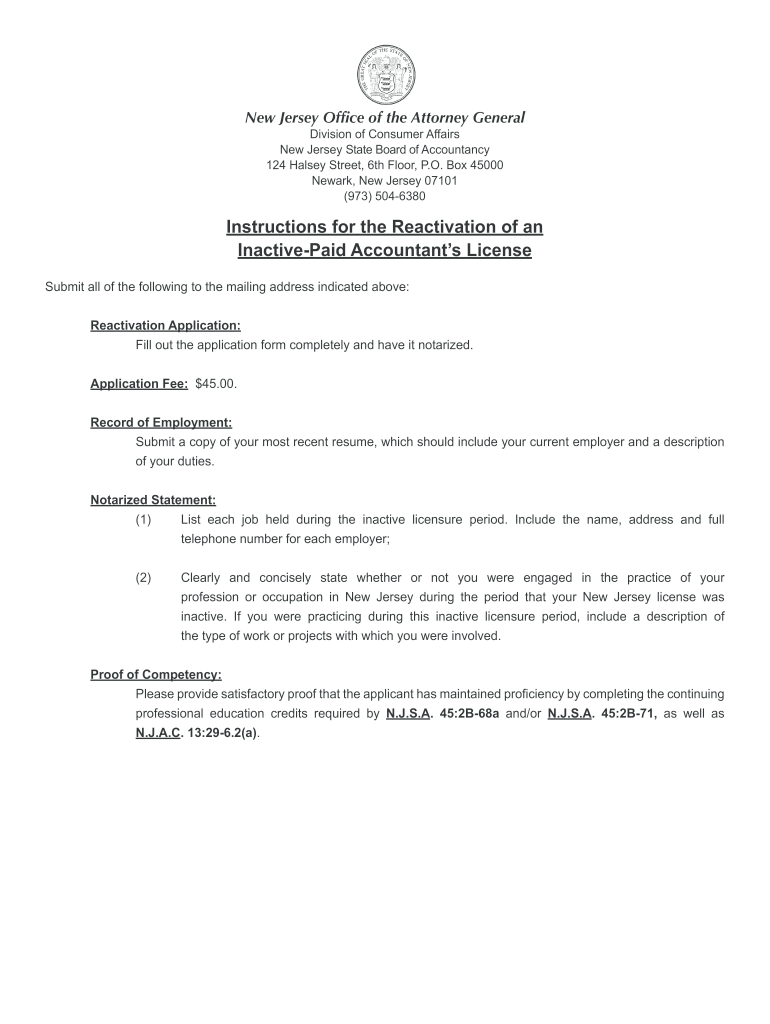
What is Inactive Paid Accountancy Status in Nj Form


What is the inactive paid accountancy status form?
The inactive paid accountancy status form is a legal document used to indicate that an accountant's license is currently inactive. This form is essential for accountants in New Jersey who wish to maintain compliance with state regulations while not actively practicing. It serves to inform the state board of accountancy about the current status of the accountant’s practice and ensures that they remain in good standing.
Steps to complete the inactive paid accountancy status form
Completing the inactive paid accountancy status form involves several key steps:
- Obtain the latest version of the form from the official state board of accountancy website or a trusted source.
- Fill in your personal information, including your name, address, and license number.
- Indicate the reason for your inactive status and provide any required documentation.
- Review the completed form for accuracy and ensure all necessary fields are filled out.
- Sign and date the form to certify its accuracy.
Legal use of the inactive paid accountancy status form
The legal use of the inactive paid accountancy status form is crucial for accountants wishing to pause their practice without losing their license. By submitting this form, accountants can ensure they meet state regulations and avoid penalties for practicing without an active license. It is important to keep a copy of the submitted form for personal records and to verify the status with the state board if needed.
Eligibility criteria for the inactive paid accountancy status form
To qualify for the inactive paid accountancy status, accountants must meet specific eligibility criteria, including:
- Possessing a valid accountant license that is currently active.
- Providing a valid reason for requesting inactive status, such as retirement, personal circumstances, or health issues.
- Maintaining compliance with any continuing education requirements prior to submitting the form.
Form submission methods for the inactive paid accountancy status form
Accountants can submit the inactive paid accountancy status form through various methods, including:
- Online submission via the state board's official website, if available.
- Mailing the completed form to the designated office of the state board of accountancy.
- In-person delivery at the state board's office during business hours.
Key elements of the inactive paid accountancy status form
Important elements to include in the inactive paid accountancy status form are:
- Personal identification information, such as name and address.
- License number and status.
- Reason for requesting inactive status.
- Signature and date to validate the information provided.
Quick guide on how to complete what is inactive paid accountancy status in nj form
Complete and submit your What Is Inactive Paid Accountancy Status In Nj Form swiftly
Robust tools for electronic document transmission and validation are essential for optimizing processes and the ongoing enhancement of your forms. When handling legal documents and signing a What Is Inactive Paid Accountancy Status In Nj Form, an appropriate signature solution can conserve a signNow amount of time and reduce paper use with every submission.
Locate, fill out, modify, sign, and distribute your legal paperwork with airSlate SignNow. This service encompasses everything required to create streamlined paper submission workflows. Its extensive legal forms repository and easy navigation can assist you in discovering your What Is Inactive Paid Accountancy Status In Nj Form instantly, and the editor featuring our signature capability will enable you to finalize and authorize it promptly.
Authenticate your What Is Inactive Paid Accountancy Status In Nj Form in a few straightforward steps
- Retrieve the What Is Inactive Paid Accountancy Status In Nj Form you need from our library using the search or catalog options.
- Examine the form details and preview it to ensure it meets your requirements and complies with state regulations.
- Click Obtain form to access it for modification.
- Fill out the document using the extensive toolbar.
- Verify the information you entered and click the Sign feature to authorize your document.
- Select one of three options to incorporate your signature.
- Complete any further adjustments and save the document in your files, and then download it onto your device or share it directly.
Simplify each phase of your document preparation and validation with airSlate SignNow. Experience a more effective online solution that has all aspects of managing your paperwork carefully considered.
Create this form in 5 minutes or less
FAQs
-
What are the good ways to fill out 1120 form if my business is inactive?
While you might not have been “active” throughout the year, by filing a “no activity” return you may be throwing away potential deductions! Most businesses (even unprofitable ones) will have some form of expenses – think tax prep fees, taxes, filing fees, home office, phone, etc. Don’t miss out on your chance to preserve these valuable deductions. You can carry these forward to more profitable years by using the Net Operating Loss Carry-forward rules. But you must report them to take advantage of this break. If you honestly did not have any expenses or income during the tax year, simply file form 1120 by the due date (no later than 2 and one half months after the close of the business tax year – March 15 for calendar year businesses). Complete sections A-E on the front page of the return and make sure you sign the bottom – that’s it!
-
What is the procedure to fill out the DU admission form? How many colleges and courses can I fill in?
It's as simple as filling any school admission form but you need to be quite careful while filling for courses ,don't mind you are from which stream in class 12 choose all the courses you feel like choosing,there is no limitations in choosing course and yes you must fill all the courses related to your stream ,additionally there is no choice for filling of college names in the application form .
-
If a foreign citizen lives in the US on a working visa for more than a year, then what is his status? What tax form will such a person fill out when filing for taxes at the end of the tax year? Is the 1040NR the form to fill out?
In most situations, a person who is physically present in the United States for at least 183 days out of any calendar year is a US resident for tax purposes and must file Form 1040 as a tax resident. There are exceptions to this general rule, but none of them apply to people who are present in the United States in H-1B (guest worker) status. Furthermore, H-1B workers are categorically resident aliens for tax purposes and must pay taxes on the income they earn while in H-1B status as a resident alien in every year in which they earn more than the personal exemption limit. This includes both the first year and last year, even if the first or last year contains less than 183 days of residence in the United States. The short years may result in a filing as a “dual-status” alien.An H-1B worker will therefore only file Form 1040NR as his or her primary tax return in the tax year in which he or she leaves the United States permanently, and all US-connected income during that year will be taxed as if the taxpayer was a US resident, under the dual-status rules. All other tax returns during that person’s residence in the United States will be on Form 1040. The first year’s return may be under dual-status rules, with a Form 1040NR attached as a “dual status statement” as per the procedure in Chapter 6 of Publication 519 (2016), U.S. Tax Guide for Aliens. A person who resides the entire year in the United States in H-1B status may not use Form 1040NR, and is required to pay US income tax on his or her worldwide income, excepting only that income which is subject to protection under a tax treaty.See Publication 519 (2016), U.S. Tax Guide for Aliens for more information. The use of a tax professional, especially in the first and last year of H-1B status, is highly recommended as completing a dual-status return correctly is exceedingly challenging.
-
What is the new procedure in filling out the AIIMS 2019 form? What is the last date to fill out its form?
AIIMS has introduced the PAAR facility (Prospective Applicant Advanced Registration) for filling up the application form. Through PAAR facility, the process application form is divided into two steps- basic registration and final registration.Basic Registration:On this part you have to fill up your basic details like Full name, parent’s name, date of birth, gender, category, state of domicile, ID proof/number and others. No paAIIMS Final RegistrationA Code will be issued to the candidates who complete the Basic Registration. You have to use the same code to login again and fill the form.At this stage, candidates are required to fill out the entire details of their personal, professional and academic background. Also, they have to submit the application fee as per their category.Here I have explained the two steps for AIIMS 2019 form.For more details visit aim4aiims’s website:About AIIMS Exam 2019
Create this form in 5 minutes!
How to create an eSignature for the what is inactive paid accountancy status in nj form
How to make an eSignature for your What Is Inactive Paid Accountancy Status In Nj Form in the online mode
How to create an eSignature for your What Is Inactive Paid Accountancy Status In Nj Form in Google Chrome
How to generate an electronic signature for signing the What Is Inactive Paid Accountancy Status In Nj Form in Gmail
How to make an eSignature for the What Is Inactive Paid Accountancy Status In Nj Form straight from your mobile device
How to generate an electronic signature for the What Is Inactive Paid Accountancy Status In Nj Form on iOS
How to make an eSignature for the What Is Inactive Paid Accountancy Status In Nj Form on Android OS
People also ask
-
What Is Inactive Paid Accountancy Status In Nj Form?
The 'Inactive Paid Accountancy Status In NJ Form' is a designation for New Jersey accountants who wish to maintain their licenses without actively practicing. This status allows professionals to keep their credentials while not engaging in accountancy services. Understanding what this form entails is crucial for compliance and maintaining your professional standing.
-
How can airSlate SignNow help with the Inactive Paid Accountancy Status In Nj Form?
airSlate SignNow streamlines the process of completing and signing the Inactive Paid Accountancy Status In NJ Form. With our user-friendly platform, you can easily fill out, eSign, and send important documents securely. This ensures that your paperwork is handled efficiently and in compliance with New Jersey regulations.
-
What are the pricing options for using airSlate SignNow for accountancy forms?
airSlate SignNow offers flexible pricing plans that cater to different business needs. Whether you're an individual accountant or a larger firm, you can choose a plan that suits your budget while providing access to features necessary for managing documents like the Inactive Paid Accountancy Status In NJ Form.
-
Are there any features in airSlate SignNow specifically for accountants?
Yes, airSlate SignNow provides features tailored for accountants, including customizable templates, advanced eSignature capabilities, and document tracking. These features make it easier to manage forms like the Inactive Paid Accountancy Status In NJ Form efficiently and professionally.
-
Can I integrate airSlate SignNow with other accounting software?
Absolutely! airSlate SignNow integrates seamlessly with various accounting software solutions, enhancing your workflow. This means you can manage your documents, including the Inactive Paid Accountancy Status In NJ Form, alongside your existing tools to streamline your business operations.
-
What are the benefits of using airSlate SignNow for document management?
Using airSlate SignNow for document management offers numerous benefits, such as increased efficiency, enhanced security, and compliance with regulations. This is especially important when dealing with forms like the Inactive Paid Accountancy Status In NJ Form, as you can ensure your documents are handled correctly and securely.
-
Is airSlate SignNow secure for submitting sensitive documents?
Yes, airSlate SignNow employs robust security measures, including encryption and secure cloud storage, to protect your sensitive documents. This ensures that your Inactive Paid Accountancy Status In NJ Form and other important files are safe from unauthorized access.
Get more for What Is Inactive Paid Accountancy Status In Nj Form
Find out other What Is Inactive Paid Accountancy Status In Nj Form
- How Can I eSign Louisiana Legal Presentation
- How To eSign Louisiana Legal Presentation
- Can I eSign Minnesota Legal Document
- How Do I eSign Hawaii Non-Profit PDF
- How To eSign Hawaii Non-Profit Word
- How Do I eSign Hawaii Non-Profit Presentation
- How Do I eSign Maryland Non-Profit Word
- Help Me With eSign New Jersey Legal PDF
- How To eSign New York Legal Form
- How Can I eSign North Carolina Non-Profit Document
- How To eSign Vermont Non-Profit Presentation
- How Do I eSign Hawaii Orthodontists PDF
- How Can I eSign Colorado Plumbing PDF
- Can I eSign Hawaii Plumbing PDF
- How Do I eSign Hawaii Plumbing Form
- Can I eSign Hawaii Plumbing Form
- How To eSign Hawaii Plumbing Word
- Help Me With eSign Hawaii Plumbing Document
- How To eSign Hawaii Plumbing Presentation
- How To eSign Maryland Plumbing Document