California Cpa Continuing Education Reporting Worksheet Excel 2005-2026


What is the California CPA Continuing Education Reporting Worksheet Excel
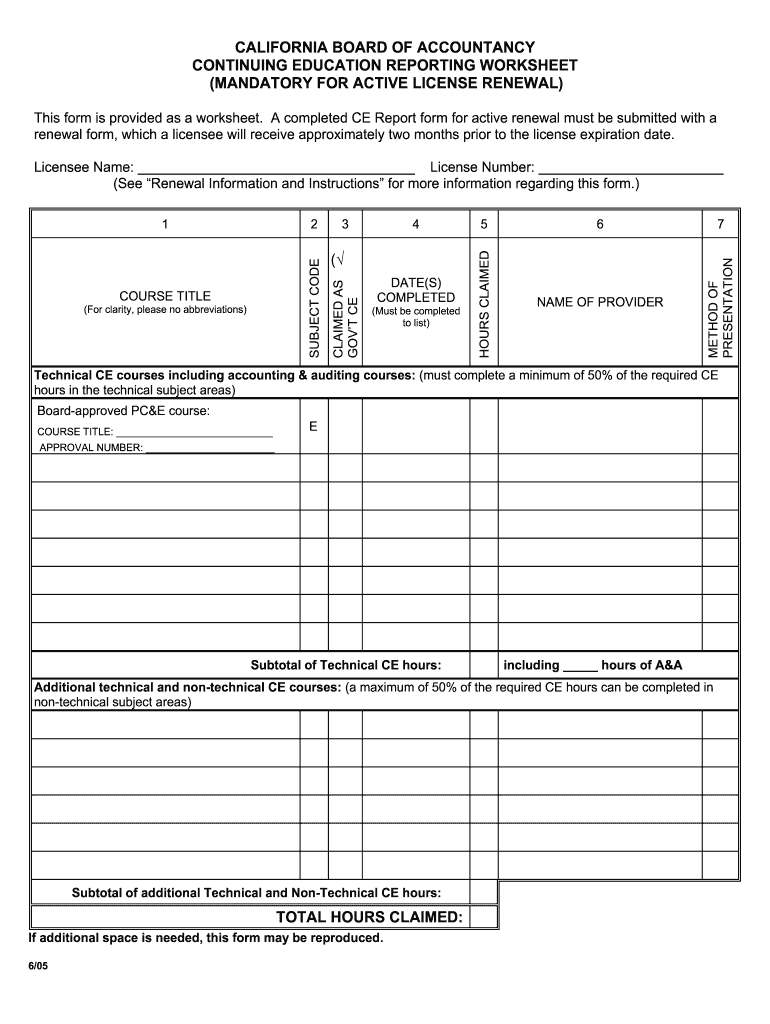
The California CPA Continuing Education Reporting Worksheet Excel is a vital tool for Certified Public Accountants (CPAs) in California to track and report their continuing education (CPE) hours. This worksheet is designed to help CPAs organize their completed courses and ensure they meet the state’s CPE requirements for license renewal. It typically includes sections for course titles, hours completed, dates attended, and providers, making it easier for professionals to compile their educational achievements in a structured format.
How to Use the California CPA Continuing Education Reporting Worksheet Excel
To effectively use the California CPA Continuing Education Reporting Worksheet Excel, start by downloading the template from a reliable source. Open the worksheet in a compatible program, such as Microsoft Excel. Begin by filling in the necessary information, including your name, license number, and the reporting period. As you complete each CPE course, enter the course title, provider, date completed, and the number of hours earned. This organized approach simplifies the process of tracking your educational progress and ensures you have all required information ready for submission during the renewal process.
Steps to Complete the California CPA Continuing Education Reporting Worksheet Excel
Completing the California CPA Continuing Education Reporting Worksheet Excel involves several straightforward steps:
- Open the Excel worksheet and enter your personal information at the top, including your name and CPA license number.
- Review the CPE requirements set by the California Board of Accountancy to ensure compliance.
- As you complete each course, log the details in the designated columns: course title, provider, date, and hours completed.
- Double-check your entries for accuracy and completeness.
- Save the completed worksheet for your records and for submission with your renewal application.
Key Elements of the California CPA Continuing Education Reporting Worksheet Excel
Several key elements are essential to the California CPA Continuing Education Reporting Worksheet Excel. These include:
- Course Title: The name of the course completed.
- Provider: The organization or institution that offered the course.
- Date Completed: The specific date when the course was finished.
- Hours Earned: The total number of CPE hours awarded for the course.
- Category: Classification of the course, such as ethics, accounting, or tax-related topics.
Legal Use of the California CPA Continuing Education Reporting Worksheet Excel
The California CPA Continuing Education Reporting Worksheet Excel is legally recognized as a valid document for reporting CPE hours to the California Board of Accountancy. To ensure its legal standing, it is crucial to maintain accurate records and provide all necessary information as required by state regulations. The worksheet serves as a formal record of your educational activities, which may be requested during audits or for verification purposes. Compliance with the guidelines set forth by the California Board of Accountancy is essential for maintaining your CPA license.
Filing Deadlines / Important Dates
Staying informed about filing deadlines and important dates is critical for California CPAs. The renewal cycle typically occurs every two years, with specific deadlines for submitting your CPE reporting worksheet. It is advisable to check the California Board of Accountancy’s website for the exact dates, as they may vary. Mark your calendar with these deadlines to ensure timely submission and avoid any penalties associated with late filings.
Quick guide on how to complete california board of accountancy continuing education reporting
Effortlessly prepare California Cpa Continuing Education Reporting Worksheet Excel on any device
The management of documents online has gained popularity among organizations and individuals. It serves as an ideal eco-friendly alternative to traditional printed and signed papers, as you can easily find the necessary form and securely save it online. airSlate SignNow provides all the tools you require to create, modify, and electronically sign your documents swiftly without delays. Manage California Cpa Continuing Education Reporting Worksheet Excel on any platform using the airSlate SignNow apps for Android or iOS and simplify your document-related processes today.
The easiest way to modify and eSign California Cpa Continuing Education Reporting Worksheet Excel seamlessly
- Obtain California Cpa Continuing Education Reporting Worksheet Excel and click on Get Form to begin.
- Utilize the tools we offer to complete your document.
- Emphasize key sections of your documents or redact sensitive information using the tools that airSlate SignNow provides specifically for that purpose.
- Generate your eSignature with the Sign feature, which takes mere seconds and holds the same legal validity as a conventional ink signature.
- Review all the details and click on the Done button to save your modifications.
- Select your preferred method to send your form, whether by email, SMS, invitation link, or download it to your computer.
Say goodbye to lost or misplaced files, tedious form searches, or mistakes that require reprinting new document copies. airSlate SignNow meets all your document management needs in just a few clicks from any device you prefer. Modify and eSign California Cpa Continuing Education Reporting Worksheet Excel to ensure effective communication at every stage of your form preparation with airSlate SignNow.
Create this form in 5 minutes or less
FAQs
-
Are there any chances to fill out the improvement form for 2019 of the RBSE board for 12 class?
Hari om, you are asking a question as to : “ Are there any chancesto fill out the improvement form for 2019 of the RBSE Board for 12 class?”. Hari om. Hari om.ANSWER :Browse through the following links for further details regarding the answers to your questions on the improvement exam for class 12 of RBSE 2019 :how to give improvement exams in rbse class 12is there a chance to fill rbse improvement form 2019 for a 12th class studentHari om.
-
How can I fill out Google's intern host matching form to optimize my chances of receiving a match?
I was selected for a summer internship 2016.I tried to be very open while filling the preference form: I choose many products as my favorite products and I said I'm open about the team I want to join.I even was very open in the location and start date to get host matching interviews (I negotiated the start date in the interview until both me and my host were happy.) You could ask your recruiter to review your form (there are very cool and could help you a lot since they have a bigger experience).Do a search on the potential team.Before the interviews, try to find smart question that you are going to ask for the potential host (do a search on the team to find nice and deep questions to impress your host). Prepare well your resume.You are very likely not going to get algorithm/data structure questions like in the first round. It's going to be just some friendly chat if you are lucky. If your potential team is working on something like machine learning, expect that they are going to ask you questions about machine learning, courses related to machine learning you have and relevant experience (projects, internship). Of course you have to study that before the interview. Take as long time as you need if you feel rusty. It takes some time to get ready for the host matching (it's less than the technical interview) but it's worth it of course.
-
How do I fill out the form of DU CIC? I couldn't find the link to fill out the form.
Just register on the admission portal and during registration you will get an option for the entrance based course. Just register there. There is no separate form for DU CIC.
-
How do I fill out an application form to open a bank account?
I want to believe that most banks nowadays have made the process of opening bank account, which used to be cumbersome, less cumbersome. All you need to do is to approach the bank, collect the form, and fill. However if you have any difficulty in filling it, you can always call on one of the banks rep to help you out.
-
How can I repeat the HSC Maharashtra board 2019? Which kind of form should I have to fill and when?
If you have passed HSC but not satisfied due to less marks and wants to appear again then you can go for HSC improvement exam. Just contact your Institute and fill out form of it and appear exam again.You can also apply online through site https://mahahsscboard.maharashtra.gov.in/ select class improvement and fill the form.
Create this form in 5 minutes!
How to create an eSignature for the california board of accountancy continuing education reporting
How to generate an electronic signature for your California Board Of Accountancy Continuing Education Reporting in the online mode
How to make an eSignature for the California Board Of Accountancy Continuing Education Reporting in Google Chrome
How to make an eSignature for putting it on the California Board Of Accountancy Continuing Education Reporting in Gmail
How to generate an electronic signature for the California Board Of Accountancy Continuing Education Reporting right from your smart phone
How to generate an electronic signature for the California Board Of Accountancy Continuing Education Reporting on iOS
How to make an electronic signature for the California Board Of Accountancy Continuing Education Reporting on Android
People also ask
-
What is the California CPA Continuing Education Reporting Worksheet Excel?
The California CPA Continuing Education Reporting Worksheet Excel is an essential tool designed for CPAs to track and report their continuing education credits efficiently. This Excel worksheet simplifies the process of organizing and documenting your required courses, ensuring that you meet California's CPA continuing education requirements.
-
How can I use the California CPA Continuing Education Reporting Worksheet Excel?
Using the California CPA Continuing Education Reporting Worksheet Excel is straightforward. You can input your course details, including dates, credits earned, and provider information, allowing for easy calculation of total credits. This tool helps ensure you stay compliant with continuing education regulations.
-
Is the California CPA Continuing Education Reporting Worksheet Excel easy to customize?
Absolutely! The California CPA Continuing Education Reporting Worksheet Excel is designed for easy customization. You can modify the spreadsheet to suit your specific reporting needs, add additional categories, or adjust formatting for better readability.
-
What are the benefits of using the California CPA Continuing Education Reporting Worksheet Excel?
The primary benefits of using the California CPA Continuing Education Reporting Worksheet Excel include simplicity and accuracy in tracking your education credits. It saves time and reduces errors in reporting, ensuring that you meet the California CPA continuing education requirements without hassle.
-
Does the California CPA Continuing Education Reporting Worksheet Excel integrate with other software?
Yes, the California CPA Continuing Education Reporting Worksheet Excel can easily integrate with other software tools. You can export data to various formats or import information from accounting software, making it a versatile choice for managing your continuing education records.
-
What is the cost of the California CPA Continuing Education Reporting Worksheet Excel?
The California CPA Continuing Education Reporting Worksheet Excel is available at a competitive price, offering great value for CPAs looking to streamline their reporting process. Check our website for current pricing and any promotional offers that may be available.
-
How does airSlate SignNow enhance the use of the California CPA Continuing Education Reporting Worksheet Excel?
airSlate SignNow enhances the California CPA Continuing Education Reporting Worksheet Excel by providing a seamless e-signature solution. You can easily send documents for signature and manage your education credits efficiently, ensuring compliance with California's CPA requirements.
Get more for California Cpa Continuing Education Reporting Worksheet Excel
- Waiver and release from liability for fairgrounds owner form
- Minors only iowa state recreation services form
- Liability waiversaveafox form
- Waiver release and hold harmless agreement 3 i waive all form
- Boat travel release of liability waiver of claims express form
- Accident waiver and release of liability form american
- Waiver and release from liability for rallydemonstration form
- Waiver and release by parent of minor child from liability for rally form
Find out other California Cpa Continuing Education Reporting Worksheet Excel
- Sign Indiana Sports Rental Application Free
- Sign Kentucky Sports Stock Certificate Later
- How Can I Sign Maine Real Estate Separation Agreement
- How Do I Sign Massachusetts Real Estate LLC Operating Agreement
- Can I Sign Massachusetts Real Estate LLC Operating Agreement
- Sign Massachusetts Real Estate Quitclaim Deed Simple
- Sign Massachusetts Sports NDA Mobile
- Sign Minnesota Real Estate Rental Lease Agreement Now
- How To Sign Minnesota Real Estate Residential Lease Agreement
- Sign Mississippi Sports Confidentiality Agreement Computer
- Help Me With Sign Montana Sports Month To Month Lease
- Sign Mississippi Real Estate Warranty Deed Later
- How Can I Sign Mississippi Real Estate Affidavit Of Heirship
- How To Sign Missouri Real Estate Warranty Deed
- Sign Nebraska Real Estate Letter Of Intent Online
- Sign Nebraska Real Estate Limited Power Of Attorney Mobile
- How Do I Sign New Mexico Sports Limited Power Of Attorney
- Sign Ohio Sports LLC Operating Agreement Easy
- Sign New Jersey Real Estate Limited Power Of Attorney Computer
- Sign New Mexico Real Estate Contract Safe