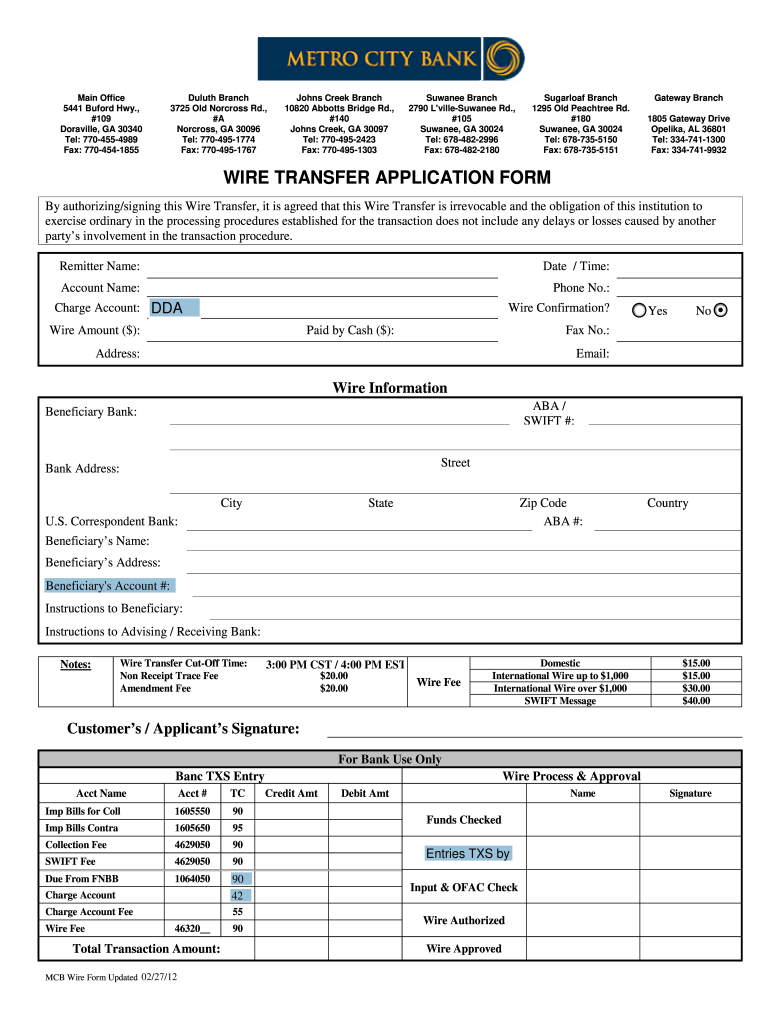
Metro Bank Form


What is the Metro City Bank?
Metro City Bank is a financial institution that provides a range of banking services tailored to meet the needs of individuals and businesses. It offers various products, including checking and savings accounts, loans, and wire transfer services. The bank focuses on delivering customer-centric solutions, ensuring that clients can manage their finances effectively and securely.
How to use the Metro City Bank
Using Metro City Bank's services is straightforward. Customers can open an account online or in person, depending on their preference. Once an account is established, clients can access online banking features to manage their accounts, transfer funds, and pay bills. For wire transfers, customers can fill out the metro wire application online, ensuring a quick and efficient process.
Steps to complete the Metro City Bank wire application
To complete the metro wire application, follow these steps:
- Log into your Metro City Bank online account.
- Navigate to the wire transfer section.
- Fill out the required fields in the wire application form, including recipient details and transfer amount.
- Review the information for accuracy.
- Sign the application electronically to authorize the transfer.
- Submit the application and retain a copy for your records.
Legal use of the Metro City Bank wire transfer
Metro City Bank wire transfers are governed by specific regulations that ensure the legality of electronic transactions. The bank complies with the Electronic Signatures in Global and National Commerce (ESIGN) Act and the Uniform Electronic Transactions Act (UETA), which validate the use of electronic signatures in financial transactions. This compliance guarantees that your wire transfers are legally binding and secure.
Required Documents for Metro City Bank wire transfers
When initiating a wire transfer through Metro City Bank, certain documents may be required. These typically include:
- A valid government-issued ID.
- Proof of account ownership, such as a recent bank statement.
- Recipient's banking information, including account number and routing number.
Having these documents ready can facilitate a smoother transaction process.
Eligibility Criteria for Metro City Bank services
To utilize services at Metro City Bank, customers must meet certain eligibility criteria, which may include:
- Being a legal resident of the United States.
- Meeting minimum age requirements, typically eighteen years old.
- Providing necessary identification and documentation as requested by the bank.
These criteria ensure that all clients can access banking services while maintaining security and compliance.
Quick guide on how to complete metro city bank form
The optimal approach to acquire and sign Metro Bank
Across the entirety of your organization, unproductive procedures related to document authorization can consume a signNow amount of valuable time. Endorsing documents like Metro Bank is a fundamental aspect of operations in any sector, which is why the effectiveness of each agreement’s lifecycle has such a substantial impact on the overall performance of the company. With airSlate SignNow, endorsing your Metro Bank is as straightforward and quick as it can be. This platform provides you with the latest version of nearly any document. Even better, you can endorse it instantly without needing to install external software on your computer or printing anything as physical copies.
Steps to obtain and endorse your Metro Bank
- Browse our collection by category or utilize the search feature to locate the document you require.
- View the document preview by clicking Learn more to confirm it’s the correct one.
- Click Get form to begin editing immediately.
- Fill out your document and include any essential information using the toolbar.
- Once completed, click the Sign tool to endorse your Metro Bank.
- Select the signing method that works best for you: Sketch, Create initials, or upload an image of your handwritten signature.
- Click Done to finalize editing and move on to document-sharing options as needed.
With airSlate SignNow, you possess everything necessary to manage your documents proficiently. You can locate, fill out, edit, and even send your Metro Bank in one tab without any difficulties. Optimize your procedures with a unified, intelligent eSignature solution.
Create this form in 5 minutes or less
FAQs
-
How to decide my bank name city and state if filling out a form, if the bank is a national bank?
Somewhere on that form should be a blank for routing number and account number. Those are available from your check and/or your bank statements. If you can't find them, call the bank and ask or go by their office for help with the form. As long as those numbers are entered correctly, any error you make in spelling, location or naming should not influence the eventual deposit into your proper account.
-
How do I get an ISP license?
Step 1: How to (apply for &) get an ISP license in India? – Check EligibilityTo obtain an ISP license, you require a registered company under the Companies Act, 1956. You can log on to the Registrar of Companies’ website for more information on how to register a company if you haven’t already registered yours.Step 2: How to (apply for &) get an ISP license in India? – Choose a suitable ISP license category to apply underThe next step to obtaining an ISP license is to know / decide which category of license you require – category A, B or C. Click here to know more about how to select the right category for your ISP License.In India, there are 3 different categories of licenses to become an internet service provider, depending upon the City/State/Town/District/Village you want to start your ISP business in.The 3 categories of ISP licenses are:Class A (National Area)Class B (Telecom Circle/Metro Area)Class C (Secondary Switching Area)Naturally, a Class A ISP license would be quite expensive, followed by Class B & C respectively.Step 3: How to (apply for &) get an ISP license in India? – Budgeting and CostingTo promote internet access in smaller towns, cities & villages, the Government of India has made a conscious effort to ease prices of a Class C license compared to a Class A or B license.The total government cost for a Class C license is INR 90,000/- whereas for a Class A license is as high as 2 ½ crores.Thus, in order to become a Class C ISP licence holder, you don’t require more than Rs. 3-4 lakhs, depending on the lawyer / ISP consultant fees.Once you have selected the category of the ISP license you want to obtain, it is important to know how the entire application process goes.Now, let’s take you through on how to apply for an ISP license & the documents, legal help, etc. you will require.Step 4: How to (apply for &) get an ISP license in India? – Initial Application ProcessAfter you have chosen your ISP license category, you will need to fill out an application form. Click here to download the form.Along with the form, a non-refundable Processing Fee of INR 15,000/- must be paid by the applicant, along with 2 copies of the application form, by DD/Pay Order from a Schedule Bank payable at New Delhi issued in the name of Pay & Accounts Officer (Headquarter) DOT.Provide all required official documents. Click here to know the list of documents required.Step 5: How to (apply for &) get an ISP license in India? – Document ReviewOnce you have submitted your application form along with the required documents & fees, the Department of Telecom will review your application & respond to you, the applicant, in under 60 days,as far as practicable i.e. in case there are any issues with your application, there may be a delay in the issuing of a response from the DOT.If there is no problem with your complete application, the DOT will issue a ‘Letter of Intent’ in your favor.However, there are chances that your application may be rejected or delayed due to non-compliance with legal, security, hardware, commercial and contractual compliance and human errors such as incomplete form submission.Therefore, it is important to get an ISP consultant / lawyer to review your application before you submit your application form for obtaining the ISP authorization under the Unified License . Click here to know more.Disclaimer: the rules keep changing as per notifications by DOT and Govt. This information was published on Oct’2016. Do not treat this as professional advice, kindly contact us for up-to-date compliance and to avail professional assistance for your application.
-
Which bank should I prefer while filling IBPS PO form to get a posting in metro cities?
All most all PSBs have there branches in Rural, semi urban and small cities and towns…so getting metro posting is entirely on your luck in initial days.. and much will depend on your current location (the place to you belong) coz the posting will be generally far from your home location. So don't think about posting…Just study and crack the exam…All the Best!
-
How do I fill out an application form to open a bank account?
I want to believe that most banks nowadays have made the process of opening bank account, which used to be cumbersome, less cumbersome. All you need to do is to approach the bank, collect the form, and fill. However if you have any difficulty in filling it, you can always call on one of the banks rep to help you out.
-
How do I fill out the dd form for SBI bank?
Write the name of the beneficiary in the space after “in favour of “ and the branch name where the beneficiary would encash it in the space “payable at”.Fill in the amount in words and figures and the appropriate exchange .Fill up your name and address in “Applicant's name” and sign at “ applicant's signature”
-
How do I apply for ISP (Internet service provider) license in India?
Step 1: How to (apply for &) get an ISP license in India? – Check EligibilityTo obtain an ISP license, you require a registered company under the Companies Act, 1956. You can log on to the Registrar of Companies’ website for more information on how to register a company if you haven’t already registered yours.Step 2: How to (apply for &) get an ISP license in India? – Choose a suitable ISP license category to apply underThe next step to obtaining an ISP license is to know / decide which category of license you require – category A, B or C. Click here to know more about how to select the right category for your ISP License.In India, there are 3 different categories of licenses to become an internet service provider, depending upon the City/State/Town/District/Village you want to start your ISP business in.The 3 categories of ISP licenses are:Class A (National Area)Class B (Telecom Circle/Metro Area)Class C (Secondary Switching Area)Naturally, a Class A ISP license would be quite expensive, followed by Class B & C respectively.Step 3: How to (apply for &) get an ISP license in India? – Budgeting and CostingTo promote internet access in smaller towns, cities & villages, the Government of India has made a conscious effort to ease prices of a Class C license compared to a Class A or B license.The following table will explain the financial entry conditions you require to fulfill in order to obtain a Class A/B/C ISP license:ServiceMinimum EquityMinimum Net worthEntry Fee (Rs.)Performance BG (Rs.)Financial BG (Rs.)Application Processing Fee (Rs.)Total Capital Required (Rs.)ISP “A” (National Area)NilNil30 Lakh2 Crores10 Lakh50 Thousand2,40,50,000ISP “B” (Telecom circle/Metro Area)NilNil2 Lakh10 Lakh1 Lakh15 Thousand13,15,000ISP “C” (SSA)NilNil20 Thousand50 Thousand10 Thousand10 Thousand90,000As you can see above, the total capital required for a Class C license is INR 90,000/- whereas for a Class A license is as high as 2 ½ crores.Thus, in order to become a Class C ISP licence holder, you don’t require more than Rs. 3-4 lakhs, depending on the lawyer / ISP consultant fees.Once you have selected the category of the ISP license you want to obtain, it is important to know how the entire application process goes.Now, let’s take you through on how to apply for an ISP license & the documents, legal help, etc. you will require.Step 4: How to (apply for &) get an ISP license in India? – Initial Application ProcessAfter you have chosen your ISP license category, you will need to fill out an application form.Along with the form, a non-refundable Processing Fee of INR 15,000/- must be paid by the applicant, along with 2 copies of the application form, by DD/Pay Order from a Schedule Bank payable at New Delhi issued in the name of Pay & Accounts Officer (Headquarter) DOT.Provide all required official documents. Click here to know the list of documents required.Step 5: How to (apply for &) get an ISP license in India? – Document ReviewOnce you have submitted your application form along with the required documents & fees, the Department of Telecom will review your application & respond to you, the applicant, in under 60 days, as far as practicable i.e. in case there are any issues with your application, there may be a delay in the issuing of a response from the DOT.If there is no problem with your complete application, the DOT will issue a ‘Letter of Intent’ in your favor. However, there are chances that your application may be rejected or delayed due to non-compliance with legal, security, hardware, commercial and contractual compliance and human errors such as incomplete form submission.Therefore, it is important to get an ISP consultant / lawyer to review your application before you submit your application form for obtaining the ISP authorization under the Unified License . Click here to know more.Step 6: How to (apply for &) get an ISP license in India? – Letter of IntentIf there are no issues with your application form for obtaining the ISP authorization under the Unified License, the DOT will issue a ‘Letter of Intent’ in your favor. Once the Letter of Intent is issued,You will have to submit the one-time entry fee (as mentioned in the table above) along with the required bank guarantees.The total of both for Category A is 2.4 crores, for category B is 13 lakh & for category C is 80,000/-.Furthermore, you will have to submit a signed license agreement with the DOT and any other documents required, including the documents mentioned in the Letter of Intent.Do note that the one-time entry fee is non-refundable & once the Letter of intent is issued, all the above requirements have to be fulfilled within a specific period that will be mentioned in the Letter of Intent.Step 7: How to (apply for &) get an ISP license in India? – ConfirmationIf everything goes smoothly, you will be issued an ISP authorization under the Unified License for a period of 20 years. The DOT will contact you / mail you directly to inform you whether you have been issued the ISP License.Step 8: How to (apply for &) get an ISP license in India? Conclusion – Need for Expertise: Get/Apply an ISP license in IndiaThe process of ISP licensing is technical and lengthy for a common person to comprehend. There have been quite a few instances where the application is rejected because of an incomplete submission, missing information, non-compliance, missing documents etc. Thus, it is advisable to get your documents & forms reviewed by a professional ISP consultant or lawyer to make sure you don’t lose out on time & money.Click here to know more about our ISP consultancy.Disclaimer: the rules keep changing as per notifications by DOT and Govt. This information was published on Oct’2016. Do not treat this as professional advice, kindly contact us for up-to-date compliance and to avail professional assistance for your application.- FROM How to apply for an ISP license in India
-
How do I fill out the Andhra Bank account opening form?
Follow the step by step process for filling up the Andhra Bank account opening form.Download Account Opening FormIf you don't want to read the article, watch this video tutorial or continue the post:Andhra Bank Account Opening Minimum Balance:The minimum amount required for opening Savings Account in Andhra Bank isRs. 150Andhra Bank Account Opening Required Documents:Two latest passport size photographsProof of identity - Passport, Driving license, Voter’s ID card, etc.Proof of address - Passport, Driving license, Voter’s ID card, etc. If temporary address and permanent address are different, then both addresses will have to submitted.PAN cardForm 16 (only if PAN card is not available)See More Acceptable Documents for Account OpeningNow Finally let's move to filling your Andhra Bank Account Opening Form:Step 1:Step 2:Read More…
-
How do I fill out the Axis Bank account closure form?
How To Fill Axis Bank Account Closure FormTo close your axis bank account, first you have to download the bank account closure form then submit it to your bank branch.Click the link and download the form:http://bit.ly/accntclosurepdfAfter downloading the account closure form, you have to fill up exactly as I have show below with detail. Kindly go through the filled form below and after filling the form, take all the kit like credit card, debit card, passbook and etc and submit it to your bank with the filled form.Source: How To Fill Axis Bank Account Closure Form
Create this form in 5 minutes!
How to create an eSignature for the metro city bank form
How to make an electronic signature for your Metro City Bank Form in the online mode
How to generate an electronic signature for your Metro City Bank Form in Google Chrome
How to make an electronic signature for putting it on the Metro City Bank Form in Gmail
How to create an electronic signature for the Metro City Bank Form straight from your smartphone
How to create an electronic signature for the Metro City Bank Form on iOS devices
How to generate an eSignature for the Metro City Bank Form on Android OS
People also ask
-
What is airSlate SignNow and how does it integrate with Metro Bank?
airSlate SignNow is a powerful eSignature solution that allows businesses to send and sign documents quickly and securely. With its seamless integration with Metro Bank, users can streamline their document workflow while ensuring that sensitive financial information is protected. This integration simplifies the signing process for Metro Bank customers, enhancing overall efficiency.
-
How can airSlate SignNow benefit Metro Bank customers?
Metro Bank customers can greatly benefit from using airSlate SignNow by enjoying a faster and more efficient way to manage document signing. The platform allows for real-time tracking and notifications, ensuring that important financial documents are signed promptly. This not only saves time but also enhances customer satisfaction for Metro Bank clients.
-
What are the pricing options for airSlate SignNow for Metro Bank users?
airSlate SignNow offers competitive pricing plans that cater to various business needs, including those of Metro Bank users. Plans are designed to be cost-effective while providing access to essential features like unlimited eSignatures and cloud storage. Metro Bank customers can choose a plan that best fits their document management requirements without breaking the bank.
-
Is airSlate SignNow secure for use with Metro Bank transactions?
Yes, airSlate SignNow prioritizes security, making it a safe choice for transactions involving Metro Bank. The platform is compliant with industry regulations and employs encryption to protect sensitive data. This ensures that all eSigned documents and transactions remain confidential and secure.
-
What key features does airSlate SignNow offer for Metro Bank clients?
Key features of airSlate SignNow include customizable templates, advanced analytics, and real-time notifications, all of which are beneficial for Metro Bank clients. These features streamline the signing process, enable better tracking of document statuses, and provide insights into user engagement. This makes it easier for businesses to manage their documentation effectively.
-
Can airSlate SignNow be used for both personal and business documents related to Metro Bank?
Absolutely! airSlate SignNow is versatile, allowing users to manage both personal and business documents seamlessly, including those related to Metro Bank. Whether you're signing a loan agreement or personal banking forms, the platform simplifies the process, making it accessible for all types of users.
-
How does airSlate SignNow improve document workflow for Metro Bank users?
airSlate SignNow signNowly improves document workflow for Metro Bank users by automating the signing process and reducing manual errors. With features like automated reminders and document routing, users can ensure that important documents are processed quickly and efficiently. This leads to faster turnaround times and improved productivity.
Get more for Metro Bank
- Letter from tenant to landlord with demand that landlord provide proper outdoor garbage receptacles delaware form
- Letter from tenant to landlord about landlords failure to make repairs delaware form
- Letter tenant rent 497302070 form
- Letter from tenant to landlord about landlord using unlawful self help to gain possession delaware form
- 2022255261 form
- Letter from landlord to tenant about time of intent to enter premises delaware form
- Delaware letter tenant landlord form
- Letter from tenant to landlord about sexual harassment delaware form
Find out other Metro Bank
- How Can I Sign Utah House rent agreement format
- Sign Alabama House rental lease agreement Online
- Sign Arkansas House rental lease agreement Free
- Sign Alaska Land lease agreement Computer
- How Do I Sign Texas Land lease agreement
- Sign Vermont Land lease agreement Free
- Sign Texas House rental lease Now
- How Can I Sign Arizona Lease agreement contract
- Help Me With Sign New Hampshire lease agreement
- How To Sign Kentucky Lease agreement form
- Can I Sign Michigan Lease agreement sample
- How Do I Sign Oregon Lease agreement sample
- How Can I Sign Oregon Lease agreement sample
- Can I Sign Oregon Lease agreement sample
- How To Sign West Virginia Lease agreement contract
- How Do I Sign Colorado Lease agreement template
- Sign Iowa Lease agreement template Free
- Sign Missouri Lease agreement template Later
- Sign West Virginia Lease agreement template Computer
- Sign Nevada Lease template Myself