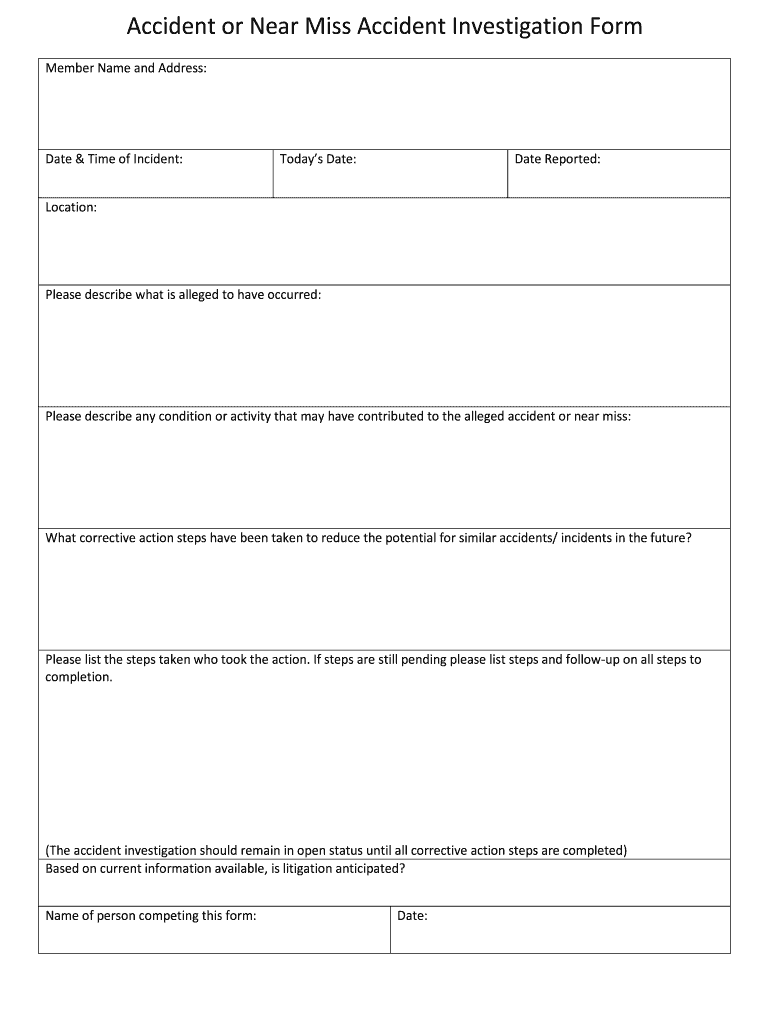
Near Miss Report Template Word Form


What is the Near Miss Report Template Word
The near miss report template word is a structured document designed to capture details about incidents that could have resulted in injury or damage but did not. This template serves as a vital tool for organizations to document and analyze near misses, ultimately enhancing workplace safety. It typically includes sections for the date and time of the incident, location, a description of what occurred, and any contributing factors. By utilizing this template, businesses can identify trends and implement preventive measures to mitigate future risks.
How to use the Near Miss Report Template Word
Using the near miss report template word involves several straightforward steps. First, download the template in a compatible format, such as Microsoft Word. Next, fill in the required fields with accurate information regarding the near miss incident. This includes details about the individuals involved, the circumstances surrounding the event, and any immediate actions taken. Once completed, the report can be saved and shared with relevant stakeholders for further review and action. This process ensures that all near misses are systematically recorded and addressed.
Steps to complete the Near Miss Report Template Word
Completing the near miss report template word requires attention to detail and a systematic approach. Follow these steps:
- Download the template and open it in Microsoft Word.
- Enter the date and time of the incident in the designated fields.
- Provide a clear and concise description of the near miss.
- Identify the location where the incident occurred.
- List any individuals involved, including witnesses.
- Document any contributing factors that may have led to the near miss.
- Outline any immediate corrective actions taken following the incident.
- Review the completed report for accuracy before saving and distributing it.
Key elements of the Near Miss Report Template Word
The key elements of the near miss report template word are crucial for effective documentation and analysis. Essential components typically include:
- Date and Time: When the near miss occurred.
- Location: The specific site of the incident.
- Description: A detailed account of what happened.
- Involved Parties: Names and roles of individuals involved.
- Contributing Factors: Any conditions or actions that led to the near miss.
- Corrective Actions: Steps taken to prevent recurrence.
Legal use of the Near Miss Report Template Word
The near miss report template word can have legal implications, making it important for organizations to use it correctly. When properly filled out, the report serves as a record that can be referenced in case of future incidents or investigations. To ensure legal compliance, it is essential to maintain confidentiality and protect the identities of individuals involved. Additionally, organizations should follow relevant occupational safety regulations to ensure that their reporting practices align with legal standards.
Examples of using the Near Miss Report Template Word
Examples of using the near miss report template word can illustrate its practical application in various industries. For instance, in a manufacturing setting, a report might document a near miss involving a worker who narrowly avoided a machinery accident. In an office environment, a report could detail a situation where a slip hazard was identified but not acted upon. These examples highlight how the template can be adapted to different contexts, emphasizing the importance of reporting near misses to improve safety protocols.
Quick guide on how to complete near miss report microsoft word form
Complete Near Miss Report Template Word effortlessly on any device
Digital document management has become increasingly popular among businesses and individuals. It offers an ideal eco-friendly substitute to conventional printed and signed papers, as you can access the correct form and securely store it online. airSlate SignNow equips you with all the resources necessary to create, amend, and eSign your documents quickly without any delays. Manage Near Miss Report Template Word on any device with airSlate SignNow's Android or iOS applications and streamline any document-related process today.
The simplest way to modify and eSign Near Miss Report Template Word with ease
- Locate Near Miss Report Template Word and click Get Form to begin.
- Utilize the tools available to fill out your form.
- Emphasize relevant sections of the documents or obscure sensitive information with tools that airSlate SignNow specifically provides for that purpose.
- Generate your eSignature using the Sign tool, which takes seconds and carries the same legal validity as a traditional wet ink signature.
- Verify all the details and click on the Done button to save your modifications.
- Select how you wish to share your form: via email, SMS, or invitation link, or download it to your computer.
Eliminate concerns about lost or mislaid documents, tedious form searching, or errors that necessitate printing new document copies. airSlate SignNow fulfills all your document management requirements in just a few clicks from any device of your preference. Modify and eSign Near Miss Report Template Word and ensure excellent communication at every stage of your form preparation process with airSlate SignNow.
Create this form in 5 minutes or less
FAQs
-
What tax forms do I need to fill out for reporting bitcoin gains and loses?
IRS1040 and 1099 forms.“For instance, there is no long-term capital gains tax to pay if you are in the lower two tax brackets (less than $36,900 single income or less than $73,800 married income). The capital gains rate is only 15% for other tax brackets (less than $405,100 single income) with 20% for the final bracket.”Reference: Filing Bitcoin Taxes Capital Gains Losses 1040 Schedule DOther References:IRS Virtual Currency Guidance : Virtual Currency Is Treated as Property for U.S. Federal Tax Purposes; General Rules for Property Transactions ApplyHow do I report taxes?Filing Bitcoin Taxes Capital Gains Losses 1040 Schedule Dhttps://www.irs.gov/pub/irs-drop...
-
Is there any problem if I missed to fill out my bio marks in the NEET application form?
Hi…The correction window is going to open today, kindly login and do the needful correction if the NTA allows you to do the same.But at the same time if you are not allowed to edit the changes, kindly drop a mail to the NTA, about your mentioned problem and lets see if they can do something from their end.Although not entering the marks wont reject your application form and you will be allowed to appear in the NEET entrance exam 2019.But at the same time its important to note that you put forward a mail to the NTA.ALL THE BEST!!!FOR more info about the Medical Counselling process:Www.gyanshetra.com
-
How can I fill out Google's intern host matching form to optimize my chances of receiving a match?
I was selected for a summer internship 2016.I tried to be very open while filling the preference form: I choose many products as my favorite products and I said I'm open about the team I want to join.I even was very open in the location and start date to get host matching interviews (I negotiated the start date in the interview until both me and my host were happy.) You could ask your recruiter to review your form (there are very cool and could help you a lot since they have a bigger experience).Do a search on the potential team.Before the interviews, try to find smart question that you are going to ask for the potential host (do a search on the team to find nice and deep questions to impress your host). Prepare well your resume.You are very likely not going to get algorithm/data structure questions like in the first round. It's going to be just some friendly chat if you are lucky. If your potential team is working on something like machine learning, expect that they are going to ask you questions about machine learning, courses related to machine learning you have and relevant experience (projects, internship). Of course you have to study that before the interview. Take as long time as you need if you feel rusty. It takes some time to get ready for the host matching (it's less than the technical interview) but it's worth it of course.
-
Do W9 forms need to be filled out by hand? Can I fill it out in a text editor like Word instead?
No, W9 forms do not need to be filled out by hand. Assuming you have a PDF, there are many PDF editors which allow you to fill in the form on your personal computer and even insert a signature, if you have one.Mac’s Preview app does this on most PDFs. Word might actually do it as well, I simply don’t use Word. Google Docs has the functionality, as well.
-
How do you change Microsoft word documents from PDF form to doc form?
You have a few different options here - if you want to use software on your own computer Microsoft Office will give you a good quality conversion but it can be quite expensive to purchase. LibreOffice is free to use, but the quality of the output can be quite variable - more complex documents don’t always look great.Another option is to use Zamzar which is an online converter service. The quality of output is high, and it’s simple to use - Just select your Word file choose “PDF” as the output format and the tool will then convert your file in realtime.The great thing about this tool is that it’s free to use for up to 5 conversions per day, up to 50MB in size, and you don’t have to download any software - it works in any web browser on any computer (Windows, Mac or Linux).Full disclosure: I’m one of the co-founders at Zamzar.
Create this form in 5 minutes!
How to create an eSignature for the near miss report microsoft word form
How to generate an electronic signature for the Near Miss Report Microsoft Word Form in the online mode
How to create an eSignature for your Near Miss Report Microsoft Word Form in Google Chrome
How to generate an eSignature for putting it on the Near Miss Report Microsoft Word Form in Gmail
How to generate an eSignature for the Near Miss Report Microsoft Word Form straight from your mobile device
How to generate an electronic signature for the Near Miss Report Microsoft Word Form on iOS
How to generate an eSignature for the Near Miss Report Microsoft Word Form on Android OS
People also ask
-
What is a Near Miss Report Template Word?
A Near Miss Report Template Word is a structured document used to record incidents that almost resulted in an accident but did not. This template is crucial for organizations to analyze potential hazards and improve safety protocols. Using a Near Miss Report Template Word helps ensure that your team learns from these incidents to prevent future occurrences.
-
How can I create a Near Miss Report using your template?
Creating a Near Miss Report using our template is straightforward. Simply download the Near Miss Report Template Word from our website, fill in the required fields with relevant details of the near miss incident, and save it for your records. This easy process ensures that you can document incidents promptly and efficiently.
-
Is the Near Miss Report Template Word customizable?
Yes, the Near Miss Report Template Word is fully customizable. You can modify sections, add or remove fields, and tailor the template to meet your organization's specific reporting needs. This flexibility ensures that you capture all necessary information relevant to your workplace safety.
-
What are the benefits of using a Near Miss Report Template Word?
Using a Near Miss Report Template Word enhances your incident reporting process by providing a clear structure for documentation. It helps you identify trends in near misses, promotes a culture of safety, and assists in compliance with safety regulations. Ultimately, it contributes to a safer work environment.
-
Can I integrate the Near Miss Report Template Word with other software?
Yes, our Near Miss Report Template Word can be integrated with various software solutions, including project management and safety management systems. This integration allows for seamless data transfer and better tracking of safety incidents across platforms, enhancing your overall safety management process.
-
How much does the Near Miss Report Template Word cost?
The Near Miss Report Template Word is available at a competitive price, designed to fit within your budget. We offer flexible pricing plans depending on your organization's size and needs, ensuring you get the best value for your investment in safety reporting.
-
Is support available for using the Near Miss Report Template Word?
Absolutely! Our team provides comprehensive support for users of the Near Miss Report Template Word. Whether you have questions about customization, integration, or best practices for reporting, our support team is here to help you every step of the way.
Get more for Near Miss Report Template Word
- Letter from tenant to landlord about sexual harassment kansas form
- Letter from tenant to landlord about fair housing reduction or denial of services to family with children kansas form
- Letter from tenant to landlord containing notice of termination for landlords noncompliance with possibility to cure kansas form
- Letter from tenant to landlord responding to notice to terminate for noncompliance noncompliant condition caused by landlords 497307454 form
- Letter from tenant to landlord for failure of landlord to return all prepaid and unearned rent and security recoverable by 497307455 form
- Ks codes form
- Letter from landlord to tenant where tenant complaint was caused by the deliberate or negligent act of tenant or tenants guest 497307457 form
- Letter from landlord to tenant for failure to keep premises as clean and safe as condition of premises permits remedy or lease 497307458 form
Find out other Near Miss Report Template Word
- eSignature Connecticut Retainer Agreement Template Myself
- How To Electronic signature Alaska House rental lease agreement
- eSignature Illinois Retainer Agreement Template Free
- How Do I Electronic signature Idaho Land lease agreement
- Electronic signature Illinois Land lease agreement Fast
- eSignature Minnesota Retainer Agreement Template Fast
- Electronic signature Louisiana Land lease agreement Fast
- How Do I eSignature Arizona Attorney Approval
- How Can I eSignature North Carolina Retainer Agreement Template
- Electronic signature New York Land lease agreement Secure
- eSignature Ohio Attorney Approval Now
- eSignature Pennsylvania Retainer Agreement Template Secure
- Electronic signature Texas Land lease agreement Free
- Electronic signature Kentucky Landlord lease agreement Later
- Electronic signature Wisconsin Land lease agreement Myself
- Electronic signature Maryland Landlord lease agreement Secure
- How To Electronic signature Utah Landlord lease agreement
- Electronic signature Wyoming Landlord lease agreement Safe
- Electronic signature Illinois Landlord tenant lease agreement Mobile
- Electronic signature Hawaii lease agreement Mobile