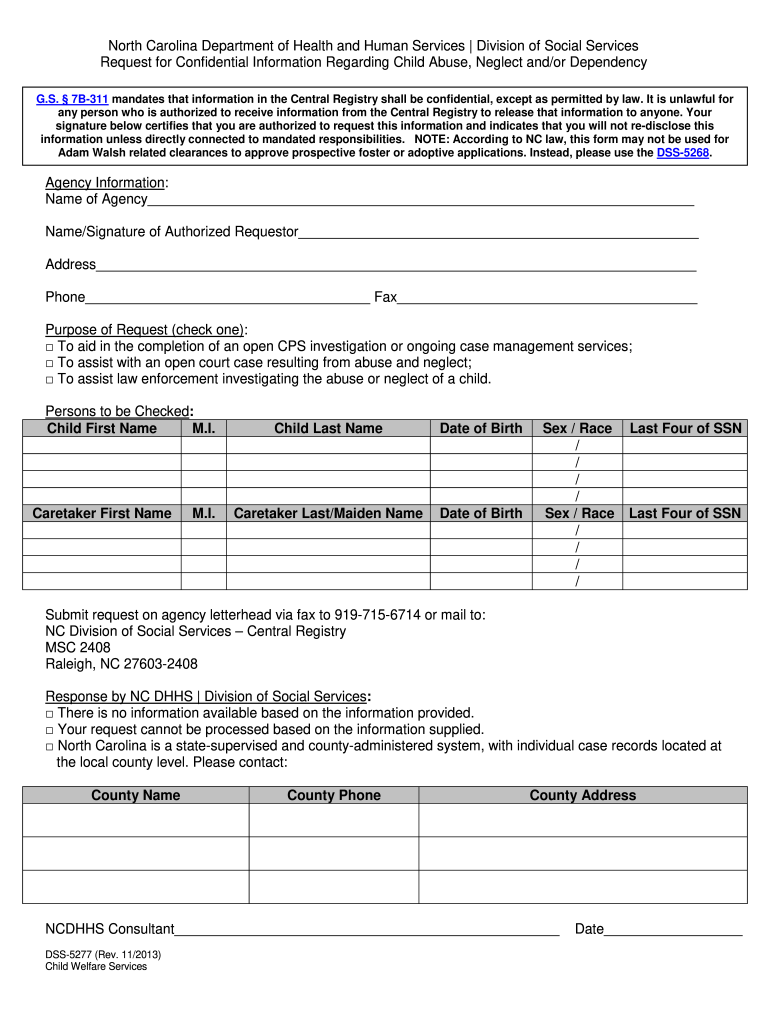
Nc Dss 5277 2013-2026


What is the NC DSS 5277?
The NC DSS 5277 form, also known as the DSS 5277 information form, is a document used in North Carolina to collect information regarding child abuse or neglect. It is primarily utilized by the Department of Health and Human Services (DHHS) to ensure the safety and well-being of children. This form plays a critical role in the state's efforts to respond to allegations of child maltreatment and is essential for initiating investigations and providing necessary services.
How to Obtain the NC DSS 5277
To obtain the NC DSS 5277 form, individuals can visit the official North Carolina Department of Health and Human Services website. The form is typically available for download in a PDF format, allowing users to print it for completion. Additionally, local county DSS offices may provide physical copies of the form upon request. It is important to ensure that you are using the most current version of the form to comply with legal requirements.
Steps to Complete the NC DSS 5277
Completing the NC DSS 5277 form involves several key steps to ensure accuracy and compliance:
- Begin by filling out the identifying information, including the names and addresses of the child and family involved.
- Provide detailed descriptions of the allegations, including dates, locations, and any known witnesses.
- Include information about any previous reports or investigations related to the family.
- Review the completed form for accuracy before submission, ensuring all sections are filled out completely.
Once the form is completed, it can be submitted to the local DSS office for processing.
Legal Use of the NC DSS 5277
The NC DSS 5277 form is legally binding and must be completed accurately to ensure that the information provided is valid for investigations. It is important to understand that submitting false information on this form can lead to legal penalties. The form is designed to protect the rights of children and families while ensuring that appropriate actions are taken in response to allegations of abuse or neglect.
Key Elements of the NC DSS 5277
Several key elements are essential when filling out the NC DSS 5277 form:
- Identifying Information: Names, addresses, and contact details of the child and family.
- Description of Allegations: Detailed accounts of the suspected abuse or neglect.
- Previous Reports: Information regarding any prior allegations or investigations.
- Reporting Party Information: Details about the individual submitting the form, including their relationship to the child.
These elements are crucial for the effective processing of the report and subsequent investigations.
Quick guide on how to complete dss 5277 request for confidential information regarding child abuse neglect and dependency info dhhs state nc
Explore the simpler method to manage your Nc Dss 5277
The traditional approach to finishing and approving paperwork consumes an excessive amount of time compared to contemporary document management tools. Previously, you would search for suitable social forms, print them out, fill in all the details, and mail them. Now, you can obtain, complete, and sign your Nc Dss 5277 all within a single browser tab using airSlate SignNow. Preparing your Nc Dss 5277 has never been easier.
Steps to finalize your Nc Dss 5277 with airSlate SignNow
- Access the category page you require and locate your state-specific Nc Dss 5277. Alternatively, utilize the search bar.
- Confirm the version of the form is accurate by previewing it.
- Click Get form and enter editing mode.
- Fill in your document with the necessary information using the editing tools.
- Review the entered details and click the Sign button to validate your form.
- Select the most convenient method to create your signature: generate it, draw your signature, or upload an image of it.
- Click DONE to finalize changes.
- Download the document to your device or proceed to Sharing settings to send it digitally.
Robust online solutions like airSlate SignNow streamline the process of filling out and submitting your forms. Use it to discover how long document management and approval workflows are truly meant to take. You’ll conserve a signNow amount of time.
Create this form in 5 minutes or less
Create this form in 5 minutes!
How to create an eSignature for the dss 5277 request for confidential information regarding child abuse neglect and dependency info dhhs state nc
How to make an eSignature for the Dss 5277 Request For Confidential Information Regarding Child Abuse Neglect And Dependency Info Dhhs State Nc in the online mode
How to generate an electronic signature for the Dss 5277 Request For Confidential Information Regarding Child Abuse Neglect And Dependency Info Dhhs State Nc in Google Chrome
How to make an eSignature for putting it on the Dss 5277 Request For Confidential Information Regarding Child Abuse Neglect And Dependency Info Dhhs State Nc in Gmail
How to generate an electronic signature for the Dss 5277 Request For Confidential Information Regarding Child Abuse Neglect And Dependency Info Dhhs State Nc from your mobile device
How to create an electronic signature for the Dss 5277 Request For Confidential Information Regarding Child Abuse Neglect And Dependency Info Dhhs State Nc on iOS devices
How to make an electronic signature for the Dss 5277 Request For Confidential Information Regarding Child Abuse Neglect And Dependency Info Dhhs State Nc on Android OS
People also ask
-
What is the Nc Dss 5277 form and why is it important?
The Nc Dss 5277 form is a vital document used for various administrative and legal processes in North Carolina. It is essential for ensuring compliance with state regulations and streamlining applications related to social services. Using airSlate SignNow to eSign and manage the Nc Dss 5277 can greatly enhance efficiency and accuracy in handling these important transactions.
-
How does airSlate SignNow support the completion of the Nc Dss 5277?
airSlate SignNow provides an intuitive platform that allows users to easily fill out and eSign the Nc Dss 5277 form. Our solution simplifies the document workflow by enabling electronic signatures, which can signNowly speed up the submission process. With airSlate SignNow, you can ensure that your Nc Dss 5277 is completed accurately and efficiently.
-
What are the pricing options for using airSlate SignNow with the Nc Dss 5277?
airSlate SignNow offers flexible pricing plans tailored to meet the needs of different users, whether for individuals or businesses. Our competitive pricing ensures that you can manage and eSign documents like the Nc Dss 5277 without breaking the bank. Visit our pricing page for more details on how you can get started.
-
Can I integrate airSlate SignNow with other software to manage the Nc Dss 5277?
Yes, airSlate SignNow seamlessly integrates with a variety of applications and platforms, making it easy to manage the Nc Dss 5277 alongside your existing tools. This integration capability enhances your workflow by allowing you to automate document handling processes. Check our integrations page to see all compatible applications.
-
What are the key features of airSlate SignNow that benefit Nc Dss 5277 users?
airSlate SignNow offers several key features that benefit users of the Nc Dss 5277, such as easy document editing, customizable templates, and secure eSigning. These features improve the overall efficiency of document management and ensure that your Nc Dss 5277 is processed quickly and securely. With our user-friendly interface, you can navigate these features effortlessly.
-
Is airSlate SignNow secure for handling sensitive documents like the Nc Dss 5277?
Absolutely, airSlate SignNow prioritizes security and compliance, which is crucial when dealing with sensitive documents like the Nc Dss 5277. Our platform utilizes advanced encryption and complies with industry regulations to protect your data. You can confidently eSign and manage your Nc Dss 5277 knowing your information is safe.
-
How can airSlate SignNow streamline my workflow for the Nc Dss 5277?
By using airSlate SignNow, you can streamline your workflow for the Nc Dss 5277 through automated processes and electronic signatures. This not only reduces the time spent on manual tasks but also minimizes the risk of errors. Our platform enhances collaboration among team members, ensuring that your Nc Dss 5277 is completed efficiently and accurately.
Get more for Nc Dss 5277
- Wyoming notice make form
- Quitclaim deed by two individuals to husband and wife wyoming form
- Warranty deed from two individuals to husband and wife wyoming form
- Wyoming corporation form
- Golden transcript 0418 by colorado community media issuu form
- Quitclaim deed by two individuals to llc wyoming form
- Warranty deed from two individuals to llc wyoming form
- Subcontractors notice of right to claim a liencorporation form
Find out other Nc Dss 5277
- Sign South Dakota Plumbing Job Offer Later
- Sign Tennessee Plumbing Business Letter Template Secure
- Sign South Dakota Plumbing Emergency Contact Form Later
- Sign South Dakota Plumbing Emergency Contact Form Myself
- Help Me With Sign South Dakota Plumbing Emergency Contact Form
- How To Sign Arkansas Real Estate Confidentiality Agreement
- Sign Arkansas Real Estate Promissory Note Template Free
- How Can I Sign Arkansas Real Estate Operating Agreement
- Sign Arkansas Real Estate Stock Certificate Myself
- Sign California Real Estate IOU Safe
- Sign Connecticut Real Estate Business Plan Template Simple
- How To Sign Wisconsin Plumbing Cease And Desist Letter
- Sign Colorado Real Estate LLC Operating Agreement Simple
- How Do I Sign Connecticut Real Estate Operating Agreement
- Sign Delaware Real Estate Quitclaim Deed Secure
- Sign Georgia Real Estate Business Plan Template Computer
- Sign Georgia Real Estate Last Will And Testament Computer
- How To Sign Georgia Real Estate LLC Operating Agreement
- Sign Georgia Real Estate Residential Lease Agreement Simple
- Sign Colorado Sports Lease Agreement Form Simple