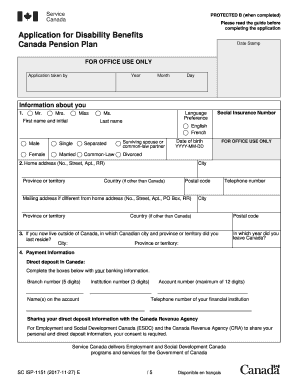
Application for Disability Benefits Canada Pension Plan ISP1151E Form


What is the Application for Disability Benefits Canada Pension Plan ISP1151E
The Application for Disability Benefits Canada Pension Plan, known as ISP1151E, is a crucial document for individuals seeking financial assistance due to disabilities. This application allows eligible Canadians to apply for benefits under the Canada Pension Plan (CPP). The benefits are designed to provide financial support to those whose disabilities prevent them from working. Understanding the purpose of this form is essential for applicants to ensure they meet the eligibility criteria and can effectively navigate the application process.
Eligibility Criteria for the Canada Disability Benefit Application
To qualify for the Canada disability benefit, applicants must meet specific eligibility criteria. This includes having made sufficient contributions to the Canada Pension Plan and being unable to work due to a severe and prolonged disability. The disability must significantly impair the applicant's ability to perform regular work duties. Gathering relevant medical documentation and employment history is vital to demonstrate eligibility when completing the application.
Steps to Complete the Application for Disability Benefits Canada Pension Plan ISP1151E
Completing the ISP1151E application involves several important steps. First, applicants should gather necessary documents, including medical records and proof of income. Next, fill out the application form accurately, ensuring all sections are completed. It is essential to provide detailed information about the disability and how it affects daily life. Once the form is filled out, review it for completeness before submission. Finally, submit the application either online or by mail, depending on personal preference.
Required Documents for the Canada Disability Benefit Application
When applying for the Canada disability benefit, specific documents are required to support the application. These typically include:
- Medical reports from healthcare providers detailing the nature and extent of the disability.
- Proof of contributions to the Canada Pension Plan.
- Identification documents, such as a birth certificate or driver's license.
- Employment history and details about previous jobs.
Having these documents prepared in advance can streamline the application process and enhance the chances of approval.
Form Submission Methods for the Canada Disability Benefit Application
Applicants have several options for submitting the Canada disability benefit application. The form can be completed and submitted online through the official government portal, which offers a convenient and efficient method. Alternatively, applicants may choose to print the application and submit it by mail. In-person submissions at designated service centers are also an option for those who prefer direct assistance. Each method has its own advantages, and applicants should choose the one that best suits their needs.
Legal Use of the Application for Disability Benefits Canada Pension Plan ISP1151E
The ISP1151E application is legally binding once submitted and must be completed truthfully and accurately. Providing false information can lead to penalties, including denial of benefits or legal action. Understanding the legal implications of the application is crucial for applicants. Ensuring compliance with all requirements will help protect the applicant's rights and ensure a smoother process in receiving the benefits they need.
Quick guide on how to complete application for disability benefits canada pension plan isp1151e
Effortlessly manage Application For Disability Benefits Canada Pension Plan ISP1151E on any device
Digital document management has become increasingly popular among businesses and individuals. It serves as a perfect eco-friendly alternative to traditional printed and signed documents, allowing you to find the right form and securely store it online. airSlate SignNow equips you with all the resources needed to create, modify, and electronically sign your documents promptly without delays. Manage Application For Disability Benefits Canada Pension Plan ISP1151E on any platform using airSlate SignNow's Android or iOS applications and simplify any document-based process today.
How to edit and electronically sign Application For Disability Benefits Canada Pension Plan ISP1151E effortlessly
- Find Application For Disability Benefits Canada Pension Plan ISP1151E and click on Get Form to begin.
- Utilize the tools we offer to complete your document.
- Highlight important sections of the documents or redact sensitive information with tools specifically provided by airSlate SignNow.
- Create your eSignature using the Sign feature, which takes seconds and holds the same legal validity as a conventional wet ink signature.
- Review all the details and click on the Done button to save your modifications.
- Choose your preferred method to send your form, whether by email, text message (SMS), invite link, or download it to your computer.
Say goodbye to missing or misplaced files, tedious form searches, or errors that necessitate printing new document copies. airSlate SignNow fulfills your document management needs in just a few clicks from your chosen device. Edit and eSign Application For Disability Benefits Canada Pension Plan ISP1151E and ensure excellent communication at every stage of the form preparation process with airSlate SignNow.
Create this form in 5 minutes or less
Create this form in 5 minutes!
How to create an eSignature for the application for disability benefits canada pension plan isp1151e
How to create an electronic signature for a PDF online
How to create an electronic signature for a PDF in Google Chrome
How to create an e-signature for signing PDFs in Gmail
How to create an e-signature right from your smartphone
How to create an e-signature for a PDF on iOS
How to create an e-signature for a PDF on Android
People also ask
-
What is the Canada disability benefit application process?
The Canada disability benefit application process involves several steps, including gathering the necessary documentation and completing the application form. It’s crucial to provide detailed information about your disability and how it affects your daily life. Ensure all documents are submitted to the appropriate agency to avoid delays in your Canada disability benefit application.
-
How can airSlate SignNow help with my Canada disability benefit application?
airSlate SignNow provides an efficient platform for managing and eSigning the documents needed for your Canada disability benefit application. Our user-friendly interface allows you to easily upload, send, and track your application documents securely. This can signNowly streamline the process and reduce the time spent on paperwork.
-
Is there a cost associated with using airSlate SignNow for the Canada disability benefit application?
Yes, there is a subscription fee for using airSlate SignNow, but it is designed to be cost-effective for individuals and businesses. The pricing varies depending on the features you need, ensuring you only pay for what is necessary to facilitate your Canada disability benefit application efficiently.
-
What features does airSlate SignNow offer for Canada disability benefit applications?
airSlate SignNow offers features such as document templates, eSignature capabilities, and real-time tracking for your Canada disability benefit application. These tools make it easier to manage the necessary paperwork and ensure that all signatures are gathered promptly and securely.
-
Can I integrate airSlate SignNow with other tools for my Canada disability benefit application?
Absolutely! airSlate SignNow supports integrations with various tools and platforms to enhance your workflow. This means you can connect your application process with your existing systems to make the Canada disability benefit application smoother and more efficient.
-
What benefits can I expect from using airSlate SignNow for my application?
Using airSlate SignNow for your Canada disability benefit application offers several benefits, including increased efficiency and reduced turnaround time. The digital platform minimizes the chances of errors and lost documents, ensuring a seamless submission process. Additionally, you have the ability to manage your applications anytime, anywhere.
-
How secure is my information when using airSlate SignNow for my application?
Security is a top priority for airSlate SignNow. We employ advanced encryption and security protocols to protect your personal information while you complete your Canada disability benefit application. You can trust that your sensitive data is handled with the utmost care and confidentiality.
Get more for Application For Disability Benefits Canada Pension Plan ISP1151E
Find out other Application For Disability Benefits Canada Pension Plan ISP1151E
- Can I eSignature Indiana Life Sciences Rental Application
- eSignature Indiana Life Sciences LLC Operating Agreement Fast
- eSignature Kentucky Life Sciences Quitclaim Deed Fast
- Help Me With eSignature Georgia Non-Profit NDA
- How Can I eSignature Idaho Non-Profit Business Plan Template
- eSignature Mississippi Life Sciences Lease Agreement Myself
- How Can I eSignature Mississippi Life Sciences Last Will And Testament
- How To eSignature Illinois Non-Profit Contract
- eSignature Louisiana Non-Profit Business Plan Template Now
- How Do I eSignature North Dakota Life Sciences Operating Agreement
- eSignature Oregon Life Sciences Job Offer Myself
- eSignature Oregon Life Sciences Job Offer Fast
- eSignature Oregon Life Sciences Warranty Deed Myself
- eSignature Maryland Non-Profit Cease And Desist Letter Fast
- eSignature Pennsylvania Life Sciences Rental Lease Agreement Easy
- eSignature Washington Life Sciences Permission Slip Now
- eSignature West Virginia Life Sciences Quitclaim Deed Free
- Can I eSignature West Virginia Life Sciences Residential Lease Agreement
- eSignature New York Non-Profit LLC Operating Agreement Mobile
- How Can I eSignature Colorado Orthodontists LLC Operating Agreement