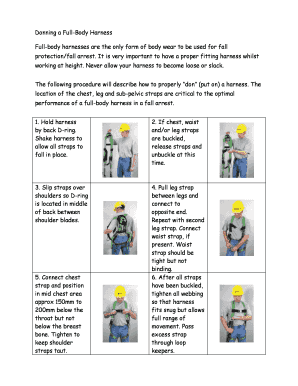
Donning a Full Body Harness Full Body Harnesses Are the Only Form


Understanding the Full Body Harness
A full body harness is a crucial piece of safety equipment designed to protect individuals working at heights. It distributes the force of a fall across the body, minimizing injury risk. The harness typically consists of straps that encircle the legs, waist, and shoulders, providing a secure fit. Understanding its components and how they function is essential for ensuring safety while using the harness.
Essential Components of a Full Body Harness
A full body harness is made up of several key components, each serving a specific purpose:
- Shoulder Straps: These straps secure the harness over the shoulders, allowing for proper weight distribution.
- Leg Straps: These straps wrap around the thighs, providing additional support and preventing the harness from slipping off.
- Chest Strap: This strap connects the shoulder straps, ensuring the harness remains secure and aligned.
- D-Rings: Located on the back or front, these metal rings are attachment points for lanyards and other safety equipment.
Steps to Properly Don a Full Body Harness
To ensure safety, it is vital to follow specific steps when putting on a full body harness:
- Begin by holding the harness by the D-ring and shaking it to ensure it is not twisted.
- Step into the leg straps, allowing the harness to fall around your body.
- Pull the shoulder straps over your shoulders.
- Fasten the chest strap securely, ensuring it is at the center of your chest.
- Adjust the leg straps so they fit snugly but comfortably around your thighs.
- Finally, connect any additional safety equipment to the D-rings as needed.
Legal Considerations for Using a Full Body Harness
In the United States, the Occupational Safety and Health Administration (OSHA) mandates the use of personal protective equipment, including full body harnesses, in specific work environments. Employers must ensure that harnesses meet safety standards and that employees are trained in their use. Compliance with these regulations is essential to maintain workplace safety and avoid legal penalties.
Common Mistakes When Donning a Harness
Several common mistakes can compromise safety when putting on a full body harness:
- Failing to adjust the straps properly, leading to an improper fit.
- Not checking for wear and tear on the harness before use.
- Neglecting to attach the harness to a secure anchor point.
Training Requirements for Harness Use
Employers are responsible for providing training on the proper use of full body harnesses. This training should cover how to don the harness correctly, inspect it for damage, and understand its components. Regular refresher courses can help maintain safety standards and ensure that employees are knowledgeable about best practices.
Quick guide on how to complete donning a full body harness full body harnesses are the only form
Easily Prepare Donning A Full Body Harness Full body Harnesses Are The Only Form on Any Device
Online document management has become increasingly popular among companies and individuals. It offers a fantastic eco-friendly substitute for traditional printed and signed papers, as you can locate the correct form and securely save it online. airSlate SignNow equips you with all the necessary tools to create, adjust, and eSign your documents quickly without delays. Manage Donning A Full Body Harness Full body Harnesses Are The Only Form on any device using airSlate SignNow's Android or iOS applications and enhance any document-related procedure today.
How to Edit and eSign Donning A Full Body Harness Full body Harnesses Are The Only Form Effortlessly
- Locate Donning A Full Body Harness Full body Harnesses Are The Only Form and click Get Form to begin.
- Utilize the tools we provide to complete your form.
- Highlight important sections of your documents or obscure sensitive information with tools that airSlate SignNow offers specifically for that purpose.
- Create your signature using the Sign tool, which takes mere seconds and holds the same legal validity as a traditional wet ink signature.
- Review all the details and click on the Done button to save your modifications.
- Select your preferred delivery method for your form, whether by email, SMS, invite link, or download it to your computer.
Say goodbye to lost or misplaced documents, tedious form searching, or errors that necessitate printing new document copies. airSlate SignNow meets your document management needs in just a few clicks from your chosen device. Modify and eSign Donning A Full Body Harness Full body Harnesses Are The Only Form and ensure effective communication at any stage of your form preparation process with airSlate SignNow.
Create this form in 5 minutes or less
Create this form in 5 minutes!
How to create an eSignature for the donning a full body harness full body harnesses are the only form
How to create an electronic signature for a PDF online
How to create an electronic signature for a PDF in Google Chrome
How to create an e-signature for signing PDFs in Gmail
How to create an e-signature right from your smartphone
How to create an e-signature for a PDF on iOS
How to create an e-signature for a PDF on Android
People also ask
-
What is the first step for donning a class 3 full body harness?
The first step for donning a class 3 full body harness is to identify a safe and clear area to put on the harness. Ensure the harness is free of any damage and properly adjusted before putting it on. Once you have the harness ready, slip it over your shoulders and fasten all straps securely for safety.
-
Why is it important to wear a class 3 full body harness?
Wearing a class 3 full body harness is crucial for fall protection in high-risk work environments. It provides support and restraint, minimizing the risk of injury during a fall. Understanding what is the first step for donning a class 3 full body harness ensures proper usage and safety on the job site.
-
How does airSlate SignNow support safety training for harness use?
AirSlate SignNow can facilitate safety training by allowing organizations to create, share, and eSign training documents efficiently. This ensures all employees understand what is the first step for donning a class 3 full body harness and other critical safety protocols. This streamlined process encourages compliance and safety awareness among workers.
-
What features should I look for in a full body harness?
When selecting a full body harness, it’s essential to look for features like adjustable straps, durable materials, and easy-to-use buckles. It should meet industry safety standards and be comfortable for extended wear. Remember, knowing what is the first step for donning a class 3 full body harness will maximize the effectiveness of these features.
-
How much does a class 3 full body harness typically cost?
The cost of a class 3 full body harness can range from $100 to $500, depending on the brand, features, and materials. It's important to consider not just the price, but also the quality and safety certifications of the harness. Investing in a reliable harness while knowing what is the first step for donning a class 3 full body harness is vital for ensuring safety.
-
What are the benefits of using a class 3 full body harness?
A class 3 full body harness provides comprehensive fall protection, distributing the force of a fall across the body to minimize injury. It allows for freedom of movement while ensuring safety in high-risk environments. Knowing what is the first step for donning a class 3 full body harness enhances the effectiveness of this essential safety equipment.
-
Can I integrate airSlate SignNow with safety training platforms?
Yes, airSlate SignNow can easily integrate with various safety training platforms to streamline the training and documentation process. This integration facilitates the management of training materials that cover important topics, including what is the first step for donning a class 3 full body harness. This synergy helps organizations maintain compliance and improve employee safety.
Get more for Donning A Full Body Harness Full body Harnesses Are The Only Form
- Turbo tax form 2120
- Form ha 2010 2019
- Body donation unc chapel hill form
- I authorize virginia western to release my educational information to virginiawestern
- Arkansas state medical board armedicalboard form
- 2005 forms w 2 magnetic media specifications handbook mass gov mass
- Georgia dol4n instructions form
- Bir 1601 c form
Find out other Donning A Full Body Harness Full body Harnesses Are The Only Form
- eSign Missouri Car Dealer Lease Termination Letter Fast
- Help Me With eSign Kentucky Business Operations Quitclaim Deed
- eSign Nevada Car Dealer Warranty Deed Myself
- How To eSign New Hampshire Car Dealer Purchase Order Template
- eSign New Jersey Car Dealer Arbitration Agreement Myself
- eSign North Carolina Car Dealer Arbitration Agreement Now
- eSign Ohio Car Dealer Business Plan Template Online
- eSign Ohio Car Dealer Bill Of Lading Free
- How To eSign North Dakota Car Dealer Residential Lease Agreement
- How Do I eSign Ohio Car Dealer Last Will And Testament
- Sign North Dakota Courts Lease Agreement Form Free
- eSign Oregon Car Dealer Job Description Template Online
- Sign Ohio Courts LLC Operating Agreement Secure
- Can I eSign Michigan Business Operations POA
- eSign Car Dealer PDF South Dakota Computer
- eSign Car Dealer PDF South Dakota Later
- eSign Rhode Island Car Dealer Moving Checklist Simple
- eSign Tennessee Car Dealer Lease Agreement Form Now
- Sign Pennsylvania Courts Quitclaim Deed Mobile
- eSign Washington Car Dealer Bill Of Lading Mobile