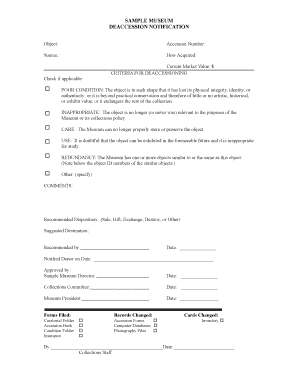
SAMPLE MUSEUM DEACCESSION NOTIFICATION ARCS Arcsinfo Form


Understanding the Sample Museum Deaccession Notification ARCS Arcsinfo
The Sample Museum Deaccession Notification ARCS Arcsinfo serves as a formal document used by museums to notify relevant parties about the deaccessioning of items from their collections. This process is essential for maintaining transparency and accountability in museum practices. The form outlines the specific items being deaccessioned, the reasons for their removal, and the proposed methods for their disposition. By adhering to established guidelines, museums ensure compliance with legal and ethical standards.
Steps to Complete the Sample Museum Deaccession Notification ARCS Arcsinfo
Completing the Sample Museum Deaccession Notification ARCS Arcsinfo involves several key steps to ensure accuracy and compliance. Begin by gathering all necessary information regarding the items to be deaccessioned, including descriptions, condition reports, and provenance details. Next, fill out the form carefully, ensuring that all required fields are completed. It is important to provide a clear rationale for the deaccessioning decision. After completing the form, review it for any errors or omissions before submission to the appropriate governing body or board for approval.
Legal Use of the Sample Museum Deaccession Notification ARCS Arcsinfo
The legal use of the Sample Museum Deaccession Notification ARCS Arcsinfo is governed by various regulations and standards that museums must follow. This form must comply with state and federal laws regarding the deaccessioning of museum collections. Additionally, museums must adhere to their own internal policies and ethical guidelines set forth by professional organizations. Proper execution of this form ensures that the deaccessioning process is legally binding and recognized by relevant authorities, thereby protecting the institution from potential legal challenges.
Key Elements of the Sample Museum Deaccession Notification ARCS Arcsinfo
Several key elements must be included in the Sample Museum Deaccession Notification ARCS Arcsinfo to ensure its effectiveness. These elements typically include:
- Item Description: Detailed information about each item being deaccessioned.
- Reason for Deaccession: A clear explanation of why the item is being removed from the collection.
- Disposition Method: Proposed methods for how the items will be handled post-deaccession.
- Approval Signatures: Necessary signatures from museum officials or board members to validate the process.
How to Obtain the Sample Museum Deaccession Notification ARCS Arcsinfo
Obtaining the Sample Museum Deaccession Notification ARCS Arcsinfo can typically be done through the museum’s administrative office or its official website. Many institutions provide downloadable versions of this form for ease of access. If the form is not readily available online, contacting the museum directly can provide guidance on how to acquire it. Ensure that you are using the most current version of the form to comply with any updates in regulations or institutional policies.
Examples of Using the Sample Museum Deaccession Notification ARCS Arcsinfo
Examples of using the Sample Museum Deaccession Notification ARCS Arcsinfo can vary widely among institutions. For instance, a museum may decide to deaccession items that no longer align with its mission or that require excessive maintenance. Another example might involve the removal of items that have been deemed duplicates or that lack historical significance. Each case should be documented thoroughly to maintain transparency and uphold the institution's integrity.
Quick guide on how to complete sample museum deaccession notification arcs arcsinfo
Easily Prepare SAMPLE MUSEUM DEACCESSION NOTIFICATION ARCS Arcsinfo on Any Device
Digital document management has become increasingly favored by both businesses and individuals. It offers an ideal environmentally friendly alternative to traditional printed and signed documents, as you can access the right form and securely store it online. airSlate SignNow provides all the necessary tools to create, modify, and electronically sign your documents quickly and effortlessly. Manage SAMPLE MUSEUM DEACCESSION NOTIFICATION ARCS Arcsinfo on any platform using the airSlate SignNow Android or iOS applications and simplify any document-related procedure today.
How to Edit and Electronically Sign SAMPLE MUSEUM DEACCESSION NOTIFICATION ARCS Arcsinfo with Ease
- Locate SAMPLE MUSEUM DEACCESSION NOTIFICATION ARCS Arcsinfo and click Get Form to begin.
- Utilize the tools provided to complete your document.
- Emphasize important sections of your documents or obscure sensitive information with tools specifically designed for that purpose by airSlate SignNow.
- Generate your eSignature using the Sign feature, which takes just seconds and holds the same legal validity as a traditional wet ink signature.
- Review all the details and then click the Done button to save your changes.
- Select how you want to send your form, via email, text message (SMS), invite link, or download it to your computer.
Eliminate worries about lost or misplaced documents, tedious form searches, or errors that require printing new copies. airSlate SignNow meets all your document management needs in just a few clicks from any device you choose. Edit and electronically sign SAMPLE MUSEUM DEACCESSION NOTIFICATION ARCS Arcsinfo and ensure excellent communication throughout your form completion process with airSlate SignNow.
Create this form in 5 minutes or less
Create this form in 5 minutes!
How to create an eSignature for the sample museum deaccession notification arcs arcsinfo
How to create an electronic signature for a PDF online
How to create an electronic signature for a PDF in Google Chrome
How to create an e-signature for signing PDFs in Gmail
How to create an e-signature right from your smartphone
How to create an e-signature for a PDF on iOS
How to create an e-signature for a PDF on Android
People also ask
-
What is a SAMPLE MUSEUM DEACCESSION NOTIFICATION ARCS Arcsinfo?
A SAMPLE MUSEUM DEACCESSION NOTIFICATION ARCS Arcsinfo is a standardized document used by museums to formally announce the removal of items from their collections. This notification ensures transparency and follows ethical guidelines during the deaccessioning process. Utilizing a reliable eSignature solution, such as airSlate SignNow, can streamline the process and maintain compliance.
-
How can airSlate SignNow help with SAMPLE MUSEUM DEACCESSION NOTIFICATION ARCS Arcsinfo?
airSlate SignNow provides an efficient platform for creating, sending, and signing SAMPLE MUSEUM DEACCESSION NOTIFICATION ARCS Arcsinfo documents. With its user-friendly interface, you can quickly customize templates and gather necessary signatures electronically. This not only saves time but also enhances the accuracy of your museum’s deaccession notifications.
-
What are the pricing options for using airSlate SignNow?
airSlate SignNow offers various pricing plans designed to accommodate organizations of different sizes and budgets. You can choose from monthly or annual subscriptions depending on your needs. With competitive pricing, airSlate SignNow ensures you have access to essential features for managing SAMPLE MUSEUM DEACCESSION NOTIFICATION ARCS Arcsinfo at an affordable rate.
-
Are there any integrations available with airSlate SignNow?
Yes, airSlate SignNow seamlessly integrates with a range of popular applications, making it easier to manage your SAMPLE MUSEUM DEACCESSION NOTIFICATION ARCS Arcsinfo within your existing workflows. You can connect with tools like Google Drive, Salesforce, and more. These integrations help streamline document management and enhance overall efficiency.
-
What features does airSlate SignNow provide for document management?
airSlate SignNow offers a variety of features including customizable templates, real-time tracking, and secure cloud storage, which are essential for managing SAMPLE MUSEUM DEACCESSION NOTIFICATION ARCS Arcsinfo. The platform allows multiple users to collaborate on documents and ensures compliance through its robust security measures. These features empower museums to manage their deaccession processes effectively.
-
Is airSlate SignNow secure for handling sensitive documents like deaccession notifications?
Absolutely, airSlate SignNow prioritizes security and employs advanced encryption protocols to protect your SAMPLE MUSEUM DEACCESSION NOTIFICATION ARCS Arcsinfo and other sensitive documents. With features like secure access and auditing capabilities, you can trust that your data is safe from unauthorized access. Compliance with industry standards further enhances the platform's reliability.
-
Can I customize the SAMPLE MUSEUM DEACCESSION NOTIFICATION ARCS Arcsinfo templates in airSlate SignNow?
Yes, airSlate SignNow allows users to fully customize SAMPLE MUSEUM DEACCESSION NOTIFICATION ARCS Arcsinfo templates to meet specific institutional needs. You can easily add your museum's branding, modify text, and include relevant details required for the deaccessioning process. This flexibility ensures that your notifications align with your museum's standards and policies.
Get more for SAMPLE MUSEUM DEACCESSION NOTIFICATION ARCS Arcsinfo
- Nih state of the science conference on improving consensus nih form
- Mayo collaborative services dba mayo medical laboratories and mayo clinic rochester petitioners form
- News release treasurer ca form
- Patentability of circuits and systems ieee li ieee form
- Nordstrom and destefano 4 2 125 tobacco control bmj form
- A national survey of health service use in thai age and ageing ageing oxfordjournals form
- Purchase of real estate contract template form
- Quality laboratory contract template form
Find out other SAMPLE MUSEUM DEACCESSION NOTIFICATION ARCS Arcsinfo
- eSign Non-Profit Document Michigan Safe
- eSign New Mexico Legal Living Will Now
- eSign Minnesota Non-Profit Confidentiality Agreement Fast
- How Do I eSign Montana Non-Profit POA
- eSign Legal Form New York Online
- Can I eSign Nevada Non-Profit LLC Operating Agreement
- eSign Legal Presentation New York Online
- eSign Ohio Legal Moving Checklist Simple
- How To eSign Ohio Non-Profit LLC Operating Agreement
- eSign Oklahoma Non-Profit Cease And Desist Letter Mobile
- eSign Arizona Orthodontists Business Plan Template Simple
- eSign Oklahoma Non-Profit Affidavit Of Heirship Computer
- How Do I eSign Pennsylvania Non-Profit Quitclaim Deed
- eSign Rhode Island Non-Profit Permission Slip Online
- eSign South Carolina Non-Profit Business Plan Template Simple
- How Can I eSign South Dakota Non-Profit LLC Operating Agreement
- eSign Oregon Legal Cease And Desist Letter Free
- eSign Oregon Legal Credit Memo Now
- eSign Oregon Legal Limited Power Of Attorney Now
- eSign Utah Non-Profit LLC Operating Agreement Safe