Multimodal Dangerous Goods Form Excel Format


What is the multimodal dangerous goods form Excel format
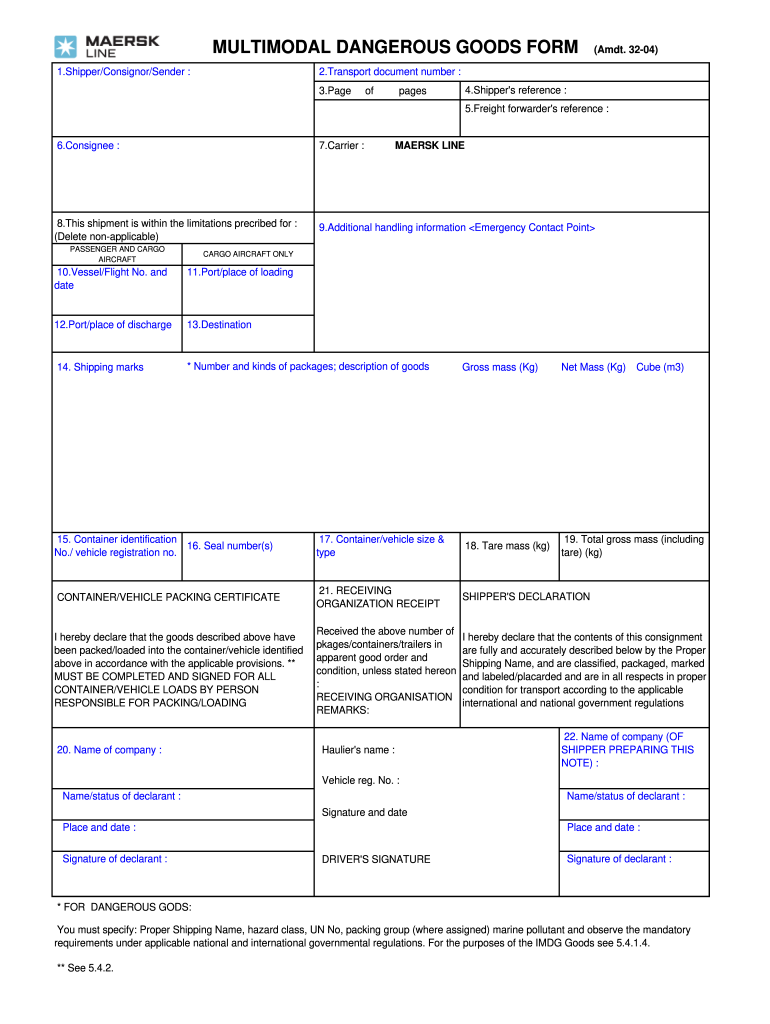
The multimodal dangerous goods form Excel format is a structured template designed for the electronic submission of dangerous goods declarations. This format allows shippers to provide essential information about hazardous materials in a standardized manner, facilitating compliance with international regulations. The Excel format is particularly useful for businesses that frequently ship dangerous goods, as it streamlines the data entry process and ensures accuracy in reporting.
How to use the multimodal dangerous goods form Excel format
Using the multimodal dangerous goods form Excel format involves several straightforward steps. First, download the template from a reliable source. Next, open the file in Microsoft Excel or a compatible spreadsheet application. Fill in the required fields, including details about the consignor, consignee, and the specific nature of the dangerous goods being shipped. Ensure that all information is accurate and complete before saving the document. Finally, the completed form can be printed or submitted electronically, depending on the requirements of the shipping carrier.
Steps to complete the multimodal dangerous goods form Excel format
Completing the multimodal dangerous goods form in Excel requires attention to detail. Follow these steps for accurate completion:
- Open the Excel template and review the fields provided.
- Enter the consignor's and consignee's information, including names, addresses, and contact details.
- Specify the type of dangerous goods, including UN numbers and proper shipping names.
- Indicate the quantity and packaging details, ensuring compliance with relevant regulations.
- Review all entries for accuracy and completeness before finalizing the document.
Key elements of the multimodal dangerous goods form Excel format
The key elements of the multimodal dangerous goods form Excel format include:
- Consignor Information: Details of the sender, including contact information.
- Consignee Information: Details of the recipient, including contact information.
- Dangerous Goods Description: Proper shipping names, UN numbers, and hazard classifications.
- Packaging Information: Types of containers and quantities being shipped.
- Signature Section: Space for signatures from authorized personnel.
Legal use of the multimodal dangerous goods form Excel format
The legal use of the multimodal dangerous goods form Excel format is governed by various international and national regulations. Compliance with the International Maritime Organization (IMO) guidelines and the U.S. Department of Transportation (DOT) regulations is essential. The form must be completed accurately to ensure that it is legally binding and accepted by carriers and regulatory authorities. Failure to comply with these regulations can result in penalties or delays in shipping.
Examples of using the multimodal dangerous goods form Excel format
Examples of using the multimodal dangerous goods form Excel format can be found in various shipping scenarios. For instance, a company shipping lithium batteries must accurately fill out the form with the correct UN number and hazard classification. Another example includes shipping chemicals that require specific packaging and labeling. These examples illustrate the importance of providing precise information to ensure safe and compliant transportation of hazardous materials.
Quick guide on how to complete multimodal dangerous goods form maersk line
Accomplish Multimodal Dangerous Goods Form Excel Format effortlessly on any device
Digital document management has become increasingly popular among businesses and individuals alike. It serves as an ideal eco-friendly alternative to conventional printed and signed documents, allowing you to find the correct form and securely save it online. airSlate SignNow provides all the necessary tools for you to create, modify, and electronically sign your documents quickly and efficiently. Manage Multimodal Dangerous Goods Form Excel Format on any device using airSlate SignNow's Android or iOS applications and enhance any document-driven task today.
How to alter and electronically sign Multimodal Dangerous Goods Form Excel Format with ease
- Obtain Multimodal Dangerous Goods Form Excel Format and click on Get Form to begin.
- Employ the features we provide to complete your form.
- Highlight pertinent sections of your documents or redact sensitive information with the tools that airSlate SignNow specifically offers for this purpose.
- Create your signature using the Sign tool, which takes mere seconds and carries the same legal validity as a conventional wet ink signature.
- Review all the details and click on the Done button to save your modifications.
- Select your preferred method of delivering your form, whether by email, SMS, or invite link, or download it to your computer.
Say goodbye to lost or misplaced files, tedious form searching, or errors that require printing new document copies. airSlate SignNow takes care of all your document management needs in just a few clicks from the device of your choice. Modify and electronically sign Multimodal Dangerous Goods Form Excel Format to ensure outstanding communication at every stage of the form preparation process with airSlate SignNow.
Create this form in 5 minutes or less
FAQs
-
How do I fill out Address Line 1 on an Online Form?
(street number) (street name) (street suffix)101 Main StreetYou can query the post office on your address, best as you know it, for the “standard” way of presenting your address. USPS.com® - ZIP Code Lookup or whatever service is offered in your country. That will tell you the standard way to fill out address lines.
-
How do you fill out line 5 on a 1040EZ tax form?
I suspect the question is related to knowing whether someone can claim you as a dependent, because otherwise line 5 itself is pretty clear.General answer: if you are under 19, or a full-time student under the age of 24, your parents can probably claim you as a dependent. If you are living with someone to whom you are not married and who is providing you with more than half of your support, that person can probably claim you as a dependent. If you are married and filing jointly, your spouse needs to answer the same questions.Note that whether those individuals actually do claim you as a dependent doesn't matter; the question is whether they can. It is not a choice.
-
Is the condition of Maersk Line good enough to join as a marine engineer? Is the company throwing out cadets due to recession?
I'm not sure what exactly do you mean when you use the words, “condition of Maersk line.”@Maersk Line vessels are ones with the highest standards of safety and security. They have amassed admiration from around the world in coming up with ingenious and economic, not to say the largest ship designs and ship building. Crew welfare and racial diversity form a core part of operations.As an engineer, you would see cutting edge technology in terms of automation and electronic engines.“Throwing out cadets due to recession" is a severely absurd statement. I have sailed with a lot of cadets in the past who are officers onboard right now and doing well. All organisations have their standards to uphold and there are guidelines for dismissal. You cannot just “throw" people out.What you are referring to could be a waiting period for cadets on their first assignment as an officer. Well, of course this will vary according to present requirement in the fleet and sometimes the waiting period could be longer than expected. I assure you, if you're sincere and passionate enough, you have nothing to worry in Maersk or any other organisation.Good luck!
-
What are the good ways to fill out 1120 form if my business is inactive?
While you might not have been “active” throughout the year, by filing a “no activity” return you may be throwing away potential deductions! Most businesses (even unprofitable ones) will have some form of expenses – think tax prep fees, taxes, filing fees, home office, phone, etc. Don’t miss out on your chance to preserve these valuable deductions. You can carry these forward to more profitable years by using the Net Operating Loss Carry-forward rules. But you must report them to take advantage of this break. If you honestly did not have any expenses or income during the tax year, simply file form 1120 by the due date (no later than 2 and one half months after the close of the business tax year – March 15 for calendar year businesses). Complete sections A-E on the front page of the return and make sure you sign the bottom – that’s it!
-
How and what forms does a customs broker fill out for imported goods?
Omg I really don’t know :)I am a permanent client of brokers from https://clearit.ca/ , they usually solve all the details so that I don’t need to worry about any forms and other things.I will subscribe to this question, I am really interested now.
-
How can I fill out Google's intern host matching form to optimize my chances of receiving a match?
I was selected for a summer internship 2016.I tried to be very open while filling the preference form: I choose many products as my favorite products and I said I'm open about the team I want to join.I even was very open in the location and start date to get host matching interviews (I negotiated the start date in the interview until both me and my host were happy.) You could ask your recruiter to review your form (there are very cool and could help you a lot since they have a bigger experience).Do a search on the potential team.Before the interviews, try to find smart question that you are going to ask for the potential host (do a search on the team to find nice and deep questions to impress your host). Prepare well your resume.You are very likely not going to get algorithm/data structure questions like in the first round. It's going to be just some friendly chat if you are lucky. If your potential team is working on something like machine learning, expect that they are going to ask you questions about machine learning, courses related to machine learning you have and relevant experience (projects, internship). Of course you have to study that before the interview. Take as long time as you need if you feel rusty. It takes some time to get ready for the host matching (it's less than the technical interview) but it's worth it of course.
Create this form in 5 minutes!
How to create an eSignature for the multimodal dangerous goods form maersk line
How to generate an eSignature for your Multimodal Dangerous Goods Form Maersk Line online
How to create an electronic signature for the Multimodal Dangerous Goods Form Maersk Line in Google Chrome
How to generate an electronic signature for signing the Multimodal Dangerous Goods Form Maersk Line in Gmail
How to generate an eSignature for the Multimodal Dangerous Goods Form Maersk Line right from your mobile device
How to make an electronic signature for the Multimodal Dangerous Goods Form Maersk Line on iOS devices
How to create an electronic signature for the Multimodal Dangerous Goods Form Maersk Line on Android devices
People also ask
-
What is the Multimodal Dangerous Goods Form Excel Format?
The Multimodal Dangerous Goods Form Excel Format is a standardized template used for documenting the transportation of hazardous materials across various modes of transport. This format ensures compliance with international regulations, making it essential for businesses involved in shipping dangerous goods. By utilizing this format, companies can streamline their documentation process and enhance safety.
-
How can I obtain the Multimodal Dangerous Goods Form in Excel Format?
You can easily obtain the Multimodal Dangerous Goods Form Excel Format through airSlate SignNow. Our platform offers customizable templates that allow you to create, edit, and manage your dangerous goods documentation seamlessly. Simply sign up and access the template library to get started.
-
What are the benefits of using the Multimodal Dangerous Goods Form Excel Format with airSlate SignNow?
Using the Multimodal Dangerous Goods Form Excel Format with airSlate SignNow offers numerous benefits, including improved compliance with regulations, streamlined document management, and enhanced collaboration among team members. Additionally, our user-friendly interface simplifies the process of filling out and signing documents, saving you time and reducing errors.
-
Is the Multimodal Dangerous Goods Form Excel Format customizable?
Yes, the Multimodal Dangerous Goods Form Excel Format is fully customizable within the airSlate SignNow platform. You can modify fields, add specific data relevant to your shipments, and tailor the format to meet your company's unique requirements. Customization helps ensure that all necessary information is accurately captured and presented.
-
Can I integrate the Multimodal Dangerous Goods Form Excel Format with other software?
Absolutely! airSlate SignNow allows for seamless integration with various software applications, ensuring that your Multimodal Dangerous Goods Form Excel Format fits into your existing workflow. Whether you use CRM systems, project management tools, or other document management software, our platform can enhance your operational efficiency.
-
What pricing options are available for accessing the Multimodal Dangerous Goods Form Excel Format?
airSlate SignNow offers a range of pricing plans to suit different business needs, including options for individuals and teams. Each plan provides access to the Multimodal Dangerous Goods Form Excel Format and other valuable features. Visit our pricing page for detailed information and choose the plan that best fits your requirements.
-
How secure is my information when using the Multimodal Dangerous Goods Form Excel Format with airSlate SignNow?
Your security is our top priority at airSlate SignNow. When using the Multimodal Dangerous Goods Form Excel Format, all data is protected with advanced encryption protocols and secure storage solutions. We comply with industry standards to ensure that your sensitive information remains confidential and secure.
Get more for Multimodal Dangerous Goods Form Excel Format
- Exclusive agency listing form
- 10 team double elimination bracket 409921366 form
- Motion to disqualify counsel sample form
- Southern illinois university edwardsville transcript request form
- English companion cornell notes form
- Discharge summary template mental health form
- Missouri background check form
- Property management rental agreement template form
Find out other Multimodal Dangerous Goods Form Excel Format
- How Can I Electronic signature New Mexico Finance & Tax Accounting Word
- How Do I Electronic signature New York Education Form
- How To Electronic signature North Carolina Education Form
- How Can I Electronic signature Arizona Healthcare / Medical Form
- How Can I Electronic signature Arizona Healthcare / Medical Presentation
- How To Electronic signature Oklahoma Finance & Tax Accounting PDF
- How Can I Electronic signature Oregon Finance & Tax Accounting PDF
- How To Electronic signature Indiana Healthcare / Medical PDF
- How Do I Electronic signature Maryland Healthcare / Medical Presentation
- How To Electronic signature Tennessee Healthcare / Medical Word
- Can I Electronic signature Hawaii Insurance PDF
- Help Me With Electronic signature Colorado High Tech Form
- How To Electronic signature Indiana Insurance Document
- Can I Electronic signature Virginia Education Word
- How To Electronic signature Louisiana Insurance Document
- Can I Electronic signature Florida High Tech Document
- Can I Electronic signature Minnesota Insurance PDF
- How Do I Electronic signature Minnesota Insurance Document
- How To Electronic signature Missouri Insurance Form
- How Can I Electronic signature New Jersey Insurance Document