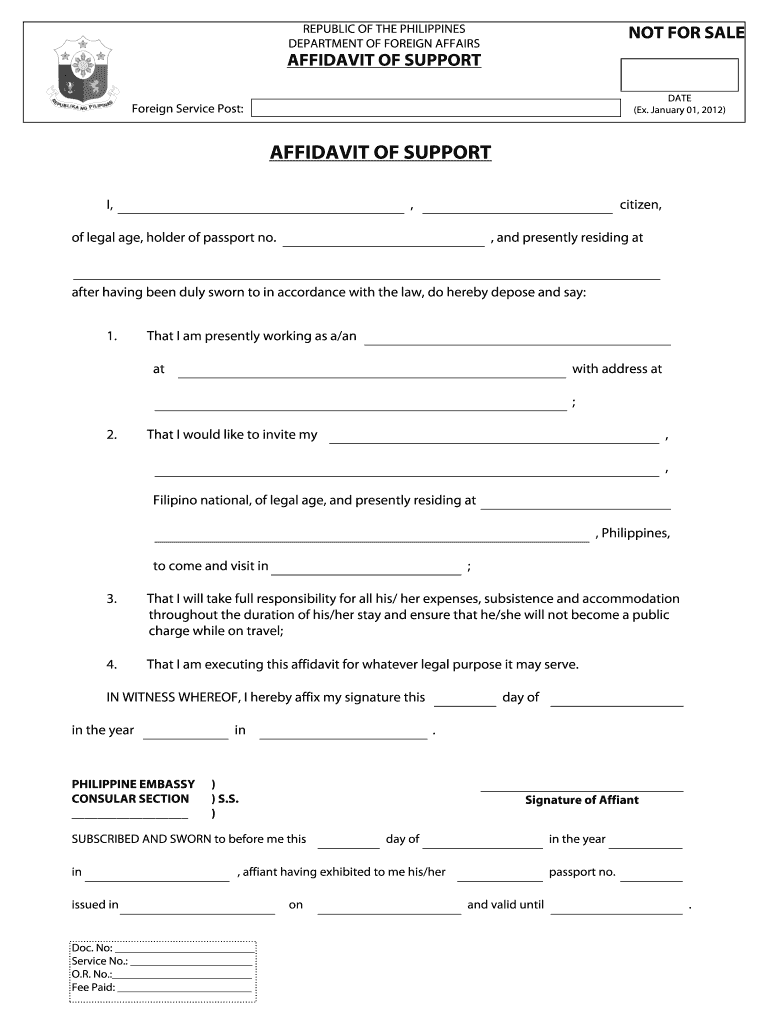
Affidavit of Support Form


What is the Affidavit of Support?
The Affidavit of Support is a legal document required by the Philippine Embassy in Bangkok for individuals seeking to sponsor a visa applicant. This form demonstrates the sponsor's financial capability to support the applicant during their stay in Thailand. It serves as a guarantee that the sponsor will provide necessary financial assistance, ensuring that the applicant will not become a public charge during their visit.
How to Obtain the Affidavit of Support
To obtain the Affidavit of Support for the Philippine Embassy in Bangkok, you will need to visit the embassy in person or check their official website for specific guidelines. Typically, the process involves filling out the required form, providing necessary documentation, and possibly scheduling an appointment. Ensure you have all required documents ready, such as proof of income, identification, and any other supporting materials as specified by the embassy.
Steps to Complete the Affidavit of Support
Completing the Affidavit of Support involves several key steps:
- Gather required documents, including proof of income and identification.
- Fill out the Affidavit of Support form accurately, ensuring all information is correct.
- Review the form for completeness, checking that all required fields are filled in.
- Sign the document in the presence of a notary public if required.
- Submit the completed form along with supporting documents to the Philippine Embassy in Bangkok.
Key Elements of the Affidavit of Support
The Affidavit of Support must include specific key elements to be considered valid. These include:
- The full name and contact information of the sponsor.
- The full name and details of the visa applicant.
- A declaration of the sponsor's financial capability.
- Details of the relationship between the sponsor and the applicant.
- Signatures of both the sponsor and a notary public, if required.
Legal Use of the Affidavit of Support
The Affidavit of Support is legally binding, meaning that the sponsor is responsible for providing financial support as stated in the document. Failure to comply with the terms outlined in the affidavit can result in legal consequences, including potential penalties for the sponsor. It is essential to understand the obligations that come with signing this document to ensure compliance with U.S. and Philippine laws.
Required Documents
When preparing the Affidavit of Support, several documents are typically required. These may include:
- Proof of income, such as recent pay stubs or tax returns.
- Identification documents, including a passport or driver's license.
- Evidence of the relationship between the sponsor and the applicant.
- Any additional documentation as specified by the Philippine Embassy.
Quick guide on how to complete affidavit of support philippine embassy thailand
A brief guide on how to create your Affidavit Of Support
Finding the appropriate template can be difficult when you need to submit official international documents. Even if you possess the necessary form, it may be tedious to promptly prepare it according to all specifications if you opt for hard copies instead of handling everything digitally. airSlate SignNow is the online e-signature platform that assists you in overcoming these obstacles. It enables you to obtain your Affidavit Of Support and swiftly complete and sign it on-site without needing to reprint documents in case of typographical errors.
Follow these steps to prepare your Affidavit Of Support using airSlate SignNow:
- Click the Get Form button to upload your document to our editor right away.
- Begin with the first empty field, enter information, and proceed with the Next tool.
- Complete the blank fields using the Cross and Check tools from the toolbar above.
- Select the Highlight or Line options to emphasize the most important details.
- Click on Image and upload one if your Affidavit Of Support requires it.
- Utilize the right-side panel to add extra fields for you or others to complete if needed.
- Review your responses and confirm the template by clicking Date, Initials, and Sign.
- Create, type, upload your eSignature, or capture it using a camera or QR code.
- Complete the form adjustments by clicking the Done button and selecting your file-sharing preferences.
Once your Affidavit Of Support is finalized, you can share it however you prefer - send it to your recipients via email, SMS, fax, or even print it directly from the editor. You can also securely store all your finalized documents in your account, organized in folders according to your preferences. Don’t waste time on manual form filling; try airSlate SignNow!
Create this form in 5 minutes or less
FAQs
-
How should a petitioner fill in Part 5 Household Size of the form I-864 Affidavit of support if he would like to sponsor 2 principal immigrants at the same time? Each family has 4 members.
Each principal beneficiary (and their family) is petitioned with a separate I-130 petition, and each I-130 petition has a separate I-864 Affidavit of Support. Each family’s I-864 does not count the other family in the “family members” in Part 3 (note that it says “Do not include any relative listed on a separate visa petition.”).If the two I-864s are filed at the same time for the two families, then each family’s I-864’s household size (Part 5) would just count the number of people immigrating in that family, which is 4 (item 1), the petitioner (item 2), and the petitioner’s spouse (item 3), dependent children (item 4), and other tax dependents (item 5), if there are any. It would not count anyone from the other family.On the other hand, if one I-864 is filed for one family, and that family has already immigrated before the second I-864 is filed for the other family, then the first family’s members will need to be counted in Part 5 item 6 (people sponsored on Form I-864 who are now lawful permanent residents) for the second family’s I-864.
-
How can I fill out Google's intern host matching form to optimize my chances of receiving a match?
I was selected for a summer internship 2016.I tried to be very open while filling the preference form: I choose many products as my favorite products and I said I'm open about the team I want to join.I even was very open in the location and start date to get host matching interviews (I negotiated the start date in the interview until both me and my host were happy.) You could ask your recruiter to review your form (there are very cool and could help you a lot since they have a bigger experience).Do a search on the potential team.Before the interviews, try to find smart question that you are going to ask for the potential host (do a search on the team to find nice and deep questions to impress your host). Prepare well your resume.You are very likely not going to get algorithm/data structure questions like in the first round. It's going to be just some friendly chat if you are lucky. If your potential team is working on something like machine learning, expect that they are going to ask you questions about machine learning, courses related to machine learning you have and relevant experience (projects, internship). Of course you have to study that before the interview. Take as long time as you need if you feel rusty. It takes some time to get ready for the host matching (it's less than the technical interview) but it's worth it of course.
-
How do I fill out the form of DU CIC? I couldn't find the link to fill out the form.
Just register on the admission portal and during registration you will get an option for the entrance based course. Just register there. There is no separate form for DU CIC.
Create this form in 5 minutes!
How to create an eSignature for the affidavit of support philippine embassy thailand
How to create an electronic signature for your Affidavit Of Support Philippine Embassy Thailand online
How to make an electronic signature for the Affidavit Of Support Philippine Embassy Thailand in Chrome
How to generate an electronic signature for signing the Affidavit Of Support Philippine Embassy Thailand in Gmail
How to make an eSignature for the Affidavit Of Support Philippine Embassy Thailand from your mobile device
How to create an electronic signature for the Affidavit Of Support Philippine Embassy Thailand on iOS devices
How to make an electronic signature for the Affidavit Of Support Philippine Embassy Thailand on Android devices
People also ask
-
What is an Affidavit Of Support and why is it important?
An Affidavit Of Support is a legal document used to demonstrate that a sponsor can financially support an immigrant or non-citizen. It is crucial for visa applications, as it assures the government that the individual will not become a public charge. Understanding how to properly complete an Affidavit Of Support can streamline the immigration process.
-
How can airSlate SignNow help with the Affidavit Of Support process?
airSlate SignNow simplifies the process of creating, sending, and eSigning an Affidavit Of Support. Our platform allows you to easily upload your document, gather necessary signatures, and securely store your files all in one place. This efficiency helps you complete the Affidavit Of Support in a timely manner.
-
Is there a cost associated with using airSlate SignNow for the Affidavit Of Support?
Yes, airSlate SignNow offers various pricing plans to accommodate different needs. Our pricing is designed to be cost-effective, making it easy for users to manage their Affidavit Of Support and other documents without breaking the bank. Explore our plans to find one that suits your requirements.
-
What features does airSlate SignNow offer for managing the Affidavit Of Support?
airSlate SignNow provides features like document templates, real-time tracking, and customizable workflows specifically for documents like the Affidavit Of Support. These tools enhance your efficiency and help ensure that all necessary steps are completed. Additionally, the user-friendly interface makes it accessible for everyone.
-
Can I integrate airSlate SignNow with other applications for my Affidavit Of Support?
Absolutely! airSlate SignNow integrates seamlessly with a variety of applications, allowing you to manage your Affidavit Of Support alongside your existing tools. This integration enhances the overall efficiency of your document management process, making it easier to collaborate and share information.
-
What security measures does airSlate SignNow implement for Affidavit Of Support documents?
Security is a top priority at airSlate SignNow. We utilize advanced encryption, secure servers, and compliance with data protection regulations to ensure that your Affidavit Of Support and other documents are safe from unauthorized access. You can confidently manage sensitive information knowing it is protected.
-
How can I ensure my Affidavit Of Support is completed correctly?
To ensure your Affidavit Of Support is completed correctly, utilize airSlate SignNow's comprehensive templates and step-by-step guidance. Our platform provides helpful tips and prompts to assist you in filling out the document accurately, reducing the likelihood of errors that could delay the process.
Get more for Affidavit Of Support
Find out other Affidavit Of Support
- Help Me With eSignature Iowa Life Sciences Presentation
- How Can I eSignature Michigan Life Sciences Word
- Can I eSignature New Jersey Life Sciences Presentation
- How Can I eSignature Louisiana Non-Profit PDF
- Can I eSignature Alaska Orthodontists PDF
- How Do I eSignature New York Non-Profit Form
- How To eSignature Iowa Orthodontists Presentation
- Can I eSignature South Dakota Lawers Document
- Can I eSignature Oklahoma Orthodontists Document
- Can I eSignature Oklahoma Orthodontists Word
- How Can I eSignature Wisconsin Orthodontists Word
- How Do I eSignature Arizona Real Estate PDF
- How To eSignature Arkansas Real Estate Document
- How Do I eSignature Oregon Plumbing PPT
- How Do I eSignature Connecticut Real Estate Presentation
- Can I eSignature Arizona Sports PPT
- How Can I eSignature Wisconsin Plumbing Document
- Can I eSignature Massachusetts Real Estate PDF
- How Can I eSignature New Jersey Police Document
- How Can I eSignature New Jersey Real Estate Word