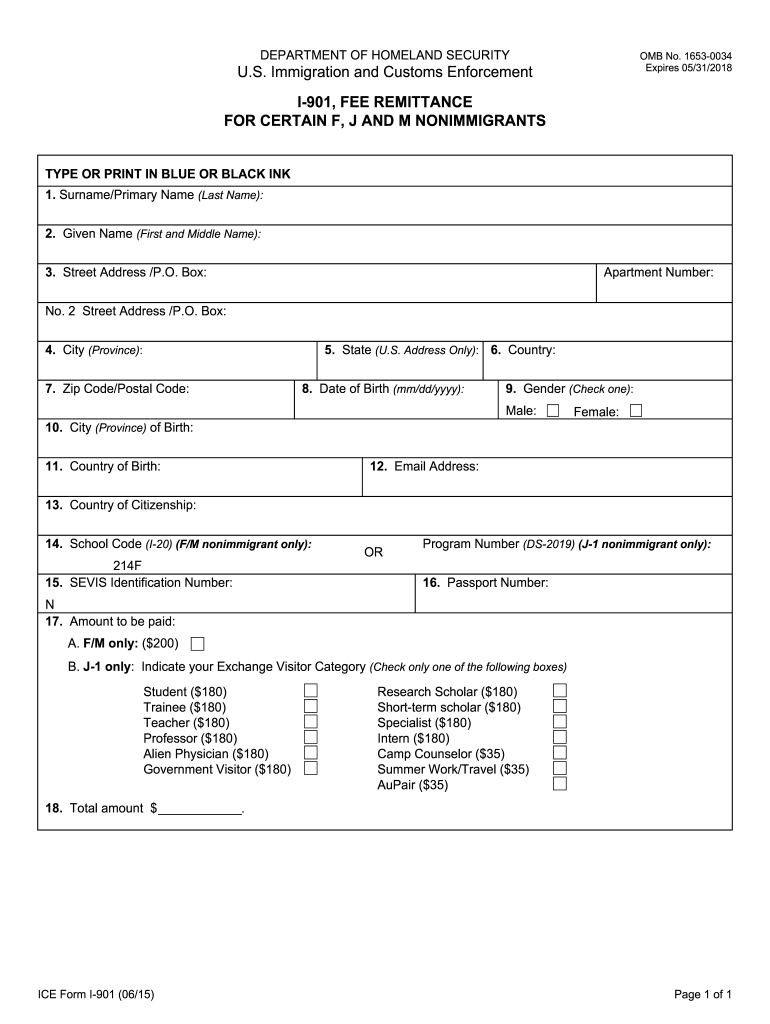
I 901 Fee 2015-2026


What is the I-901 Fee?
The I-901 fee is a payment required by the U.S. government for international students and exchange visitors applying for a non-immigrant visa. This fee supports the Student and Exchange Visitor Information System (SEVIS), which tracks and monitors schools and programs, as well as the individuals enrolled in them. The fee amount is typically two hundred dollars for F and M visa applicants and two hundred and twenty-five dollars for J visa applicants. Paying this fee is essential for obtaining the SEVIS ID number, which is necessary for completing the visa application process.
Steps to Complete the I-901 Fee
Completing the I-901 fee payment involves a few straightforward steps:
- Visit the official I-901 fee payment website.
- Provide your SEVIS ID number, which can be found on your Form I-20 or DS-2019.
- Fill out the required personal information, including your name, date of birth, and country of origin.
- Select your payment method, which can include credit card or bank transfer.
- Review your information for accuracy and submit your payment.
After payment, you will receive a confirmation receipt, which you should keep for your records and present during your visa interview.
How to Obtain the I-901 Fee Receipt
After successfully completing the I-901 fee payment, you will receive a receipt that serves as proof of payment. This receipt is crucial for your visa application process. To obtain your receipt:
- Check your email for a confirmation message that includes your payment details.
- If you do not receive it, you can log back into the I-901 payment website using your SEVIS ID number and personal details to access your payment history.
- You can also print the receipt directly from the website for your records.
Keep this receipt safe, as it will be required during your visa interview and when you enter the United States.
Legal Use of the I-901 Fee
The I-901 fee must be paid to ensure compliance with U.S. immigration laws. It is a legal requirement for all international students and exchange visitors applying for a visa. Failure to pay the fee or to provide proof of payment can result in visa denial. It is important to ensure that the payment is made through the official I-901 fee payment website to avoid scams or fraudulent activities.
Required Documents for the I-901 Fee
To complete the I-901 fee payment, you will need the following documents:
- Your Form I-20 (for F and M visa applicants) or Form DS-2019 (for J visa applicants).
- Your SEVIS ID number, which is located on these forms.
- A valid credit card or bank account information for payment.
- Your personal identification details, such as your name and date of birth.
Having these documents ready will streamline the payment process and ensure that you can complete it without delays.
Who Issues the I-901 Fee?
The I-901 fee is issued by the U.S. Department of Homeland Security (DHS). The fee is collected to fund the SEVIS, which is essential for maintaining the integrity of the U.S. educational system for international students. The DHS oversees the entire process, ensuring that all payments are processed correctly and that the necessary information is recorded in the SEVIS database.
Quick guide on how to complete i 901 form
Discover the most efficient method to complete and endorse your I 901 Fee
Are you still spending time crafting your official paperwork on paper instead of online? airSlate SignNow offers a superior approach to complete and endorse your I 901 Fee and similar forms for public services. Our advanced electronic signature system provides you with everything necessary to manage documents swiftly while adhering to formal standards - powerful PDF editing, organizing, securing, signing, and sharing tools all available within an easy-to-use interface.
Only a few steps are needed to complete and sign your I 901 Fee:
- Upload the editable template to the editor by clicking the Get Form button.
- Identify what details you must include in your I 901 Fee.
- Move through the fields using the Next button to ensure nothing is overlooked.
- Utilize Text, Check, and Cross tools to populate the fields with your information.
- Modify the content with Text boxes or Images from the top menu.
- Emphasize what is crucial or Redact sections that are no longer relevant.
- Press Sign to create a legally binding electronic signature using any method you choose.
- Add the Date next to your signature and conclude your task with the Done button.
Store your completed I 901 Fee in the Documents folder within your account, download it, or send it to your preferred cloud storage. Our platform also provides versatile file sharing. There’s no need to print your forms when you have to submit them to the necessary public office - do it via email, fax, or by requesting a USPS “snail mail” delivery from your profile. Try it out now!
Create this form in 5 minutes or less
FAQs
-
What is Stanford's SEVIS ID?
A2A. Information on Visas and Supporting Documents has the links to Student Process Steps: How to Navigate the U.S. Immigration System that explains the overall process of getting a Visa. SEVIS fee is step 2 of Pre-Arrival. Once you paid the fee you will get an SEVIS ID. I-901 SEVIS Fee is the form you would fill out.
-
What are steps to follow for getting F1 Student US visa for Indian students?
1. Fill DS-160 form2. Make your profile at Apply for a Visa3. Make the visa fee payment.4. Pay SEVIS FEE5. Schedule your appointment at whatever zone you are in.Make sure you answer all the questions correctly. Any falsification can lead to denial of your visa. Also carry all your required documents which includes your college transcript, SEVIS receipt, GRE/TOEFL score cards, I-20 and financial documents showing funds for your studies.
-
What is the process to get a student visa for USA?
If you’re looking to come to the United States as a student, you should understand that you must be able to prove that you’ll be able to support yourself throughout your entire stay. There is a restriction on work for F-1 visa holders. There are a few exceptions (such as certain on-campus jobs and very limited work off campus) for work. USCIS refers to this as self-supporting.Now that I’ve mentioned that, let’s move on to the actual steps.- You must first be accepted at an SEVP approved school. SEVP stands for Student and Exchange Visitor Program. You can learn more about it by visiting this site. Again, as you are considering schools, make sure it is SEVP approved or you will not receive an F-1 visa.- After you’re accepted, you must pay the SEVIS I-901 service fee. For F visa applicants, the fee is $200 according to the official government website. This fee is separate from your visa fees and any SEVIS administration fees. After this is done, you’ll receive Form I-20 from your school. You will need to present this form during your F-1 visa interview. If you’re going to bring your spouse or children, they also need I-20s, but they do not need to be listed in SEVIS.- At this step, you’ll complete your visa application. You will pay a non-refundable application fee. There is an online version available. Make sure that you complete and print Form DS-160 to take to your interview.- Now you need to schedule your interview with the U.S. embassy or consulate. Apply for it as soon as you can. An F-1 visa can be issued up to 120 days in advance of the day you start school. You can enter the U.S. with an F-1 up to 30 days before your first day of school. Make sure that you bring all of the proper documents to your interview: a valid passport, Form DS-160, the receipt for your application fee, a passport photo, and your Form I-20. You should also bring your academic transcripts, diplomas, degrees, test scores (such as SAT or GMAT), proof of your ability to support yourself, and proof that you plan to leave the U.S. when your studies are complete.- Go to your interview. You may be required to undergo fingerprinting as well and you may need to pay a visa issuance fee. You will be told when you will receive your visa and your passport back.As you can see, getting your F-1 visa can take a lot of work. If you’d like to get help from an immigration attorney, consider LawTrades. LawTrades is a legal marketplace and you can get the advice and help that you need to get your F-1 visa processed.
-
Can we convert an H4 visa to an F1 visa?
In general, it is possible to change status from H-4 to F-1 provided that you have the appropriate (I-20) documentation from the school you intend to attend.Note that H-4 is a dual intent visa, but F-1 is not; as a result, you may be denied the change of status if USCIS concludes that you have immigrant intent.Note also that change of status only applies while you are in the United States. If you are not in the United States and have a currently valid H-4 visa, but wish to obtain an F-1 visa, you must simply apply for an (entirely new) F-1 visa. While you can reuse some of the documentary evidence you collected for the H-4 visa for the F-1 application, it will be a new application.
-
How do you change a B1/B2 visa to an F1 visa?
You can change your status. In order to do that, You need to submit an application to the U.S. Citizenship and Immigration Services (USCIS) for a change of status. This option allows you to change your nonimmigrant status while remaining in the U.S. With this, you may gain a new status but you will not receive a new visa; visas are only issued outside the U.S.To change your status, you will need the following:Your I-94 card which lists you departures and arrival dates, along with the expiration date for your stayApply to an academic course of study at a college/university, once accepted, the school will issue an I-20 formUse the SEVIS ID number located on the top right corner of I-20, to fill out you SEVIS I-901 form and pay the required fee.Write a letter explaining why you want to change your status from B1 to F1.Fill out a form I-539 to change your nonimmigrant status from B1 to F1. Pay the filing fee.
-
How do I file change of Status within USA from H4 to F1?
Here’s your answer: Here are the things you will need.First of all an acceptance from an accredited school, a copy of the acceptance letter and a copy of a signed I-20 stating your department and your duration of status as a student. You will need to inform the school of your intention to change status from H1B to F1. Sign the Student Attestation section.And since you will be changing status, you will need to fill out an I-539 form (instructions here) and take out your check book for a hefty $370 filing fee, made payable to U.S. Department of Homeland Security. There may also be an additional $85 for biometrics. USCIS will signNow out to you as to when and where you should show up for giving up your fingerprints, retina scan, hair sample, blood and perhaps one of your kidneys. And do you really need two lungs??And in the spirit of keeping up with expenses, write out another check for your I-901 SEVIS Fee. See here for payment. Send the copy of the receipt.And as if it was not already clear from your ability to drop a couple of hundreds, at the drop of USCIS hat, you will also need to produce finance support documents making them believe that you will be sufficiently loaded throughout the duration of your study.You need to submit a copy of your I-94 (you can print out an electronic copy).Photocopies of all your I-797 (Approval Notices), current and previous. Your I-797 will reflect the period since when you have been legal to work.Photocopies of your Passport, including your H1B visa page. Keep a copy of your expired passport, if any. Comes in handy if the dates in any of your forms are relevant to the validity period of your previous passport.While you are at it, send in copies of all immigration documents you’ve had – EAD, etc.Write a letter explaining your change of heart. Why school? Why now?Pay stubs from your current job and a letter verifying your employment from your current employer.A letter of support from your would-be adviser at your would-be school, helps.And finally, get all your documents (I-94 et al) prepared for your dependents, if any.Once all your paperwork is ready and copies are shelved in your folder for your bookkeeping, you should send in your documents (Read for address):[For US Postal Services – Express or Slow Coach]USCISP.O. Box 660166Dallas, TX 75266And[For Courier]USCISATTN: I-5392501 S. State Highway 121 BusinessSuite 400Lewisville, TX 75067Reference: H1B to F1 US Visa: Change of status and processing time | MBA Crystal Ball
-
Do military members have to pay any fee for leave or fiancee forms?
NOOOOOOO. You are talking to a military romance scammer. I received an email from the US Army that directly answers your question that is pasted below please keep reading.I believe you are the victim of a military Romance Scam whereas the person you are talking to is a foreign national posing as an American Soldier claiming to be stationed overseas on a peacekeeping mission. That's the key to the scam they always claim to be on a peacekeeping mission.Part of their scam is saying that they have no access to their money that their mission is highly dangerous.If your boyfriend girlfriend/future husband/wife is asking you to do the following or has exhibited this behavior, it is a most likely a scam:Moves to private messaging site immediately after meeting you on Facebook or SnapChat or Instagram or some dating or social media site. Often times they delete the site you met them on right after they asked you to move to a more private messaging siteProfesses love to you very quickly & seems to quote poems and song lyrics along with using their own sort of broken language, as they profess their love and devotion quickly. They also showed concern for your health and love for your family.Promises marriage as soon as he/she gets to state for leave that they asked you to pay for.They Requests money (wire transfers) and Amazon, iTune ,Verizon, etc gift cards, for medicine, religious practices, and leaves to come home, internet access, complete job assignments, help sick friend, get him out of trouble, or anything that sounds fishy.The military does provide all the soldier needs including food medical Care and transportation for leave. Trust me, I lived it, you are probably being scammed. I am just trying to show you examples that you are most likely being connned.Below is an email response I received after I sent an inquiry to the US government when I discovered I was scammed. I received this wonderful response back with lots of useful links on how to find and report your scammer. And how to learn more about Romance Scams.Right now you can also copy the picture he gave you and do a google image search and you will hopefully see the pictures of the real person he is impersonating. this doesn't always work and take some digging. if you find the real person you can direct message them and alert them that their image is being used for scamming.Good Luck to you and I'm sorry this may be happening to you. please continue reading the government response I received below it's very informative. You have contacted an email that is monitored by the U.S. Army Criminal Investigation Command. Unfortunately, this is a common concern. We assure you there is never any reason to send money to anyone claiming to be a Soldier online. If you have only spoken with this person online, it is likely they are not a U.S. Soldier at all. If this is a suspected imposter social media profile, we urge you to report it to that platform as soon as possible. Please continue reading for more resources and answers to other frequently asked questions: How to report an imposter Facebook profile: Caution-https://www.facebook.com/help/16... < Caution-https://www.facebook.com/help/16... > Answers to frequently asked questions: - Soldiers and their loved ones are not charged money so that the Soldier can go on leave. - Soldiers are not charged money for secure communications or leave. - Soldiers do not need permission to get married. - Soldiers emails are in this format: john.doe.mil@mail.mil < Caution-mailto: john.doe.mil@mail.mil > anything ending in .us or .com is not an official email account. - Soldiers have medical insurance, which pays for their medical costs when treated at civilian health care facilities worldwide – family and friends do not need to pay their medical expenses. - Military aircraft are not used to transport Privately Owned Vehicles. - Army financial offices are not used to help Soldiers buy or sell items of any kind. - Soldiers deployed to Combat Zones do not need to solicit money from the public to feed or house themselves or their troops. - Deployed Soldiers do not find large unclaimed sums of money and need your help to get that money out of the country. Anyone who tells you one of the above-listed conditions/circumstances is true is likely posing as a Soldier and trying to steal money from you. We would urge you to immediately cease all contact with this individual. For more information on avoiding online scams and to report this crime, please see the following sites and articles: This article may help clarify some of the tricks social media scammers try to use to take advantage of people: Caution-https://www.army.mil/article/61432/< Caution-https://www.army.mil/article/61432/> CID advises vigilance against 'romance scams,' scammers impersonating Soldiers Caution-https://www.army.mil/article/180749 < Caution-https://www.army.mil/article/180749 > FBI Internet Crime Complaint Center: Caution-http://www.ic3.gov/default.aspx< Caution-http://www.ic3.gov/default.aspx> U.S. Army investigators warn public against romance scams: Caution-https://www.army.mil/article/130...< Caution-https://www.army.mil/article/130...> DOD warns troops, families to be cybercrime smart -Caution-http://www.army.mil/article/1450...< Caution-http://www.army.mil/article/1450...> Use caution with social networking Caution-https://www.army.mil/article/146...< Caution-https://www.army.mil/article/146...> Please see our frequently asked questions section under scams and legal issues. Caution-http://www.army.mil/faq/ < Caution-http://www.army.mil/faq/ > or visit Caution-http://www.cid.army.mil/ < Caution-http://www.cid.army.mil/ >. The challenge with most scams is determining if an individual is a legitimate member of the US Army. Based on the Privacy Act of 1974, we cannot provide this information. If concerned about a scam you may contact the Better Business Bureau (if it involves a solicitation for money), or local law enforcement. If you're involved in a Facebook or dating site scam, you are free to contact us direct; (571) 305-4056. If you have a social security number, you can find information about Soldiers online at Caution-https://www.dmdc.osd.mil/appj/sc... < Caution-https://www.dmdc.osd.mil/appj/sc... > . While this is a free search, it does not help you locate a retiree, but it can tell you if the Soldier is active duty or not. If more information is needed such as current duty station or location, you can contact the Commander Soldier's Records Data Center (SRDC) by phone or mail and they will help you locate individuals on active duty only, not retirees. There is a fee of $3.50 for businesses to use this service. The check or money order must be made out to the U.S. Treasury. It is not refundable. The address is: Commander Soldier's Records Data Center (SRDC) 8899 East 56th Street Indianapolis, IN 46249-5301 Phone: 1-866-771-6357 In addition, it is not possible to remove social networking site profiles without legitimate proof of identity theft or a scam. If you suspect fraud on this site, take a screenshot of any advances for money or impersonations and report the account on the social networking platform immediately. Please submit all information you have on this incident to Caution-www.ic3.gov < Caution-http://www.ic3.gov > (FBI website, Internet Criminal Complaint Center), immediately stop contact with the scammer (you are potentially providing them more information which can be used to scam you), and learn how to protect yourself against these scams at Caution-http://www.ftc.gov < Caution-http://www.ftc.gov > (Federal Trade Commission's website)
-
How can I fill out Google's intern host matching form to optimize my chances of receiving a match?
I was selected for a summer internship 2016.I tried to be very open while filling the preference form: I choose many products as my favorite products and I said I'm open about the team I want to join.I even was very open in the location and start date to get host matching interviews (I negotiated the start date in the interview until both me and my host were happy.) You could ask your recruiter to review your form (there are very cool and could help you a lot since they have a bigger experience).Do a search on the potential team.Before the interviews, try to find smart question that you are going to ask for the potential host (do a search on the team to find nice and deep questions to impress your host). Prepare well your resume.You are very likely not going to get algorithm/data structure questions like in the first round. It's going to be just some friendly chat if you are lucky. If your potential team is working on something like machine learning, expect that they are going to ask you questions about machine learning, courses related to machine learning you have and relevant experience (projects, internship). Of course you have to study that before the interview. Take as long time as you need if you feel rusty. It takes some time to get ready for the host matching (it's less than the technical interview) but it's worth it of course.
Create this form in 5 minutes!
How to create an eSignature for the i 901 form
How to generate an eSignature for the I 901 Form online
How to generate an electronic signature for the I 901 Form in Chrome
How to create an electronic signature for signing the I 901 Form in Gmail
How to create an electronic signature for the I 901 Form from your smartphone
How to generate an electronic signature for the I 901 Form on iOS
How to generate an electronic signature for the I 901 Form on Android devices
People also ask
-
What is the I 901 Fee and why do I need to pay it?
The I 901 Fee is a mandatory fee required by the U.S. government for certain visa applicants. It's essential for processing your application and ensures that your documents are handled correctly. Paying the I 901 Fee is a crucial step in obtaining your visa, making it important to understand the fee structure.
-
How much is the I 901 Fee?
The I 901 Fee varies depending on the type of visa you are applying for. Typically, the fee ranges from $200 to $500, depending on the specific application. It's important to check the official USCIS website for the most accurate and current fee information regarding the I 901 Fee.
-
Can I pay the I 901 Fee through airSlate SignNow?
While airSlate SignNow is primarily a solution for sending and eSigning documents, you can use it to manage and securely send payment confirmation documents related to the I 901 Fee. However, the actual payment must be made through the designated USCIS payment portal.
-
What features does airSlate SignNow offer for managing I 901 Fee documents?
airSlate SignNow provides a range of features that can help you manage your I 901 Fee documents seamlessly. You can eSign documents, track their status, and store them securely in the cloud. This ensures that your visa application process remains organized and efficient.
-
How does airSlate SignNow ensure the security of my I 901 Fee documents?
Security is a top priority at airSlate SignNow. We use advanced encryption and secure cloud storage to protect your I 901 Fee documents from unauthorized access. This ensures that your sensitive information remains confidential and secure throughout the signing process.
-
Are there any integrations available with airSlate SignNow for managing I 901 Fee documents?
Yes, airSlate SignNow offers various integrations with popular business applications that can help streamline the management of your I 901 Fee documents. These integrations allow for easier document sharing and collaboration, enhancing your overall workflow.
-
What are the benefits of using airSlate SignNow for the I 901 Fee process?
Using airSlate SignNow for the I 901 Fee process simplifies document management and enhances efficiency. With features like eSigning, document tracking, and secure storage, you can focus on your visa application rather than worrying about paperwork. It's a cost-effective solution for individuals and businesses alike.
Get more for I 901 Fee
- Cg 6038a form
- Annex 3 g security agreement ssi iss tpsgc pwgsc gc form
- Bcbs al enr 431 form
- Digitz scale manual form
- North carolina financial standing affidavit form
- Application for ballot by mail jones county texas form
- International supply agreement template form
- Internship agreement template form
Find out other I 901 Fee
- Electronic signature Utah Mobile App Design Proposal Template Fast
- Electronic signature Nevada Software Development Agreement Template Free
- Electronic signature New York Operating Agreement Safe
- How To eSignature Indiana Reseller Agreement
- Electronic signature Delaware Joint Venture Agreement Template Free
- Electronic signature Hawaii Joint Venture Agreement Template Simple
- Electronic signature Idaho Web Hosting Agreement Easy
- Electronic signature Illinois Web Hosting Agreement Secure
- Electronic signature Texas Joint Venture Agreement Template Easy
- How To Electronic signature Maryland Web Hosting Agreement
- Can I Electronic signature Maryland Web Hosting Agreement
- Electronic signature Michigan Web Hosting Agreement Simple
- Electronic signature Missouri Web Hosting Agreement Simple
- Can I eSignature New York Bulk Sale Agreement
- How Do I Electronic signature Tennessee Web Hosting Agreement
- Help Me With Electronic signature Hawaii Debt Settlement Agreement Template
- Electronic signature Oregon Stock Purchase Agreement Template Later
- Electronic signature Mississippi Debt Settlement Agreement Template Later
- Electronic signature Vermont Stock Purchase Agreement Template Safe
- Electronic signature California Stock Transfer Form Template Mobile