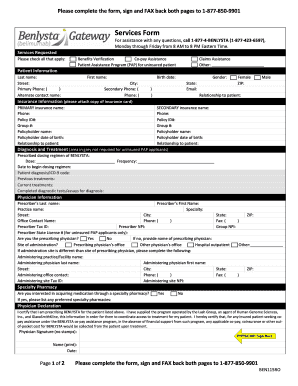
Gateway Services Form Pacific Infusion


What is the Gateway Services Form Pacific Infusion
The Gateway Services Form Pacific Infusion is a specialized document used to facilitate the processing of infusion services within healthcare settings. This form is essential for ensuring that patients receive the necessary treatments while maintaining compliance with healthcare regulations. It typically includes sections for patient information, treatment details, and authorization signatures, making it a critical component in the infusion service workflow.
How to use the Gateway Services Form Pacific Infusion
Using the Gateway Services Form Pacific Infusion involves several steps to ensure accurate completion and submission. First, gather all necessary patient information, including demographics and medical history. Next, fill out the treatment details, specifying the type of infusion service required. Finally, ensure that all required signatures are obtained before submitting the form to the appropriate healthcare provider or insurance company.
Steps to complete the Gateway Services Form Pacific Infusion
Completing the Gateway Services Form Pacific Infusion can be streamlined by following these steps:
- Collect patient information, including full name, date of birth, and insurance details.
- Specify the infusion service needed, including dosage and frequency.
- Obtain necessary authorizations and signatures from the patient or their legal representative.
- Review the completed form for accuracy before submission.
- Submit the form electronically or via mail to the designated healthcare provider.
Legal use of the Gateway Services Form Pacific Infusion
The legal use of the Gateway Services Form Pacific Infusion is governed by healthcare regulations that ensure patient rights and confidentiality. It is crucial that the form is filled out accurately and signed appropriately to be considered valid. Compliance with laws such as HIPAA is essential to protect patient information throughout the process. Additionally, electronic signatures on this form are legally binding, provided that they adhere to the requirements set forth by the ESIGN Act and UETA.
Key elements of the Gateway Services Form Pacific Infusion
Key elements of the Gateway Services Form Pacific Infusion include:
- Patient Information: Essential details such as name, address, and insurance information.
- Treatment Details: Specifics about the infusion service, including type, dosage, and frequency.
- Authorization Signatures: Signatures from the patient or their representative to authorize treatment.
- Compliance Statements: Sections that affirm adherence to legal and regulatory requirements.
Form Submission Methods
The Gateway Services Form Pacific Infusion can be submitted through various methods to accommodate different preferences and requirements. Common submission methods include:
- Online Submission: Many healthcare providers allow for electronic submission through secure portals.
- Mail: The form can be printed and sent via postal mail to the appropriate office.
- In-Person Delivery: Patients may also choose to deliver the form directly to their healthcare provider's office.
Quick guide on how to complete gateway services form pacific infusion
Prepare Gateway Services Form Pacific Infusion effortlessly on any gadget
Digital document management has gained popularity among organizations and individuals. It offers an ideal eco-friendly substitute for traditional printed and signed paperwork, allowing you to find the appropriate form and securely keep it online. airSlate SignNow provides you with all the resources necessary to create, edit, and eSign your documents swiftly without any hold-ups. Handle Gateway Services Form Pacific Infusion on any gadget with airSlate SignNow Android or iOS applications and simplify any document-related task today.
The simplest method to edit and eSign Gateway Services Form Pacific Infusion with ease
- Find Gateway Services Form Pacific Infusion and then click Get Form to begin.
- Use the tools we offer to complete your form.
- Emphasize important sections of the documents or redact sensitive information with tools that airSlate SignNow provides specifically for that purpose.
- Create your signature using the Sign tool, which takes seconds and carries the same legal significance as a traditional wet ink signature.
- Review the details and then click on the Done button to save your changes.
- Choose how you want to send your form, whether by email, SMS, or invitation link, or download it to your computer.
Eliminate concerns about lost or misplaced files, tedious form searching, or errors that require reprinting documents. airSlate SignNow meets all your document management needs in just a few clicks from any device you prefer. Edit and eSign Gateway Services Form Pacific Infusion and ensure excellent communication at any stage of your form preparation process with airSlate SignNow.
Create this form in 5 minutes or less
Create this form in 5 minutes!
How to create an eSignature for the gateway services form pacific infusion
How to create an electronic signature for a PDF online
How to create an electronic signature for a PDF in Google Chrome
How to create an e-signature for signing PDFs in Gmail
How to create an e-signature right from your smartphone
How to create an e-signature for a PDF on iOS
How to create an e-signature for a PDF on Android
People also ask
-
What is the Gateway Services Form Pacific Infusion?
The Gateway Services Form Pacific Infusion is an essential tool that allows healthcare providers to efficiently manage and process patient information. This form streamlines the infusion services request, making it easier for professionals to access and utilize necessary documentation.
-
How does the Gateway Services Form Pacific Infusion improve workflow?
By utilizing the Gateway Services Form Pacific Infusion, healthcare providers can signNowly enhance their workflow. The form automates the documentation processes, reduces manual errors, and accelerates patient care, leading to improved operational efficiency.
-
What are the pricing options for the Gateway Services Form Pacific Infusion?
Pricing for the Gateway Services Form Pacific Infusion is competitive and tailored to fit various business needs. Depending on the specific plan you choose, your investment will ensure access to comprehensive features that enhance your document management system.
-
What features are included in the Gateway Services Form Pacific Infusion?
The Gateway Services Form Pacific Infusion includes robust features such as electronic signatures, customizable templates, and real-time tracking. These elements work together to create a seamless user experience and ensure secure document management.
-
Can I integrate the Gateway Services Form Pacific Infusion with other software?
Yes, the Gateway Services Form Pacific Infusion is designed for easy integration with various software solutions. This flexibility allows businesses to connect their existing applications, enhancing their document workflows and overall efficiency.
-
What benefits does the Gateway Services Form Pacific Infusion offer to healthcare providers?
The Gateway Services Form Pacific Infusion offers numerous benefits, including time savings, reduced administrative burden, and improved patient satisfaction. By streamlining processes, healthcare providers can focus more on patient care rather than paperwork.
-
Is the Gateway Services Form Pacific Infusion user-friendly?
Absolutely! The Gateway Services Form Pacific Infusion is designed with user-friendliness in mind. Its intuitive interface ensures that users can easily navigate and utilize the form without extensive training, making it accessible for all staff members.
Get more for Gateway Services Form Pacific Infusion
- Form deq 50 12 waste motor oil burning equipment certification
- Hunting permission form 143153
- Wwwkamp kaninecomwp contentuploadsdoggie daycare agreement kamp kanine form
- Waiver of medical treatment or observation form
- Mychart cone form
- Medicare part b patient intake form
- Wwwuslegalformscomform library490916 acclaimacclaim dermatology intake form us legal forms
- Patient enrollment form medexpress pharmacy
Find out other Gateway Services Form Pacific Infusion
- How To Electronic signature Florida Car Dealer Word
- How Do I Electronic signature Florida Car Dealer Document
- Help Me With Electronic signature Florida Car Dealer Presentation
- Can I Electronic signature Georgia Car Dealer PDF
- How Do I Electronic signature Georgia Car Dealer Document
- Can I Electronic signature Georgia Car Dealer Form
- Can I Electronic signature Idaho Car Dealer Document
- How Can I Electronic signature Illinois Car Dealer Document
- How Can I Electronic signature North Carolina Banking PPT
- Can I Electronic signature Kentucky Car Dealer Document
- Can I Electronic signature Louisiana Car Dealer Form
- How Do I Electronic signature Oklahoma Banking Document
- How To Electronic signature Oklahoma Banking Word
- How Can I Electronic signature Massachusetts Car Dealer PDF
- How Can I Electronic signature Michigan Car Dealer Document
- How Do I Electronic signature Minnesota Car Dealer Form
- Can I Electronic signature Missouri Car Dealer Document
- How Do I Electronic signature Nevada Car Dealer PDF
- How To Electronic signature South Carolina Banking Document
- Can I Electronic signature New York Car Dealer Document