4 Sp Form


What is the 2019 Form 4 SP?
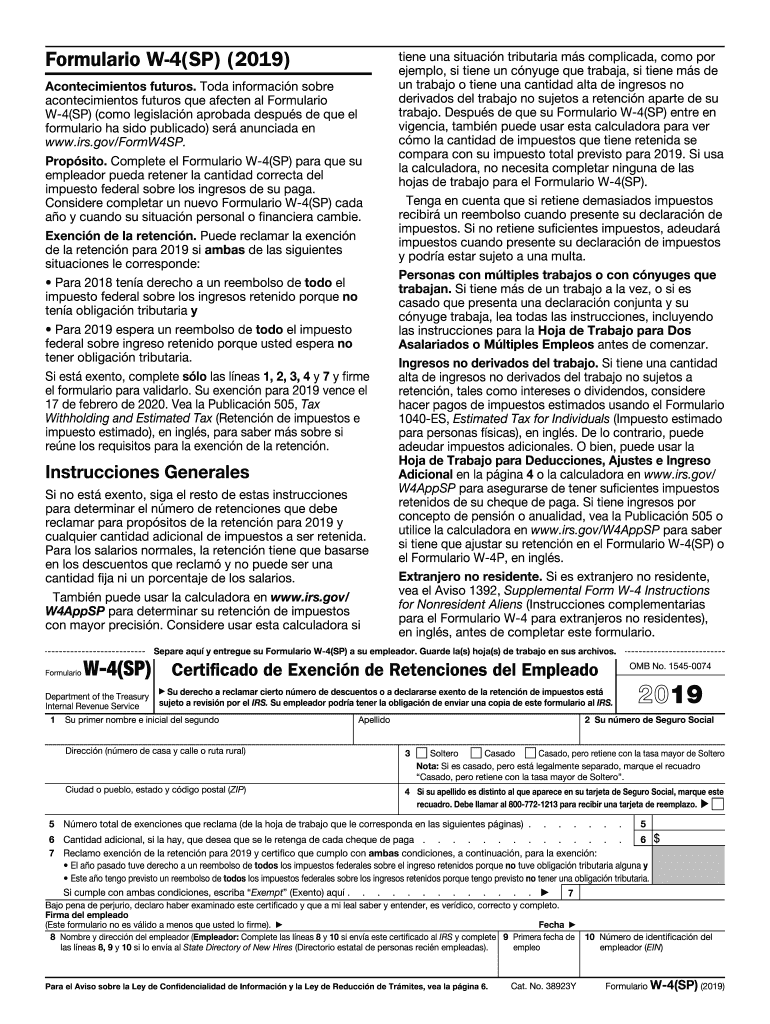
The 2019 Form 4 SP, also known as the "2019 Exención Form," is a tax document used by individuals in the United States to claim exemption from withholding on their income. This form is particularly relevant for those who expect to owe no federal income tax for the year or had no tax liability in the previous year. Understanding the purpose and proper use of the 2019 Form 4 SP is essential for ensuring compliance with IRS regulations.
Steps to Complete the 2019 Form 4 SP
Completing the 2019 Form 4 SP requires careful attention to detail. Here are the steps to follow:
- Begin by entering your personal information, including your name, address, and Social Security number.
- Indicate your filing status and the number of allowances you are claiming.
- Clearly state your eligibility for exemption by checking the appropriate box.
- Sign and date the form to validate your submission.
It is important to ensure that all information is accurate to avoid any issues with the IRS.
IRS Guidelines for the 2019 Form 4 SP
The IRS provides specific guidelines for using the 2019 Form 4 SP. To qualify for exemption, taxpayers must meet certain criteria, such as having no tax liability in the previous year and expecting none for the current year. Additionally, the IRS requires that the form be submitted to your employer to adjust your withholding appropriately. Familiarizing yourself with these guidelines can help prevent errors and ensure compliance.
Legal Use of the 2019 Form 4 SP
The 2019 Form 4 SP is legally recognized as a valid document for claiming exemption from withholding. To ensure that your use of this form is compliant with tax laws, it is crucial to understand the legal implications of submitting it. This includes being truthful about your tax situation and maintaining records that support your claim. Misuse of the form can lead to penalties or audits by the IRS.
Filing Deadlines for the 2019 Form 4 SP
Filing deadlines for the 2019 Form 4 SP are critical to ensure that your exemption is recognized in a timely manner. Typically, the form should be submitted to your employer by the end of the calendar year to affect your withholding for that year. It is advisable to check with the IRS or your tax professional for specific deadlines related to your situation, as they may vary based on individual circumstances.
Examples of Using the 2019 Form 4 SP
Understanding practical scenarios can clarify how the 2019 Form 4 SP is utilized. For instance, a recent college graduate who has started their first job and expects to earn below the taxable threshold may use this form to avoid having federal taxes withheld. Similarly, individuals who had no tax liability in the previous year, such as retirees with minimal income, can also benefit from submitting the 2019 Form 4 SP to ensure they do not have unnecessary taxes withheld from their paychecks.
Quick guide on how to complete 2019 form w 4sp employees withholding allowance certificate spanish version
Execute 4 Sp effortlessly on any device
Online document management has gained popularity among businesses and individuals alike. It offers an ideal eco-friendly substitute for traditional printed and signed paperwork, allowing you to find the correct form and securely keep it online. airSlate SignNow provides you with all the tools necessary to create, edit, and eSign your documents swiftly without delays. Handle 4 Sp on any device using airSlate SignNow's Android or iOS applications and streamline any document-based process today.
The most efficient way to edit and eSign 4 Sp with ease
- Obtain 4 Sp and click on Get Form to begin.
- Utilize the tools we offer to fill out your document.
- Emphasize pertinent sections of the documents or redact sensitive information with tools that airSlate SignNow offers specifically for that purpose.
- Create your signature using the Sign feature, which takes seconds and carries the same legal significance as a conventional wet ink signature.
- Review all the details and click the Done button to preserve your changes.
- Select your preferred method of delivering your form, whether by email, SMS, invite link, or download it to your computer.
Say goodbye to lost or misplaced documents, tedious form searching, or mistakes that necessitate printing new copies. airSlate SignNow fulfills all your document management needs in just a few clicks from any device you choose. Modify and eSign 4 Sp and ensure excellent communication throughout the form preparation process with airSlate SignNow.
Create this form in 5 minutes or less
Create this form in 5 minutes!
How to create an eSignature for the 2019 form w 4sp employees withholding allowance certificate spanish version
How to make an electronic signature for your 2019 Form W 4sp Employees Withholding Allowance Certificate Spanish Version in the online mode
How to create an eSignature for your 2019 Form W 4sp Employees Withholding Allowance Certificate Spanish Version in Chrome
How to make an electronic signature for signing the 2019 Form W 4sp Employees Withholding Allowance Certificate Spanish Version in Gmail
How to generate an electronic signature for the 2019 Form W 4sp Employees Withholding Allowance Certificate Spanish Version right from your mobile device
How to generate an electronic signature for the 2019 Form W 4sp Employees Withholding Allowance Certificate Spanish Version on iOS
How to make an eSignature for the 2019 Form W 4sp Employees Withholding Allowance Certificate Spanish Version on Android
People also ask
-
What is airSlate SignNow and how does it relate to 4 Sp?
airSlate SignNow is a powerful eSignature solution designed to streamline document management and signing processes. With its focus on a user-friendly experience, it provides businesses with a cost-effective way to handle document workflows, including the 4 Sp feature that allows for multiple signatures on a single document.
-
How much does airSlate SignNow cost for the 4 Sp feature?
Pricing for airSlate SignNow varies based on the plan you choose. The 4 Sp feature is included in several tiers, making it accessible for businesses of all sizes. Check our pricing page for detailed information on how you can utilize the 4 Sp feature within your chosen plan.
-
What are the key features of airSlate SignNow's 4 Sp?
The 4 Sp feature in airSlate SignNow allows users to efficiently manage multiple signatures on documents. This capability simplifies the signing process, ensuring that all necessary parties can easily complete their parts. Additionally, it enhances document security and compliance, which is crucial for businesses.
-
Can I integrate airSlate SignNow's 4 Sp with other applications?
Yes, airSlate SignNow offers seamless integrations with numerous applications, allowing you to enhance your workflow. With the 4 Sp feature, you can easily connect to CRM systems, cloud storage solutions, and other software to manage documents more effectively. Explore our integrations page to see the full list.
-
What benefits does the 4 Sp feature provide to businesses?
The 4 Sp feature streamlines the signing process by enabling multiple signatures on one document, which saves time and reduces delays in approval workflows. This is particularly beneficial for businesses that require quick turnaround times for contracts and agreements, ultimately enhancing productivity.
-
Is airSlate SignNow secure for using the 4 Sp feature?
Absolutely! airSlate SignNow prioritizes security and compliance, especially when using the 4 Sp feature. All signed documents are encrypted and stored securely, ensuring that sensitive information remains protected throughout the signing process.
-
How does the 4 Sp feature improve document workflows?
By utilizing the 4 Sp feature, businesses can streamline their document workflows, allowing multiple stakeholders to sign documents simultaneously. This reduces the back-and-forth typically associated with traditional signing processes, leading to faster completion times and improved efficiency.
Get more for 4 Sp
- Michigan pardon governor form
- Michigan department of licensing and regulatory affairs board of nursing michigan form
- Tr52 form
- Bdvr form
- Application for sign specialist examination state of michigan michigan form
- Michigan department of revenue form 4430
- Missouri employer withholding tax form
- Temporary third license plate application form
Find out other 4 Sp
- Help Me With eSign Hawaii Lawers Word
- How Can I eSign Hawaii Lawers Document
- How To eSign Hawaii Lawers PPT
- Help Me With eSign Hawaii Insurance PPT
- Help Me With eSign Idaho Insurance Presentation
- Can I eSign Indiana Insurance Form
- How To eSign Maryland Insurance PPT
- Can I eSign Arkansas Life Sciences PDF
- How Can I eSign Arkansas Life Sciences PDF
- Can I eSign Connecticut Legal Form
- How Do I eSign Connecticut Legal Form
- How Do I eSign Hawaii Life Sciences Word
- Can I eSign Hawaii Life Sciences Word
- How Do I eSign Hawaii Life Sciences Document
- How Do I eSign North Carolina Insurance Document
- How Can I eSign Hawaii Legal Word
- Help Me With eSign Hawaii Legal Document
- How To eSign Hawaii Legal Form
- Help Me With eSign Hawaii Legal Form
- Can I eSign Hawaii Legal Document