Filing Season Form 8888 and Series I Savings Bonds


What is the Filing Season Form 8888 and Series I Savings Bonds
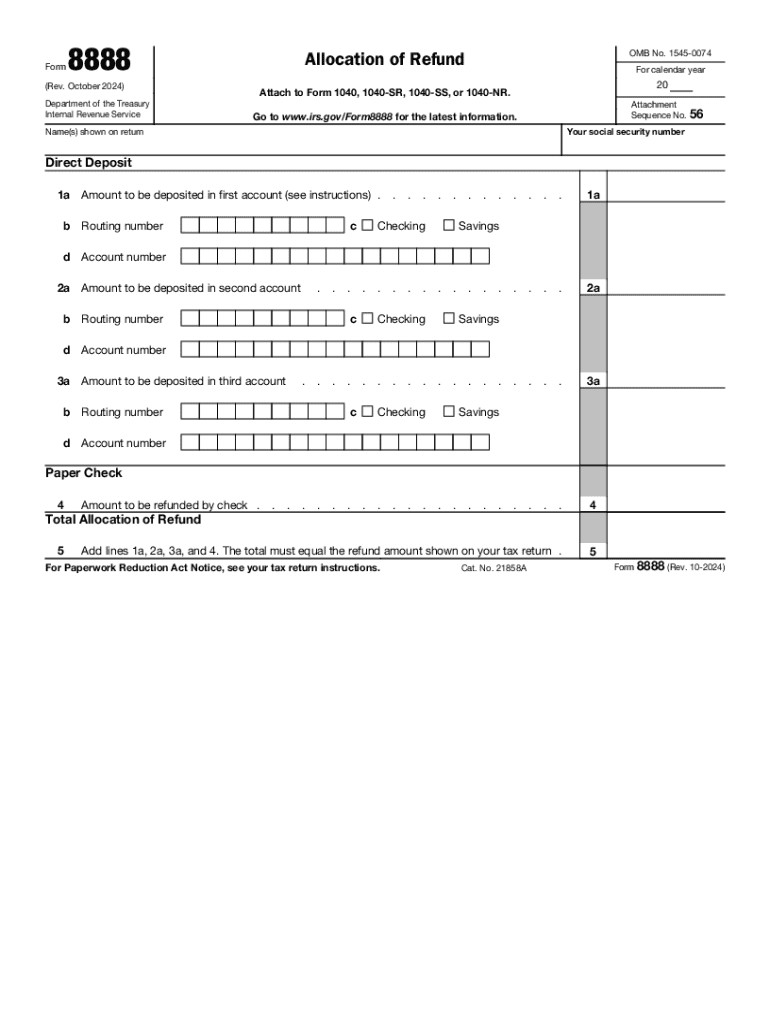
The Filing Season Form 8888, also known as the Allocation of Refund, is a tax form used by individuals to direct their IRS refund into multiple accounts or to purchase U.S. Series I Savings Bonds. This form allows taxpayers to specify how their refund should be allocated, making it easier to manage finances or invest in savings bonds. By using Form 8888, taxpayers can split their refund among different bank accounts or opt to invest a portion of it in savings bonds, which are a secure way to save and grow money over time.
How to Use the Filing Season Form 8888 and Series I Savings Bonds
To use Form 8888 effectively, taxpayers need to complete the form during their tax filing process. First, they should gather their bank account information, including routing and account numbers, and decide how much of their refund they wish to allocate to each account or to purchase bonds. After filling out the form, it should be attached to the tax return before submission. The IRS will then process the allocation as specified, allowing for direct deposit into the chosen accounts or the purchase of bonds.
Steps to Complete the Filing Season Form 8888 and Series I Savings Bonds
Completing Form 8888 involves several straightforward steps:
- Obtain a copy of Form 8888 from the IRS website or your tax preparation software.
- Fill in your personal information, including your name, Social Security number, and filing status.
- Decide how you want your refund allocated: specify amounts for each bank account or indicate the purchase of Series I Savings Bonds.
- Provide the necessary banking information, including routing and account numbers for direct deposits.
- Review the form for accuracy, ensuring all information is correct.
- Attach Form 8888 to your completed tax return before submitting it to the IRS.
IRS Guidelines for Form 8888
The IRS provides specific guidelines for using Form 8888. Taxpayers must ensure that the total amount allocated does not exceed their total refund. Additionally, the form can only be used for refunds that are being directly deposited or for purchasing bonds. The IRS recommends checking the status of your refund after filing to confirm that the allocations have been processed correctly. Familiarizing yourself with IRS guidelines can help avoid delays or issues with your refund.
Eligibility Criteria for Using Form 8888
To use Form 8888, taxpayers must meet certain eligibility criteria. They must be filing a federal tax return and expect a refund. The form can be used by individual taxpayers, including those filing jointly. However, it is important to note that if a taxpayer owes any federal or state debts, the IRS may offset their refund, which could affect the amounts allocated on Form 8888. Understanding these eligibility requirements ensures that taxpayers can effectively utilize the form for their financial planning.
Required Documents for Form 8888 Submission
When preparing to submit Form 8888, taxpayers should have several documents on hand. These include:
- Your completed federal tax return (Form 1040 or 1040-SR).
- Bank account information, including routing and account numbers for direct deposits.
- Any necessary documentation related to the purchase of Series I Savings Bonds.
- Previous tax returns for reference, if needed.
Having these documents ready can streamline the filing process and help ensure accurate completion of Form 8888.
Handy tips for filling out Filing Season Form 8888 And Series I Savings Bonds online
Quick steps to complete and e-sign Filing Season Form 8888 And Series I Savings Bonds online:
- Use Get Form or simply click on the template preview to open it in the editor.
- Start completing the fillable fields and carefully type in required information.
- Use the Cross or Check marks in the top toolbar to select your answers in the list boxes.
- Utilize the Circle icon for other Yes/No questions.
- Look through the document several times and make sure that all fields are completed with the correct information.
- Insert the current Date with the corresponding icon.
- Add a legally-binding e-signature. Go to Sign -> Add New Signature and select the option you prefer: type, draw, or upload an image of your handwritten signature and place it where you need it.
- Finish filling out the form with the Done button.
- Download your copy, save it to the cloud, print it, or share it right from the editor.
- Check the Help section and contact our Support team if you run into any troubles when using the editor.
We know how stressing filling out documents could be. Obtain access to a HIPAA and GDPR compliant solution for optimum efficiency. Use signNow to e-sign and send out Filing Season Form 8888 And Series I Savings Bonds for e-signing.
Create this form in 5 minutes or less
Create this form in 5 minutes!
How to create an eSignature for the filing season form 8888 and series i savings bonds
How to create an electronic signature for a PDF online
How to create an electronic signature for a PDF in Google Chrome
How to create an e-signature for signing PDFs in Gmail
How to create an e-signature right from your smartphone
How to create an e-signature for a PDF on iOS
How to create an e-signature for a PDF on Android
People also ask
-
What is IRS refund direct deposit?
IRS refund direct deposit is a method by which the IRS electronically transfers your tax refund directly into your bank account. This process is faster and more secure than receiving a paper check. By opting for IRS refund direct deposit, you can access your funds quickly and avoid the risk of lost or stolen checks.
-
How can airSlate SignNow help with IRS refund direct deposit?
airSlate SignNow streamlines the document signing process, allowing you to quickly prepare and send forms related to IRS refund direct deposit. With our easy-to-use platform, you can ensure that all necessary documents are signed and submitted efficiently, helping you to receive your refund without delays.
-
Is there a cost associated with using airSlate SignNow for IRS refund direct deposit?
Yes, airSlate SignNow offers various pricing plans to suit different business needs. Our cost-effective solution provides access to features that simplify the process of managing documents related to IRS refund direct deposit. You can choose a plan that fits your budget while benefiting from our comprehensive eSigning capabilities.
-
What features does airSlate SignNow offer for managing IRS refund direct deposit documents?
airSlate SignNow includes features such as customizable templates, secure eSigning, and document tracking, all of which are essential for managing IRS refund direct deposit documents. These tools help ensure that your forms are completed accurately and submitted on time, enhancing your overall efficiency.
-
Can I integrate airSlate SignNow with other software for IRS refund direct deposit?
Absolutely! airSlate SignNow offers integrations with various accounting and tax software, making it easier to manage your IRS refund direct deposit processes. By connecting our platform with your existing tools, you can streamline workflows and improve collaboration across your team.
-
What are the benefits of using airSlate SignNow for IRS refund direct deposit?
Using airSlate SignNow for IRS refund direct deposit provides numerous benefits, including faster processing times and enhanced security. Our platform ensures that your documents are signed and stored securely, reducing the risk of errors and delays in receiving your refund. Additionally, the user-friendly interface makes it easy for anyone to navigate.
-
How does airSlate SignNow ensure the security of IRS refund direct deposit documents?
airSlate SignNow prioritizes the security of your documents by employing advanced encryption and secure storage solutions. This ensures that all information related to IRS refund direct deposit is protected from unauthorized access. Our compliance with industry standards further guarantees the safety of your sensitive data.
Get more for Filing Season Form 8888 And Series I Savings Bonds
- Electronic fillable meeting agenda form
- Labeling a bat form
- Dps 164 c 100000535 form
- Medical leave of absence form
- Addition of single digit numbers with three addends addition operations with multiple addends form
- Verification of deposit form
- Position 5 form rd 4279 4 rev 06 17
- Publication 584 rev december form
Find out other Filing Season Form 8888 And Series I Savings Bonds
- eSignature North Carolina Legal Cease And Desist Letter Safe
- How Can I eSignature Ohio Legal Stock Certificate
- How To eSignature Pennsylvania Legal Cease And Desist Letter
- eSignature Oregon Legal Lease Agreement Template Later
- Can I eSignature Oregon Legal Limited Power Of Attorney
- eSignature South Dakota Legal Limited Power Of Attorney Now
- eSignature Texas Legal Affidavit Of Heirship Easy
- eSignature Utah Legal Promissory Note Template Free
- eSignature Louisiana Lawers Living Will Free
- eSignature Louisiana Lawers Last Will And Testament Now
- How To eSignature West Virginia Legal Quitclaim Deed
- eSignature West Virginia Legal Lease Agreement Template Online
- eSignature West Virginia Legal Medical History Online
- eSignature Maine Lawers Last Will And Testament Free
- eSignature Alabama Non-Profit Living Will Free
- eSignature Wyoming Legal Executive Summary Template Myself
- eSignature Alabama Non-Profit Lease Agreement Template Computer
- eSignature Arkansas Life Sciences LLC Operating Agreement Mobile
- eSignature California Life Sciences Contract Safe
- eSignature California Non-Profit LLC Operating Agreement Fast