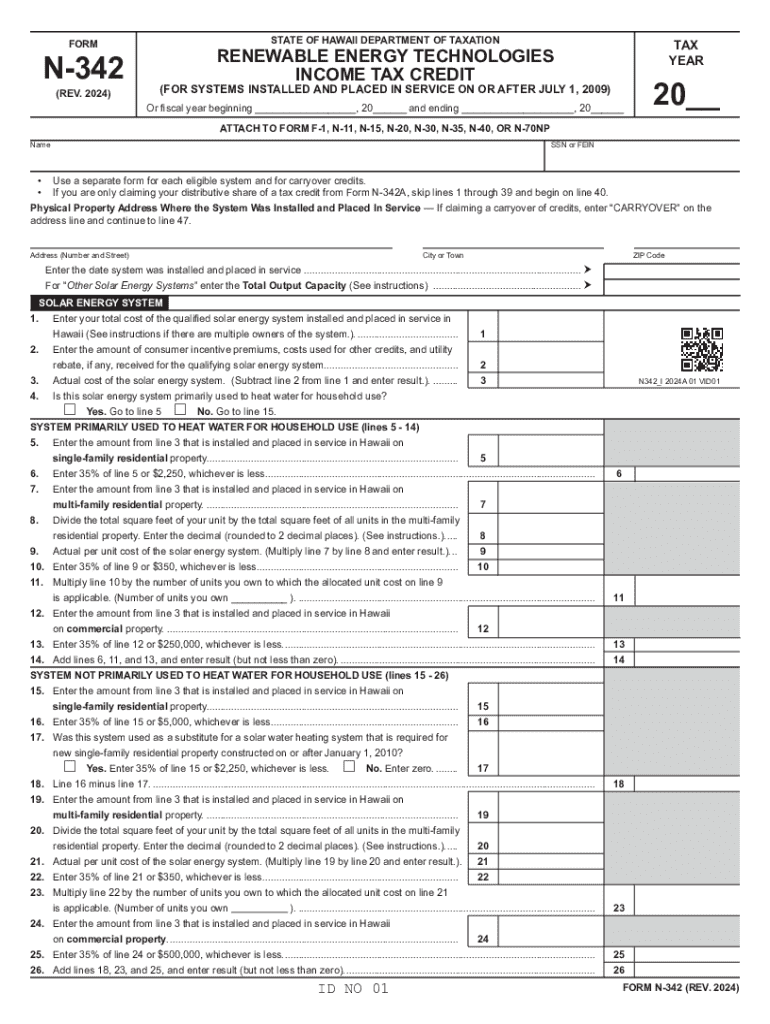
Form N 342, , Renewable Energy Technologies Income Tax Credit for Systems Installed and Placed in Service on or After July 1,


What is the Form N-342?
The Form N-342 is a tax form used in Hawaii to claim the Renewable Energy Technologies Income Tax Credit. This credit is available for individuals and businesses that install renewable energy systems, such as solar panels, geothermal systems, or wind turbines, and place them in service on or after July 1. The form helps taxpayers reduce their state tax liability by providing a credit based on the cost of the renewable energy systems installed.
How to Use the Form N-342
To utilize the Form N-342, taxpayers must first ensure they meet the eligibility criteria for the Renewable Energy Technologies Income Tax Credit. Once eligibility is confirmed, the form must be filled out with accurate information regarding the installed renewable energy systems. This includes details such as the type of system, installation costs, and the date the system was placed in service. After completing the form, it should be submitted with the taxpayer's Hawaii income tax return.
Steps to Complete the Form N-342
Completing the Form N-342 involves several key steps:
- Gather necessary documentation, including receipts for the purchase and installation of the renewable energy system.
- Fill out the form with accurate details, ensuring all required fields are completed.
- Calculate the credit amount based on the installation costs and any applicable limits.
- Attach the completed form to your Hawaii income tax return.
Eligibility Criteria for the Form N-342
To qualify for the Renewable Energy Technologies Income Tax Credit using Form N-342, taxpayers must meet specific eligibility criteria. These include:
- The renewable energy system must be installed in Hawaii.
- The system must be placed in service on or after July 1.
- Taxpayers must provide proof of installation costs through receipts and documentation.
Key Elements of the Form N-342
Key elements of the Form N-342 include:
- Taxpayer identification information, including name and Social Security number or taxpayer identification number.
- Details about the renewable energy system, such as type and installation date.
- Calculation of the credit amount based on the total costs incurred.
Form Submission Methods
The Form N-342 can be submitted in various ways. Taxpayers may choose to file their tax returns electronically, which often allows for quicker processing. Alternatively, the form can be mailed to the appropriate state tax office. In-person submissions may also be possible at designated tax offices, depending on local regulations and availability.
Create this form in 5 minutes or less
Create this form in 5 minutes!
How to create an eSignature for the form n 342 renewable energy technologies income tax credit for systems installed and placed in service on or after july 1
How to create an electronic signature for a PDF online
How to create an electronic signature for a PDF in Google Chrome
How to create an e-signature for signing PDFs in Gmail
How to create an e-signature right from your smartphone
How to create an e-signature for a PDF on iOS
How to create an e-signature for a PDF on Android
People also ask
-
What is form n 342 and how can airSlate SignNow help with it?
Form n 342 is a specific document used for various administrative purposes. airSlate SignNow simplifies the process of filling out and eSigning form n 342, ensuring that your documents are completed accurately and efficiently. With our platform, you can easily manage and send this form for signatures, streamlining your workflow.
-
What features does airSlate SignNow offer for managing form n 342?
airSlate SignNow provides a range of features for managing form n 342, including customizable templates, secure eSigning, and real-time tracking. These features allow you to create, send, and monitor the status of your form n 342 effortlessly. Additionally, our user-friendly interface makes it easy for anyone to navigate the process.
-
Is there a cost associated with using airSlate SignNow for form n 342?
Yes, there is a cost associated with using airSlate SignNow, but we offer competitive pricing plans that cater to different business needs. Our plans provide access to all features necessary for managing form n 342, ensuring you get the best value for your investment. You can choose a plan that fits your budget and requirements.
-
Can I integrate airSlate SignNow with other applications for form n 342?
Absolutely! airSlate SignNow offers seamless integrations with various applications, allowing you to enhance your workflow when dealing with form n 342. Whether you use CRM systems, cloud storage, or other productivity tools, our platform can connect with them to streamline your document management process.
-
What are the benefits of using airSlate SignNow for form n 342?
Using airSlate SignNow for form n 342 provides numerous benefits, including increased efficiency, reduced paperwork, and enhanced security. Our platform ensures that your documents are signed quickly and securely, minimizing delays in your processes. Additionally, you can access your forms anytime, anywhere, making it convenient for your business.
-
How secure is airSlate SignNow when handling form n 342?
Security is a top priority at airSlate SignNow. When handling form n 342, we utilize advanced encryption and secure storage to protect your sensitive information. Our compliance with industry standards ensures that your documents are safe from unauthorized access, giving you peace of mind.
-
Can I track the status of form n 342 sent through airSlate SignNow?
Yes, airSlate SignNow allows you to track the status of form n 342 in real-time. You will receive notifications when the document is viewed, signed, or completed, enabling you to stay updated on its progress. This feature helps you manage your documents more effectively and ensures timely follow-ups.
Get more for Form N 342, , Renewable Energy Technologies Income Tax Credit For Systems Installed And Placed In Service On Or After July 1,
Find out other Form N 342, , Renewable Energy Technologies Income Tax Credit For Systems Installed And Placed In Service On Or After July 1,
- How Do I eSignature Maryland Healthcare / Medical PDF
- Help Me With eSignature New Mexico Healthcare / Medical Form
- How Do I eSignature New York Healthcare / Medical Presentation
- How To eSignature Oklahoma Finance & Tax Accounting PPT
- Help Me With eSignature Connecticut High Tech Presentation
- How To eSignature Georgia High Tech Document
- How Can I eSignature Rhode Island Finance & Tax Accounting Word
- How Can I eSignature Colorado Insurance Presentation
- Help Me With eSignature Georgia Insurance Form
- How Do I eSignature Kansas Insurance Word
- How Do I eSignature Washington Insurance Form
- How Do I eSignature Alaska Life Sciences Presentation
- Help Me With eSignature Iowa Life Sciences Presentation
- How Can I eSignature Michigan Life Sciences Word
- Can I eSignature New Jersey Life Sciences Presentation
- How Can I eSignature Louisiana Non-Profit PDF
- Can I eSignature Alaska Orthodontists PDF
- How Do I eSignature New York Non-Profit Form
- How To eSignature Iowa Orthodontists Presentation
- Can I eSignature South Dakota Lawers Document