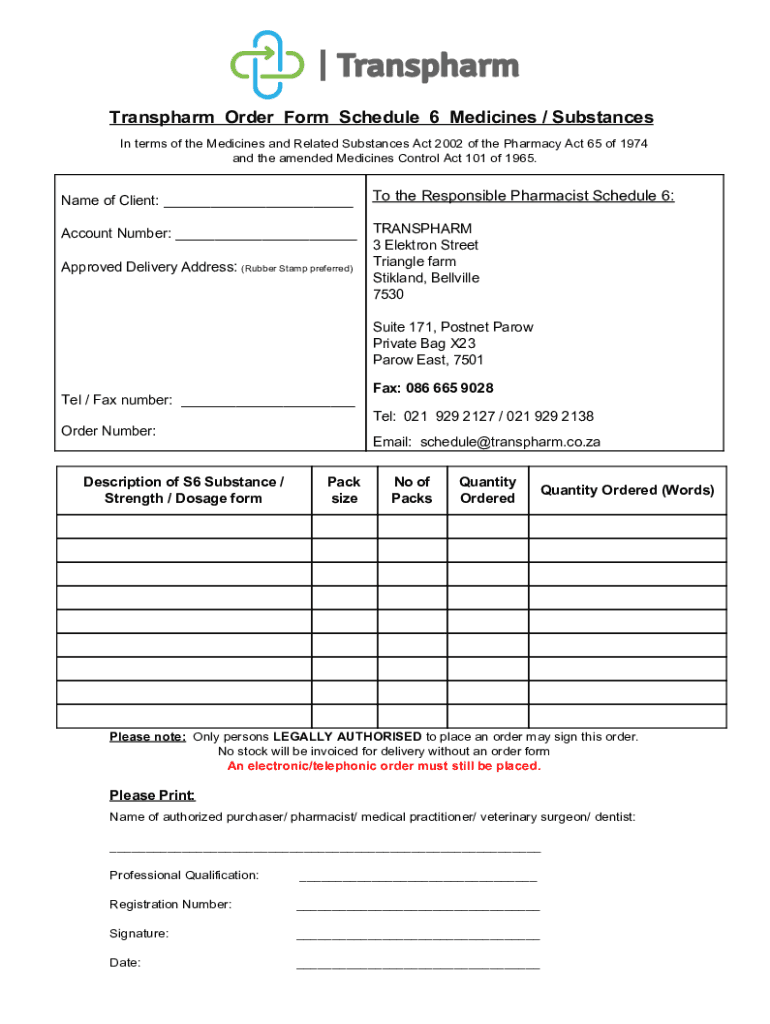
Transpharm WCSchedule 6 Order Form


What is the Transpharm WCSchedule 6 Order Form
The Transpharm WCSchedule 6 Order Form is a specialized document used primarily in the pharmaceutical sector. It serves as a formal request for the procurement of specific medications or pharmaceutical products. This form is crucial for ensuring compliance with regulatory standards while facilitating the efficient ordering process within healthcare settings. Understanding its purpose and structure is essential for healthcare providers and pharmacies to maintain proper inventory and legal compliance.
How to use the Transpharm WCSchedule 6 Order Form
Using the Transpharm WCSchedule 6 Order Form involves several key steps. First, ensure that you have the most current version of the form to comply with any updates in regulations. Fill out the required fields accurately, including details such as the product name, quantity, and any relevant patient information. After completing the form, review it for accuracy to avoid any potential delays in processing. Finally, submit the form through the appropriate channels, whether electronically or via traditional mail, depending on the specific requirements of your organization.
Steps to complete the Transpharm WCSchedule 6 Order Form
Completing the Transpharm WCSchedule 6 Order Form requires attention to detail. Follow these steps for a successful submission:
- Gather necessary information: Collect all required details, including product specifications and patient data.
- Fill out the form: Enter the information clearly in the designated fields, ensuring accuracy.
- Double-check entries: Review the completed form for any errors or omissions that could lead to complications.
- Submit the form: Send the completed form through the designated method, ensuring it reaches the appropriate department or supplier.
Key elements of the Transpharm WCSchedule 6 Order Form
The Transpharm WCSchedule 6 Order Form contains several key elements that are essential for its proper use. These include:
- Patient information: Details such as the patient's name, identification number, and contact information.
- Medication details: The specific drugs or products being ordered, including dosage and quantity.
- Prescriber information: Information about the healthcare provider authorizing the order, including their credentials.
- Signature section: A designated area for the prescriber’s signature, confirming the legitimacy of the order.
Legal use of the Transpharm WCSchedule 6 Order Form
The legal use of the Transpharm WCSchedule 6 Order Form is governed by various healthcare regulations. It is essential for healthcare providers to ensure that the form is filled out correctly to comply with state and federal laws regarding medication procurement. Failure to adhere to these regulations may result in legal repercussions, including fines or loss of licensure. Thus, understanding the legal framework surrounding this form is crucial for all parties involved in the ordering process.
Form Submission Methods
The Transpharm WCSchedule 6 Order Form can be submitted through various methods, depending on the preferences of the healthcare provider or pharmacy. Common submission methods include:
- Online submission: Many organizations allow for electronic submission through secure portals, streamlining the ordering process.
- Mail submission: The traditional method involves sending the completed form via postal service to the appropriate address.
- In-person submission: Some facilities may require or allow the form to be delivered directly to a designated office or department.
Handy tips for filling out Transpharm WCSchedule 6 Order Form online
Quick steps to complete and e-sign Transpharm WCSchedule 6 Order Form online:
- Use Get Form or simply click on the template preview to open it in the editor.
- Start completing the fillable fields and carefully type in required information.
- Use the Cross or Check marks in the top toolbar to select your answers in the list boxes.
- Utilize the Circle icon for other Yes/No questions.
- Look through the document several times and make sure that all fields are completed with the correct information.
- Insert the current Date with the corresponding icon.
- Add a legally-binding e-signature. Go to Sign -> Add New Signature and select the option you prefer: type, draw, or upload an image of your handwritten signature and place it where you need it.
- Finish filling out the form with the Done button.
- Download your copy, save it to the cloud, print it, or share it right from the editor.
- Check the Help section and contact our Support team if you run into any troubles when using the editor.
We understand how straining completing documents can be. Get access to a HIPAA and GDPR compliant solution for maximum simplicity. Use signNow to electronically sign and share Transpharm WCSchedule 6 Order Form for e-signing.
Create this form in 5 minutes or less
Create this form in 5 minutes!
How to create an eSignature for the transpharm wcschedule 6 order form
How to create an electronic signature for a PDF online
How to create an electronic signature for a PDF in Google Chrome
How to create an e-signature for signing PDFs in Gmail
How to create an e-signature right from your smartphone
How to create an e-signature for a PDF on iOS
How to create an e-signature for a PDF on Android
People also ask
-
What is the Transpharm WCSchedule 6 Order Form?
The Transpharm WCSchedule 6 Order Form is a specialized document designed for the ordering of Schedule 6 substances. It ensures compliance with regulatory requirements while streamlining the ordering process for healthcare providers and pharmacies.
-
How can I access the Transpharm WCSchedule 6 Order Form?
You can easily access the Transpharm WCSchedule 6 Order Form through the airSlate SignNow platform. Simply log in to your account, navigate to the templates section, and search for the Transpharm WCSchedule 6 Order Form to get started.
-
What are the key features of the Transpharm WCSchedule 6 Order Form?
The Transpharm WCSchedule 6 Order Form includes features such as customizable fields, electronic signatures, and secure document storage. These features enhance the efficiency of the ordering process while ensuring compliance with legal standards.
-
Is the Transpharm WCSchedule 6 Order Form compliant with regulations?
Yes, the Transpharm WCSchedule 6 Order Form is designed to meet all necessary regulatory requirements. By using this form, businesses can ensure they are compliant with laws governing the ordering of controlled substances.
-
What are the benefits of using the Transpharm WCSchedule 6 Order Form?
Using the Transpharm WCSchedule 6 Order Form simplifies the ordering process, reduces paperwork, and minimizes errors. This leads to faster processing times and improved accuracy in managing Schedule 6 substance orders.
-
Can I integrate the Transpharm WCSchedule 6 Order Form with other software?
Yes, the Transpharm WCSchedule 6 Order Form can be integrated with various software solutions, including CRM and ERP systems. This integration helps streamline workflows and enhances overall operational efficiency.
-
What is the pricing for using the Transpharm WCSchedule 6 Order Form?
Pricing for the Transpharm WCSchedule 6 Order Form varies based on the subscription plan you choose with airSlate SignNow. We offer flexible pricing options to accommodate businesses of all sizes, ensuring you get the best value for your needs.
Get more for Transpharm WCSchedule 6 Order Form
Find out other Transpharm WCSchedule 6 Order Form
- How Do I eSignature Alaska Life Sciences Presentation
- Help Me With eSignature Iowa Life Sciences Presentation
- How Can I eSignature Michigan Life Sciences Word
- Can I eSignature New Jersey Life Sciences Presentation
- How Can I eSignature Louisiana Non-Profit PDF
- Can I eSignature Alaska Orthodontists PDF
- How Do I eSignature New York Non-Profit Form
- How To eSignature Iowa Orthodontists Presentation
- Can I eSignature South Dakota Lawers Document
- Can I eSignature Oklahoma Orthodontists Document
- Can I eSignature Oklahoma Orthodontists Word
- How Can I eSignature Wisconsin Orthodontists Word
- How Do I eSignature Arizona Real Estate PDF
- How To eSignature Arkansas Real Estate Document
- How Do I eSignature Oregon Plumbing PPT
- How Do I eSignature Connecticut Real Estate Presentation
- Can I eSignature Arizona Sports PPT
- How Can I eSignature Wisconsin Plumbing Document
- Can I eSignature Massachusetts Real Estate PDF
- How Can I eSignature New Jersey Police Document