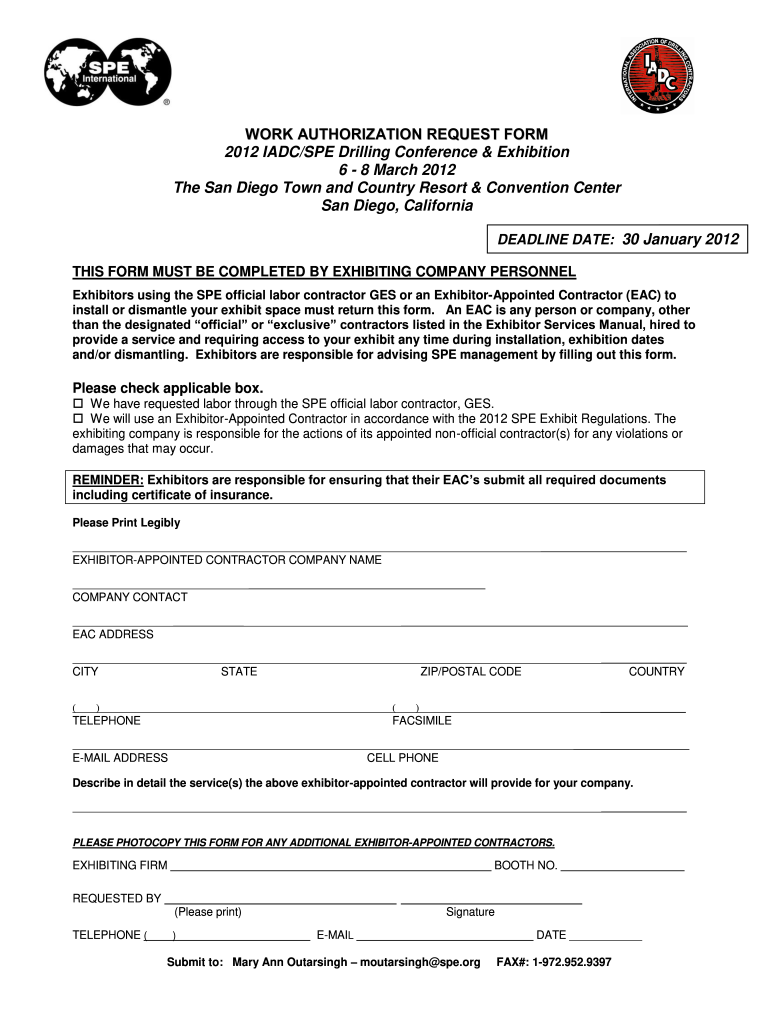
Work Authorization Form 2012-2026


What is the Work Authorization Form
The work authorization form contractor serves as a crucial document that allows businesses to verify that a contractor is legally permitted to perform work. This form typically includes essential details such as the contractor's name, contact information, and the scope of work to be performed. It acts as a safeguard for both the contractor and the hiring entity, ensuring compliance with labor laws and regulations. By formalizing the work arrangement, this document helps prevent misunderstandings and establishes clear expectations regarding the work to be completed.
How to Use the Work Authorization Form
Using the work authorization form contractor involves several straightforward steps. First, the hiring entity must fill out the form with accurate details about the contractor and the specific project. Next, the contractor reviews the information to ensure it aligns with their understanding of the work. Once both parties agree on the terms, they sign the document, which may also require additional verification, such as a witness signature or notarization, depending on state regulations. Finally, both parties should retain a copy for their records to ensure transparency and accountability.
Steps to Complete the Work Authorization Form
Completing the work authorization form contractor involves a series of organized steps:
- Gather necessary information: Collect details such as the contractor's name, address, and the nature of the work to be performed.
- Fill out the form: Enter the gathered information accurately, ensuring all required fields are completed.
- Review the document: Both parties should review the form to confirm that all details are correct and understood.
- Sign the form: Both the contractor and the hiring entity should sign the document, which may include additional verification as needed.
- Distribute copies: Provide copies of the signed form to all involved parties to maintain a record of the agreement.
Legal Use of the Work Authorization Form
The legal use of the work authorization form contractor is essential for ensuring compliance with labor laws in the United States. This form serves as evidence that the contractor is authorized to work, which can protect both the contractor and the hiring entity from potential legal issues. It is important to ensure that the form is filled out accurately and signed by both parties, as improper use or incomplete information may lead to disputes or penalties. Adhering to state-specific regulations regarding work authorization is also critical to maintaining legal compliance.
Key Elements of the Work Authorization Form
Several key elements are essential for a comprehensive work authorization form contractor:
- Contractor Information: Full name, address, and contact details of the contractor.
- Scope of Work: A detailed description of the tasks to be performed.
- Duration: The start and end dates of the contract work.
- Signatures: Signatures of both the contractor and the hiring entity, along with dates.
- Compliance Clauses: Statements ensuring adherence to relevant labor laws and regulations.
Examples of Using the Work Authorization Form
There are various scenarios in which the work authorization form contractor is utilized. For instance, a construction company may use this form when hiring subcontractors for specific projects. Similarly, businesses in the service industry may require this form when engaging independent contractors for short-term assignments. Each example highlights the importance of having a formalized agreement that outlines the terms of work, ensuring clarity and legal protection for all parties involved.
Quick guide on how to complete contractor work authorization form for insurance work
Complete Work Authorization Form effortlessly on any gadget
Online document management has become increasingly popular among companies and individuals. It offers an ideal environmentally friendly substitute to traditional printed and signed documents, as you can obtain the right form and securely store it online. airSlate SignNow equips you with all the resources you need to create, modify, and eSign your documents swiftly without delays. Manage Work Authorization Form on any gadget with airSlate SignNow Android or iOS applications and enhance any document-related process today.
How to alter and eSign Work Authorization Form effortlessly
- Locate Work Authorization Form and then click Get Form to begin.
- Utilize the tools we offer to complete your form.
- Emphasize pertinent sections of the documents or conceal sensitive information with tools that airSlate SignNow provides specifically for that purpose.
- Create your signature with the Sign tool, which takes mere seconds and carries the same legal validity as a conventional wet ink signature.
- Review all the information and then click the Done button to save your changes.
- Select your preferred delivery method for your form, whether by email, text message (SMS), invitation link, or download it to your computer.
Eliminate concerns about lost or misplaced documents, tedious form searching, or errors that necessitate printing new document copies. airSlate SignNow addresses all your needs in document management in just a few clicks from any device you prefer. Adjust and eSign Work Authorization Form and ensure excellent communication at any stage of your form preparation process with airSlate SignNow.
Create this form in 5 minutes or less
FAQs
-
Which GST form should I fill out for filing a return as a building work contractor?
You need to file GSTR 3b and GSTR 1 ,if it government contract make sure to claim INPUT for TDS deducted amount.
-
As one of the cofounders of a multi-member LLC taxed as a partnership, how do I pay myself for work I am doing as a contractor for the company? What forms do I need to fill out?
First, the LLC operates as tax partnership (“TP”) as the default tax status if no election has been made as noted in Treasury Regulation Section 301.7701-3(b)(i). For legal purposes, we have a LLC. For tax purposes we have a tax partnership. Since we are discussing a tax issue here, we will discuss the issue from the perspective of a TP.A partner cannot under any circumstances be an employee of the TP as Revenue Ruling 69-184 dictated such. And, the 2016 preamble to Temporary Treasury Regulation Section 301.7701-2T notes the Treasury still supports this revenue ruling.Though a partner can engage in a transaction with the TP in a non partner capacity (Section 707a(a)).A partner receiving a 707(a) payment from the partnership receives the payment as any stranger receives a payment from the TP for services rendered. This partner gets treated for this transaction as if he/she were not a member of the TP (Treasury Regulation Section 1.707-1(a).As an example, a partner owns and operates a law firm specializing in contract law. The TP requires advice on terms and creation for new contracts the TP uses in its business with clients. This partner provides a bid for this unique job and the TP accepts it. Here, the partner bills the TP as it would any other client, and the partner reports the income from the TP client job as he/she would for any other client. The TP records the job as an expense and pays the partner as it would any other vendor. Here, I am assuming the law contract job represents an expense versus a capital item. Of course, the partner may have a law corporation though the same principle applies.Further, a TP can make fixed payments to a partner for services or capital — called guaranteed payments as noted in subsection (c).A 707(c) guaranteed payment shows up in the membership agreement drawn up by the business attorney. This payment provides a service partner with a guaranteed payment regardless of the TP’s income for the year as noted in Treasury Regulation Section 1.707-1(c).As an example, the TP operates an exclusive restaurant. Several partners contribute capital for the venture. The TP’s key service partner is the chef for the restaurant. And, the whole restaurant concept centers on this chef’s experience and creativity. The TP’s operating agreement provides the chef receives a certain % profit interest but as a minimum receives yearly a fixed $X guaranteed payment regardless of TP’s income level. In the first year of operations the TP has low profits as expected. The chef receives the guaranteed $X payment as provided in the membership agreement.The TP allocates the guaranteed payment to the capital interest partners on their TP k-1s as business expense. And, the TP includes the full $X guaranteed payment as income on the chef’s K-1. Here, the membership agreement demonstrates the chef only shares in profits not losses. So, the TP only allocates the guaranteed expense to those partners responsible for making up losses (the capital partners) as noted in Treasury Regulation Section 707-1(c) Example 3. The chef gets no allocation for the guaranteed expense as he/she does not participate in losses.If we change the situation slightly, we may change the tax results. If the membership agreement says the chef shares in losses, we then allocate a portion of the guaranteed expense back to the chef following the above treasury regulation.As a final note, a TP return requires knowledge of primary tax law if the TP desires filing a completed an accurate partnership tax return.I have completed the above tax analysis based on primary partnership tax law. If the situation changes in any manner, the tax outcome may change considerably. www.rst.tax
-
When you start working as an independent contractor for companies like Leapforce/Appen, how do you file for taxes? Do you fill out the W-8BEN form?
Austin Martin’s answer is spot on. When you are an independent contractor, you are in business for yourself. In other words, you are the business! That means you must pay taxes, and since you aren’t an employee of someone else, you have to make estimated tax payments, which will be “squared up” at year end when you file your tax return
-
If I am living in UK with T2 General visa and work as a contractor for a US company with W-8BEN form filled out, do I still need to pay income tax to the UK government?
Yes.Every country in the world taxes people who live there. The US (which claims global jurisdiction over its citizens) taxes you because you are a citizen, the UK (which accepts that its jurisdiction stops at its own border, like every other country except the US) taxes you because you are present and earning money.But you don’t pay tax twice.The UK gets the first bite of the cherry - you’re living there, so you should pay towards public services. If you’re resident, you are taxed like the British taxpayers alongside whom you work, except if you have US investment or rental income that you don’t transfer or remit to the UK, special rules for ‘non-domiciled’ visitors may mean there’s no UK tax on this non-UK income (this is a complex area - take proper advice).You then report all your income to Uncle Sam too. The IRS lets you exclude a certain amount of foreign earned income for US tax purposes (up to $103,900 for 2018). If, even with the exclusion, you still owe US income taxes on your UK compensation, you should be able to claim a credit for UK taxes paid that reduces your US tax liability.Again, this is a complex area - take proper advice.It’s actually even more complex, because social security taxes operate under different rules. You should pay in only the UK or the US, but which country’s rules apply depends on the exact circumstances and how they fit with the US-UK bilateral social security treaty.Take advice (I hope that is clear by now!).
-
What are some reasons that a health insurance company would ask for a pre-authorization form to be filled out by a Dr. before filling a prescription?
One common reason would be that there is a cheaper, therapeutically equivalent drug that they would like you to try first before they approve a claim for the prescribed drug. Another reason is that they want to make sure the prescribed drug is medically necessary.Remember that nothing is stopping you from filling the prescribed drug. It just won't be covered by insurance until the pre-authorization process is complete.
-
How do you fill out music copyright forms for works with two writers?
U.S. perspectiveAs concerns copyright registration, a work that is created by multiple authors or composers is referred to as a “joint work” - please see 17 USC Section 201(a).Put simply, one lists both composers of a joint musical work as the authors.You probably will register the copyright online. However, it is easier to show how multiple authors are entered by referring to the form used for hard-copy registration.Form PA is used to register works of the performing arts. The composers are identified in Space 2 - the first composer in part a, the second in part b.
-
How do you fill out music copyright forms for works with two producers?
U.S. perspectiveAlthough this question is similar to How do you fill out music copyright forms for works with two writers?, the answer to this question is not quite so straightforward because the role of the producers, as concerns copyright registration, has not been explicitly stated.If the registration pertains to a sound recording, rather than the underlying composition, then Form SR (or the online equivalent) is used.If the two producers are the copyright claimants, then they are so identified in Space 4a, and how they became the claimants (e.g., by transfer of rights by the authors) is explained in Space 4b.
Create this form in 5 minutes!
How to create an eSignature for the contractor work authorization form for insurance work
How to make an electronic signature for the Contractor Work Authorization Form For Insurance Work online
How to make an eSignature for the Contractor Work Authorization Form For Insurance Work in Google Chrome
How to create an electronic signature for signing the Contractor Work Authorization Form For Insurance Work in Gmail
How to generate an eSignature for the Contractor Work Authorization Form For Insurance Work from your mobile device
How to create an electronic signature for the Contractor Work Authorization Form For Insurance Work on iOS devices
How to make an eSignature for the Contractor Work Authorization Form For Insurance Work on Android devices
People also ask
-
What is a Work Authorization Form and why do I need it?
A Work Authorization Form is a crucial document that allows employers to verify an employee's eligibility to work in a specific role. By using airSlate SignNow, you can easily create, send, and eSign this form, ensuring compliance with employment laws. This streamlined process helps businesses stay organized and efficient.
-
How can airSlate SignNow help me manage my Work Authorization Forms?
With airSlate SignNow, managing your Work Authorization Forms becomes straightforward and efficient. You can create customizable templates, automate workflows, and securely eSign documents in minutes. This platform helps you reduce paperwork and streamline your hiring processes.
-
Is there a cost associated with using airSlate SignNow for Work Authorization Forms?
Yes, airSlate SignNow offers various pricing plans to suit different business needs, including those specifically for managing Work Authorization Forms. Our pricing is competitive and designed to provide value by streamlining your document management processes. Visit our pricing page to find the best plan for your organization.
-
Can I integrate airSlate SignNow with other software for my Work Authorization Forms?
Absolutely! airSlate SignNow integrates seamlessly with many popular business applications, allowing you to manage your Work Authorization Forms alongside your existing tools. This integration capability enhances your workflow by ensuring that all your documents are in sync and easily accessible.
-
What features does airSlate SignNow offer for Work Authorization Forms?
airSlate SignNow provides a range of features for managing Work Authorization Forms, including customizable templates, secure eSigning, document tracking, and automated reminders. These tools are designed to enhance efficiency and ensure that your documents are handled accurately and promptly.
-
How secure is airSlate SignNow for handling Work Authorization Forms?
Security is a top priority at airSlate SignNow. Our platform uses advanced encryption and secure servers to protect your Work Authorization Forms and sensitive data. We comply with industry standards to ensure that your documents remain confidential and secure.
-
Can I access my Work Authorization Forms on mobile devices using airSlate SignNow?
Yes, airSlate SignNow is fully optimized for mobile use, allowing you to access and manage your Work Authorization Forms from anywhere. Whether you're on a smartphone or tablet, you can easily create, send, and eSign documents on the go, making your workflow more flexible.
Get more for Work Authorization Form
Find out other Work Authorization Form
- eSignature California Commercial Lease Agreement Template Myself
- eSignature California Commercial Lease Agreement Template Easy
- eSignature Florida Commercial Lease Agreement Template Easy
- eSignature Texas Roommate Contract Easy
- eSignature Arizona Sublease Agreement Template Free
- eSignature Georgia Sublease Agreement Template Online
- eSignature Arkansas Roommate Rental Agreement Template Mobile
- eSignature Maryland Roommate Rental Agreement Template Free
- How Do I eSignature California Lodger Agreement Template
- eSignature Kentucky Lodger Agreement Template Online
- eSignature North Carolina Lodger Agreement Template Myself
- eSignature Alabama Storage Rental Agreement Free
- eSignature Oregon Housekeeping Contract Computer
- eSignature Montana Home Loan Application Online
- eSignature New Hampshire Home Loan Application Online
- eSignature Minnesota Mortgage Quote Request Simple
- eSignature New Jersey Mortgage Quote Request Online
- Can I eSignature Kentucky Temporary Employment Contract Template
- eSignature Minnesota Email Cover Letter Template Fast
- How To eSignature New York Job Applicant Rejection Letter