Intervention Tracking Sheet 2012-2026


What is the Intervention Tracking Sheet
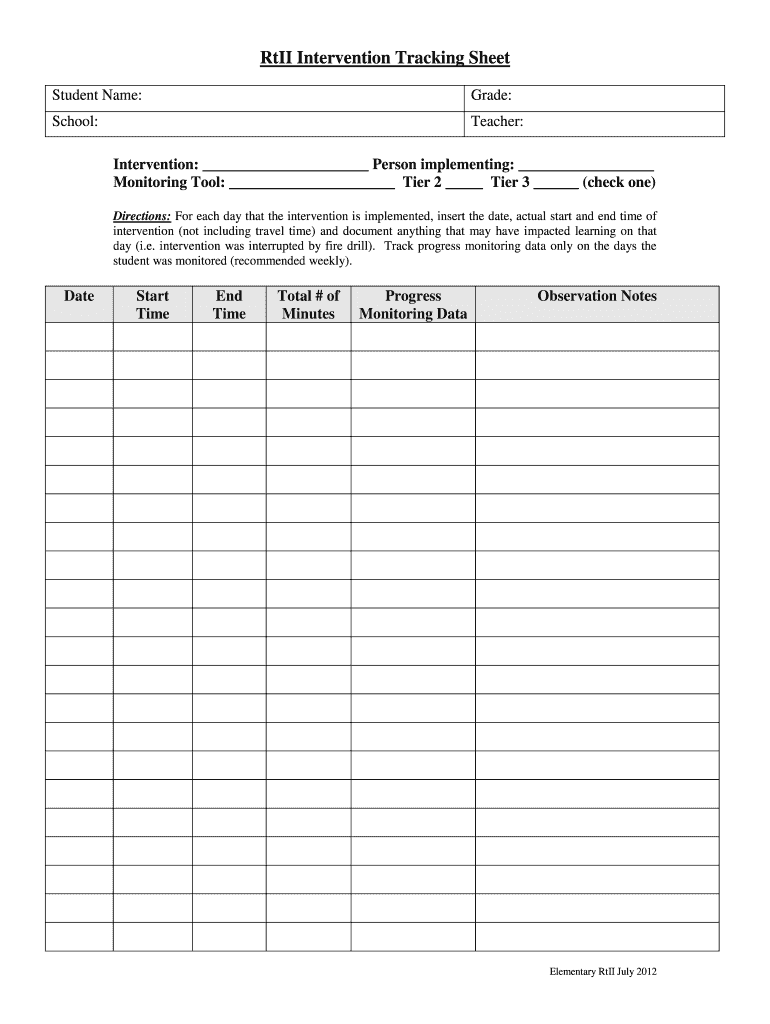
The intervention tracking sheet is a structured document designed to monitor and document interventions in various settings, particularly in educational and therapeutic environments. It serves as a tool for educators, therapists, and administrators to record specific interventions applied to individuals, track their effectiveness, and make informed decisions based on the collected data. This sheet typically includes sections for participant information, types of interventions, dates of implementation, and outcomes observed, allowing for a comprehensive overview of progress over time.
How to use the Intervention Tracking Sheet
Using the intervention tracking sheet effectively involves several key steps. First, identify the individual or group for whom interventions are being tracked. Next, fill in the relevant personal information, such as name, age, and any pertinent background details. Then, document each intervention applied, including the date, type, and specific strategies used. It is essential to record the outcomes or responses to each intervention, as this data will inform future actions. Regularly reviewing and updating the sheet ensures that it remains a valuable resource for ongoing assessment and planning.
Steps to complete the Intervention Tracking Sheet
Completing the intervention tracking sheet involves a systematic approach. Start by gathering necessary information about the individual or group. Follow these steps:
- Enter the participant's details, including name and identification number.
- List the date of each intervention and the specific type of intervention implemented.
- Describe the strategies used during the intervention.
- Document the outcomes, noting any changes in behavior or performance.
- Regularly review the entries to assess trends and make adjustments as needed.
Key elements of the Intervention Tracking Sheet
Several key elements are essential for an effective intervention tracking sheet. These include:
- Participant Information: Basic details about the individual receiving interventions.
- Intervention Types: A clear categorization of the interventions used.
- Implementation Dates: Accurate dates when each intervention was applied.
- Outcomes: Observations and results following each intervention.
- Notes: Additional comments or insights that may be relevant for future reference.
Legal use of the Intervention Tracking Sheet
The legal use of the intervention tracking sheet is crucial in ensuring compliance with educational and health regulations. It is important to maintain confidentiality and secure the data collected, as it may contain sensitive information. Organizations should also ensure that the tracking sheet aligns with relevant laws, such as the Family Educational Rights and Privacy Act (FERPA) in educational settings, which protects student information. Proper documentation can provide legal protection and support accountability in intervention practices.
Examples of using the Intervention Tracking Sheet
Examples of utilizing the intervention tracking sheet can vary across different contexts. In an educational setting, a teacher might use the sheet to track interventions for a student with learning disabilities, noting specific strategies and their outcomes. In a therapeutic context, a clinician may document interventions for a client dealing with anxiety, detailing the techniques used and the client's responses over time. These examples illustrate how the intervention tracking sheet can be tailored to meet the needs of various disciplines while providing valuable insights into the effectiveness of interventions.
Quick guide on how to complete intervention tracking sheet
Complete Intervention Tracking Sheet effortlessly on any device
Web-based document management has become increasingly favored by companies and individuals. It offers an ideal eco-friendly alternative to standard printed and signed documents, allowing you to locate the appropriate form and securely store it online. airSlate SignNow equips you with all the tools necessary to create, modify, and eSign your documents promptly without interruptions. Handle Intervention Tracking Sheet on any device using the airSlate SignNow Android or iOS applications and streamline any document-related process today.
How to modify and eSign Intervention Tracking Sheet effortlessly
- Locate Intervention Tracking Sheet and click Get Form to begin.
- Utilize the tools we provide to complete your document.
- Emphasize signNow sections of the documents or redact sensitive information using tools that airSlate SignNow specifically offers for that purpose.
- Create your signature using the Sign tool, which takes just seconds and holds the same legal validity as a traditional handwritten signature.
- Review all the details and click on the Done button to save your changes.
- Choose your preferred method for delivering your form, whether by email, SMS, invitation link, or downloading it to your PC.
Eliminate concerns about lost or misplaced files, tedious form searches, or mistakes that necessitate printing new document copies. airSlate SignNow fulfills all your document management needs in just a few clicks from any device of your choice. Modify and eSign Intervention Tracking Sheet and ensure excellent communication at any stage of the form preparation process with airSlate SignNow.
Create this form in 5 minutes or less
Create this form in 5 minutes!
How to create an eSignature for the intervention tracking sheet
How to create an eSignature for your PDF document in the online mode
How to create an eSignature for your PDF document in Chrome
The best way to make an electronic signature for putting it on PDFs in Gmail
How to generate an eSignature from your mobile device
How to generate an electronic signature for a PDF document on iOS devices
How to generate an eSignature for a PDF file on Android devices
People also ask
-
What is an intervention tracking sheet?
An intervention tracking sheet is a structured document that helps organizations monitor and evaluate the effectiveness of interventions or strategies used. It allows for systematic data collection, aiding in decision-making and improving processes over time.
-
How can airSlate SignNow help with my intervention tracking sheet?
airSlate SignNow streamlines the process of creating, signing, and managing your intervention tracking sheet. With its easy-to-use features, you can quickly generate, distribute, and track responses to your sheets, ensuring efficient data collection and collaboration.
-
Is there a cost associated with using airSlate SignNow for intervention tracking sheets?
Yes, airSlate SignNow offers competitive pricing plans tailored to various organizational needs. Each plan includes tools that enhance the management of your intervention tracking sheet, providing excellent value for teams of any size.
-
What features does airSlate SignNow offer for intervention tracking sheets?
Key features of airSlate SignNow for intervention tracking sheets include eSignature capabilities, document templates, and automated workflows. These functionalities streamline the process, reduce manual errors, and expedite document handling.
-
Can I customize my intervention tracking sheet in airSlate SignNow?
Absolutely! airSlate SignNow allows you to fully customize your intervention tracking sheet to meet your specific needs. You can tailor fields, sections, and templates to reflect the nuances of your operations while maintaining an organized format.
-
What benefits does using an intervention tracking sheet provide?
Using an intervention tracking sheet enhances transparency and accountability in your processes. It helps in tracking progress over time, evaluating outcomes effectively, and making informed decisions for future interventions.
-
Does airSlate SignNow integrate with other tools for managing intervention tracking sheets?
Yes, airSlate SignNow seamlessly integrates with various productivity tools and software. This capability allows you to synchronize information and improve the workflow surrounding your intervention tracking sheet, making collaboration easier.
Get more for Intervention Tracking Sheet
Find out other Intervention Tracking Sheet
- Electronic signature Doctors Word South Dakota Safe
- Electronic signature South Dakota Doctors Confidentiality Agreement Myself
- How Do I Electronic signature Vermont Doctors NDA
- Electronic signature Utah Doctors Promissory Note Template Secure
- Electronic signature West Virginia Doctors Bill Of Lading Online
- Electronic signature West Virginia Construction Quitclaim Deed Computer
- Electronic signature Construction PDF Wisconsin Myself
- How Do I Electronic signature Wyoming Doctors Rental Lease Agreement
- Help Me With Electronic signature Wyoming Doctors Rental Lease Agreement
- How Do I Electronic signature Colorado Education RFP
- Electronic signature Colorado Education Lease Agreement Form Online
- How To Electronic signature Colorado Education Business Associate Agreement
- Can I Electronic signature California Education Cease And Desist Letter
- Electronic signature Arizona Finance & Tax Accounting Promissory Note Template Computer
- Electronic signature California Finance & Tax Accounting Warranty Deed Fast
- Can I Electronic signature Georgia Education Quitclaim Deed
- Electronic signature California Finance & Tax Accounting LLC Operating Agreement Now
- Electronic signature Connecticut Finance & Tax Accounting Executive Summary Template Myself
- Can I Electronic signature California Government Stock Certificate
- Electronic signature California Government POA Simple