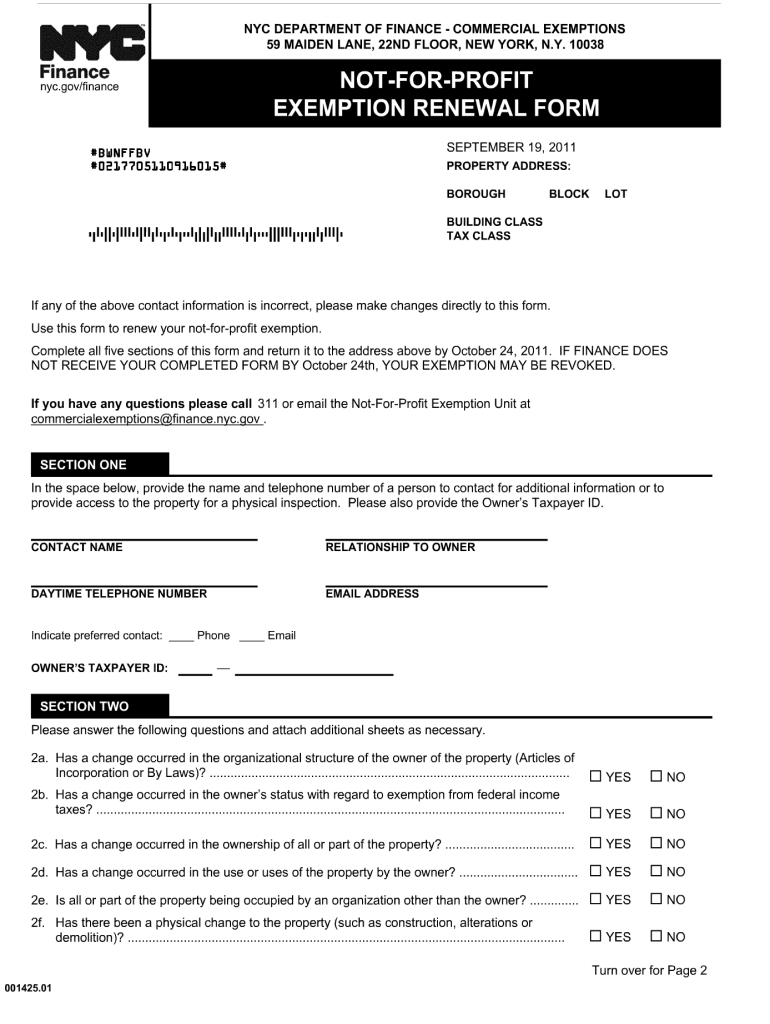
Nyc Gov Commercial Exemptions 2011-2026


What is the NYC Gov Commercial Exemptions
The NYC Gov Commercial Exemptions refer to various tax exemptions available for commercial properties within New York City. These exemptions are designed to reduce the property tax burden on eligible commercial entities, including not-for-profit organizations and certain businesses. By qualifying for these exemptions, property owners can significantly lower their annual tax liabilities, which can aid in financial planning and operational sustainability.
Eligibility Criteria
To qualify for the NYC Gov Commercial Exemptions, applicants must meet specific eligibility requirements. These criteria often include:
- The property must be used for commercial purposes or as a not-for-profit entity.
- The applicant must provide documentation proving the property's use and ownership.
- Compliance with local zoning laws and regulations is necessary.
- Timely submission of the required renewal forms and supporting documents is essential.
Steps to Complete the NYC Gov Commercial Exemptions
Completing the NYC Gov Commercial Exemptions involves several key steps:
- Gather all necessary documentation, including proof of property use and ownership.
- Obtain the appropriate NYC property tax exemption renewal form, such as the NYC property tax exemption renewal form.
- Fill out the form accurately, ensuring all required fields are completed.
- Submit the completed form along with the necessary documents by the specified deadline.
- Keep a copy of the submitted materials for your records.
Required Documents
When applying for the NYC Gov Commercial Exemptions, specific documents are typically required to support your application. These may include:
- Proof of ownership, such as a deed or title.
- Documentation demonstrating the property's use, such as leases or operational statements.
- Previous tax exemption approvals, if applicable.
- Any additional forms or certifications as specified by the NYC Department of Finance.
Form Submission Methods
The NYC property tax exemption renewal form can be submitted through various methods to accommodate different preferences:
- Online: Many applicants prefer to submit forms electronically through the NYC Department of Finance website.
- Mail: Completed forms can be sent via postal service to the appropriate department address.
- In-Person: Applicants may also choose to submit their forms directly at designated NYC Department of Finance offices.
Filing Deadlines / Important Dates
Staying informed about filing deadlines is crucial for maintaining eligibility for the NYC Gov Commercial Exemptions. Key dates include:
- The renewal application period, which typically occurs annually.
- Specific deadlines for submitting the NYC property tax exemption renewal form, usually set by the NYC Department of Finance.
- Notification dates for applicants regarding their exemption status.
Quick guide on how to complete not for profit exemption renewal form nyc
Prepare Nyc Gov Commercial Exemptions effortlessly on any device
Online document management has gained popularity among businesses and individuals. It offers a flawless eco-friendly alternative to traditional printed and signed paperwork, allowing you to access the necessary form and securely store it online. airSlate SignNow provides you with all the tools needed to create, modify, and eSign your documents swiftly without delays. Manage Nyc Gov Commercial Exemptions on any platform using the airSlate SignNow Android or iOS applications and streamline any document-related process today.
The easiest way to modify and eSign Nyc Gov Commercial Exemptions seamlessly
- Locate Nyc Gov Commercial Exemptions and click on Get Form to begin.
- Utilize the tools we offer to complete your document.
- Emphasize important sections of your documents or obscure sensitive information with tools specifically provided by airSlate SignNow for this purpose.
- Create your eSignature using the Sign feature, which takes moments and carries the same legal validity as a conventional wet ink signature.
- Verify the information and select the Done button to save your changes.
- Decide how to send your form, either by email, SMS, or invitation link, or download it to your computer.
Eliminate concerns about lost or misplaced documents, tedious form hunts, or mistakes that necessitate printing new document copies. airSlate SignNow meets all your document management needs in just a few clicks from any device of your choice. Modify and eSign Nyc Gov Commercial Exemptions and ensure effective communication at every stage of the form preparation process with airSlate SignNow.
Create this form in 5 minutes or less
FAQs
-
Do I need to fill out form 8843 if I'm not exempt but also do not meet the substantial presence test?
It would not be a problem to file 1040-NR without the 8843. After all, the purpose of the 8843 is to exclude days of presence in the USA for the purposes of the Substantial Presence Test. If none of the days during the tax year qualifies for exclusion do not attach the form.
-
Which forms do I fill out for taxes in California? I have a DBA/sole proprietorship company with less than $1000 in profit. How many forms do I fill out? This is really overwhelming. Do I need to fill the Form 1040-ES? Did the deadline pass?
You need to file two tax returns- one Federal Tax Form and another California State income law.My answer to your questions are for Tax Year 2018The limitation date for tax year 15.04.2018Federal Tax return for Individual is Form 1040 . Since you are carrying on proprietorship business, you will need to fill the Schedule C in Form 1040Form 1040 -ES , as the name suggests is for paying estimated tax for the current year. This is not the actual tax return form. Please note that while Form 1040, which is the return form for individuals, relates to the previous year, the estimated tax form (Form 1040-EZ ) calculates taxes for the current year.As far as , the tax return under tax laws of Californa State is concerned, the Schedule CA (540) Form is to be used for filing state income tax return . You use your federal information (forms 1040) to fill out your 540 FormPrashanthttp://irstaxapp.com
-
What is wrong with the hiring process and how could it be fixed? Endless forms have to be filled out, nothing is unified, and GitHub, StackOverflow (for developers) or Dribbble (for designers) are not taken into consideration.
Finding the right job candidates is one of the biggest recruiting challenges. Recruiters and other HR professionals that don’t use best recruiting strategies are often unable to find high-quality job applicants. With all the changes and advances in HR technologies, new recruiting and hiring solutions have emerged. Many recruiters are now implementing these new solutions to become more effective and productive in their jobs.According to Recruitment strategies report 2017 done by GetApp, the biggest recruiting challenge in 2017 was the shortage of skilled candidates.The process of finding job candidates has changed signNowly since few years ago. Back then, it was enough to post a job on job boards and wait for candidates to apply. Also called “post and pray” strategy.Today, it is more about building a strong Employer Branding strategy that attracts high quality applicants for hard-to-fill roles.Steps for finding the right job candidates1. Define your ideal candidate a.k.a candidate personaNot knowing who your ideal candidate is, will make finding one impossible. To be able to attract and hire them, you need to know their characteristics, motivations, skills and preferences.Defining a candidate persona requires planning and evaluation. The best way is to start from your current talent star employees. Learn more about their personalities, preferences, motivations and characteristics. Use these findings to find similar people for your current and future job openings.2. Engage your current employeesYou probably already know that your current employees are your best brand ambassadors. Same as current product users are best ambassadors for product brands. Their word of mouth means more than anyone else’s.Encourage their engagement and let them communicate their positive experiences to the outside. Remember, your employees are your best ambassadors, and people trust people more than brands, CEOs and other C-level executives.Involving your current employees can not only help you build a strong Employer Branding strategy, but it can also help your employees feel more engaged and satisfied with their jobs.3. Write a clear job descriptionsEven though many recruiters underestimate this step, it is extremely important to do it right! Writing a clear and detailed job description plays a huge role in finding and attracting candidates with a good fit. Don’t only list duties, responsibilities and requirements, but talk about your company’s culture and Employee Value Proposition.To save time, here are our free job description templates.4. Streamline your efforts with a Recruitment Marketing toolIf you have right tools, finding the right job candidates is much easier and faster than without them. Solutions offered by recruitment marketing software are various, and with them you can build innovative recruiting strategies such as Inbound Recruiting and Candidate Relationship Management to improve Candidate Experience and encourage Candidate Engagement.Sending useful, timely and relevant information to the candidates from your talent pool is a great way for strengthening your Employer Brand and communicating your Employee Value Proposition.5. Optimize your career site to invite visitors to applyWhen candidates want to learn about you, they go to your career site. Don-t loose this opportunity to impress them. Create content and look that reflects your company’s culture, mission and vision. Tell visitors about other employees success and career stories.You can start by adding employee testimonials, fun videos, introduce your team, and write about cool project that your company is working on.Don’t let visitors leave before hitting “Apply Now” button.6. Use a recruiting software with a powerful sourcing toolToday, there are powerful sourcing tools that find and extract candidates profiles. They also add them directly to your talent pool. Manual search takes a lot of time and effort, and is often very inefficient. With a powerful sourcing tool, you can make this process much faster, easier and more productive. These tools help you find candidates that match both the position and company culture.7. Use an Applicant Tracking SystemSolutions offered by applicant tracking systems are various, but their main purpose is to fasten and streamline the selections and hiring processes. By fastening the hiring and selection process, you can signNowly improve Candidate Experience. With this, you can increase your application and hire rate for hard-to-fill roles. Did you know that top talent stays available on the market for only 10 days?8. Implement and use employee referral programsReferrals are proven to be best employees! Referrals can improve your time, cost and quality of hire, and make your hiring strategy much more productive. Yet, many companies still don’t have developed strategies for employee referrals.This is another great way to use your current employee to help you find the best people. To start, use these referral email templates for recruiters, and start engaging your employees today!GetApp‘s survey has proven that employee referrals take shortest to hire, and bring the highest quality job applicants.If you don’t have ideas about how to reward good referrals, here’s our favorite list of ideas for employee referral rewards.
-
How can I make it easier for users to fill out a form on mobile apps?
I’ll tell you a secret - you can thank me later for this.If you want to make the form-filling experience easy for a user - make sure that you have a great UI to offer.Everything boils down to UI at the end.Axonator is one of the best mobile apps to collect data since it offers powerful features bundled with a simple UI.The problem with most of the mobile form apps is that they are overloaded with features that aren’t really necessary.The same doesn’t hold true for Axonator. It has useful features but it is very unlikely that the user will feel overwhelmed in using them.So, if you are inclined towards having greater form completion rates for your survey or any data collection projects, then Axonator is the way to go.Apart from that, there are other features that make the data collection process faster like offline data collection, rich data capture - audio, video, images, QR code & barcode data capture, live location & time capture, and more!Check all the features here!You will be able to complete more surveys - because productivity will certainly shoot up.Since you aren’t using paper forms, errors will drop signNowly.The cost of the paper & print will be saved - your office expenses will drop dramatically.No repeat work. No data entry. Time & money saved yet again.Analytics will empower you to make strategic decisions and explore new revenue opportunities.The app is dirt-cheap & you don’t any training to use the app. They come in with a smooth UI. Forget using, even creating forms for your apps is easy on the platform. Just drag & drop - and it’s ready for use. Anyone can build an app under hours.
-
How should one fill out Form 1120 for a company with no activity and no income and that has not issued shares?
You put all zeros in for revenue and expenses. Even though the corporation has not formally issued shares, someone or several individuals or entities own the common stock of the corporation and you need to report anyone who owns more than 20% of the corporation.
Create this form in 5 minutes!
How to create an eSignature for the not for profit exemption renewal form nyc
How to create an eSignature for your Not For Profit Exemption Renewal Form Nyc in the online mode
How to generate an eSignature for your Not For Profit Exemption Renewal Form Nyc in Google Chrome
How to create an electronic signature for signing the Not For Profit Exemption Renewal Form Nyc in Gmail
How to generate an electronic signature for the Not For Profit Exemption Renewal Form Nyc straight from your smartphone
How to make an eSignature for the Not For Profit Exemption Renewal Form Nyc on iOS
How to create an eSignature for the Not For Profit Exemption Renewal Form Nyc on Android OS
People also ask
-
What are NYC Gov Commercial Exemptions and how can they benefit my business?
NYC Gov Commercial Exemptions are specific tax exemptions that can help businesses reduce their tax liabilities. By utilizing these exemptions, companies can save money and reinvest those funds into their operations. Understanding and leveraging NYC Gov Commercial Exemptions can provide signNow financial benefits for your business.
-
How does airSlate SignNow facilitate the application of NYC Gov Commercial Exemptions?
airSlate SignNow streamlines the application process for NYC Gov Commercial Exemptions by allowing businesses to quickly prepare and send necessary documents electronically. With our user-friendly eSignature platform, you can easily obtain the required signatures and ensure compliance with local regulations. This efficient process helps you focus on what matters most—growing your business.
-
Is there a cost involved with using airSlate SignNow for NYC Gov Commercial Exemptions?
airSlate SignNow offers a cost-effective solution for managing documents related to NYC Gov Commercial Exemptions. Our pricing plans are designed to fit businesses of all sizes, ensuring you get the features you need without breaking the bank. You can choose from various subscription options to find the right fit for your budget.
-
What features does airSlate SignNow offer to assist with NYC Gov Commercial Exemptions?
airSlate SignNow includes several features that simplify the process of managing NYC Gov Commercial Exemptions, such as customizable templates, automated workflows, and secure cloud storage. These tools help ensure that your documents are correctly filled out and submitted on time, minimizing the risk of errors. Additionally, our platform allows for easy tracking of document status.
-
Can airSlate SignNow integrate with other tools to manage NYC Gov Commercial Exemptions?
Yes, airSlate SignNow integrates seamlessly with various business applications, enhancing your workflow related to NYC Gov Commercial Exemptions. Whether you use CRM systems or project management tools, our integrations can help streamline the document management process. This connectivity ensures that all your data remains organized and accessible.
-
How secure is airSlate SignNow when handling documents for NYC Gov Commercial Exemptions?
Security is a top priority at airSlate SignNow, especially when dealing with sensitive documents like those related to NYC Gov Commercial Exemptions. Our platform employs advanced encryption protocols and compliance with industry standards to protect your information. You can trust that your documents are secure while being processed and stored.
-
What support options are available for customers using airSlate SignNow for NYC Gov Commercial Exemptions?
airSlate SignNow provides a range of customer support options for users managing NYC Gov Commercial Exemptions. Our dedicated support team is available through live chat, email, and phone to assist with any questions or issues you may encounter. We also offer comprehensive online resources, including tutorials and FAQs, to help you maximize your use of the platform.
Get more for Nyc Gov Commercial Exemptions
- United states parachute associationsafety ampamp trainingdemo jumps form
- Duke medical form
- Pioneer plan application form
- Macquarie skin cancer clinic pre appointment form
- Colorado telehealth consent form
- Consent to drugalcohol testing statement of acknowledgment form
- Durable power of attorney for health care rush university medical rush form
- Summer program planning guide university of texas rio form
Find out other Nyc Gov Commercial Exemptions
- eSign Arkansas Government Affidavit Of Heirship Easy
- eSign California Government LLC Operating Agreement Computer
- eSign Oklahoma Finance & Tax Accounting Executive Summary Template Computer
- eSign Tennessee Finance & Tax Accounting Cease And Desist Letter Myself
- eSign Finance & Tax Accounting Form Texas Now
- eSign Vermont Finance & Tax Accounting Emergency Contact Form Simple
- eSign Delaware Government Stock Certificate Secure
- Can I eSign Vermont Finance & Tax Accounting Emergency Contact Form
- eSign Washington Finance & Tax Accounting Emergency Contact Form Safe
- How To eSign Georgia Government Claim
- How Do I eSign Hawaii Government Contract
- eSign Hawaii Government Contract Now
- Help Me With eSign Hawaii Government Contract
- eSign Hawaii Government Contract Later
- Help Me With eSign California Healthcare / Medical Lease Agreement
- Can I eSign California Healthcare / Medical Lease Agreement
- How To eSign Hawaii Government Bill Of Lading
- How Can I eSign Hawaii Government Bill Of Lading
- eSign Hawaii Government Promissory Note Template Now
- eSign Hawaii Government Work Order Online