Eia Form 861


What is the EIA Form 861
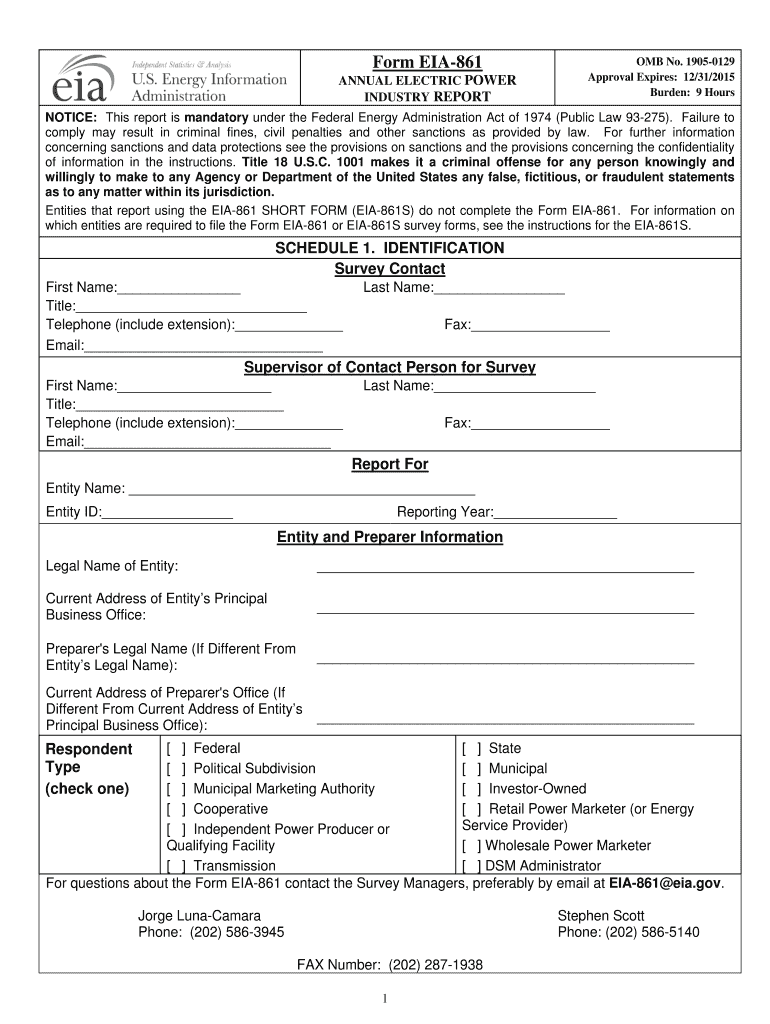
The EIA Form 861, also known as the Annual Electric Power Industry Report, is a comprehensive document used by the U.S. Energy Information Administration (EIA) to collect data on electric power generation, sales, and consumption. This form is essential for understanding the electric power sector's performance and trends. It gathers information from utilities and power producers, including data on electricity sales, revenue, and the sources of energy generation. The information collected helps inform energy policy and supports national energy statistics.
Steps to Complete the EIA Form 861
Completing the EIA Form 861 requires careful attention to detail to ensure accuracy and compliance. Here are the key steps:
- Gather Required Information: Collect data on electricity sales, generation, and revenue from your utility or power production operations.
- Review Instructions: Familiarize yourself with the detailed instructions provided by the EIA for the form to understand all required fields and data.
- Fill Out the Form: Accurately input the collected data into the appropriate sections of the form, ensuring all required fields are completed.
- Double-Check Entries: Review all entries for accuracy and completeness before submission to avoid potential penalties.
- Submit the Form: Choose your preferred submission method, whether online or by mail, and ensure it is sent before the deadline.
Legal Use of the EIA Form 861
The EIA Form 861 must be completed and submitted in accordance with federal regulations. It is crucial to use the most current version of the form, as outdated documents may not be accepted. All data provided must be accurate and complete to maintain compliance with legal requirements. Failure to submit the form or providing incorrect information can result in penalties, including fines or other legal repercussions.
Form Submission Methods
The EIA Form 861 can be submitted through various methods, ensuring flexibility for users. The available submission methods include:
- Online Submission: Users can complete and submit the form electronically through the EIA's designated online platform, which provides a secure and efficient way to file.
- Mail Submission: Alternatively, the form can be printed and mailed to the EIA. Ensure sufficient postage and allow for delivery time to meet submission deadlines.
- In-Person Submission: Some users may have the option to submit the form in person at designated EIA offices, although this method is less common.
Key Elements of the EIA Form 861
The EIA Form 861 consists of several key elements that must be accurately reported. These include:
- Utility Identification: Information about the utility or power producer, including name, address, and contact details.
- Electricity Sales Data: Detailed reporting on the amount of electricity sold, categorized by customer type and other relevant factors.
- Generation Sources: Information on the types of energy sources used for electricity generation, such as coal, natural gas, renewables, and nuclear.
- Revenue Details: Reporting on the revenue generated from electricity sales, providing insights into the financial health of the utility.
Filing Deadlines / Important Dates
It is important to be aware of the filing deadlines for the EIA Form 861 to ensure timely submission. The form typically has an annual deadline, with specific dates set by the EIA. Late submissions may incur penalties, so it is advisable to check the EIA's official announcements for the exact deadlines each year. Mark these dates on your calendar to avoid any last-minute issues.
Quick guide on how to complete eia annual electric power industry report form
Uncover the most efficient method to complete and endorse your Eia Form 861
Are you still spending time preparing your official documents on paper instead of online? airSlate SignNow offers a superior way to fill out and sign your Eia Form 861 and other forms for public services. Our intelligent electronic signature platform provides you with all the tools necessary to manage documents swiftly and in compliance with official standards - robust PDF editing, handling, protecting, endorsing, and sharing options are all readily available within a user-friendly interface.
Only a few steps are needed to fill out and endorse your Eia Form 861:
- Upload the editable template to the editor by clicking on the Get Form button.
- Review the information you must supply in your Eia Form 861.
- Move between the fields using the Next option to ensure you don't miss anything.
- Utilize Text, Check, and Cross tools to fill in the sections with your information.
- Update the content with Text boxes or Images from the toolbar above.
- Emphasize what is essential or Conceal fields that are no longer relevant.
- Select Sign to create a legally binding electronic signature using any method you prefer.
- Add the Date next to your signature and finalize your work by clicking Done.
Store your completed Eia Form 861 in the Documents section of your profile, download it, or transfer it to your preferred cloud storage. Our service also provides versatile file sharing options. There is no need to print your forms when you need to submit them to the appropriate public office - do it via email, fax, or by requesting USPS “snail mail” delivery from your account. Give it a try today!
Create this form in 5 minutes or less
FAQs
-
I need to pay an $800 annual LLC tax for my LLC that formed a month ago, so I am looking to apply for an extension. It's a solely owned LLC, so I need to fill out a Form 7004. How do I fill this form out?
ExpressExtension is an IRS-authorized e-file provider for all types of business entities, including C-Corps (Form 1120), S-Corps (Form 1120S), Multi-Member LLC, Partnerships (Form 1065). Trusts, and Estates.File Tax Extension Form 7004 InstructionsStep 1- Begin by creating your free account with ExpressExtensionStep 2- Enter the basic business details including: Business name, EIN, Address, and Primary Contact.Step 3- Select the business entity type and choose the form you would like to file an extension for.Step 4- Select the tax year and select the option if your organization is a Holding CompanyStep 5- Enter and make a payment on the total estimated tax owed to the IRSStep 6- Carefully review your form for errorsStep 7- Pay and transmit your form to the IRSClick here to e-file before the deadline
-
How much will a doctor with a physical disability and annual net income of around Rs. 2.8 lakhs pay in income tax? Which ITR form is to be filled out?
For disability a deduction of ₹75,000/- is available u/s 80U.Rebate u/s87AFor AY 17–18, rebate was ₹5,000/- or income tax which ever is lower for person with income less than ₹5,00,000/-For AY 18–19, rebate is ₹2,500/- or income tax whichever is lower for person with income less than 3,50,000/-So, for an income of 2.8 lakhs, taxable income after deduction u/s 80U will remain ₹2,05,000/- which is below the slab rate and hence will not be taxable for any of the above said AY.For ITR,If doctor is practicing himself i.e. He has a professional income than ITR 4 should be filedIf doctor is getting any salary than ITR 1 should be filed.:)
Create this form in 5 minutes!
How to create an eSignature for the eia annual electric power industry report form
How to generate an electronic signature for the Eia Annual Electric Power Industry Report Form online
How to make an eSignature for the Eia Annual Electric Power Industry Report Form in Chrome
How to make an electronic signature for putting it on the Eia Annual Electric Power Industry Report Form in Gmail
How to generate an electronic signature for the Eia Annual Electric Power Industry Report Form from your smart phone
How to create an eSignature for the Eia Annual Electric Power Industry Report Form on iOS devices
How to generate an eSignature for the Eia Annual Electric Power Industry Report Form on Android
People also ask
-
What is the Eia Form 861 and why is it important for businesses?
The Eia Form 861 is a crucial document used to report annual energy consumption and sales data for electricity providers in the United States. Understanding this form is vital for businesses involved in energy reporting, as it helps ensure compliance with federal regulations and aids in strategic planning.
-
How can airSlate SignNow help with completing the Eia Form 861?
airSlate SignNow simplifies the process of completing the Eia Form 861 by allowing businesses to easily fill, sign, and send documents electronically. With its user-friendly interface, users can streamline their reporting process and ensure accurate submissions, saving time and reducing errors.
-
Is airSlate SignNow a cost-effective solution for managing the Eia Form 861?
Yes, airSlate SignNow offers a cost-effective solution for managing the Eia Form 861, with pricing plans designed to accommodate businesses of all sizes. By reducing the need for paper documents and manual processes, businesses can also lower their operational costs while ensuring compliance.
-
What features does airSlate SignNow offer to assist with Eia Form 861 submissions?
airSlate SignNow provides features such as customizable templates, electronic signatures, and secure document storage, all of which are beneficial for Eia Form 861 submissions. These features enhance the efficiency of document management and ensure that all submissions are securely tracked and stored.
-
Can airSlate SignNow integrate with other tools for managing the Eia Form 861?
Absolutely! airSlate SignNow integrates seamlessly with various business tools, including CRM systems and accounting software, making it easier to manage the Eia Form 861 alongside other operational processes. This integration helps streamline workflows and keeps all relevant data organized and accessible.
-
What are the benefits of using airSlate SignNow for the Eia Form 861?
Using airSlate SignNow for the Eia Form 861 offers several benefits, including enhanced security, improved accuracy, and faster processing times. Additionally, the platform's ease of use ensures that employees can complete forms efficiently, reducing the risk of delays in compliance.
-
How does airSlate SignNow ensure the security of the Eia Form 861 documents?
airSlate SignNow prioritizes security by using advanced encryption and secure cloud storage for all documents, including the Eia Form 861. This means that sensitive information is protected against unauthorized access while maintaining compliance with industry regulations.
Get more for Eia Form 861
- Reciprocity exemptionaffidavit of residency for tax year 2017 form
- M1prx amended homestead credit refund for homeowners form
- 2005 form mo ptc property tax credit claim formsend
- Pennsylvania exemption certificate rev 1220 pa department of form
- Bill of sale missouri print 2009 form
- Mo mwp missouri works program missouri department of revenue dor mo form
- Agriculture disaster relief form mo agdr dor mo
- Application for amusement device viewing stand or tent operating permit sh80 form
Find out other Eia Form 861
- How To eSign Virginia Business Operations Presentation
- How To eSign Hawaii Construction Word
- How Can I eSign Hawaii Construction Word
- How Can I eSign Hawaii Construction Word
- How Do I eSign Hawaii Construction Form
- How Can I eSign Hawaii Construction Form
- How To eSign Hawaii Construction Document
- Can I eSign Hawaii Construction Document
- How Do I eSign Hawaii Construction Form
- How To eSign Hawaii Construction Form
- How Do I eSign Hawaii Construction Form
- How To eSign Florida Doctors Form
- Help Me With eSign Hawaii Doctors Word
- How Can I eSign Hawaii Doctors Word
- Help Me With eSign New York Doctors PPT
- Can I eSign Hawaii Education PDF
- How To eSign Hawaii Education Document
- Can I eSign Hawaii Education Document
- How Can I eSign South Carolina Doctors PPT
- How Can I eSign Kansas Education Word