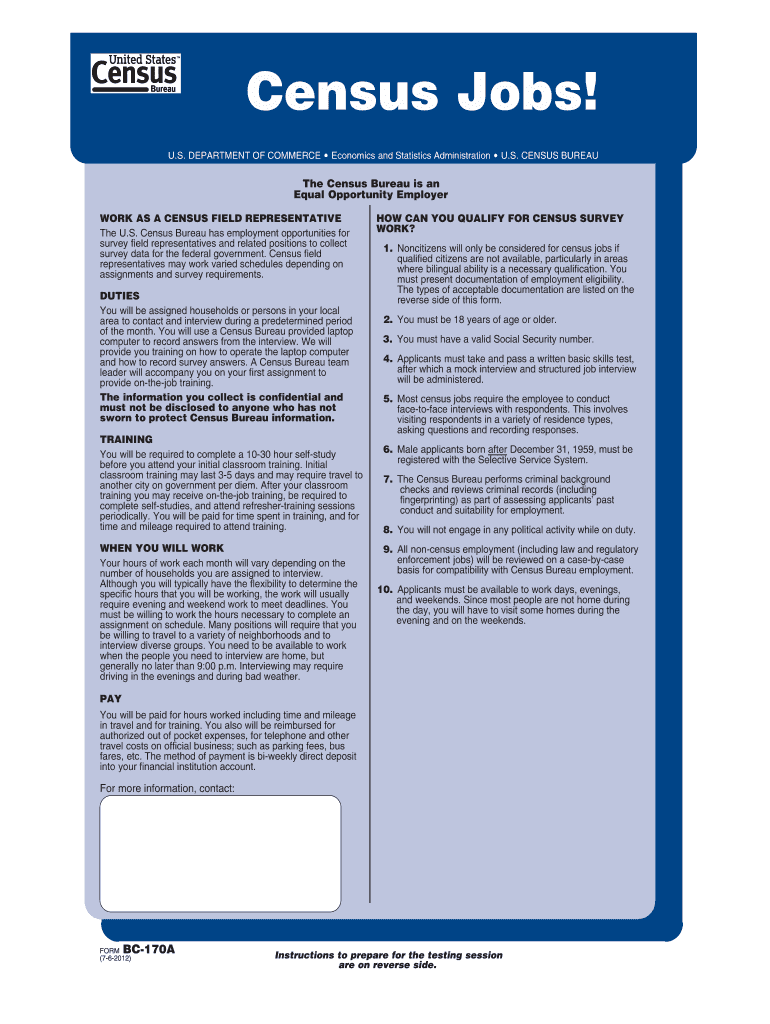
Bc 170 Form


What is the BC-170 Form
The BC-170 form, also known as the U.S. Census Employment Application, is a critical document used for applying to various positions within the U.S. Census Bureau. This form gathers essential information about the applicant, including personal details, employment history, and qualifications relevant to census-related jobs. It serves as a formal request for consideration in roles such as field representatives and other positions that support the census process.
How to Use the BC-170 Form
To effectively use the BC-170 form, applicants should first ensure they have all necessary information at hand. This includes personal identification details, work experience, and educational background. The form is designed to be user-friendly, guiding applicants through each section. It is important to fill out the form completely and accurately, as incomplete submissions may delay the application process.
Steps to Complete the BC-170 Form
Completing the BC-170 form involves several key steps:
- Gather required information, including your Social Security number, contact details, and employment history.
- Carefully read the instructions provided with the form to ensure compliance with all requirements.
- Fill out each section of the form, providing clear and accurate information.
- Review the completed form for any errors or omissions.
- Submit the form according to the specified submission methods, whether online or by mail.
Legal Use of the BC-170 Form
The BC-170 form is legally binding once submitted, meaning that the information provided must be truthful and accurate. Misrepresentation or false information can lead to disqualification from employment opportunities or legal repercussions. It is essential for applicants to understand the legal implications of their submissions and to ensure that all details are correct before sending the form.
Required Documents
When completing the BC-170 form, applicants may need to provide supporting documents to verify their identity and qualifications. Commonly required documents include:
- Proof of identity, such as a driver's license or state ID.
- Social Security card.
- Educational transcripts or diplomas.
- Previous employment records or references.
Form Submission Methods
The BC-170 form can be submitted through various methods, ensuring convenience for applicants. The available submission methods include:
- Online submission through the U.S. Census Bureau's designated portal.
- Mailing the completed form to the appropriate address provided in the instructions.
- In-person submission at designated Census Bureau offices, if applicable.
Quick guide on how to complete bc 170a census jobs censusgov census
Finalize Bc 170 Form seamlessly on any device
Online document management has gained traction among companies and individuals alike. It offers an ideal environmentally friendly alternative to traditional printed and signed documents, enabling you to locate the appropriate form and securely store it online. airSlate SignNow equips you with all the necessary tools to create, edit, and electronically sign your documents promptly without delays. Oversee Bc 170 Form on any platform with airSlate SignNow’s Android or iOS applications and simplify any document-related tasks today.
How to modify and electronically sign Bc 170 Form effortlessly
- Obtain Bc 170 Form and click on Get Form to begin.
- Utilize the tools at your disposal to complete your form.
- Highlight essential parts of the documents or conceal sensitive information with features that airSlate SignNow specifically offers for that purpose.
- Create your electronic signature using the Sign tool, which takes mere seconds and carries the same legal validity as a traditional handwritten signature.
- Review the information and click on the Done button to save your adjustments.
- Choose your preferred method of delivering your form, whether by email, text message (SMS), invitation link, or downloading it to your computer.
Put an end to lost or misplaced documents, cumbersome form navigation, or mistakes that require printing new document copies. airSlate SignNow fulfills all your document management needs in just a few clicks from any device you choose. Modify and electronically sign Bc 170 Form to ensure excellent communication at every stage of your form preparation process with airSlate SignNow.
Create this form in 5 minutes or less
FAQs
-
Do I have to fill out the census forms?
Yes, you do. Census helps the government/private companies know the number and the types of people in your town/state/country. When you provide information, you get better service.If you're worried about your personal information getting leaked, don't be. A census usually only requires your name and the no. of people in your house (depends on the scale of the census)You got to nothing to lose anyway. Just give the information. It'll take less than 5 minutes.
-
Why did the government stop sending census takers, and instead forcing us to fill out the forms?
I do not believe the Census Bureau has stopped sending census-takers. Rather, they have largely automated some of the decennial census data where they are confident of receiving accurate counts and, instead, focus their census-taking person counters in areas where they may be uncertain of getting an accurate count.Not too long ago, the Census Bureau asked Congress if the decennial census could be based on sampling the population. Congress, knowing that the counts serve as the basis for representation in the US House of Representatives, said no. In short, not only must the Census be based on reported observations (takers and mailed-in counts), this method also preserves some of the flaws in the system that can allow states to challenge the Census counts (and number of representatives derived from them) in court.
-
Is not filling out the census an effective form of protest?
Not participating in or not allowing to c0nduct a population census may ultimately harm the people’s objective. A good example is available from India. During late seventies people of the Eastern state of Assam felt that the migrants to the state are taking away job opportunities and depriving the local people of economic development and launched an agitation that continued for a long time. In the situation it was not possible to conduct the 1981 census. However, had the census been conducted in a peaceful atmosphere, the data would have proved the increasing levels of migration into the state and bolstered the claim of those who were agitating.
-
When filling out census data, how do Brazilians or other Latin Americans pick their race?
Brazilians? Mostly on appearence and cultural references. The options on the Census are “white”, “brown” (it’s the best translation of pardo, the actual word), “black”, “yellow”, “native american” and “no declaration”. Racial identity is really hard to determine in Brazil. Yes, most people have some degree of african, amerindian and european ancestry. But depending where, it’s different.My state, in Southern Brazil, has a lot of german, italian and polish immigrants. Some people here really have african/amerindian heritage, but usually far behind. They usually declare themselves white. Southern Brazil is the whitest region.As you go north, people tend to identify themselves as pardos, or brown. It’s a quite personal question, influenced by cultural values and even by racism. Brazil on the last census had only 7,61% of the population. Many people of strong black ancestry call themselves brown or even white, that’s because not only there isn’t a clear line that separates this races, but also because of racism, that is very powerful in the brazilian society. For example: the number of people that identify as native american has risen a lot. Do native americans have more kids? Not really, but being native american is becoming less and less of a stigma and each time more a thing to be proud of.Most people aren’t really sure on what they use to determinate their race, it’s complicated. And it’s complicated enough to decide if we are white, black or brown. If the Census narrowed it down to ethnicity, I can only say: oh boy. Results very hard to predict. I personally have no ideia on what I would respond.
-
Why are you going to participate or refuse to fill out the next census?
Yes, I have been and I will continue to do so.Among many other purposes, the census results are used to determine each state’s representation in the House of Representatives in Washington DC. The more people the census shows in a state, the more representatives it is entitled to have. For better or worse, government has its nose in almost everything we do, so this matters across a very wide range of modern life.The biggest reason some people do not want to participate is they fear the loss of their privacy. And under many circumstances in life I’d agree. But the fact is, if you join Facebook or use Google, they will know vastly more about you than what the census asks you to reveal.What’s even more important is the degree of privacy legally granted you when you fill out the census form, which is way, way above the legal protection you have in virtually any other activity in life, especially online.Here is what the census website has to say on that topic…“The Census Bureau is legally bound to strict confidentiality requirements and we never reveal your identity to anybody else. When you respond to the … Survey, your individual records are not shared with anyone, including federal agencies and law enforcement entities. By law, the Census Bureau cannot share respondents' answers with anyone, -- not the IRS, not the FBI, not the CIA, and not with any other government agency.All Census Bureau employees take an oath of nondisclosure and are sworn for life to protect all information that could identify individuals. Any employee who violates the provisions of the oath is subject to a fine up to $250,000 or a prison sentence up to 5 years, or both.To protect your privacy, the American Community Survey NEVER asks for:your Social Security numberyour mother’s maiden nameyour personal information through emailmoney or donationscredit card or bank account information”In other words, from a privacy viewpoint accurately filling out the census survey is just about the safest thing you can do, way safer than virtually anything you do online, for example.What I wish for—indeed what we all need—is a guarantee of privacy as strong as the above for all we do digitally. Unfortunately, that’s not something our state legislators nor our federal government is going to do. Instead, the answer is coming soon, from technology itself.
-
How does the US government make sure everyone takes the 2020 census? What if someone forgets to fill it out, or intentionally doesn't send it back?
I am a former employee of the CB. I do NOT speak for the Census Bureau.Your question is somewhat circular. The US government does not know if everyone in the USA is counted. That is the reason for the census in the first place!!!!The objective and goal of the census is to count everyone. But no census has ever been 100% accurate, and none ever will. The census is a GOVERNMENT operation, and therefore prone to government-think, and government f***-ups. Trust me on this.The fact is: The census is the largest government operation, which is conducted primarily by amateurs (college kids, housewives, retired people, etc). It always comes in on time, and under budget. The people who work on the census, are not contaminated by lifetime federal employment.The Bureau purchases junk mail lists from commercial vendors. Then it sends a census form to every person on the junk mail list. Some of the recipients may have died or moved, or the address is no longer valid. In 1980, I did not have a residence address, I got my mail in a PO Box. I never received a form in the mail. I was not counted.There are various ways to get the forms to the people in the USA. In high-rise housing apartment buildings, the bureau just gets a wheelbarrow full of forms, and dumps them in the lobby, with a poster telling people to pick up a form, fill it out, and mail it in. ( compliance in federally-operated housing projects is low).The bureau tracks every mailed form. If a form is not returned, then a check is made. If the address is valid, and there are persons domiciled at that address, then an “enumerator” is sent there is person, to collect the information.ALL people who are in the USA on April 1, of every year that ends in a “0”, are required to be counted. This includes citizens, aliens, (legal and illegal), and nationals (residents of the US territories, who are not citizens). ALL people , including people in hospitals, jails, retirement homes, etc.When a person gets a form, they are required to fill the form out completely and honestly, and return it promptly. Deliberately withholding information, or falsifying information, may result in prosecution and/or imprisonment. (prosecutions are rare).It is the DUTY of every person, citizen, alien, and national, to complete the form and return it promptly. The US relies on people’s patriotism, and the threat of federal imprisonment, to ensure compliance.
-
How does the US Federal Government know where to send the US Census form if I moved recently?
They don’t track people by names and addresses. They both send census takers to go door-to-door to fulfill the census and/or they mail them care of the resident at the address. It doesn’t matter where you live, they’re not looking for you or any individual. And they survey roughly 48 million households for a statistical representation of the over 356 million citizens in the country.
Create this form in 5 minutes!
How to create an eSignature for the bc 170a census jobs censusgov census
How to create an eSignature for your Bc 170a Census Jobs Censusgov Census in the online mode
How to make an electronic signature for the Bc 170a Census Jobs Censusgov Census in Chrome
How to make an electronic signature for signing the Bc 170a Census Jobs Censusgov Census in Gmail
How to create an electronic signature for the Bc 170a Census Jobs Censusgov Census from your smartphone
How to generate an eSignature for the Bc 170a Census Jobs Censusgov Census on iOS devices
How to create an electronic signature for the Bc 170a Census Jobs Censusgov Census on Android OS
People also ask
-
What is the Bc 170 Form and how is it used?
The Bc 170 Form is a crucial document used for various administrative purposes in British Columbia. It typically involves the submission of information related to business operations, ensuring compliance with local regulations. Utilizing airSlate SignNow, you can easily eSign and send the Bc 170 Form, streamlining your workflow and saving time.
-
How can airSlate SignNow simplify the Bc 170 Form process?
airSlate SignNow simplifies the Bc 170 Form process by allowing users to electronically sign and manage their documents seamlessly. With an intuitive interface, you can fill out, eSign, and send the Bc 170 Form without the hassle of printing or scanning. This not only enhances efficiency but also helps maintain a paperless environment.
-
What are the pricing options for airSlate SignNow when using the Bc 170 Form?
airSlate SignNow offers flexible pricing plans that cater to businesses of all sizes, making it affordable to manage documents like the Bc 170 Form. Plans often include features such as unlimited eSigning and document storage, ensuring you get the best value for your investment. For specific pricing details, you can visit our website or contact our sales team.
-
Are there any integrations available for the Bc 170 Form with airSlate SignNow?
Yes, airSlate SignNow provides various integrations that enhance the functionality of the Bc 170 Form. You can integrate with popular business applications such as Salesforce, Google Drive, and Zapier, allowing for seamless document management. These integrations help you streamline your processes and improve productivity.
-
What are the benefits of using airSlate SignNow for the Bc 170 Form?
Using airSlate SignNow for the Bc 170 Form offers numerous benefits, including faster turnaround times and enhanced security for your documents. The platform ensures that your documents are safely stored and easily accessible, simplifying the management of important forms. Additionally, eSigning the Bc 170 Form reduces the need for physical paperwork, promoting a more efficient workflow.
-
Is airSlate SignNow compliant with legal requirements for the Bc 170 Form?
Yes, airSlate SignNow is compliant with legal requirements for eSigning documents like the Bc 170 Form. The platform adheres to regulations such as the ESIGN Act and UETA, ensuring that your electronically signed documents are legally binding. This compliance provides peace of mind when managing important business forms.
-
Can I track the status of my Bc 170 Form with airSlate SignNow?
Absolutely! airSlate SignNow allows you to track the status of your Bc 170 Form throughout the signing process. You can receive notifications when the document is viewed, signed, or completed, giving you complete visibility and control over your documents. This feature helps you stay organized and ensures timely submissions.
Get more for Bc 170 Form
- 440 4978 oregon division of financial regulation state of form
- 30 day notice of termination of lease your lease form
- Marijuana business individual history form
- Creek nation tanf form
- Muscogee creek nation tanf okmulgee form
- Building permit application form
- County contact phone number form
- City of dayton ohio journeyman registration form
Find out other Bc 170 Form
- How Do I eSignature Alaska Life Sciences Presentation
- Help Me With eSignature Iowa Life Sciences Presentation
- How Can I eSignature Michigan Life Sciences Word
- Can I eSignature New Jersey Life Sciences Presentation
- How Can I eSignature Louisiana Non-Profit PDF
- Can I eSignature Alaska Orthodontists PDF
- How Do I eSignature New York Non-Profit Form
- How To eSignature Iowa Orthodontists Presentation
- Can I eSignature South Dakota Lawers Document
- Can I eSignature Oklahoma Orthodontists Document
- Can I eSignature Oklahoma Orthodontists Word
- How Can I eSignature Wisconsin Orthodontists Word
- How Do I eSignature Arizona Real Estate PDF
- How To eSignature Arkansas Real Estate Document
- How Do I eSignature Oregon Plumbing PPT
- How Do I eSignature Connecticut Real Estate Presentation
- Can I eSignature Arizona Sports PPT
- How Can I eSignature Wisconsin Plumbing Document
- Can I eSignature Massachusetts Real Estate PDF
- How Can I eSignature New Jersey Police Document