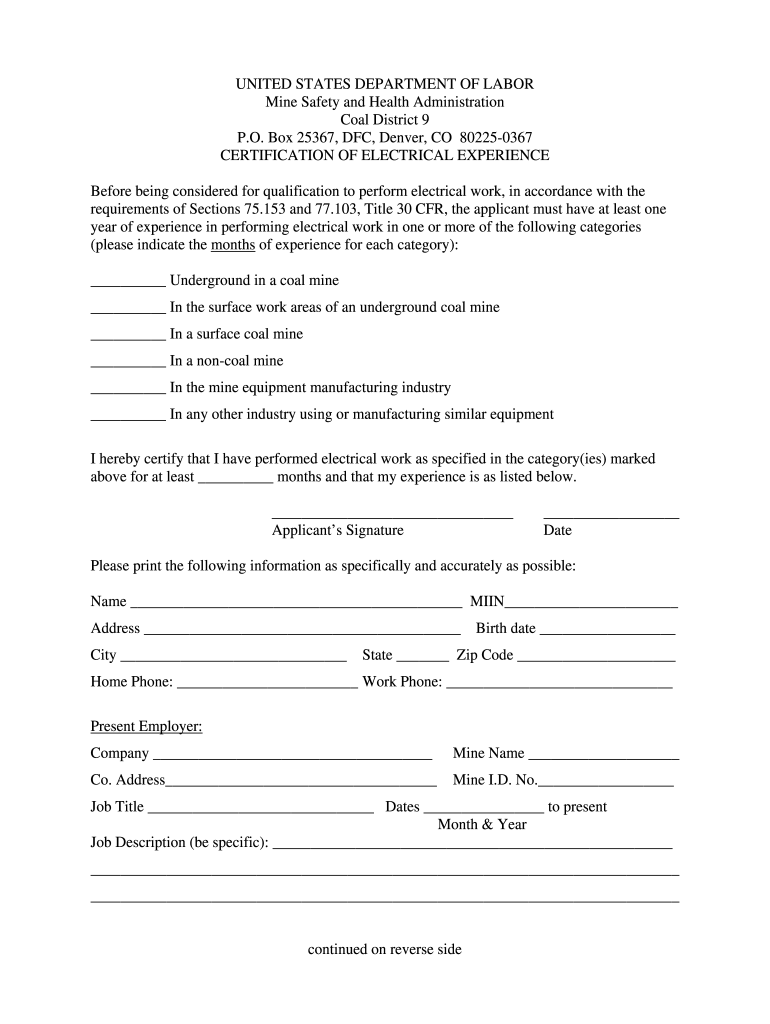
Msha District 9 Certification of Electrical Experience Form 2009


What is the MSHA District 9 Certification of Electrical Experience Form
The MSHA District 9 Certification of Electrical Experience Form is a crucial document for individuals seeking to validate their electrical experience in mining operations. This certification is essential for compliance with the Mine Safety and Health Administration (MSHA) regulations, ensuring that personnel working in mining environments possess the necessary knowledge and skills related to electrical safety and operations. The form serves as an official record of an individual's electrical training and experience, which is vital for maintaining safety standards in the mining industry.
How to use the MSHA District 9 Certification of Electrical Experience Form
Using the MSHA District 9 Certification of Electrical Experience Form involves several steps to ensure proper completion and submission. First, individuals must gather all relevant information regarding their electrical experience, including details about previous employment, training programs attended, and specific skills acquired. Once this information is compiled, it should be accurately entered into the form. After filling out the form, it is important to review it for any errors or omissions before submitting it to the appropriate MSHA district office for processing. This ensures that the certification is valid and recognized by regulatory authorities.
Steps to complete the MSHA District 9 Certification of Electrical Experience Form
Completing the MSHA District 9 Certification of Electrical Experience Form requires attention to detail and adherence to specific guidelines. The following steps outline the process:
- Gather all necessary documentation related to electrical experience and training.
- Fill out personal details, including name, contact information, and employment history.
- Provide a comprehensive account of electrical training, including courses and certifications obtained.
- Detail specific electrical work experience, including job titles and responsibilities.
- Review the form for accuracy and completeness before submission.
Legal use of the MSHA District 9 Certification of Electrical Experience Form
The legal use of the MSHA District 9 Certification of Electrical Experience Form is governed by MSHA regulations, which require that all personnel working in mining operations are properly certified. This form must be filled out accurately to ensure compliance with safety standards. Failure to use the form correctly can lead to penalties or delays in certification, which may impact an individual's ability to work in the mining sector. It is essential to maintain records of the certification process to demonstrate compliance during inspections or audits.
Key elements of the MSHA District 9 Certification of Electrical Experience Form
Key elements of the MSHA District 9 Certification of Electrical Experience Form include:
- Personal Information: Name, address, and contact details of the applicant.
- Employment History: List of previous employers and job titles related to electrical work.
- Training Records: Documentation of electrical training courses and certifications.
- Work Experience: Description of specific electrical tasks performed in mining operations.
- Signature: The applicant's signature, affirming the accuracy of the information provided.
Who Issues the MSHA District 9 Certification of Electrical Experience Form
The MSHA District 9 Certification of Electrical Experience Form is issued by the Mine Safety and Health Administration, specifically through its district offices. These offices are responsible for overseeing compliance with mining safety regulations and ensuring that all personnel meet the necessary qualifications for electrical work in mining environments. Upon successful submission and review of the form, MSHA will issue the certification, validating the individual's electrical experience and training.
Quick guide on how to complete msha district 9 certification of electrical experience form
Complete Msha District 9 Certification Of Electrical Experience Form effortlessly on any device
Managing documents online has gained popularity among businesses and individuals. It offers an ideal eco-friendly substitute for conventional printed and signed paperwork, allowing you to access the correct form and securely store it online. airSlate SignNow equips you with all the resources necessary to generate, alter, and electronically sign your documents promptly without interruptions. Handle Msha District 9 Certification Of Electrical Experience Form on any device using airSlate SignNow's Android or iOS applications and enhance any document-centric process today.
How to modify and eSign Msha District 9 Certification Of Electrical Experience Form with ease
- Locate Msha District 9 Certification Of Electrical Experience Form and click Get Form to begin.
- Use the tools we offer to fill out your form.
- Highlight important sections of your documents or redact sensitive information with tools that airSlate SignNow specifically provides for that task.
- Generate your eSignature with the Sign tool, which takes mere seconds and carries the same legal validity as a traditional handwritten signature.
- Review all the details and click on the Done button to save your changes.
- Select how you would like to send your form, via email, SMS, or shareable link, or download it to your computer.
Eliminate the hassle of missing or lost documents, cumbersome form hunting, or mistakes that require printing new copies. airSlate SignNow fulfills your document management needs with just a few clicks from your chosen device. Modify and eSign Msha District 9 Certification Of Electrical Experience Form to ensure excellent communication at every step of your form preparation process with airSlate SignNow.
Create this form in 5 minutes or less
Find and fill out the correct msha district 9 certification of electrical experience form
FAQs
-
Why did my employer give me a W-9 Form to fill out instead of a W-4 Form?
I wrote about the independent-contractor-vs-employee issue last year, see http://nctaxpro.wordpress.com/20...Broadly speaking, you are an employee when someone else - AKA the employer - has control over when and where you work and the processes by which you perform the work that you do for that individual. A DJ or bartender under some circumstances, I suppose, might qualify as an independent contractor at a restaurant, but the waitstaff, bus help, hosts, kitchen aides, etc. almost certainly would not.There's always risk in confronting an employer when faced with a situation like yours - my experience is that most employers know full well that they are violating the law when they treat employees as independent contractors, and for that reason they don't tolerate questions about that policy very well - so you definitely should tread cautiously if you want to keep this position. Nonetheless, I think you owe it to yourself to ask whether or not the restaurant intends to withhold federal taxes from your checks - if for no other reason than you don't want to get caught short when it comes to filing your own return, even if you don't intend to challenge the policy.
-
I received my late husband's W-9 form to fill out for what I believe were our stocks. How am I supposed to fill this out or am I even supposed to?
You do not sound as a person who handles intricasies of finances on daily basis, this is why you should redirect the qustion to your family’s tax professional who does hte filings for you.The form itself, W-9 form, is a form created and approved by the IRS, if that’s your only inquiry.Whether the form applies to you or to your husband’s estate - that’s something only a person familiar with the situation would tell you about; there is no generic answer to this.
-
How can I fill out Google's intern host matching form to optimize my chances of receiving a match?
I was selected for a summer internship 2016.I tried to be very open while filling the preference form: I choose many products as my favorite products and I said I'm open about the team I want to join.I even was very open in the location and start date to get host matching interviews (I negotiated the start date in the interview until both me and my host were happy.) You could ask your recruiter to review your form (there are very cool and could help you a lot since they have a bigger experience).Do a search on the potential team.Before the interviews, try to find smart question that you are going to ask for the potential host (do a search on the team to find nice and deep questions to impress your host). Prepare well your resume.You are very likely not going to get algorithm/data structure questions like in the first round. It's going to be just some friendly chat if you are lucky. If your potential team is working on something like machine learning, expect that they are going to ask you questions about machine learning, courses related to machine learning you have and relevant experience (projects, internship). Of course you have to study that before the interview. Take as long time as you need if you feel rusty. It takes some time to get ready for the host matching (it's less than the technical interview) but it's worth it of course.
-
How do I fill out the form of DU CIC? I couldn't find the link to fill out the form.
Just register on the admission portal and during registration you will get an option for the entrance based course. Just register there. There is no separate form for DU CIC.
Create this form in 5 minutes!
How to create an eSignature for the msha district 9 certification of electrical experience form
How to make an eSignature for your Msha District 9 Certification Of Electrical Experience Form online
How to generate an electronic signature for the Msha District 9 Certification Of Electrical Experience Form in Google Chrome
How to create an eSignature for putting it on the Msha District 9 Certification Of Electrical Experience Form in Gmail
How to generate an electronic signature for the Msha District 9 Certification Of Electrical Experience Form right from your smart phone
How to create an electronic signature for the Msha District 9 Certification Of Electrical Experience Form on iOS devices
How to create an electronic signature for the Msha District 9 Certification Of Electrical Experience Form on Android OS
People also ask
-
What is the MSHA District 9 Certification of Electrical Experience Form?
The MSHA District 9 Certification of Electrical Experience Form is a crucial document required for miners to prove their electrical experience and competency. This form is essential for compliance with mining safety regulations and is recognized by the Mine Safety and Health Administration (MSHA) in District 9.
-
How can airSlate SignNow help with the MSHA District 9 Certification of Electrical Experience Form?
airSlate SignNow simplifies the process of filling out and signing the MSHA District 9 Certification of Electrical Experience Form. Our platform allows users to create, send, and eSign documents easily, ensuring that your certification process is efficient and compliant with MSHA regulations.
-
What features does airSlate SignNow offer for managing the MSHA District 9 Certification of Electrical Experience Form?
With airSlate SignNow, you can utilize features like customizable templates, real-time collaboration, and secure cloud storage for your MSHA District 9 Certification of Electrical Experience Form. These tools help streamline document management and enhance your overall workflow.
-
Is there a cost associated with using airSlate SignNow for the MSHA District 9 Certification of Electrical Experience Form?
Yes, airSlate SignNow offers various pricing plans tailored to meet different business needs. Our subscription plans are cost-effective and designed to provide you with comprehensive tools to manage the MSHA District 9 Certification of Electrical Experience Form and other documents.
-
Can I integrate airSlate SignNow with other applications for the MSHA District 9 Certification of Electrical Experience Form?
Absolutely! airSlate SignNow supports integration with various applications, such as Google Drive and Salesforce, to enhance your workflow. This means you can easily manage the MSHA District 9 Certification of Electrical Experience Form alongside your other business processes.
-
What are the benefits of using airSlate SignNow for the MSHA District 9 Certification of Electrical Experience Form?
Using airSlate SignNow for the MSHA District 9 Certification of Electrical Experience Form offers numerous benefits, including increased efficiency, reduced paperwork, and enhanced security. Our platform ensures that your documentation process is quick and compliant, allowing you to focus on your core business activities.
-
Is it easy to eSign the MSHA District 9 Certification of Electrical Experience Form with airSlate SignNow?
Yes, eSigning the MSHA District 9 Certification of Electrical Experience Form with airSlate SignNow is incredibly easy. Our user-friendly interface allows you to sign documents electronically in just a few clicks, ensuring a hassle-free experience.
Get more for Msha District 9 Certification Of Electrical Experience Form
Find out other Msha District 9 Certification Of Electrical Experience Form
- How To Sign Alabama Legal LLC Operating Agreement
- Sign Alabama Legal Cease And Desist Letter Now
- Sign Alabama Legal Cease And Desist Letter Later
- Sign California Legal Living Will Online
- How Do I Sign Colorado Legal LLC Operating Agreement
- How Can I Sign California Legal Promissory Note Template
- How Do I Sign North Dakota Insurance Quitclaim Deed
- How To Sign Connecticut Legal Quitclaim Deed
- How Do I Sign Delaware Legal Warranty Deed
- Sign Delaware Legal LLC Operating Agreement Mobile
- Sign Florida Legal Job Offer Now
- Sign Insurance Word Ohio Safe
- How Do I Sign Hawaii Legal Business Letter Template
- How To Sign Georgia Legal Cease And Desist Letter
- Sign Georgia Legal Residential Lease Agreement Now
- Sign Idaho Legal Living Will Online
- Sign Oklahoma Insurance Limited Power Of Attorney Now
- Sign Idaho Legal Separation Agreement Online
- Sign Illinois Legal IOU Later
- Sign Illinois Legal Cease And Desist Letter Fast