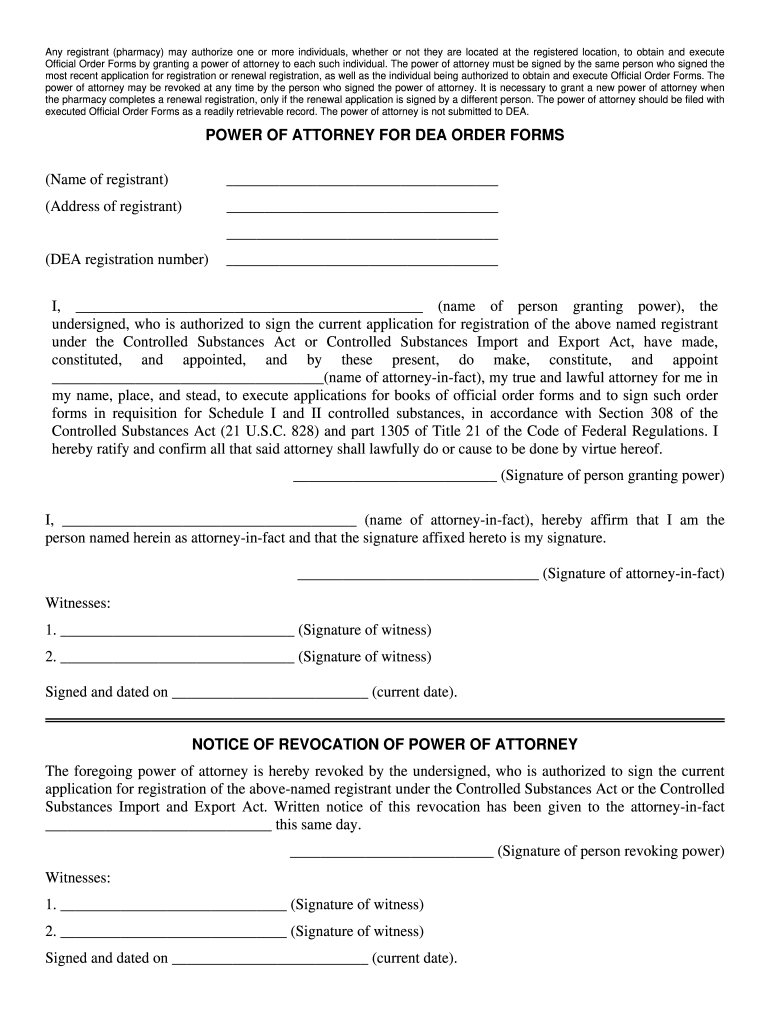
Dea Power of Attorney Form


What is the DEA Power of Attorney?
The DEA Power of Attorney is a legal document that allows a designated individual to act on behalf of a pharmacy or healthcare provider in matters related to controlled substances. This authority is essential for managing the ordering and handling of medications classified under the Controlled Substances Act. The individual granted this power can sign DEA Forms 222 for ordering Schedule I and II controlled substances, as well as electronic orders for these medications.
How to Use the DEA Power of Attorney
To effectively utilize the DEA Power of Attorney, the designated agent must first ensure that they are properly appointed through a signed document. This document should clearly outline the powers granted, including the ability to order controlled substances. When placing orders, the agent will need to present the Power of Attorney documentation to the supplier to verify their authority. It is crucial to keep this document accessible and updated to reflect any changes in personnel or authority.
Steps to Complete the DEA Power of Attorney
Completing the DEA Power of Attorney involves several key steps:
- Obtain a blank DEA Power of Attorney form from the DEA or a legal source.
- Fill in the required information, including the names and signatures of both the pharmacy owner and the designated agent.
- Ensure the document is dated and signed appropriately to validate it.
- Keep copies of the completed form in a secure location, accessible to authorized personnel.
Legal Use of the DEA Power of Attorney
The legal use of the DEA Power of Attorney is governed by federal and state regulations. It is important to ensure compliance with the Controlled Substances Act and any relevant state laws. The designated agent must act within the scope of authority granted in the document, and any misuse can result in legal penalties. Regular audits and reviews of the Power of Attorney documentation can help maintain compliance and ensure that only authorized individuals are managing controlled substances.
Key Elements of the DEA Power of Attorney
Key elements of the DEA Power of Attorney include:
- The name and address of the pharmacy or healthcare provider.
- The name of the individual granted the power of attorney.
- The specific powers being granted, such as signing DEA Forms 222.
- The signatures of both the pharmacy owner and the designated agent.
- The date the document is executed.
Examples of Using the DEA Power of Attorney
Examples of using the DEA Power of Attorney include:
- A pharmacy owner designating a pharmacy manager to order controlled substances on their behalf.
- A healthcare provider granting authority to an office manager to handle all DEA-related documentation.
- In a multi-pharmacy organization, allowing a corporate compliance officer to manage DEA compliance across locations.
Quick guide on how to complete pharmacy power of attorney form
Complete and submit your Dea Power Of Attorney swiftly
Effective tools for digital document interchange and authorization are now vital for enhancing processes and the ongoing refinement of your forms. When managing legal documents and endorsing a Dea Power Of Attorney, the correct signing solution can conserve considerable time and resources with every submission.
Locate, fill in, modify, endorse, and distribute your legal documents with airSlate SignNow. This platform provides everything necessary to establish streamlined paper submission workflows. Its extensive library of legal forms and intuitive navigation will assist you in obtaining your Dea Power Of Attorney promptly, and the editor featuring our signing capability will enable you to finalize and approve it instantly.
Authorize your Dea Power Of Attorney in a few straightforward steps
- Retrieve the Dea Power Of Attorney you require from our library by utilizing the search or catalog sections.
- Examine the form specifications and preview it to ensure it meets your requirements and regional regulations.
- Click Obtain form to access it for modification.
- Complete the form using the all-encompassing toolbar.
- Double-check the information you've provided and click the Sign feature to validate your document.
- Select one of three options to affix your signature.
- Conclude the editing process and save the document in your files, then download it to your device or share it right away.
Simplify every phase of your document creation and endorsement with airSlate SignNow. Experience a more effective online solution that has all aspects of managing your documents meticulously planned.
Create this form in 5 minutes or less
FAQs
-
Can power of attorney in fact forms be filled out and authorized completely online?
Note: I am not an attorney. Even if I were an attorney, I am not your attorney. This is merely the opinion of a fairly savvy Citizen. It is not legal advice. If you want legal advice hire an actual attorney. In the U.S.A. "signing" something like a Power of Attorney electronically is generally not enforcable* because many (most?) Courts require that the authorizing of them usually requires a "wet" signature which has been signNowd. You could try it but, because they are such powerful documents, almost any court (or business for that matter) will require that the signature be signNowd before allowing them to be enforced and used.In fact many businesses simply have a policy of not recognizing them without a confirming court order as well. This is especially true in health care.This is mainly because the business wants to make damned sure that any liability for errors or misunderstandings lies with someone other than the business. *Note that "not enforcable" =/= "illegal" (or even sick hawk).There's no law preventing you from doing it. It's just completely pointless; because if you complete the Power of Attorney electronically anybody who knows anything about law or contracts or fiduciary duty will simply ignore it... along with any instructions you might try to give them under it.Do yourself a favor by getting an attorney and doing it right.
-
Can a power of attorney document be filled out with an online signature?
In California A Power of Attorney does not require notarization unless the document to be signed by the individual holding the power itself requires notarization, for example documents affecting a transfer or encumbrance of real property. As a small business attorney I routinely prepare Limited Powers of all accomplished through email which allow me to accomplish specific tasks on the half of a client. Granting of even Limited Powers of Attorney necessarily involve a great deal of trust, and a customer should be wary of signing such a document. Peter, Oakland, California small business attorney. Not offer or intended as legal advice.
-
How can I fill out Google's intern host matching form to optimize my chances of receiving a match?
I was selected for a summer internship 2016.I tried to be very open while filling the preference form: I choose many products as my favorite products and I said I'm open about the team I want to join.I even was very open in the location and start date to get host matching interviews (I negotiated the start date in the interview until both me and my host were happy.) You could ask your recruiter to review your form (there are very cool and could help you a lot since they have a bigger experience).Do a search on the potential team.Before the interviews, try to find smart question that you are going to ask for the potential host (do a search on the team to find nice and deep questions to impress your host). Prepare well your resume.You are very likely not going to get algorithm/data structure questions like in the first round. It's going to be just some friendly chat if you are lucky. If your potential team is working on something like machine learning, expect that they are going to ask you questions about machine learning, courses related to machine learning you have and relevant experience (projects, internship). Of course you have to study that before the interview. Take as long time as you need if you feel rusty. It takes some time to get ready for the host matching (it's less than the technical interview) but it's worth it of course.
-
How do I fill out the form of DU CIC? I couldn't find the link to fill out the form.
Just register on the admission portal and during registration you will get an option for the entrance based course. Just register there. There is no separate form for DU CIC.
-
Why would a doctor send a prescription to a pharmacy, but not respond to repeated requests from the pharmacy to fill out a faxed prior authorization form?
Filling out a prior authorization is not a requirement of our practice. Most of us do this to help our patients, and it is sometimes taken for granted.Think about it. It is your insurance company that is requesting us to fill out this form, taking time away from actually treating patients, to help you save money on your medications. We understand that, and usually do our best to take care of them, but unless we have a large practice, with someone actually paid to spend all their time doing these PA’s, we have to carve out more time from our day to fill out paperwork.It’s also possible, although not likely, that the pharmacy does not have the correct fax number, the faxes have been misplaced, the doctor has some emergencies and is running behind, went on vacation, and so on.Paperwork and insurance requests have become more and more burdensome on our practices, not due to anything on the part of our patients, but a major hassle none the less.
Create this form in 5 minutes!
How to create an eSignature for the pharmacy power of attorney form
How to generate an eSignature for your Pharmacy Power Of Attorney Form in the online mode
How to create an eSignature for the Pharmacy Power Of Attorney Form in Google Chrome
How to generate an eSignature for signing the Pharmacy Power Of Attorney Form in Gmail
How to create an eSignature for the Pharmacy Power Of Attorney Form from your mobile device
How to create an eSignature for the Pharmacy Power Of Attorney Form on iOS devices
How to create an electronic signature for the Pharmacy Power Of Attorney Form on Android devices
People also ask
-
What is a Dea Power Of Attorney and why is it important?
A Dea Power Of Attorney (POA) is a legal document that allows you to designate someone to make decisions on your behalf regarding your healthcare and financial matters. This is crucial for ensuring your preferences are honored, especially in medical situations where you may be unable to communicate. Using airSlate SignNow, you can easily create, manage, and eSign your Dea Power Of Attorney documents securely.
-
How much does it cost to create a Dea Power Of Attorney with airSlate SignNow?
Creating a Dea Power Of Attorney with airSlate SignNow is cost-effective, with pricing plans designed for businesses and individuals. You can choose from various subscription options that fit your needs, ensuring you get the best value for eSigning and managing your legal documents. Sign up for a free trial to start exploring how affordable it can be!
-
Can I customize my Dea Power Of Attorney document using airSlate SignNow?
Absolutely! airSlate SignNow provides customizable templates for your Dea Power Of Attorney, allowing you to tailor the document to your specific requirements. You can easily add or modify sections to ensure that your preferences are accurately reflected, making the process smooth and efficient.
-
Is airSlate SignNow secure for handling my Dea Power Of Attorney?
Yes, airSlate SignNow prioritizes the security of your sensitive documents, including your Dea Power Of Attorney. We use advanced encryption technologies and comply with industry standards to protect your information, ensuring that your eSigned documents are safe and secure.
-
What features does airSlate SignNow offer for managing a Dea Power Of Attorney?
airSlate SignNow offers a range of features for managing your Dea Power Of Attorney, including document creation, eSigning, and secure storage. You can track the status of your documents, set reminders for important deadlines, and collaborate with trusted individuals seamlessly. This makes managing your legal affairs straightforward and efficient.
-
Can I access my Dea Power Of Attorney from anywhere?
Yes, with airSlate SignNow, your Dea Power Of Attorney and other documents can be accessed from any device with an internet connection. This flexibility allows you to manage and sign your documents on-the-go, ensuring you are always in control of your legal matters.
-
Does airSlate SignNow integrate with other applications for managing a Dea Power Of Attorney?
Yes, airSlate SignNow integrates with many popular applications such as Google Drive, Dropbox, and Microsoft Office. This enables you to streamline your workflow when creating and managing your Dea Power Of Attorney, making it easier to access your documents and share them with necessary parties.
Get more for Dea Power Of Attorney
Find out other Dea Power Of Attorney
- How To Electronic signature Tennessee Healthcare / Medical Word
- Can I Electronic signature Hawaii Insurance PDF
- Help Me With Electronic signature Colorado High Tech Form
- How To Electronic signature Indiana Insurance Document
- Can I Electronic signature Virginia Education Word
- How To Electronic signature Louisiana Insurance Document
- Can I Electronic signature Florida High Tech Document
- Can I Electronic signature Minnesota Insurance PDF
- How Do I Electronic signature Minnesota Insurance Document
- How To Electronic signature Missouri Insurance Form
- How Can I Electronic signature New Jersey Insurance Document
- How To Electronic signature Indiana High Tech Document
- How Do I Electronic signature Indiana High Tech Document
- How Can I Electronic signature Ohio Insurance Document
- Can I Electronic signature South Dakota Insurance PPT
- How Can I Electronic signature Maine Lawers PPT
- How To Electronic signature Maine Lawers PPT
- Help Me With Electronic signature Minnesota Lawers PDF
- How To Electronic signature Ohio High Tech Presentation
- How Can I Electronic signature Alabama Legal PDF