Map 14 Form 2003-2026


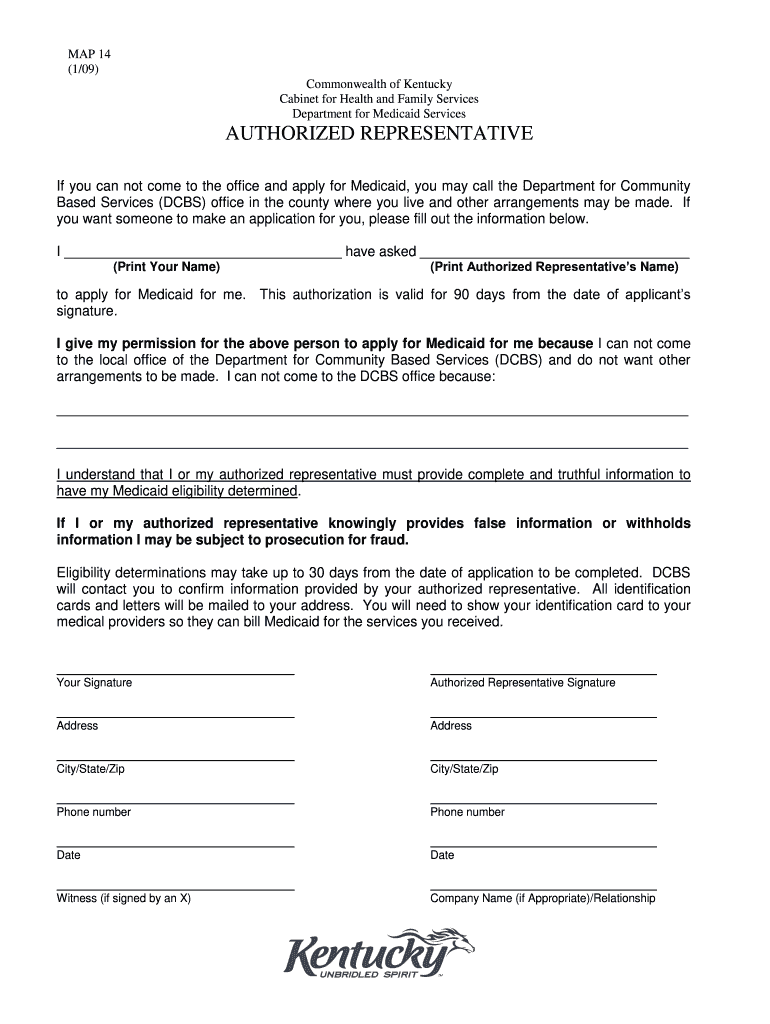
What is the Map 14 Form
The Map 14 form is a crucial document used in Kentucky to determine eligibility for Medicaid benefits. This form collects essential information about an individual's income, assets, and household composition. It is specifically designed to assess whether applicants meet the financial criteria set by the state for Medicaid assistance. Understanding the purpose of this form is vital for those seeking healthcare coverage through Kentucky's Medicaid program.
How to use the Map 14 Form
Using the Map 14 form involves several steps to ensure accurate completion and submission. First, gather all necessary documentation, including proof of income, assets, and identification. Next, fill out the form carefully, providing truthful and complete information. After completing the form, review it for accuracy before submitting it to the appropriate Medicaid office. This careful approach helps prevent delays in processing your application.
Steps to complete the Map 14 Form
Completing the Map 14 form requires careful attention to detail. Follow these steps:
- Collect necessary documents, such as pay stubs, tax returns, and bank statements.
- Fill out personal information, including your name, address, and Social Security number.
- Provide details about your household members and their income.
- List any assets you own, such as property or savings accounts.
- Review the form thoroughly to ensure all information is accurate and complete.
- Submit the form to your local Medicaid office, either online, by mail, or in person.
Eligibility Criteria
Eligibility for Medicaid in Kentucky is based on specific income and asset limits. Generally, applicants must meet the following criteria:
- Be a resident of Kentucky.
- Meet income requirements, which vary based on household size and program type.
- Have limited assets, typically not exceeding a certain threshold.
- Be a U.S. citizen or a qualified non-citizen.
It is essential to refer to the most current Kentucky Medicaid eligibility income chart to understand the specific limits applicable to your situation.
Required Documents
When completing the Map 14 form, several documents are necessary to support your application. These may include:
- Proof of income, such as pay stubs or tax returns.
- Bank statements to verify asset levels.
- Identification documents, like a driver's license or Social Security card.
- Documentation of any other benefits received, such as Social Security or unemployment benefits.
Having these documents ready can streamline the application process and help ensure a successful submission.
Form Submission Methods
The Map 14 form can be submitted through various methods, providing flexibility for applicants. Options include:
- Online submission through the Kentucky Medicaid website.
- Mailing the completed form to your local Medicaid office.
- In-person submission at designated Medicaid offices.
Choosing the method that best suits your needs can help facilitate a smoother application process.
Quick guide on how to complete kentucky authorized representative medicaid service form
Experience the simpler method for handling your Map 14 Form
The traditional methods of finishing and approving paperwork consume an excessive amount of time in comparison to modern document management systems. You would previously search for suitable social forms, print them out, fill in all the details, and send them via postal mail. Now, you can obtain, fill out, and sign your Map 14 Form all in one browser tab using airSlate SignNow. Preparing your Map 14 Form has never been more straightforward.
Steps to finish your Map 14 Form with airSlate SignNow
- Access the category page you require and locate your state-specific Map 14 Form. Alternatively, utilize the search box.
- Verify that the version of the form is accurate by previewing it.
- Hit Get form and enter editing mode.
- Fill out your document with the required information utilizing the editing tools.
- Examine the added details and click the Sign option to validate your form.
- Select the most convenient method to create your signature: generate it, draw your name, or upload its image.
- Click DONE to apply changes.
- Download the document to your device or proceed to Sharing settings to send it electronically.
Efficient online tools like airSlate SignNow make completing and submitting your forms much easier. Try it to discover how long document management and approval processes are genuinely intended to take. You'll save a signNow amount of time.
Create this form in 5 minutes or less
FAQs
-
How does filling out a customer service survey effect the representative?
This will depend on a lot of factors but generally:good feedback is of course a great morale boost especially if there’s praise for a specific action which was well performed.negative feedback isn’t necessarily a bad blow to a customer service rep. In companies where there’s good staff morale and a positive culture constructive negative feedback is used to help a rep improve at their job. Good managers will also recognise a mean or unkind rant by a customer for what it is and make sure their employee is supported if they should receive something like that.Good managers also know when negative feedback is aimed at the company or product and not the actions of their representative and will corral that feedback appropriately. For example I’m aware that many customers using the feedback tool Hively will have a separate user where feedback related directly to the company product or service will be moved to so that a customer service rep doesn’t have their score unfairly affected by a problem that they didn’t have control over.If you ever feel the need to leave negative feedback just be clear, communicate what went wrong and differentiate between whether it’s the customer service or the product that’s problematic. There’s really no need to be unkind or mean when leaving feedback.Of course if you’re happy it’s always great to give someone some nice, positive feedback - you can really make someone’s day!
-
There is curfew in my area and Internet service is blocked, how can I fill my exam form as today is the last day to fill it out?
Spend less time using your blocked Internet to ask questions on Quora, andTravel back in time to when there was no curfew and you were playing Super Mario Kart, and instead, fill out your exam form.
-
How should one fill out the DAF form for the UPSC civil services?
1) Things to keep in mind while filling your DAF1. DAF is not like your resume, the more achievements the more you will score.Here DAF is only a way to know about you so that they can ask questions.2. Please do not try to fake or write for the sake of writing. If there is no achievement, then don’t create one, no hobby then don’t write fake one .3. Be specific. For you music might be a hobby (listening in free time), but they will expect you to know about music in detail. . You might like cooking but they will ask you anything related to cooking ( about preservatives, masalas, cooking recepies, types of cuisines etc).So better to avoid writing such open ended things. Write specific things which you know you can prepare.a4. Writing something and not able to answer basic questions related to those things sends a very wrong impression. When you are filling DAF ensure you write less but meaningful things you are confident about.2) Service Preference ListImportant : These are my personal views which can be biased. Detail about each service, growth opportunities can be found here http://persmin.gov.in/AIS1/Welco...Brief about Services1. IASGood work, Good Infrastructure and highly respectable. Issue is interference and work pressure. If you want a very peaceful life and tension free life then think about it.2. IFSWork as diplomats. Good services, especially for people who like to travel, pursue intellectual hobbies. You will have alternate terms in foreign country and India. Yes do give a consideration from family perspective and secondly from perspective that if you want paraphernalia you will not get it.3. IPSMostly work is in law and order domain. Lot of power, infra and Paraphernalia. However IPS is a very tough job and not everyone is made for it. It needs lot of patience, sacrifice in personal life and has maximum interference. So choose accordingly.4. IRS IT and CustomsMy personal advice would be to choose IT over customs ( stable cadre, timely promotions , decent infra and good places of postings) However work can appear to be boring due to a desk job restricted to taxation. Customs on the other hand is having more variety.5. IRTS vs IAASIRTS is IAS of railways. Lot of manpower under you. Good infra and facilities. However issue is very hectic life especially if you are in operations side as you have to manage timely running of trains. So don't opt it if you want a peaceful and tension free life.IAAS on the other hand is a totally different service. It audits almost everything in government. Remember it is not just auditing of accounts here but a larger purview. Also stable posting, normal working hours, postings in state capital and Delhi plus lot of foreign visits and yes timely promotions. Plus everyone fears an auditor. However you won't enjoy executive powers and perks like IRTS. So decide what kind of life you want.6. Accounting ServicesIRASBest among accounting services. Total financial power in railways. Good infrastructure, work life balance and good postings. Plus lot of opportunities for deputation due to finance.IDASThis is also a good service. Lot of financial power in defence sector. Good infrastructure, work life balance and good postings. Plus lot of opportunities for deputation due to financeICASThis is more of an accounting service. It has the responsibility to consolidate accounts of all the Dept except few. Posting in Delhi. However housing, car can be an issue.IPTAFSThis service has lost lot of ground due to BSNL and MTNL separating from DoT. So major work is collecting spectrum allocation and licence fee. Infrastructure issues are also there.7. Railway servicesRailway services have good infrastructure and facilities. Housing, car and manpower is not an issue.IRTS - IRAS - IRPSIRPSNot much work, dealing with unions and personnel management .RPFI would suggest to fill it among the bottom 5 services. Its like paramilitary force (Railway Protection Force)8. IPoSGood service. Administration of all post offices. Good infra and facilities. Plus post office's are getting modernized so new work is coming up.9. IDeSThis is a service where you work as CEO of cantonments/defence estates. There is huge infrastructure at your disposal, very good facilities. However growth is stagnant, work is not dynamic. Also you will not always be working in cantonments, HQ postings and other postings are there as well.10. ICLS and ITSBoth are new age services with postings in Capital cities and Delhi. ICLS are regulators of corporate sector. They implement company law and are involved in Registration, M&A, and Liquidation etc. Service seems to have a promising future but as of now it is not much preferred. Reasons include Infrastructure problem, desk work and stagnation as the top level.IT on the other hand deals with trade policy implementation. Officers working closely with traders and exporters. Also working in SEZ, policy work and some International exposure. So work is interesting and promising.Issue with both the services is similar. These are comparatively new service & do not have a huge infrastructure compared to postal, defence and railways. So Car, housing, other facilities might be a little problem. Also at senior level stagnation issue.11. IoFSNot much of an idea but their scope is more or less related to management of ordinance factories. Infra won’t be much of an issue. But usually filled among bottom few services12. Danics & DanipsThese are like State civil services(UT civil service) with a difference that promotions are better compared to most of the states. Many people prefer them at the bottom due to Group B. However in terms of power, work, infra these are better than many group A central services.13. Indian Information ServiceThis is like a PR Job. Most IIS officers work in various media units which are under Ministry of Information and Broadcasting such as DD News, All India Radio, Press Information Bureau etc. Even posted with various Ministries as spokespersons to handle the Ministry's information and communication needs and help in policy formulation. So work wise this is a nice service, plus majorly you stay in Delhi. Infrastructure, car housing is again an issue.14. AFHQ + Pondicherry civil serviceBottom services to be filled.Now how to fill service preference listSee this is a totally personal choice depending on what you want from your life. What matters to you : balanced life ? Quality work ? Power & Infrastructure? Delhi Posting? Decide accordingly. Here are some hints based on common choice1. Most preferred services (IAS – IFS –IPS – IRS IT –IRS Customs – IRTS /IAAS) .2. Less preffered services ( AFHQ , Pondicherry civil services , RPF, IoFS, IPTAFS ,ICLS )3. Middle Category ( IRAS, IDAS, ICAS, IPOS,IDES,ITS,IIS,IRPS)As per meIRTS >IRAS>IRPSIRAS>IDAS>ICASIPOS>IDESIDAS>IDESICAS, IIS, ITS (one is accounts, other is media/PR and one relates to Trade. Usual preference is ICAS – IIS-ITS)4. Adjust DANICS & DANIPS as per your convenience. Some people prefer them after Railway, Defence and Postal while majority put it at the end. Decide as per your own choice.Delhi Posting : ICAS , IISServices where Infrastructure won’t be an issue (Apart from Most preferred services ): IRAS,IRPS,IPOS,IDES,IDAS . I think infra will not be an issue even in IOFS and RPF.3) CADRE PreferenceP.S : Totally personal views. For details you can refer here http://www.iascoachingindelhi.or...UP: great work opportunities and infrastructure. But if you don't want an exciting and challenging life, it should not be high on your list.Bihar: Mostly like UP but more backward.MP, Rajasthan, Haryana: Good cadres. Balanced ones. Usually preferred by people.Punjab: Mixed reviews about the cadre.Jharkhand and Chattisgarh, Odisha: People carry lot of misconceptions. These are nice cadres to work plus good infra. Naxal problem is prevalent only in certain areas. Other issue is these are little backward areas. But I think these are highly underrated cadres .Uttarakhand and Himachal : Decent cadres to work but terrain issues. Not everyone likes hill posting so keep that in mind.Northeast cadres : Mostly people fill them lower in their preference due to factors like distance, culture, hills, personal life etc. Assam-Megahalya is the most preferred choice among north east cadres.J&K : considered a tough posting. Hills + security concerns etc.West Bengal and Kerala : Work wise normal but their political setup is different so many people don't prefer these cadres. So decide accordingly .Andra and Telangana : Good cadres to work. North Indians prefer them most among southern states.Karnataka: fineTamil Nadu : state services is very strong here so at times they hold important posts in the district .Maharashtra : Good cadreGujarat : Mixed reviews.Agmut: mixed reviews. Good thing is you get to stay for long in Delhi.Making choicesI can’t tell you what to opt. But I can share what people preferably fill at lower preference. Again as per my knowledge.- North eastern States- J&K- Kerala and WB ( some people prefer to fill them low)Also sharing some favoured cadres due to different reasons:- Rajasthan, Haryana, MP (Delhi proximity and balanced cadres )- UP & Bihar (Strong power centres for IAS)- AGMUT (Delhi posting, but not for those who like UP , Bihar work culture )- Sorry but I am not able to comment on south Indian cadres due to lack of in depth knowledgeCadres considered bad but are actually not- Chhattisgarh and JharkhandThat is all from my side. Hopefully this post can help you to some extent. All the best
-
How many days does Medicaid require you to wait between filling out the XR?
Since is a schedule 2 controlled substance, Medicaid will only fill it as the prescription was written. If you had it filled for 30 days, you have to wait until the 30 days are up to get it refilled. They will not fill it earlier, unless the doctor has told you to take more. In that case, you must have your doctor contact the pharmacy to update them on the change so Medicaid will cover it.
-
How can I fill out Google's intern host matching form to optimize my chances of receiving a match?
I was selected for a summer internship 2016.I tried to be very open while filling the preference form: I choose many products as my favorite products and I said I'm open about the team I want to join.I even was very open in the location and start date to get host matching interviews (I negotiated the start date in the interview until both me and my host were happy.) You could ask your recruiter to review your form (there are very cool and could help you a lot since they have a bigger experience).Do a search on the potential team.Before the interviews, try to find smart question that you are going to ask for the potential host (do a search on the team to find nice and deep questions to impress your host). Prepare well your resume.You are very likely not going to get algorithm/data structure questions like in the first round. It's going to be just some friendly chat if you are lucky. If your potential team is working on something like machine learning, expect that they are going to ask you questions about machine learning, courses related to machine learning you have and relevant experience (projects, internship). Of course you have to study that before the interview. Take as long time as you need if you feel rusty. It takes some time to get ready for the host matching (it's less than the technical interview) but it's worth it of course.
-
How can I fill out the authorization form in Wipro's synergy?
By authorisation form I assume that you mean LOA. Just download the pdf and sign it with stylus or get a printout,sign it and scan the copy.Now upload it!If I my assumption is wrong please provide little clear picture!Thank you!Allah maalik!
Create this form in 5 minutes!
How to create an eSignature for the kentucky authorized representative medicaid service form
How to generate an electronic signature for the Kentucky Authorized Representative Medicaid Service Form in the online mode
How to generate an electronic signature for your Kentucky Authorized Representative Medicaid Service Form in Google Chrome
How to create an eSignature for signing the Kentucky Authorized Representative Medicaid Service Form in Gmail
How to create an electronic signature for the Kentucky Authorized Representative Medicaid Service Form right from your smart phone
How to generate an electronic signature for the Kentucky Authorized Representative Medicaid Service Form on iOS
How to make an electronic signature for the Kentucky Authorized Representative Medicaid Service Form on Android devices
People also ask
-
What is the Map 14 Form and how can it benefit my business?
The Map 14 Form is a customizable document template that streamlines the eSigning process. By utilizing airSlate SignNow, businesses can create, send, and manage Map 14 Forms efficiently, reducing paperwork and ensuring compliance with digital signatures. This form is designed to enhance productivity and save time in document handling.
-
How much does it cost to use the Map 14 Form with airSlate SignNow?
The cost of using the Map 14 Form with airSlate SignNow varies based on the subscription plan you choose. We offer flexible pricing options that can accommodate businesses of all sizes, ensuring that you get the best value for your needs. Check our pricing page for detailed information on plans that include access to the Map 14 Form.
-
Can I integrate the Map 14 Form with other software?
Yes, the Map 14 Form can be seamlessly integrated with various software platforms, enhancing your workflow. airSlate SignNow supports integrations with popular applications like Google Drive, Salesforce, and more, allowing for a streamlined document management experience. This ensures that your Map 14 Form fits perfectly into your existing processes.
-
Is the Map 14 Form compliant with legal standards?
Absolutely! The Map 14 Form generated through airSlate SignNow complies with international eSignature laws, including the ESIGN Act and UETA. This compliance ensures that your signed documents, including the Map 14 Form, are legally binding and secure, giving you peace of mind while conducting business.
-
How do I create a Map 14 Form using airSlate SignNow?
Creating a Map 14 Form with airSlate SignNow is simple and user-friendly. You can start by selecting the 'Create Document' option, uploading your template, and customizing it as needed. Our intuitive interface guides you through the process, making document creation quick and efficient.
-
What features does airSlate SignNow offer for the Map 14 Form?
airSlate SignNow offers a variety of features for the Map 14 Form, including electronic signatures, document tracking, and customizable templates. Additionally, you can automate workflows, set reminders, and access analytics to monitor the status of your documents. These features enhance the overall efficiency of managing the Map 14 Form.
-
Can I use the Map 14 Form for multiple recipients?
Yes, the Map 14 Form can be easily sent to multiple recipients for eSigning. airSlate SignNow allows you to specify the order of signing and manage multiple signers within a single document. This feature simplifies collaboration and ensures that all necessary parties can sign the Map 14 Form without hassle.
Get more for Map 14 Form
- That a form
- City of county of and state of kentucky to wit form
- Local formseastern district of kentuckyunited states
- Document systems inc loan document worksheet form
- United states of america v kenneth douglas form
- Breach of contract cases in small claims courtnolo form
- Western district of louisiana united states courts form
- Bankruptcy forms eastern district of virginia united states
Find out other Map 14 Form
- eSign Michigan Car Dealer Operating Agreement Mobile
- Can I eSign Mississippi Car Dealer Resignation Letter
- eSign Missouri Car Dealer Lease Termination Letter Fast
- Help Me With eSign Kentucky Business Operations Quitclaim Deed
- eSign Nevada Car Dealer Warranty Deed Myself
- How To eSign New Hampshire Car Dealer Purchase Order Template
- eSign New Jersey Car Dealer Arbitration Agreement Myself
- eSign North Carolina Car Dealer Arbitration Agreement Now
- eSign Ohio Car Dealer Business Plan Template Online
- eSign Ohio Car Dealer Bill Of Lading Free
- How To eSign North Dakota Car Dealer Residential Lease Agreement
- How Do I eSign Ohio Car Dealer Last Will And Testament
- Sign North Dakota Courts Lease Agreement Form Free
- eSign Oregon Car Dealer Job Description Template Online
- Sign Ohio Courts LLC Operating Agreement Secure
- Can I eSign Michigan Business Operations POA
- eSign Car Dealer PDF South Dakota Computer
- eSign Car Dealer PDF South Dakota Later
- eSign Rhode Island Car Dealer Moving Checklist Simple
- eSign Tennessee Car Dealer Lease Agreement Form Now