RFQ 15 City, County & Port of San Diego Ebidboard 2014-2026


Understanding the RFQ 15 City, County & Port Of San Diego Ebidboard
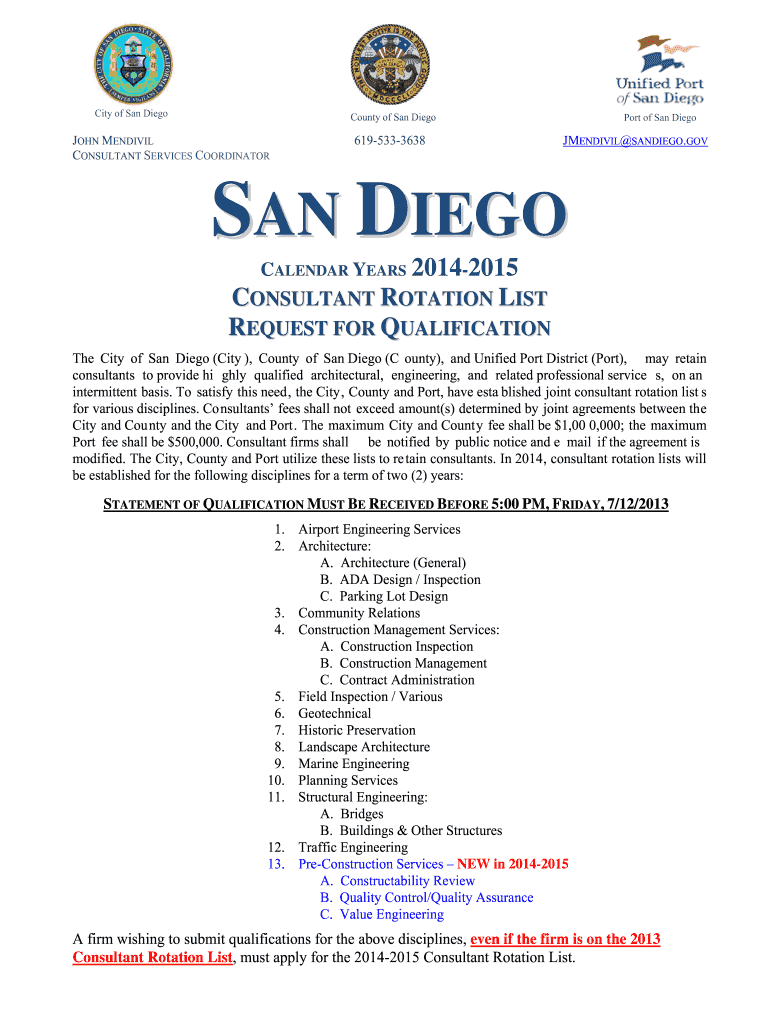
The RFQ 15 City, County & Port Of San Diego Ebidboard is a formal request for qualifications used by the City of San Diego and its associated entities. This document is essential for businesses looking to engage in contracts for various projects. It outlines the criteria that potential vendors must meet to be considered for bidding opportunities. This process ensures that the city selects qualified contractors who can deliver high-quality services and products.
Steps to Complete the RFQ 15 City, County & Port Of San Diego Ebidboard
Completing the RFQ 15 Ebidboard involves several key steps to ensure accuracy and compliance. First, gather all necessary documentation that demonstrates your qualifications, such as licenses, certifications, and past project examples. Next, access the Ebidboard platform to fill out the required forms. Ensure that all information is complete and accurate. Finally, submit the completed RFQ through the designated online portal, ensuring that you meet any submission deadlines specified in the request.
Legal Use of the RFQ 15 City, County & Port Of San Diego Ebidboard
The legal use of the RFQ 15 Ebidboard is governed by local and state procurement laws. It is crucial for businesses to understand these regulations to ensure compliance throughout the bidding process. Proper execution of this document not only validates the qualifications of the submitting entity but also protects the interests of the city and its residents. Utilizing a reliable eSigning solution can help maintain the integrity and legality of the submission.
How to Use the RFQ 15 City, County & Port Of San Diego Ebidboard
Using the RFQ 15 Ebidboard effectively requires familiarity with the platform and its requirements. Begin by registering for an account on the Ebidboard website. Once logged in, locate the RFQ 15 document and review the instructions carefully. Fill out the required fields, attach necessary documents, and ensure that all information is accurate. After completing the form, review it for any errors before submitting it electronically through the platform.
Key Elements of the RFQ 15 City, County & Port Of San Diego Ebidboard
The RFQ 15 Ebidboard includes several key elements that are vital for a successful submission. These elements typically consist of:
- Qualifications: Details about the vendor's experience and capabilities.
- Project Scope: A description of the work to be performed.
- Submission Requirements: Instructions on what documents must be included.
- Evaluation Criteria: Guidelines on how submissions will be assessed.
Eligibility Criteria for the RFQ 15 City, County & Port Of San Diego Ebidboard
Eligibility to respond to the RFQ 15 Ebidboard is typically restricted to businesses that meet specific criteria. These may include having the appropriate licenses, insurance, and a proven track record in relevant fields. Additionally, vendors must comply with all local, state, and federal regulations. It is advisable for interested parties to review the eligibility requirements outlined in the RFQ to ensure they qualify before applying.
Quick guide on how to complete rfq 2014 15 city county amp port of san diego ebidboard
Complete RFQ 15 City, County & Port Of San Diego Ebidboard effortlessly on any device
Managing documents online has gained signNow traction among businesses and individuals alike. It serves as an ideal environment-friendly alternative to traditional printed and signed documents, allowing you to locate the right form and securely keep it online. airSlate SignNow equips you with all the necessary tools to create, alter, and eSign your documents swiftly without delays. Handle RFQ 15 City, County & Port Of San Diego Ebidboard on any platform using the airSlate SignNow apps for Android or iOS, and streamline any document-related process today.
The easiest way to modify and eSign RFQ 15 City, County & Port Of San Diego Ebidboard seamlessly
- Obtain RFQ 15 City, County & Port Of San Diego Ebidboard and click Get Form to begin.
- Utilize the tools we offer to fill out your form.
- Emphasize important sections of your documents or obscure sensitive information with tools specifically provided by airSlate SignNow.
- Create your signature using the Sign tool, which takes mere seconds and holds the same legal validity as a conventional wet ink signature.
- Review all the information and click on the Done button to save your modifications.
- Choose how you wish to send your form, whether via email, SMS, invitation link, or download it to your computer.
Eliminate concerns over lost or misplaced documents, tiring form searches, or errors that require reprinting new document copies. airSlate SignNow caters to your document management needs in just a few clicks from any device of your choice. Edit and eSign RFQ 15 City, County & Port Of San Diego Ebidboard while ensuring effective communication throughout the form preparation process with airSlate SignNow.
Create this form in 5 minutes or less
FAQs
-
How can I fill the improvement form for class 12th, CBSE 2014-15?
The forms are available in November or December only. You can't apply for an improvement now!And worse? You can't apply even for next session; it has to be in the year just after you graduated from your high school.
-
How can I add my business location on instagram"s suggested locations?
Making a custom location on Instagram is actually quite easy and gives you an advantage to other businesses because it allows you to drive traffic via location.First off, Facebook owns Instagram; therefore, any location listed on Facebook also appears on Instagram. So you are going to need to create a business location on Facebook.So let’s dive into how to create a business location on Instagram.Make sure that you have enabled location services through the Facebook App or in your phone settings. If you are using an iPhone, select “Settings” → “Account Settings” → “Location” → “While Using The App”You need to create a Facebook check-in status. You do this by making a status and type the name of what you want your location to be called. For example “Growth Hustlers HQ”. Scroll to the bottom of the options and select “Add Custom Location” then tap on it!Now that you’ve created a custom location you need to describe it. It will ask you to choose which category describes your location, which you will answer “Business”.After choosing a category Facebook will ask you to choose a location. You can either choose “I’m currently here” or you can search for a location that you want to create for your business.Finally, publish your status. Congratulations! You have just created a custom location to be used on Facebook and Instagram.Now you are able to tag your business or a custom location on Instagram.If you have any questions about Social Media Marketing for businesses feel free to check out GrowthHustlers.com where you can find tons of resources about growing your Instagram following.
-
Can you add 5 odd numbers to get 30?
It is 7,9 + 9,1 + 1 + 3 + 9 = 30Wish you can find the 7,9 and 9,1 in the list of1,3,5, 7,9 ,11,13,151,3,5,7, 9,1 1,13,15
-
How many students got placed in the MUJ CSE 2014-15 and out of how many?
All the students who sat for placements did get placed..as far as my knowledge goeshighest went upto 11 lpalowest something around 2.5-3 avg was around 3.74-4 lpafaculty is well qualified...are they good...that differs from person to person..cuz every1 has a different definition for good!
Create this form in 5 minutes!
How to create an eSignature for the rfq 2014 15 city county amp port of san diego ebidboard
How to make an eSignature for your Rfq 2014 15 City County Amp Port Of San Diego Ebidboard in the online mode
How to make an eSignature for your Rfq 2014 15 City County Amp Port Of San Diego Ebidboard in Chrome
How to generate an electronic signature for putting it on the Rfq 2014 15 City County Amp Port Of San Diego Ebidboard in Gmail
How to create an electronic signature for the Rfq 2014 15 City County Amp Port Of San Diego Ebidboard from your mobile device
How to create an electronic signature for the Rfq 2014 15 City County Amp Port Of San Diego Ebidboard on iOS
How to generate an eSignature for the Rfq 2014 15 City County Amp Port Of San Diego Ebidboard on Android devices
People also ask
-
What is RFQ 15 City, County & Port Of San Diego Ebidboard?
RFQ 15 City, County & Port Of San Diego Ebidboard is a request for qualifications that allows businesses to submit their proposals for projects in the San Diego area. This platform facilitates the bidding process, ensuring a streamlined approach for contractors looking to work with the city, county, and port.
-
How can airSlate SignNow assist with RFQ 15 City, County & Port Of San Diego Ebidboard submissions?
airSlate SignNow simplifies the submission of RFQ 15 City, County & Port Of San Diego Ebidboard documents by providing a user-friendly platform for electronic signatures and document management. This ensures that all submissions are completed quickly and securely, enhancing your chances of winning contracts.
-
What are the key features of airSlate SignNow for RFQ submissions?
The key features of airSlate SignNow for RFQ 15 City, County & Port Of San Diego Ebidboard submissions include easy eSigning, document templates, and secure cloud storage. These features help streamline the process, allowing users to manage their RFQ documents effectively and efficiently.
-
Is airSlate SignNow cost-effective for businesses participating in RFQ 15 City, County & Port Of San Diego Ebidboard?
Yes, airSlate SignNow is designed to be a cost-effective solution for businesses looking to participate in RFQ 15 City, County & Port Of San Diego Ebidboard. With various pricing plans available, it provides excellent value by reducing the time and resources needed for document management.
-
Can airSlate SignNow integrate with other tools for RFQ 15 City, County & Port Of San Diego Ebidboard?
Absolutely! airSlate SignNow offers seamless integrations with various tools and platforms, enhancing your workflow for RFQ 15 City, County & Port Of San Diego Ebidboard. Whether you're using project management software or CRM systems, these integrations help streamline your document processes.
-
What are the benefits of using airSlate SignNow for RFQ 15 City, County & Port Of San Diego Ebidboard?
Using airSlate SignNow for RFQ 15 City, County & Port Of San Diego Ebidboard provides numerous benefits, including increased efficiency, reduced paperwork, and enhanced security for your documents. This solution empowers businesses to focus on their core activities while ensuring compliance with bidding requirements.
-
Is it easy to use airSlate SignNow for RFQ 15 City, County & Port Of San Diego Ebidboard submissions?
Yes, airSlate SignNow is extremely user-friendly, making it simple for anyone to handle RFQ 15 City, County & Port Of San Diego Ebidboard submissions. With intuitive navigation and straightforward features, you can quickly learn how to prepare and send your documents without any hassle.
Get more for RFQ 15 City, County & Port Of San Diego Ebidboard
- Can a permanent legal guardianship in texas expire form
- Formspierce county wa official website
- Order appointing successor guardian of person and or form
- To the individuals listed on the attached exhibit a form
- Budget disbursements and form
- Periodic reporting washington state courts court forms
- Disbursements and form
- Periodic personal care plan spokane county form
Find out other RFQ 15 City, County & Port Of San Diego Ebidboard
- Electronic signature Oklahoma Business Operations Stock Certificate Mobile
- Electronic signature Pennsylvania Business Operations Promissory Note Template Later
- Help Me With Electronic signature North Dakota Charity Resignation Letter
- Electronic signature Indiana Construction Business Plan Template Simple
- Electronic signature Wisconsin Charity Lease Agreement Mobile
- Can I Electronic signature Wisconsin Charity Lease Agreement
- Electronic signature Utah Business Operations LLC Operating Agreement Later
- How To Electronic signature Michigan Construction Cease And Desist Letter
- Electronic signature Wisconsin Business Operations LLC Operating Agreement Myself
- Electronic signature Colorado Doctors Emergency Contact Form Secure
- How Do I Electronic signature Georgia Doctors Purchase Order Template
- Electronic signature Doctors PDF Louisiana Now
- How To Electronic signature Massachusetts Doctors Quitclaim Deed
- Electronic signature Minnesota Doctors Last Will And Testament Later
- How To Electronic signature Michigan Doctors LLC Operating Agreement
- How Do I Electronic signature Oregon Construction Business Plan Template
- How Do I Electronic signature Oregon Construction Living Will
- How Can I Electronic signature Oregon Construction LLC Operating Agreement
- How To Electronic signature Oregon Construction Limited Power Of Attorney
- Electronic signature Montana Doctors Last Will And Testament Safe