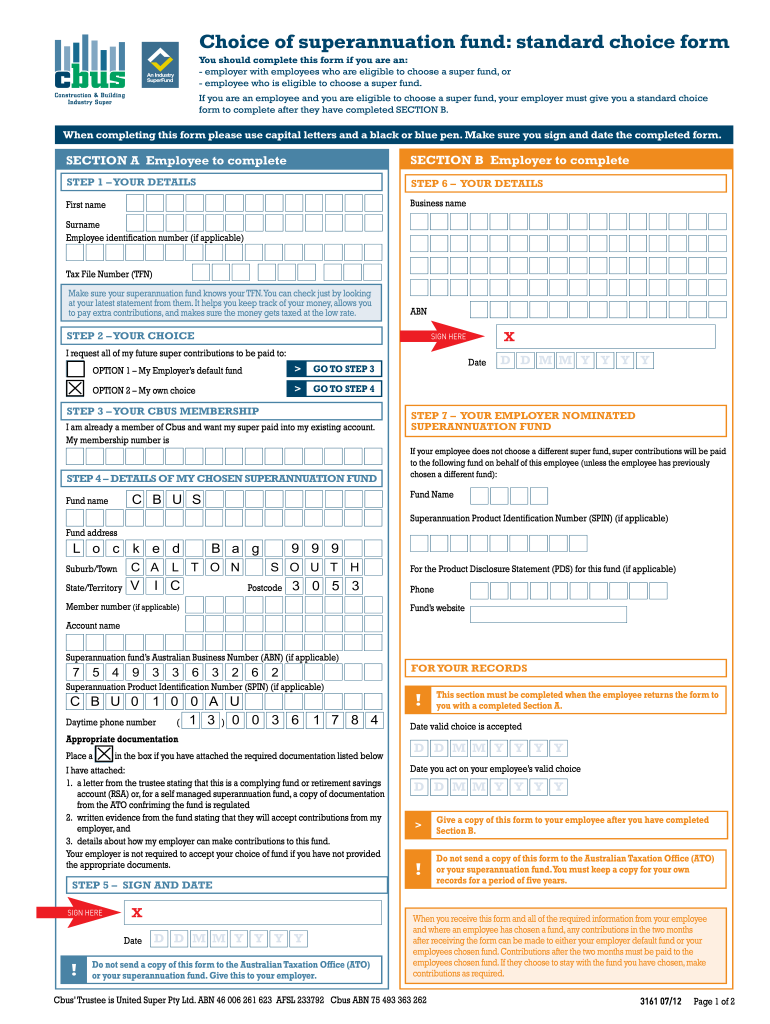
Cbus Investment Choice Form


What is the Cbus Investment Choice Form
The Cbus Investment Choice Form is a crucial document that allows members of the Cbus superannuation fund to select their preferred investment options. This form enables individuals to tailor their superannuation investments according to their financial goals and risk appetite. By completing the Cbus Investment Choice Form, members can choose from a variety of investment strategies, including growth, balanced, or conservative options, ensuring their retirement savings align with their personal preferences.
How to use the Cbus Investment Choice Form
Using the Cbus Investment Choice Form involves a straightforward process. First, members must obtain the form, which can typically be downloaded from the Cbus website or requested directly from their customer service. Once in possession of the form, individuals should carefully review their current investment options and consider their long-term financial objectives. After making informed decisions, members fill out the form by indicating their chosen investment options and providing any required personal information. Finally, the completed form should be submitted according to the specified guidelines, either online or via mail.
Steps to complete the Cbus Investment Choice Form
Completing the Cbus Investment Choice Form requires attention to detail. The following steps outline the process:
- Download or request the Cbus Investment Choice Form.
- Review your current investment strategy and assess your financial goals.
- Fill in your personal details, ensuring all information is accurate.
- Select your preferred investment options from the available choices.
- Double-check the form for any errors or missing information.
- Submit the form as instructed, either online or by mailing it to the appropriate address.
Key elements of the Cbus Investment Choice Form
The Cbus Investment Choice Form includes several key elements that members must understand to make informed choices. These elements typically encompass:
- Personal Information: Members must provide their full name, address, and member number.
- Investment Options: A list of available investment strategies, including descriptions and associated risks.
- Signature: Members must sign the form to validate their choices and confirm understanding of the implications.
- Submission Instructions: Clear guidelines on how to submit the form, whether electronically or via postal service.
Legal use of the Cbus Investment Choice Form
The Cbus Investment Choice Form is legally binding once submitted, meaning that the selections made by the member will dictate how their superannuation funds are managed. It is essential for members to understand the legal implications of their choices, as incorrect or incomplete submissions may lead to delays or issues with their investment allocations. Members should ensure they comply with all relevant regulations and guidelines to maintain the integrity of their superannuation account.
Form Submission Methods
Members have multiple options for submitting the Cbus Investment Choice Form. These methods typically include:
- Online Submission: Members can complete and submit the form through the Cbus online portal, ensuring a quick and efficient process.
- Mail: Alternatively, members can print the completed form and send it via postal service to the designated Cbus address.
- In-Person: Some members may choose to deliver the form in person at a Cbus office, allowing for immediate confirmation of receipt.
Quick guide on how to complete choice of superannuation fund standard choice form cbus
A brief tutorial on how to create your Cbus Investment Choice Form
Locating the right template can be a hurdle when you're tasked with preparing official international paperwork. Even if you possess the necessary form, it might prove challenging to swiftly fill it out according to all specifications when using physical copies instead of handling everything online. airSlate SignNow is the digital eSignature platform that enables you to navigate through this with ease. It allows you to obtain your Cbus Investment Choice Form and promptly fill it in and sign it on the spot without the need to reprint documents in the event of an error.
Here are the procedures you should follow to create your Cbus Investment Choice Form with airSlate SignNow:
- Hit the Get Form button to immediately upload your document to our editor.
- Begin at the first vacant field, input your information, and proceed using the Next tool.
- Complete the empty fields using the Cross and Check tools from the toolbar above.
- Select the Highlight or Line functions to emphasize the most crucial information.
- Click on Image and upload one if your Cbus Investment Choice Form requires it.
- Use the pane on the right side to add extra fields for yourself or others to fill out if needed.
- Review your entries and confirm the document by clicking Date, Initials, and Sign.
- Sketch, type, upload your eSignature, or capture it with a camera or QR code.
- Conclude editing the document by selecting the Done button and choosing your file-sharing preferences.
After your Cbus Investment Choice Form is ready, you can distribute it according to your preferences - send it to your recipients via email, SMS, fax, or even print it directly from the editor. Additionally, you can securely keep all your completed documents in your account, well-organized in folders based on your preferences. Save time on manual document filling; give airSlate SignNow a try!
Create this form in 5 minutes or less
FAQs
-
Why is there no choice for maths JRF when I try to fill out the form?
The online application has three options : JRF, JRF Lectureship, LectureshipIt is the same for all subjects. The age limit for JRF is 28 years for general candidates.http://59.163.216.82:8080/jrf/on...
-
How do I perfectly fill the CAP round form of engineering so that I get the desired college?
There is no specific way for filling the form.but just you have to make sure that we should fill up colleges according to our marks.Firstly We should write the top colleges for which probability of getting admission in that college is less.then next colleges to be filled are the for which there are good chances of getting that college.These are the most important as mostly you are going to get one of these colleges so preferences should be given carefully.And still if you have a desire to upgrade your college then you should opt for offline forms in Colleges.chances of getting upgrades are good in offline as Many people with more marks than you go for betterment and hence you can get that seat.All the Best
-
Can I change my choice of service from the Army to the Air Force after filling out the NDA form?
No ,Now at this time you cant change the preferences!!As per my knowledge i suggest you to go for SSB without any tension.If you clear it as well as medicals then you just join the academy as it is .After joining the academy you can change your service according to your choice .So now just prepare for your SSB.All the best !!!!
-
Do we have to fill out fresh choices during the special round of JoSAA?
yes,they will provide the left over seats and you have to fill your choices among them.If you get a seat and if you don't want to join,you won't get any refund.
Create this form in 5 minutes!
How to create an eSignature for the choice of superannuation fund standard choice form cbus
How to generate an eSignature for the Choice Of Superannuation Fund Standard Choice Form Cbus online
How to generate an electronic signature for the Choice Of Superannuation Fund Standard Choice Form Cbus in Google Chrome
How to create an electronic signature for signing the Choice Of Superannuation Fund Standard Choice Form Cbus in Gmail
How to generate an eSignature for the Choice Of Superannuation Fund Standard Choice Form Cbus straight from your smartphone
How to create an electronic signature for the Choice Of Superannuation Fund Standard Choice Form Cbus on iOS
How to generate an eSignature for the Choice Of Superannuation Fund Standard Choice Form Cbus on Android
People also ask
-
What is the Cbus Investment Choice Form?
The Cbus Investment Choice Form is a document that allows members to select their preferred investment options within their superannuation fund. With airSlate SignNow, you can easily eSign and submit your Cbus Investment Choice Form, streamlining the process and ensuring your choices are recorded accurately.
-
How can I fill out the Cbus Investment Choice Form using airSlate SignNow?
Filling out the Cbus Investment Choice Form with airSlate SignNow is simple. You can upload the form, fill it out digitally, and use our eSigning feature to sign it instantly. This ensures a fast and efficient way to manage your investment choices.
-
Is there a cost associated with using airSlate SignNow for the Cbus Investment Choice Form?
airSlate SignNow offers a cost-effective solution for handling documents, including the Cbus Investment Choice Form. Pricing varies based on the plan you select, but it’s designed to provide excellent value for businesses looking to manage their signing processes efficiently.
-
What are the benefits of using airSlate SignNow for the Cbus Investment Choice Form?
Using airSlate SignNow for the Cbus Investment Choice Form offers numerous benefits, including increased efficiency, reduced paperwork, and secure electronic signatures. You can track the status of your form in real-time, ensuring that your investment choices are processed without delays.
-
Can I integrate airSlate SignNow with other tools for managing my Cbus Investment Choice Form?
Yes, airSlate SignNow seamlessly integrates with a variety of business tools and applications. This allows you to manage your Cbus Investment Choice Form alongside your other workflows, enhancing productivity and ensuring all documents are easily accessible.
-
What security features does airSlate SignNow offer for the Cbus Investment Choice Form?
airSlate SignNow prioritizes security, providing features like encrypted document storage and secure eSigning for your Cbus Investment Choice Form. This ensures that your sensitive financial information is protected throughout the signing process.
-
How can I track my Cbus Investment Choice Form after submitting it through airSlate SignNow?
After submitting your Cbus Investment Choice Form via airSlate SignNow, you can easily track its status through our dashboard. You'll receive notifications about any updates, ensuring you stay informed about the progress of your investment selections.
Get more for Cbus Investment Choice Form
- 1003 commercial loan application pdf form
- Heavy equipment operator certificate template form
- Ireland visa application form pdf
- Similar right triangles worksheet answer key form
- Midicommand 0 1 manual pdf form
- Dv 505 info s form
- Active duty orders to officer candidate cnrc navy form
- Ba7 notice of completion bayswater wa gov form
Find out other Cbus Investment Choice Form
- eSign South Carolina Insurance Job Description Template Now
- eSign Indiana Legal Rental Application Free
- How To eSign Indiana Legal Residential Lease Agreement
- eSign Iowa Legal Separation Agreement Easy
- How To eSign New Jersey Life Sciences LLC Operating Agreement
- eSign Tennessee Insurance Rental Lease Agreement Later
- eSign Texas Insurance Affidavit Of Heirship Myself
- Help Me With eSign Kentucky Legal Quitclaim Deed
- eSign Louisiana Legal Limited Power Of Attorney Online
- How Can I eSign Maine Legal NDA
- eSign Maryland Legal LLC Operating Agreement Safe
- Can I eSign Virginia Life Sciences Job Description Template
- eSign Massachusetts Legal Promissory Note Template Safe
- eSign West Virginia Life Sciences Agreement Later
- How To eSign Michigan Legal Living Will
- eSign Alabama Non-Profit Business Plan Template Easy
- eSign Mississippi Legal Last Will And Testament Secure
- eSign California Non-Profit Month To Month Lease Myself
- eSign Colorado Non-Profit POA Mobile
- How Can I eSign Missouri Legal RFP