Eec Staff Form


What is the Eec Staff Information Form?
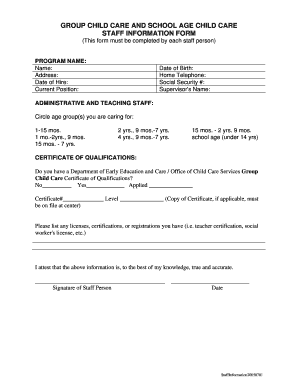
The Eec Staff Information Form is a crucial document designed to collect essential details from employees within an organization. This form typically includes personal information, employment history, and other relevant data that helps employers maintain accurate records. It serves as a foundational tool for human resources departments, ensuring compliance with various employment regulations and facilitating effective communication within the workplace.
How to Use the Eec Staff Information Form
Using the Eec Staff Information Form is a straightforward process. First, ensure that you have the latest version of the form, which can be obtained from your organization's human resources department or official website. Once you have the form, carefully fill in all required fields, providing accurate and truthful information. After completing the form, it can be submitted electronically or printed and handed in physically, depending on your organization's submission guidelines.
Steps to Complete the Eec Staff Information Form
Completing the Eec Staff Information Form involves several key steps:
- Gather personal information, including your full name, address, and contact details.
- Provide employment history, including previous positions held and relevant dates.
- Complete any additional sections that may require information about qualifications or certifications.
- Review the form for accuracy and completeness before submission.
- Submit the form according to your organization's specified method, whether online or in person.
Legal Use of the Eec Staff Information Form
The Eec Staff Information Form is legally valid when completed accurately and submitted in accordance with applicable employment laws. Organizations must ensure that the information collected complies with regulations such as the Fair Labor Standards Act and the Equal Employment Opportunity Commission guidelines. Proper handling and storage of the form are essential to protect employee privacy and maintain compliance with data protection laws.
Key Elements of the Eec Staff Information Form
Several key elements are typically included in the Eec Staff Information Form:
- Personal identification details, such as name and Social Security number.
- Contact information, including phone numbers and email addresses.
- Employment history, detailing previous jobs and relevant experience.
- Education background, including degrees and certifications.
- Emergency contact information for use in case of workplace incidents.
Form Submission Methods
The Eec Staff Information Form can be submitted through various methods, depending on the organization's policies. Common submission methods include:
- Online submission via a secure portal.
- Mailing a printed copy to the human resources department.
- Delivering the form in person to the designated HR representative.
Quick guide on how to complete eec staff form
Prepare Eec Staff Form effortlessly on any device
Digital document management has gained traction among businesses and individuals. It serves as a fantastic eco-friendly substitute to traditional printed and signed documents, as you can acquire the precise form and securely keep it online. airSlate SignNow provides you with all the tools required to create, modify, and eSign your documents swiftly without delays. Manage Eec Staff Form on any platform with airSlate SignNow's Android or iOS applications and enhance any document-oriented process today.
The simplest way to modify and eSign Eec Staff Form with ease
- Obtain Eec Staff Form and click Get Form to begin.
- Utilize the tools we offer to complete your form.
- Emphasize pertinent sections of your documents or obscure sensitive details with tools that airSlate SignNow specially provides for that purpose.
- Generate your eSignature using the Sign feature, which takes mere seconds and carries the same legal validity as a conventional wet ink signature.
- Review the information and click on the Done button to save your changes.
- Select how you wish to send your form, via email, text message (SMS), or invitation link, or download it to your computer.
Put aside concerns about lost or misplaced files, tiresome form searches, or mistakes that necessitate printing new document copies. airSlate SignNow meets all your document management needs in just a few clicks from a device of your choice. Modify and eSign Eec Staff Form and ensure seamless communication at any stage of your form preparation process with airSlate SignNow.
Create this form in 5 minutes or less
Create this form in 5 minutes!
How to create an eSignature for the eec staff form
How to create an electronic signature for a PDF online
How to create an electronic signature for a PDF in Google Chrome
How to create an e-signature for signing PDFs in Gmail
How to create an e-signature right from your smartphone
How to create an e-signature for a PDF on iOS
How to create an e-signature for a PDF on Android
People also ask
-
What is an eec staff information form?
The eec staff information form is a crucial document used by organizations to gather essential information from staff members. This form ensures that all relevant data is collected in a streamlined manner, facilitating better management and compliance within the organization.
-
How can I create an eec staff information form using airSlate SignNow?
Creating an eec staff information form with airSlate SignNow is simple and efficient. You can use our easy-to-use template builder to customize your form to meet your exact needs, ensuring that you can collect all necessary information from your staff quickly and efficiently.
-
Is there a cost associated with using the eec staff information form feature?
airSlate SignNow offers various pricing plans that include access to the eec staff information form feature. Depending on the plan you choose, you can utilize additional features, ensuring a cost-effective solution tailored to your business needs.
-
What are the benefits of using an eec staff information form?
Utilizing an eec staff information form streamlines the data collection process for HR and management teams. It enhances organization and clarity, ensures compliance with regulations, and saves time by reducing manual entry and paperwork.
-
Can I integrate the eec staff information form with other applications?
Yes, airSlate SignNow provides seamless integration capabilities for the eec staff information form with various applications, including CRM and HR systems. This integration helps to automate workflows and improve data management across platforms.
-
How secure is the data collected through the eec staff information form?
Security is a top priority for airSlate SignNow. When using the eec staff information form, all data is encrypted and stored securely, ensuring that sensitive staff information is protected against unauthorized access.
-
Can the eec staff information form be customized?
Absolutely! The eec staff information form can be fully customized using airSlate SignNow’s intuitive form builder. You can add necessary fields, modify templates, and personalize them to meet the specific needs of your organization.
Get more for Eec Staff Form
Find out other Eec Staff Form
- How Do I Sign Rhode Island Real Estate Form
- Can I Sign Vermont Real Estate Document
- How To Sign Wyoming Orthodontists Document
- Help Me With Sign Alabama Courts Form
- Help Me With Sign Virginia Police PPT
- How To Sign Colorado Courts Document
- Can I eSign Alabama Banking PPT
- How Can I eSign California Banking PDF
- How To eSign Hawaii Banking PDF
- How Can I eSign Hawaii Banking Document
- How Do I eSign Hawaii Banking Document
- How Do I eSign Hawaii Banking Document
- Help Me With eSign Hawaii Banking Document
- How To eSign Hawaii Banking Document
- Can I eSign Hawaii Banking Presentation
- Can I Sign Iowa Courts Form
- Help Me With eSign Montana Banking Form
- Can I Sign Kentucky Courts Document
- How To eSign New York Banking Word
- Can I eSign South Dakota Banking PPT