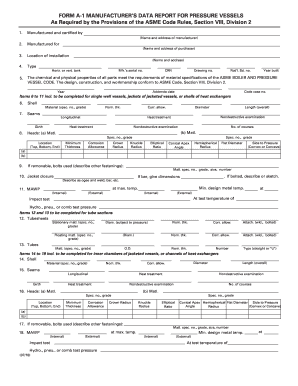
Manufacturing Data Report Example Form


What is the manufacturing data report example
The manufacturing data report example serves as a comprehensive document that outlines critical information about manufactured products. This report typically includes details such as the product specifications, materials used, and compliance with industry standards. It is essential for manufacturers to maintain accurate records, as these documents can be required for regulatory compliance, quality assurance, and customer verification. The manufacturing data report can also be referred to as a material data report, which emphasizes the materials involved in the production process.
Key elements of the manufacturing data report example
A well-structured manufacturing data report example should include several key elements to ensure clarity and compliance. These elements often consist of:
- Product Identification: A clear description of the product, including model numbers and specifications.
- Material Composition: Detailed information about the materials used in the manufacturing process.
- Compliance Information: Documentation showing adherence to relevant standards and regulations.
- Manufacturer Details: Information about the manufacturer, including name, address, and contact information.
- Inspection and Testing Results: Records of any inspections or tests performed on the product.
Steps to complete the manufacturing data report example
Completing a manufacturing data report example involves several systematic steps to ensure accuracy and compliance. Here are the typical steps:
- Gather Information: Collect all necessary data regarding the product, materials, and compliance standards.
- Fill Out the Report: Enter the gathered information into the designated sections of the report template.
- Review for Accuracy: Double-check all entries for completeness and correctness.
- Obtain Necessary Signatures: Ensure that the report is signed by authorized personnel to validate its authenticity.
- Submit the Report: Follow the appropriate submission methods, whether online or via physical delivery.
Legal use of the manufacturing data report example
The manufacturing data report example is legally binding when it meets specific criteria established by regulatory bodies. To ensure its legal standing, the report must be completed accurately and signed by authorized individuals. Additionally, it should comply with relevant laws and regulations, such as those set forth by the Occupational Safety and Health Administration (OSHA) and the American National Standards Institute (ANSI). Properly executed reports can serve as essential evidence in legal proceedings and audits.
How to use the manufacturing data report example
- Quality Control: Ensuring that products meet specified standards and regulations.
- Regulatory Compliance: Providing documentation for audits and inspections by regulatory agencies.
- Customer Assurance: Offering clients detailed information about the products they are purchasing.
- Internal Record Keeping: Maintaining accurate records for future reference and accountability.
Examples of using the manufacturing data report example
- Pressure Vessels: Manufacturers of pressure vessels must provide detailed reports to demonstrate compliance with safety standards.
- Boilers: A manufacturer's data report for boilers includes specifications and testing results to ensure operational safety.
- Automotive Parts: Automotive manufacturers use these reports to verify that parts meet industry regulations and quality benchmarks.
Quick guide on how to complete manufacturing data report example
Complete Manufacturing Data Report Example effortlessly on any device
Digital document management has gained traction among organizations and individuals alike. It serves as an ideal eco-friendly substitute for conventional printed and signed documents, allowing you to access the correct form and securely save it online. airSlate SignNow provides you with all the features necessary to create, alter, and eSign your documents rapidly without delays. Handle Manufacturing Data Report Example on any device using airSlate SignNow's Android or iOS applications and simplify any document-related task today.
The easiest method to modify and eSign Manufacturing Data Report Example with no hassle
- Find Manufacturing Data Report Example and click on Get Form to begin.
- Utilize the tools available to fill out your form.
- Emphasize pertinent sections of your documents or hide sensitive information with tools specially designed by airSlate SignNow for those tasks.
- Create your eSignature with the Sign feature, which takes only seconds and carries the same legal validity as a conventional wet ink signature.
- Review all the details and click on the Done button to save your modifications.
- Choose your preferred method of delivering your form, via email, SMS, or invitation link, or download it to your computer.
Say goodbye to lost or mislaid files, tedious form searching, or errors that necessitate printing new document copies. airSlate SignNow fulfills all your document management needs in just a few clicks from a device of your choice. Modify and eSign Manufacturing Data Report Example and ensure excellent communication throughout the form preparation process with airSlate SignNow.
Create this form in 5 minutes or less
Create this form in 5 minutes!
How to create an eSignature for the manufacturing data report example
How to create an electronic signature for a PDF online
How to create an electronic signature for a PDF in Google Chrome
How to create an e-signature for signing PDFs in Gmail
How to create an e-signature right from your smartphone
How to create an e-signature for a PDF on iOS
How to create an e-signature for a PDF on Android
People also ask
-
What is a manufacturing data report example?
A manufacturing data report example outlines key metrics and insights regarding production processes and performance. It often includes data on output, efficiency, and quality, helping manufacturers make informed decisions. This type of report is crucial for understanding the operational health of a manufacturing business.
-
How can airSlate SignNow help with creating manufacturing data reports?
With airSlate SignNow, you can easily create and eSign manufacturing data reports using customizable templates. This solution streamlines the process, allowing you to compile relevant data efficiently and share it with team members. The platform enhances collaboration and ensures that your reports are signed and stored securely.
-
What are the key features of airSlate SignNow for manufacturing data reporting?
Key features of airSlate SignNow include customizable templates, electronic signatures, and an intuitive interface. These features enable manufacturers to create well-structured manufacturing data reports quickly and securely. Additionally, the solution supports real-time collaboration, making it easier to gather feedback from stakeholders.
-
Is airSlate SignNow cost-effective for small manufacturers?
Yes, airSlate SignNow offers a cost-effective solution for small manufacturers looking to streamline their documentation processes. The pricing plans are designed to accommodate various business sizes, ensuring that even small operators can afford to utilize manufacturing data report examples efficiently. This helps them save time and reduce costs associated with manual document management.
-
Can airSlate SignNow integrate with other software used in manufacturing?
Absolutely! airSlate SignNow can seamlessly integrate with various software applications used in manufacturing, such as ERP and project management tools. This integration allows users to automate workflows and manage manufacturing data reports more effectively. It enhances the overall productivity of your team by connecting all necessary tools in one platform.
-
How secure is airSlate SignNow for handling manufacturing data reports?
airSlate SignNow prioritizes the security of your manufacturing data reports by employing industry-standard encryption and secure cloud storage. This ensures that your sensitive information remains protected at all times. Additionally, the platform complies with regulatory standards, providing peace of mind when handling critical business documents.
-
What are the benefits of using airSlate SignNow for manufacturing data reports?
Using airSlate SignNow for manufacturing data reports offers numerous benefits, including increased efficiency, ease of use, and enhanced collaboration. The platform allows teams to save time on paperwork while ensuring that all reports are signed and stored accurately. This results in improved productivity and a more organized approach to data management.
Get more for Manufacturing Data Report Example
- Senior management agreement for zefer corp form
- Underwriting agreement form
- Reseller agreement form
- Corp consulting form
- Supervision and sales agreement form
- Distribution agreement 497336753 form
- Class c corp form
- Lease agreement jackson shawn alpha metro limited partnership and efficient networks inc form
Find out other Manufacturing Data Report Example
- Sign Wyoming Courts LLC Operating Agreement Online
- How To Sign Wyoming Courts Quitclaim Deed
- eSign Vermont Business Operations Executive Summary Template Mobile
- eSign Vermont Business Operations Executive Summary Template Now
- eSign Virginia Business Operations Affidavit Of Heirship Mobile
- eSign Nebraska Charity LLC Operating Agreement Secure
- How Do I eSign Nevada Charity Lease Termination Letter
- eSign New Jersey Charity Resignation Letter Now
- eSign Alaska Construction Business Plan Template Mobile
- eSign Charity PPT North Carolina Now
- eSign New Mexico Charity Lease Agreement Form Secure
- eSign Charity PPT North Carolina Free
- eSign North Dakota Charity Rental Lease Agreement Now
- eSign Arkansas Construction Permission Slip Easy
- eSign Rhode Island Charity Rental Lease Agreement Secure
- eSign California Construction Promissory Note Template Easy
- eSign Colorado Construction LLC Operating Agreement Simple
- Can I eSign Washington Charity LLC Operating Agreement
- eSign Wyoming Charity Living Will Simple
- eSign Florida Construction Memorandum Of Understanding Easy