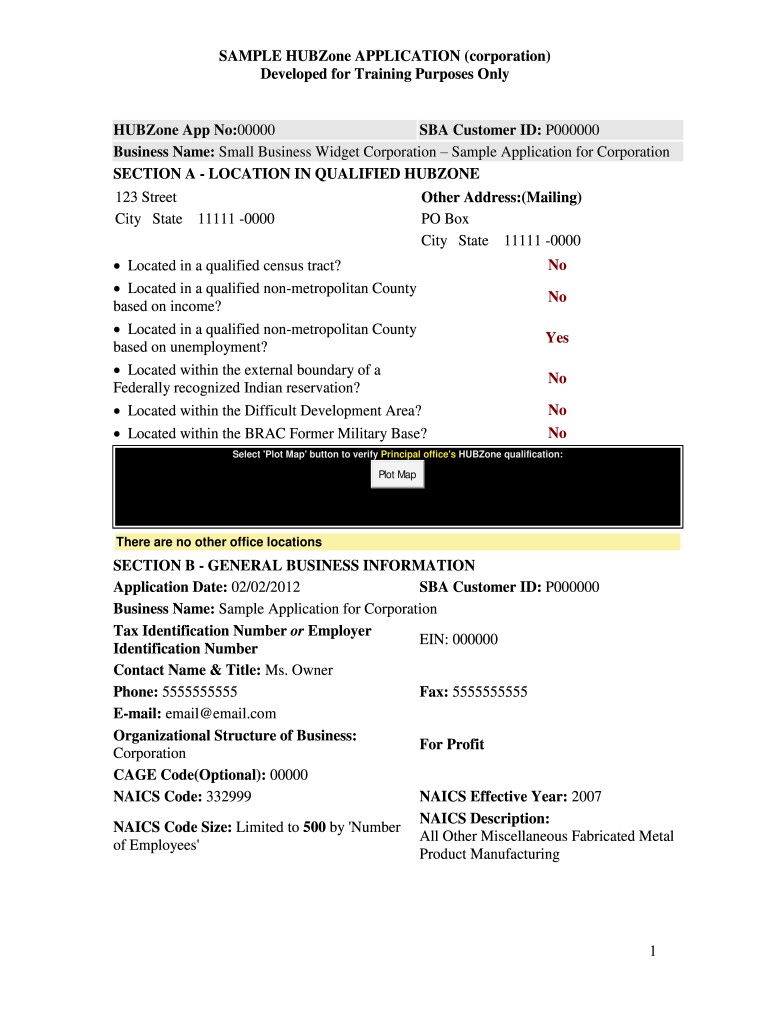
Hubzone Certification Form


What is the Hubzone Certification
The Hubzone Certification is a program established by the Small Business Administration (SBA) aimed at encouraging economic development in historically underutilized business zones. This certification allows small businesses located in these areas to gain access to federal contracting opportunities. By obtaining this certification, businesses can enhance their competitive edge when bidding for government contracts, as they may receive priority consideration. The program's goal is to stimulate job creation and investment in economically distressed communities across the United States.
How to Obtain the Hubzone Certification
To obtain the Hubzone Certification, businesses must meet specific eligibility criteria set by the SBA. The process begins by verifying that the business is located in a designated Hubzone area. Additionally, at least thirty-five percent of the business's employees must reside in Hubzone areas. Once eligibility is confirmed, businesses can complete the SBA Hubzone application online. This application requires detailed information about the business, including ownership, employee residency, and financial data. After submission, the SBA reviews the application, and if approved, the business receives Hubzone Certification.
Steps to Complete the Hubzone Certification
Completing the Hubzone Certification involves several key steps:
- Verify your business's eligibility based on location and employee residency.
- Gather necessary documentation, including ownership details and employee information.
- Complete the online Hubzone application through the SBA's website.
- Submit the application and await confirmation from the SBA regarding your certification status.
- If approved, ensure compliance with ongoing requirements to maintain your certification.
Key Elements of the Hubzone Certification
Several key elements define the Hubzone Certification process:
- Location: The business must be physically located in a designated Hubzone area.
- Employee Residency: A minimum of thirty-five percent of employees must live in Hubzone areas.
- Size Standards: The business must qualify as a small business according to SBA size standards.
- Ownership Structure: The business must be at least fifty-one percent owned and controlled by U.S. citizens.
- Compliance: Businesses must comply with ongoing requirements to maintain their Hubzone status.
Required Documents
When applying for the Hubzone Certification, businesses need to prepare several documents to support their application. These may include:
- Proof of business ownership, such as articles of incorporation or partnership agreements.
- Employee records demonstrating residency in Hubzone areas.
- Financial statements to confirm the business's size and revenue.
- Tax documents that provide additional verification of the business's legitimacy.
Eligibility Criteria
To qualify for the Hubzone Certification, businesses must meet the following eligibility criteria:
- Be a small business as defined by the SBA.
- Have its principal office located in a designated Hubzone.
- Employ at least thirty-five percent of its employees who reside in Hubzone areas.
- Be at least fifty-one percent owned and controlled by U.S. citizens.
Quick guide on how to complete hubzone application form
A straightforward guide on how to complete Hubzone Certification
Filling out digital documents has shown to be more effective and safe compared to conventional pen and paper techniques. Unlike recording information on physical copies, errors or misplaced details are easily amendable. Such oversights can be a signNow disadvantage when preparing applications and requests. Consider utilizing airSlate SignNow for completing your Hubzone Certification. Our all-encompassing, intuitive, and compliant electronic signature solution will simplify this procedure for you.
Follow our directions on how to swiftly complete and sign your Hubzone Certification with airSlate SignNow:
- Confirm the purpose of your chosen document to ensure it meets your needs, and click Get Form if it does.
- Upload your template to our editor and explore the features our tool provides for document editing.
- Fill in the empty fields with your information and mark options using Check or Cross choices.
- Insert Text boxes, replace existing content, and place Images wherever needed.
- Select the Highlight button to indicate what you wish to underscore, and obscure irrelevant information from your recipient with the Blackout tool.
- In the right-side panel, create additional fillable fields designated for specific parties if necessary.
- Secure your document with watermarks or set a password once editing is complete.
- Include Date, click Sign → Add signature and select your signing option.
- Draw, type, upload, or create your legally binding electronic signature using a QR code or the camera on your device.
- Review your responses and click Done to conclude editing and proceed with document sharing.
Utilize airSlate SignNow to finalize your Hubzone Certification and manage other professional fillable documents securely and efficiently. Register today!
Create this form in 5 minutes or less
FAQs
-
How do I fill out an application form to open a bank account?
I want to believe that most banks nowadays have made the process of opening bank account, which used to be cumbersome, less cumbersome. All you need to do is to approach the bank, collect the form, and fill. However if you have any difficulty in filling it, you can always call on one of the banks rep to help you out.
-
How do I fill out the IIFT 2018 application form?
Hi!IIFT MBA (IB) Application Form 2018 – The last date to submit the Application Form of IIFT 2018 has been extended. As per the initial notice, the last date to submit the application form was September 08, 2017. However, now the candidates may submit it untill September 15, 2017. The exam date for IIFT 2018 has also been shifted to December 03, 2017. The candidates will only be issued the admit card, if they will submit IIFT application form and fee in the prescribed format. Before filling the IIFT application form, the candidates must check the eligibility criteria because ineligible candidates will not be granted admission. The application fee for candidates is Rs. 1550, however, the candidates belonging to SC/STPWD category only need to pay Rs. 775. Check procedure to submit IIFT Application Form 2018, fee details and more information from the article below.Latest – Last date to submit IIFT application form extended until September 15, 2017.IIFT 2018 Application FormThe application form of IIFT MBA 2018 has only be released online, on http://tedu.iift.ac.in. The candidates must submit it before the laps of the deadline, which can be checked from the table below.Application form released onJuly 25, 2017Last date to submit Application form(for national candidates)September 08, 2017 September 15, 2017Last date to submit the application form(by Foreign National and NRI)February 15, 2018IIFT MBA IB entrance exam will be held onNovember 26, 2017 December 03, 2017IIFT 2018 Application FeeThe candidates should take note of the application fee before submitting the application form. The fee amount is as given below and along with it, the medium to submit the fee are also mentioned.Fee amount for IIFT 2018 Application Form is as given below:General/OBC candidatesRs 1550SC/ST/PH candidatesRs 775Foreign National/NRI/Children of NRI candidatesUS$ 80 (INR Rs. 4500)The medium to submit the application fee of IIFT 2018 is as below:Credit CardsDebit Cards (VISA/Master)Demand Draft (DD)Candidates who will submit the application fee via Demand Draft will be required to submit a DD, in favour of Indian Institute of Foreign Trade, payable at New Delhi.Procedure to Submit IIFT MBA Application Form 2018Thank you & Have a nice day! :)
-
How do I fill the JEE (Main) application form?
This is a step by step guide to help you fill your JEE (Main) application form online brought to you by Toppr. We intend to help you save time and avoid mistakes so that you can sail through this whole process rather smoothly. In case you have any doubts, please talk to our counselors by first registering at Toppr. JEE Main Application Form is completely online and there is no offline component or downloadable application form. Here are some steps you need to follow:Step 1: Fill the Application FormEnter all the details while filling the Online Application Form and choose a strong password and security question with a relevant answer.After entering the data, an application number will be generated and it will be used to complete the remaining steps. Make sure your note down this number.Once you register, you can use this number and password for further logins. Do not share the login credentials with anyone but make sure you remember them.Step 2: Upload Scanned ImagesThe scanned images of photographs, thumb impression and signature should be in JPG/JPEG format only.While uploading the photograph, signature and thumb impression, please see its preview to check if they have been uploaded correctly.You will be able to modify/correct the particulars before the payment of fees.Step 3: Make The PaymentPayment of the Application Fees for JEE (Main) is through Debit card or Credit Card or E Challan.E-challan has to be downloaded while applying and the payment has to be made in cash at Canara Bank or Syndicate Bank or ICICI bank.After successful payment, you will be able to print the acknowledgment page. In case acknowledgment page is not generated after payment, then the transaction is cancelled and amount will be refunded.Step 4: Selection of Date/SlotIf you have opted for Computer Based Examination of Paper – 1, you should select the date/slot after payment of Examination Fee.If you do not select the date/slot, you will be allotted the date/slot on random basis depending upon availability.In case you feel you are ready to get started with filling the application form, pleaseclick here. Also, if you are in the final stages of your exam preparation process, you can brush up your concepts and solve difficult problems on Toppr.com to improve your accuracy and save time.
-
How do I fill out the CAT 2018 application form?
The procedure for filling up the CAT Application form is very simple. I’ll try to explain it to you in simple words.I have provided a link below for CAT registration.See, first you have to register, then fill in details in the application form, upload images, pay the registration fee and finally submit the form.Now, to register online, you have to enter details such as your name, date of birth, email id, mobile number and choose your country. You must and must enter your own personal email id and mobile number, as you will receive latest updates on CAT exam through email and SMS only.Submit the registration details, after which an OTP will be sent to the registered email id and mobile number.Once the registration part is over, you will get the Login credentials.Next, you need to fill in your personal details, academic details, work experience details, etc.Upload scanned images of your photograph, and signature as per the specifications.Pay the registration fee, which is Rs. 950 for SC/ST/PWD category candidates and Rs. 1900 for all other categories by online mode (Credit Card/ Debit Card/ Net Banking).Final step - Submit the form and do not forget to take the print out of the application form. if not print out then atleast save it somewhere.CAT 2018 Registration (Started): Date, Fees, CAT 2018 Online Application iimcat.ac.in
-
What is the procedure for filling out the CPT registration form online?
CHECK-LIST FOR FILLING-UP CPT JUNE - 2017 EXAMINATION APPLICATION FORM1 - BEFORE FILLING UP THE FORM, PLEASE DETERMINE YOUR ELIGIBILITY AS PER DETAILS GIVEN AT PARA 1.3 (IGNORE FILLING UP THE FORM IN CASE YOU DO NOT COMPLY WITH THE ELIGIBILITY REQUIREMENTS).2 - ENSURE THAT ALL COLUMNS OF THE FORM ARE FILLED UP/SELECTED CORRECTLY AND ARE CORRECTLY APPEARING IN THE PDF.3 - CENTRE IS SELECTED CORRECTLY AND IS CORRECTLY APPEARING IN THE PDF. (FOR REFERENCE SEE APPENDIX-A).4 - MEDIUM OF THE EXAMINATION IS SELECTED CORRECTLY AND IS CORRECTLY APPEARING IN THE PDF.5 - THE SCANNED COPY OF THE DECLARATION UPLOADED PERTAINS TO THE CURRENT EXAM CYCLE.6 - ENSURE THAT PHOTOGRAPHS AND SIGNATURES HAVE BEEN AFFIXED (If the same are not appearing in the pdf) AT APPROPRIATE COLUMNS OF THE PRINTOUT OF THE EXAM FORM.7 - ADDRESS HAS BEEN RECORDED CORRECTLY AND IS CORRECTLY APPEARING IN THE PDF.8 - IN CASE THE PDF IS NOT CONTAINING THE PHOTO/SIGNATURE THEN CANDIDATE HAS TO GET THE DECLARATION SIGNED AND PDF IS GOT ATTESTED.9 - RETAIN A COPY OF THE PDF/FILLED-IN FORM FOR YOUR FUTURE REFERENCE.10 - IN CASE THE PHOTO/SIGN IS NOT APPEARING IN THE PDF, PLEASE TAKE ATTESTATIONS AND SEND THE PDF (PRINT OUT) OF THE ONLINE SUMBITTED EXAMINATION APPLICATION BY SPEED POST/REGISTERED POST ONLY.11 - KEEP IN SAFE CUSTODY THE SPEED POST/REGISTERED POST RECEIPT ISSUED BY POSTAL AUTHORITY FOR SENDING THE PDF (PRINT OUT) OF THE ONLINE SUMBITTED EXAMINATION APPLICATION FORM TO THE INSTITUTE/ RECEIPT ISSUED BY ICAI IN CASE THE APPLICATION IS DEPOSITED BY HAND.Regards,Scholar For CA089773 13131Like us on facebookScholar for ca,cma,cs https://m.facebook.com/scholarca...Sambamurthy Nagar, 5th Street, Kakinada, Andhra Pradesh 533003https://g.co/kgs/VaK6g0
-
How do I fill out the Assam CEE application form?
The application form for Assam CEE 2018 has been released on 1st March 2018.The last date for submission of the same is 20th March 2018.Filling up the Application FormAll information submitted must be valid and as per the documents possessed by the candidates.Uploading of Scanned DocumentsThe documents have to be uploaded according to the specifications mentioned by the DTE.Submission of Filled Application FormThe e-challan will be generated after the application form is successfully submitted.Payment of Application FeesThe candidates will be able to pay the required application fees of Rs. 600 through online (net banking/credit card/debit card) or offline mode (e-challan).For more information, visit this site: Assam CEE 2018 Application Form Released - Apply Now!
Create this form in 5 minutes!
How to create an eSignature for the hubzone application form
How to generate an electronic signature for the Hubzone Application Form in the online mode
How to create an electronic signature for your Hubzone Application Form in Chrome
How to make an electronic signature for signing the Hubzone Application Form in Gmail
How to create an electronic signature for the Hubzone Application Form straight from your smart phone
How to create an eSignature for the Hubzone Application Form on iOS devices
How to generate an electronic signature for the Hubzone Application Form on Android devices
People also ask
-
What is Hubzone Certification and how does it benefit my business?
Hubzone Certification is a program designed to encourage economic development in historically underutilized business zones. By obtaining Hubzone Certification, your business can gain access to federal contracting opportunities, which can signNowly increase revenue and visibility in the marketplace. This certification is especially beneficial for small businesses looking to expand their signNow and secure government contracts.
-
How can airSlate SignNow help with the Hubzone Certification application process?
airSlate SignNow streamlines the Hubzone Certification application process by allowing you to electronically sign and submit necessary documents quickly and securely. Our platform provides an easy-to-use interface that ensures all paperwork is completed accurately and submitted on time. This efficiency can help you focus on other aspects of your business while ensuring your certification process is handled smoothly.
-
Is there a cost associated with obtaining Hubzone Certification?
While there is no direct fee for the Hubzone Certification itself, businesses may incur costs related to preparation and submission of required documentation. Utilizing airSlate SignNow can minimize these costs by reducing the time and resources spent on paperwork. Our cost-effective solution allows you to manage the application process without breaking the bank.
-
What documents are needed for Hubzone Certification?
To apply for Hubzone Certification, you'll need to provide various documents, including proof of business location, ownership information, and financial statements. airSlate SignNow helps you organize and securely store these documents in one place, making it easier to compile and submit your application. We ensure that you have everything you need to successfully apply for your Hubzone Certification.
-
Can I track the status of my Hubzone Certification application with airSlate SignNow?
Yes, airSlate SignNow allows you to track the status of your Hubzone Certification application through our user-friendly dashboard. You can monitor the progress of your submission and receive notifications when updates occur, ensuring you stay informed throughout the process. This feature enhances your experience and provides peace of mind as you await certification.
-
What features does airSlate SignNow offer that assist with Hubzone Certification?
airSlate SignNow offers a variety of features that can assist with the Hubzone Certification process, including eSignature capabilities, document templates, and secure cloud storage. These tools simplify the management of documentation, allowing you to easily create, send, and track essential forms for your application. Our platform is built to support businesses seeking Hubzone Certification efficiently.
-
Are there integrations available for airSlate SignNow that enhance the Hubzone Certification process?
Yes, airSlate SignNow integrates seamlessly with various business applications, which can enhance your Hubzone Certification process. Integrations with project management and accounting software can streamline your operations, allowing you to manage your certification alongside your other business activities. This connectivity makes airSlate SignNow a versatile tool for pursuing Hubzone Certification.
Get more for Hubzone Certification
- Printable 8962 form
- Nj resale certificate fillable form
- Divorce papers california 5640617 form
- Cash assistance indiana form
- Medical outcomes study sf 36 is a set of generic coherent and easily administered quality of life measures rand form
- Teacher lesson reflection form
- Www smartpractice comshopcategoryt r u e test ready to use patch test panels smartpractice form
- Weblink ocdsb caweblink0workplace violence reporting form form 733 appendix a to pr
Find out other Hubzone Certification
- Sign Michigan Affidavit of Service Online
- How To Sign New Hampshire Affidavit of Service
- How Can I Sign Wyoming Affidavit of Service
- Help Me With Sign Colorado Affidavit of Title
- How Do I Sign Massachusetts Affidavit of Title
- How Do I Sign Oklahoma Affidavit of Title
- Help Me With Sign Pennsylvania Affidavit of Title
- Can I Sign Pennsylvania Affidavit of Title
- How Do I Sign Alabama Cease and Desist Letter
- Sign Arkansas Cease and Desist Letter Free
- Sign Hawaii Cease and Desist Letter Simple
- Sign Illinois Cease and Desist Letter Fast
- Can I Sign Illinois Cease and Desist Letter
- Sign Iowa Cease and Desist Letter Online
- Sign Maryland Cease and Desist Letter Myself
- Sign Maryland Cease and Desist Letter Free
- Sign Mississippi Cease and Desist Letter Free
- Sign Nevada Cease and Desist Letter Simple
- Sign New Jersey Cease and Desist Letter Free
- How Can I Sign North Carolina Cease and Desist Letter