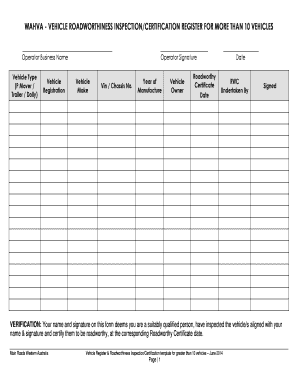
WAHVA VEHICLE ROADWORTHINESS INSPECTIONCERTIFICATION REGISTER for MORE THAN 10 VEHICLES Operator Business Name Operator Signatur Form


Understanding the WAHVA Vehicle Roadworthiness Inspection Certification Register
The WAHVA Vehicle Roadworthiness Inspection Certification Register is essential for operators managing more than ten vehicles. This register ensures that all vehicles meet safety and operational standards. It includes critical information such as the operator's business name, vehicle type, and registration details. Compliance with this register is crucial for maintaining legal and operational integrity in vehicle management.
Steps to Complete the WAHVA Vehicle Roadworthiness Inspection Certification Register
Completing the WAHVA Vehicle Roadworthiness Inspection Certification Register involves several key steps:
- Gather necessary information, including the operator's business name and vehicle details.
- Ensure each vehicle's type, make, and VIN (Vehicle Identification Number) are accurately recorded.
- Sign the document to certify that all information provided is correct and complete.
- Submit the completed register to the appropriate regulatory authority.
Legal Use of the WAHVA Vehicle Roadworthiness Inspection Certification Register
This register serves a legal purpose by documenting the roadworthiness of vehicles. It is vital for compliance with state and federal regulations. Operators must ensure that the information is accurate and up-to-date to avoid penalties or legal issues. The certification acts as proof that the vehicles have undergone necessary inspections and meet safety standards.
Key Elements of the WAHVA Vehicle Roadworthiness Inspection Certification Register
Key elements of the register include:
- Operator Business Name: The official name of the business managing the vehicles.
- Operator Signature: A signature confirming the accuracy of the information provided.
- Vehicle Type: The classification of each vehicle, such as P Mover, Trailer, or Dolly.
- Vehicle Registration: Official registration details for each vehicle.
- Vehicle Make and VIN: The manufacturer and unique identification number of each vehicle.
State-Specific Rules for the WAHVA Vehicle Roadworthiness Inspection Certification Register
Each state may have specific rules governing the use of the WAHVA Vehicle Roadworthiness Inspection Certification Register. Operators should familiarize themselves with local regulations to ensure compliance. This includes understanding any additional documentation required or specific submission methods mandated by state authorities.
Examples of Using the WAHVA Vehicle Roadworthiness Inspection Certification Register
Practical examples of using the register include:
- Documenting the roadworthiness of a fleet of delivery trucks to meet transportation regulations.
- Ensuring compliance for a rental vehicle company managing multiple cars.
- Maintaining records for a logistics business operating various trailers and dollies.
Quick guide on how to complete wahva vehicle roadworthiness inspectioncertification register for more than 10 vehicles operator business name operator
Effortlessly Prepare WAHVA VEHICLE ROADWORTHINESS INSPECTIONCERTIFICATION REGISTER FOR MORE THAN 10 VEHICLES Operator Business Name Operator Signatur on Any Device
Digital document management has seen a rise in popularity among companies and individuals. It serves as an ideal eco-friendly substitute for conventional printed and signed files, allowing you to find the right form and securely store it online. airSlate SignNow provides all the tools you require to create, edit, and eSign your documents rapidly without delays. Handle WAHVA VEHICLE ROADWORTHINESS INSPECTIONCERTIFICATION REGISTER FOR MORE THAN 10 VEHICLES Operator Business Name Operator Signatur on any platform using the airSlate SignNow Android or iOS applications and enhance any document-related process today.
Effortless Method to Edit and eSign WAHVA VEHICLE ROADWORTHINESS INSPECTIONCERTIFICATION REGISTER FOR MORE THAN 10 VEHICLES Operator Business Name Operator Signatur
- Obtain WAHVA VEHICLE ROADWORTHINESS INSPECTIONCERTIFICATION REGISTER FOR MORE THAN 10 VEHICLES Operator Business Name Operator Signatur and click on Get Form to begin.
- Utilize the tools we offer to finish your document.
- Mark important parts of your documents or obscure sensitive information with tools provided by airSlate SignNow specifically for this purpose.
- Generate your eSignature using the Sign tool, which takes mere seconds and holds the same legal validity as a traditional handwritten signature.
- Review all the details and click on the Done button to save your modifications.
- Choose how you wish to send your form, via email, SMS, or invitation link, or download it to your computer.
Eliminate worries about lost or misplaced documents, tedious form searching, or mistakes that necessitate printing new document copies. airSlate SignNow fulfills all your document management requirements in just a few clicks from any device of your preference. Edit and eSign WAHVA VEHICLE ROADWORTHINESS INSPECTIONCERTIFICATION REGISTER FOR MORE THAN 10 VEHICLES Operator Business Name Operator Signatur and ensure excellent communication throughout your form preparation process with airSlate SignNow.
Create this form in 5 minutes or less
Create this form in 5 minutes!
How to create an eSignature for the wahva vehicle roadworthiness inspectioncertification register for more than 10 vehicles operator business name operator
How to create an electronic signature for a PDF online
How to create an electronic signature for a PDF in Google Chrome
How to create an e-signature for signing PDFs in Gmail
How to create an e-signature right from your smartphone
How to create an e-signature for a PDF on iOS
How to create an e-signature for a PDF on Android
People also ask
-
What are some examples of 10 vehicles name for electronic signatures?
In the context of electronic signatures, the term '10 vehicles name' refers to various software solutions that can facilitate document signing digitally. Some popular names include signNow, signNow, airSlate SignNow, signNow, and SignNow. These platforms let users manage documents efficiently and securely.
-
How does airSlate SignNow compare to other 10 vehicles name?
airSlate SignNow stands out among other '10 vehicles name' due to its user-friendly interface and cost-effective pricing. It integrates seamlessly with a variety of applications, making it a versatile choice for businesses. The solution offers robust features that cater to both small and large organizations.
-
What pricing options are available for airSlate SignNow?
airSlate SignNow offers flexible pricing plans that cater to different business needs, making it one of the affordable options among the '10 vehicles name.' Whether you require basic features or advanced capabilities, there is a plan that fits your requirements. You can choose from monthly or annual subscriptions.
-
What features does airSlate SignNow provide?
As a leading name among the '10 vehicles name,' airSlate SignNow includes a range of features such as document templates, real-time collaboration, and mobile access. Users can also track the status of their documents and customize workflows, which enhances efficiency and streamlines the signing process.
-
Is airSlate SignNow suitable for small businesses?
Yes, airSlate SignNow is particularly well-suited for small businesses looking for an affordable solution among the '10 vehicles name.' Its intuitive features make it easy for smaller teams to manage documents without a steep learning curve. The cost-effective pricing allows small businesses to implement eSigning without breaking the bank.
-
Can I integrate airSlate SignNow with other applications?
Absolutely! airSlate SignNow offers extensive integration options, allowing you to connect it with popular tools among the '10 vehicles name,' such as Google Drive, Salesforce, and Zoho. These integrations enhance your workflow, ensuring that you can manage documents seamlessly across different platforms.
-
What are the benefits of using airSlate SignNow over traditional signing methods?
Using airSlate SignNow instead of traditional signing methods offers numerous benefits. It signNowly reduces signing time, eliminates the need for physical documents, and enhances security. By going digital with a solution from the '10 vehicles name,' businesses can improve efficiency and cut operational costs.
Get more for WAHVA VEHICLE ROADWORTHINESS INSPECTIONCERTIFICATION REGISTER FOR MORE THAN 10 VEHICLES Operator Business Name Operator Signatur
- On guardianship of a minor form
- 2420 served by publication form
- Commonwealth of kentuckypetitioner form
- Pge medical baseline form
- Customer authorization of disclosure of financial records dboqr 500265 rev 10 17 form
- Fillable online equipment lease agreement catalog form
- All information on this form must be
- 921 michigan department of licensing and regulatory 574519671 form
Find out other WAHVA VEHICLE ROADWORTHINESS INSPECTIONCERTIFICATION REGISTER FOR MORE THAN 10 VEHICLES Operator Business Name Operator Signatur
- Sign Pennsylvania Insurance Business Plan Template Safe
- Sign Pennsylvania Insurance Contract Safe
- How Do I Sign Louisiana Legal Cease And Desist Letter
- How Can I Sign Kentucky Legal Quitclaim Deed
- Sign Kentucky Legal Cease And Desist Letter Fast
- Sign Maryland Legal Quitclaim Deed Now
- Can I Sign Maine Legal NDA
- How To Sign Maine Legal Warranty Deed
- Sign Maine Legal Last Will And Testament Fast
- How To Sign Maine Legal Quitclaim Deed
- Sign Mississippi Legal Business Plan Template Easy
- How Do I Sign Minnesota Legal Residential Lease Agreement
- Sign South Carolina Insurance Lease Agreement Template Computer
- Sign Missouri Legal Last Will And Testament Online
- Sign Montana Legal Resignation Letter Easy
- How Do I Sign Montana Legal IOU
- How Do I Sign Montana Legal Quitclaim Deed
- Sign Missouri Legal Separation Agreement Myself
- How Do I Sign Nevada Legal Contract
- Sign New Jersey Legal Memorandum Of Understanding Online