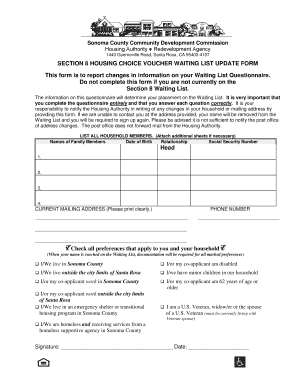
Sonoma County Section 8 Waitlist Check Form


What is the Sonoma County Section 8 Waitlist Check
The Sonoma County Section 8 waitlist check is a process that allows individuals to verify their status on the waitlist for housing assistance through the Section 8 program. This program, administered by the U.S. Department of Housing and Urban Development (HUD), provides rental assistance to low-income families, the elderly, and individuals with disabilities. The waitlist check ensures that applicants can stay informed about their position and any updates regarding their eligibility for assistance.
How to use the Sonoma County Section 8 Waitlist Check
Using the Sonoma County Section 8 waitlist check is a straightforward process. Applicants typically need to visit the official housing authority website or contact their local housing office. By entering specific personal information, such as their application number or social security number, individuals can access their waitlist status. This service is designed to provide transparency and help applicants understand where they stand in the process.
Steps to complete the Sonoma County Section 8 Waitlist Check
Completing the Sonoma County Section 8 waitlist check involves several key steps:
- Visit the official Sonoma County housing authority website.
- Locate the waitlist check section on the site.
- Enter required information, such as your application number and personal details.
- Submit the information to view your current waitlist status.
- Review any additional instructions or updates provided on the site.
Legal use of the Sonoma County Section 8 Waitlist Check
The Sonoma County Section 8 waitlist check is legally recognized as a valid method for applicants to confirm their status in the housing assistance program. It is important for individuals to use this process responsibly and ensure that their personal information is entered accurately. Maintaining compliance with privacy regulations is essential, as the information accessed through the waitlist check is sensitive and should be protected.
Eligibility Criteria
Eligibility for the Sonoma County Section 8 program is determined based on several factors, including income level, family size, and citizenship status. Applicants must meet specific income limits that are set annually by HUD. Additionally, individuals must provide documentation to verify their circumstances, such as proof of income and identification. Understanding these criteria is crucial for those seeking assistance through the Section 8 program.
Application Process & Approval Time
The application process for the Sonoma County Section 8 program typically involves submitting a completed application form, along with required documentation. After submission, applicants may undergo a screening process, which can take several weeks to months, depending on the volume of applications and available funding. It is advisable for applicants to regularly check their waitlist status to stay informed about their progress and any potential next steps.
Quick guide on how to complete sonoma county section 8 waitlist check
Complete Sonoma County Section 8 Waitlist Check effortlessly on any gadget
Digital document management has gained traction among businesses and individuals. It offers an ideal eco-friendly alternative to conventional printed and signed documents, as you can access the necessary form and securely store it online. airSlate SignNow supplies you with all the tools required to create, modify, and eSign your documents swiftly without delays. Manage Sonoma County Section 8 Waitlist Check on any gadget using airSlate SignNow's Android or iOS applications and enhance any document-focused task today.
How to modify and eSign Sonoma County Section 8 Waitlist Check with ease
- Obtain Sonoma County Section 8 Waitlist Check and click Get Form to begin.
- Utilize the tools we offer to fill out your form.
- Emphasize key sections of your documents or redact sensitive information with tools specifically provided by airSlate SignNow for that purpose.
- Create your eSignature using the Sign tool, which takes mere seconds and carries the same legal validity as a traditional wet ink signature.
- Review all the details and click on the Done button to save your modifications.
- Choose how you wish to share your form, via email, text message (SMS), or invitation link, or download it to your computer.
Eliminate concerns about lost or misplaced documents, tedious form searches, or mistakes that necessitate reprinting new document copies. airSlate SignNow takes care of all your document management needs in just a few clicks from any device of your preference. Modify and eSign Sonoma County Section 8 Waitlist Check and ensure outstanding communication at every phase of your form preparation process with airSlate SignNow.
Create this form in 5 minutes or less
Create this form in 5 minutes!
How to create an eSignature for the sonoma county section 8 waitlist check
How to create an electronic signature for a PDF online
How to create an electronic signature for a PDF in Google Chrome
How to create an e-signature for signing PDFs in Gmail
How to create an e-signature right from your smartphone
How to create an e-signature for a PDF on iOS
How to create an e-signature for a PDF on Android
People also ask
-
What is the Sonoma County Section 8 waitlist check process?
The Sonoma County section 8 waitlist check process allows applicants to verify their status on the waitlist for rental assistance. By visiting the designated online portal, individuals can enter their personal details to access information about their application and current position on the waitlist.
-
How can I perform a Sonoma County Section 8 waitlist check?
To perform a sonoma county section 8 waitlist check, you need to provide specific identifying information such as your application number or personal details. This will enable you to view your status and any updates regarding your waitlist application online.
-
Are there any fees associated with the Sonoma County Section 8 waitlist check?
No, the Sonoma County section 8 waitlist check is provided as a free service to all applicants. There are no costs to access your waitlist status or receive information about your application.
-
How long does the Sonoma County Section 8 waitlist check take?
The sonoma county section 8 waitlist check is typically processed instantly online. You should receive immediate feedback regarding your application status once you've entered your details on the portal.
-
What features should I expect from the Sonoma County Section 8 waitlist check service?
The sonoma county section 8 waitlist check service includes real-time updates on your application status, notifications for any changes, and comprehensive support throughout the process. This ensures that you are well-informed about your standing and can make necessary plans accordingly.
-
What benefits come with using the Sonoma County Section 8 waitlist check?
Using the sonoma county section 8 waitlist check offers transparency and peace of mind as you track your application. It allows you to stay informed about your status and potential housing options without the need for cumbersome phone calls or visits.
-
Can I integrate other services with the Sonoma County Section 8 waitlist check?
Yes, there are options to integrate additional housing assistance services with the sonoma county section 8 waitlist check. This can enhance your experience by providing supplementary resources and support related to affordable housing.
Get more for Sonoma County Section 8 Waitlist Check
- Montana warranty deed from individual to individual form
- Montana quitclaim deed from individual to llc form
- Montana statutory general power of attorney with durable provisions form
- Power medical treatment form
- North carolina corporation search form
- North carolina deed trust form
- Deed husband wife 481377422 form
- North carolina deed form
Find out other Sonoma County Section 8 Waitlist Check
- How Do I eSignature Maryland Healthcare / Medical PDF
- Help Me With eSignature New Mexico Healthcare / Medical Form
- How Do I eSignature New York Healthcare / Medical Presentation
- How To eSignature Oklahoma Finance & Tax Accounting PPT
- Help Me With eSignature Connecticut High Tech Presentation
- How To eSignature Georgia High Tech Document
- How Can I eSignature Rhode Island Finance & Tax Accounting Word
- How Can I eSignature Colorado Insurance Presentation
- Help Me With eSignature Georgia Insurance Form
- How Do I eSignature Kansas Insurance Word
- How Do I eSignature Washington Insurance Form
- How Do I eSignature Alaska Life Sciences Presentation
- Help Me With eSignature Iowa Life Sciences Presentation
- How Can I eSignature Michigan Life Sciences Word
- Can I eSignature New Jersey Life Sciences Presentation
- How Can I eSignature Louisiana Non-Profit PDF
- Can I eSignature Alaska Orthodontists PDF
- How Do I eSignature New York Non-Profit Form
- How To eSignature Iowa Orthodontists Presentation
- Can I eSignature South Dakota Lawers Document