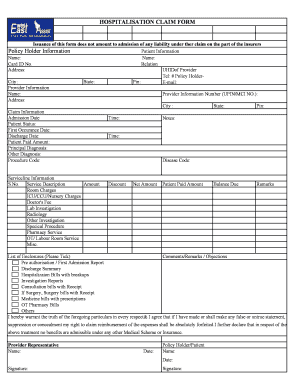
East West Preauth Form


What is the East West Preauth Form
The East West Preauth Form is a crucial document used in the healthcare industry, specifically for obtaining pre-authorization for medical services or procedures. This form is designed to ensure that the necessary approvals are secured before a patient receives specific treatments, which may be required by insurance providers. By submitting this form, healthcare providers can verify patient eligibility and coverage details, ensuring that the services rendered will be covered under the patient’s insurance plan.
How to use the East West Preauth Form
Using the East West Preauth Form involves a straightforward process. First, healthcare providers must fill out the form with accurate patient information, including personal details, insurance information, and the specific services being requested. Once completed, the form should be submitted to the appropriate insurance company for review. It is essential to ensure that all required fields are filled in correctly to avoid delays in the approval process. After submission, providers should follow up with the insurance company to confirm that the pre-authorization has been granted.
Steps to complete the East West Preauth Form
Completing the East West Preauth Form requires careful attention to detail. Here are the steps to follow:
- Gather necessary patient information, including name, date of birth, and insurance details.
- Clearly specify the medical services or procedures for which pre-authorization is being requested.
- Fill out all required fields on the form, ensuring accuracy and completeness.
- Review the form for any errors or missing information.
- Submit the form to the insurance provider, either electronically or via mail.
- Monitor the status of the pre-authorization request and follow up as needed.
Legal use of the East West Preauth Form
The East West Preauth Form must be used in compliance with healthcare regulations and insurance policies. It serves as a formal request for approval and is legally binding once submitted. Healthcare providers must ensure that the information provided is truthful and accurate, as any discrepancies could lead to denial of coverage or potential legal issues. Understanding the legal implications of using this form is essential for maintaining compliance with healthcare laws and insurance requirements.
Required Documents
When submitting the East West Preauth Form, several supporting documents may be required to facilitate the approval process. These documents typically include:
- Patient's insurance card or policy information.
- Medical records or notes that justify the need for the requested services.
- Any previous authorization documents related to the patient's treatment.
- Additional forms or information as requested by the insurance provider.
Form Submission Methods
The East West Preauth Form can be submitted through various methods, depending on the preferences of the healthcare provider and the requirements of the insurance company. Common submission methods include:
- Online submission through the insurance provider's portal.
- Mailing a physical copy of the form to the insurance company.
- Submitting the form in person at the insurance company's local office.
Quick guide on how to complete east west preauth form
Finish East West Preauth Form effortlessly on any device
Digital document management has gained traction among businesses and individuals. It serves as an ideal eco-friendly substitute for conventional printed and signed paperwork, enabling you to obtain the necessary form and securely store it online. airSlate SignNow provides you with all the resources necessary to create, modify, and eSign your documents quickly and without delay. Manage East West Preauth Form on any device using airSlate SignNow's Android or iOS applications and ease any document-related processes today.
How to modify and eSign East West Preauth Form with ease
- Obtain East West Preauth Form and then click Get Form to initiate the process.
- Utilize the tools we offer to fill out your form.
- Emphasize pertinent sections of your documents or redact sensitive information using tools that airSlate SignNow provides specifically for this purpose.
- Create your eSignature with the Sign tool, which takes just seconds and carries the same legal validity as a traditional wet ink signature.
- Review all the details and then click on the Done button to save your edits.
- Select your preferred method for sending your form, whether by email, SMS, invitation link, or download it to your computer.
Eliminate worries about lost or misplaced documents, tedious form navigation, or errors that require printing new document copies. airSlate SignNow fulfills your document management needs in just a few clicks from any device. Alter and eSign East West Preauth Form to ensure outstanding communication at any stage of the form preparation process with airSlate SignNow.
Create this form in 5 minutes or less
Create this form in 5 minutes!
How to create an eSignature for the east west preauth form
How to create an electronic signature for a PDF online
How to create an electronic signature for a PDF in Google Chrome
How to create an e-signature for signing PDFs in Gmail
How to create an e-signature right from your smartphone
How to create an e-signature for a PDF on iOS
How to create an e-signature for a PDF on Android
People also ask
-
What is the east west cashless preauth form?
The east west cashless preauth form is a digital document that allows businesses to initiate a cashless pre-authorization request. This form simplifies the process of obtaining necessary approvals for transactions without the need for paper-based documentation, enhancing efficiency and reducing errors.
-
How can the east west cashless preauth form benefit my business?
Using the east west cashless preauth form can signNowly streamline your workflow by enabling quicker transaction approvals. This digital solution reduces paperwork and processing time, allowing your team to focus on more critical tasks and improve customer satisfaction.
-
Is the east west cashless preauth form customizable?
Yes, the east west cashless preauth form can be fully customized to fit your business's specific needs. You can modify the form's fields, branding, and layout to ensure it aligns with your company’s standards and enhances your clients' experience.
-
What integrations are available for the east west cashless preauth form?
The east west cashless preauth form seamlessly integrates with various platforms such as CRM systems, accounting tools, and other software. These integrations facilitate smooth data flow and help keep your operations organized, boosting overall productivity.
-
Is the east west cashless preauth form secure?
Absolutely! The east west cashless preauth form employs advanced security features, including encryption and secure access controls. This ensures that your sensitive information is protected, making it a safe choice for managing authorization requests.
-
How much does it cost to use the east west cashless preauth form?
The pricing for the east west cashless preauth form varies based on the plan you choose. airSlate SignNow offers flexible pricing options that can accommodate businesses of all sizes, ensuring you get the best value for your investment in digital document solutions.
-
Can I track the status of my east west cashless preauth forms?
Yes, you can easily track the status of your east west cashless preauth forms through the airSlate SignNow dashboard. This feature helps you monitor progress and follow up on approvals, ensuring that nothing falls through the cracks.
Get more for East West Preauth Form
- Llc notices resolutions and other operations forms package indiana
- Indiana claim workers compensation form
- Notice of dishonored check civil keywords bad check bounced check indiana form
- Request for assistance for workers compensation indiana form
- Mutual wills containing last will and testaments for unmarried persons living together with no children indiana form
- Mutual wills package of last wills and testaments for unmarried persons living together with adult children indiana form
- Mutual wills or last will and testaments for unmarried persons living together with minor children indiana form
- Non marital cohabitation living together agreement indiana form
Find out other East West Preauth Form
- How Can I eSignature Colorado Courts PDF
- Can I eSignature Louisiana Courts Document
- How To Electronic signature Arkansas Banking Document
- How Do I Electronic signature California Banking Form
- How Do I eSignature Michigan Courts Document
- Can I eSignature Missouri Courts Document
- How Can I Electronic signature Delaware Banking PDF
- Can I Electronic signature Hawaii Banking Document
- Can I eSignature North Carolina Courts Presentation
- Can I eSignature Oklahoma Courts Word
- How To Electronic signature Alabama Business Operations Form
- Help Me With Electronic signature Alabama Car Dealer Presentation
- How Can I Electronic signature California Car Dealer PDF
- How Can I Electronic signature California Car Dealer Document
- How Can I Electronic signature Colorado Car Dealer Form
- How To Electronic signature Florida Car Dealer Word
- How Do I Electronic signature Florida Car Dealer Document
- Help Me With Electronic signature Florida Car Dealer Presentation
- Can I Electronic signature Georgia Car Dealer PDF
- How Do I Electronic signature Georgia Car Dealer Document