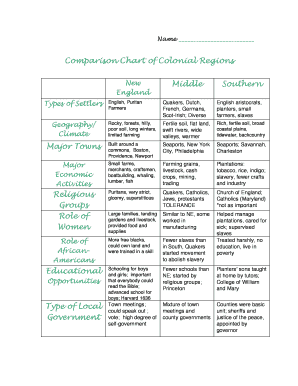
Colonial Regions Chart Form


What is the Colonial Regions Chart
The Colonial Regions Chart is a valuable educational tool that outlines the characteristics and differences among the three main colonial regions in early American history: New England, Middle, and Southern colonies. This chart helps students and educators visualize the unique social, economic, and geographical aspects of each region. By comparing these colonial regions, users can gain insights into how these factors influenced the development of the United States.
How to use the Colonial Regions Chart
To effectively use the Colonial Regions Chart, begin by identifying the key features of each region. Look for aspects such as climate, geography, economy, and social structure. Students can fill in the chart by researching each region's characteristics, allowing for a comprehensive understanding of how these elements contributed to the colonies' growth and interactions. This methodical approach encourages critical thinking and enhances learning outcomes.
Steps to complete the Colonial Regions Chart
Completing the Colonial Regions Chart involves several steps:
- Research the three colonial regions to gather information on their distinct features.
- Fill in the chart with relevant details, including climate, economy, and social structure.
- Compare and contrast the information to identify similarities and differences among the regions.
- Review the completed chart to ensure accuracy and completeness.
Legal use of the Colonial Regions Chart
The Colonial Regions Chart can be used legally in educational settings as a teaching aid. It is important to ensure that any reproduction of the chart for classroom use adheres to copyright laws. When sharing or distributing the chart, proper attribution to the original source is necessary. This ensures compliance with educational standards and promotes respectful use of intellectual property.
Key elements of the Colonial Regions Chart
Key elements of the Colonial Regions Chart include:
- Geographical Features: Information about the landscape, climate, and natural resources of each region.
- Economic Activities: Overview of the primary industries and trade practices in each colonial area.
- Social Structure: Insights into the demographics, cultural practices, and community organization within each region.
Examples of using the Colonial Regions Chart
Examples of using the Colonial Regions Chart include:
- In classroom discussions to facilitate group learning and collaboration.
- As a reference tool for writing essays or reports on colonial history.
- For creating presentations that highlight the differences among the colonial regions.
Quick guide on how to complete colonial regions chart
Complete Colonial Regions Chart effortlessly on any gadget
Web-based document management has become popular among businesses and individuals. It offers an ideal eco-friendly alternative to conventional printed and signed documents, as you can obtain the correct form and securely store it online. airSlate SignNow equips you with all the tools necessary to create, modify, and eSign your documents swiftly without delays. Manage Colonial Regions Chart on any gadget with airSlate SignNow Android or iOS applications and streamline any document-related task today.
How to modify and eSign Colonial Regions Chart with ease
- Locate Colonial Regions Chart and click Get Form to begin.
- Use the tools we provide to complete your document.
- Emphasize important sections of your documents or redact sensitive information with tools specifically designed for that purpose by airSlate SignNow.
- Create your signature using the Sign tool, which takes mere seconds and holds the same legal validity as a traditional handwritten signature.
- Review the details and then click on the Done button to save your changes.
- Choose how you wish to send your form, via email, text message (SMS), or invite link, or download it to your computer.
Eliminate concerns about lost or misplaced files, tedious form navigation, or mistakes that necessitate printing new document copies. airSlate SignNow meets your document management needs in just a few clicks from any device of your preference. Modify and eSign Colonial Regions Chart to ensure seamless communication at any stage of your form preparation process with airSlate SignNow.
Create this form in 5 minutes or less
Create this form in 5 minutes!
How to create an eSignature for the colonial regions chart
How to create an electronic signature for a PDF online
How to create an electronic signature for a PDF in Google Chrome
How to create an e-signature for signing PDFs in Gmail
How to create an e-signature right from your smartphone
How to create an e-signature for a PDF on iOS
How to create an e-signature for a PDF on Android
People also ask
-
What is the significance of comparing the colony regions answer key?
Comparing the colony regions answer key provides insights into the historical and geographical distinctions among various colonies. This understanding helps reinforce learning and can be beneficial in academic settings. Using this key, students can enhance their grasp of colonial America and its diverse influences.
-
How can airSlate SignNow facilitate document signing related to the colony regions answer key?
AirSlate SignNow allows users to easily send and eSign documents, including educational resources like the colony regions answer key. This streamlined process ensures that teachers and students can securely share and sign key documents. The platform’s user-friendly interface makes it simple to manage educational materials.
-
What features does airSlate SignNow offer for document management?
AirSlate SignNow comes equipped with features such as templates, real-time tracking, and secure storage. These tools are beneficial for managing important documents related to the colony regions answer key. Additionally, users can collaborate seamlessly, enhancing the overall educational experience.
-
Is airSlate SignNow easy to integrate with other tools?
Yes, airSlate SignNow provides easy integrations with various applications such as Google Drive, Salesforce, and Dropbox. This capability allows for efficient document management, especially when dealing with resources like the colony regions answer key. By integrating with existing tools, users can streamline their workflows.
-
What are the pricing options for airSlate SignNow?
AirSlate SignNow offers a range of pricing plans to fit different budgets and organizational needs. The pricing is competitive and provides excellent value, especially for those managing educational documents such as the colony regions answer key. Prospective users can choose from basic to advanced features based on their requirements.
-
How can airSlate SignNow benefit educational institutions?
Educational institutions can benefit from airSlate SignNow by streamlining their document signing processes for forms, agreements, and educational materials like the colony regions answer key. The platform enhances efficiency, reduces paper usage, and enables secure electronic signatures. This ultimately supports a more effective learning environment.
-
Can airSlate SignNow help with compliance for educational documents?
Absolutely, airSlate SignNow offers features that support compliance with various regulations, ensuring that educational documents like the colony regions answer key are handled securely. This functionality is critical for institutions that require adherence to legal and educational standards. Users can maintain the integrity of their document processes seamlessly.
Get more for Colonial Regions Chart
- Utah month to month lease agreement form
- Caliber serial number sn form
- This virginia commercial lease agreement agreement made on form
- F51 153a 2 surrender form
- Rhode island motor vehicle bill of sale form
- 19101020 app a sample authorization letter for the form
- Get the free backflow prevention assembly certified test form
- Bringing off exchange consumers to covered california form
Find out other Colonial Regions Chart
- eSign Alabama Independent Contractor Agreement Template Fast
- eSign New York Termination Letter Template Safe
- How To eSign West Virginia Termination Letter Template
- How To eSign Pennsylvania Independent Contractor Agreement Template
- eSignature Arkansas Affidavit of Heirship Secure
- How Can I eSign Alaska Emergency Contact Form
- Can I eSign Montana Employee Incident Report
- eSign Hawaii CV Form Template Online
- eSign Idaho CV Form Template Free
- How To eSign Kansas CV Form Template
- eSign Nevada CV Form Template Online
- eSign New Hampshire CV Form Template Safe
- eSign Indiana New Hire Onboarding Online
- eSign Delaware Software Development Proposal Template Free
- eSign Nevada Software Development Proposal Template Mobile
- Can I eSign Colorado Mobile App Design Proposal Template
- How Can I eSignature California Cohabitation Agreement
- How Do I eSignature Colorado Cohabitation Agreement
- How Do I eSignature New Jersey Cohabitation Agreement
- Can I eSign Utah Mobile App Design Proposal Template