Txpec 2016-2026


What is the Txpec
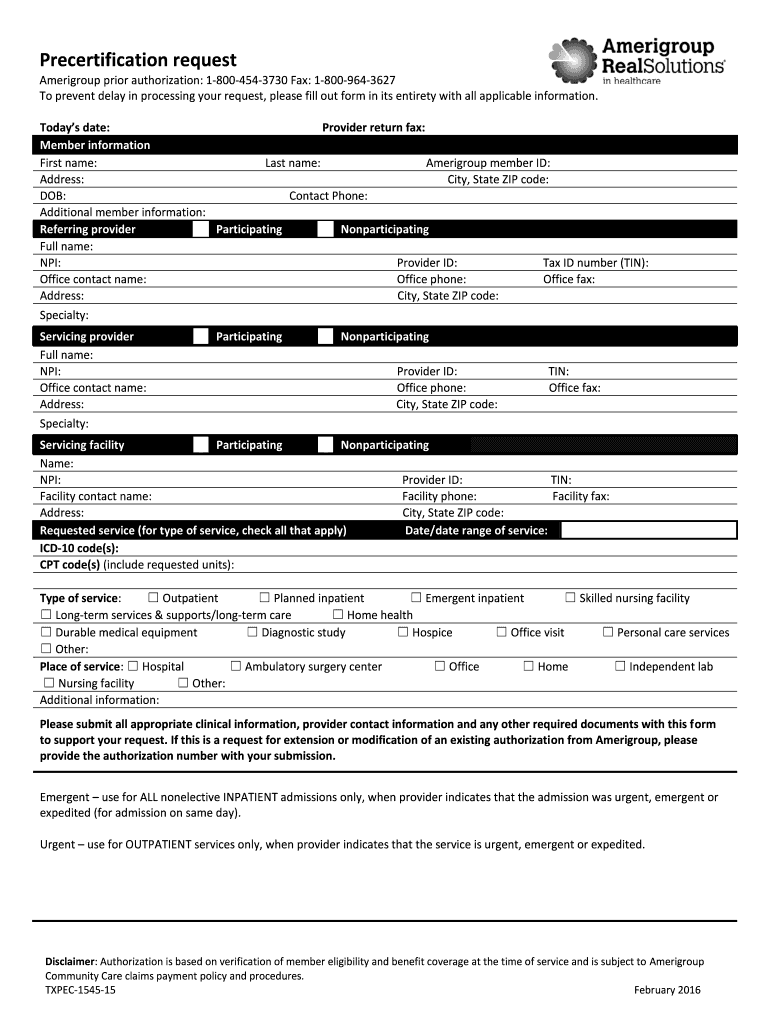
The Txpec, or the form 18004543730, is a crucial document used for various administrative purposes within the United States. It serves as a formal request for precertification, which is essential for obtaining prior approval for certain services or procedures. This form is particularly relevant in healthcare and insurance contexts, where it helps ensure that necessary services are covered under a patient's plan before they are rendered.
How to use the Txpec
Using the Txpec involves several steps to ensure that all required information is accurately provided. First, gather all necessary details related to the service or procedure for which precertification is being requested. Next, fill out the form with precise information, including patient details, service codes, and provider information. Once completed, submit the form to the appropriate insurance provider or healthcare organization for review. It is important to keep a copy of the submitted form for your records.
Steps to complete the Txpec
Completing the Txpec requires careful attention to detail. Here are the steps to follow:
- Obtain the Txpec form from the relevant source.
- Fill in the patient’s personal information, including name, date of birth, and insurance details.
- Provide the specific service or procedure details, including codes and descriptions.
- Include any supporting documentation that may be required.
- Review the completed form for accuracy before submission.
- Submit the form via the designated method, whether online, by mail, or in person.
Legal use of the Txpec
The Txpec must be used in accordance with relevant laws and regulations. It is essential to ensure that the information provided is truthful and accurate to avoid potential legal repercussions. Misuse of the form, such as providing false information, can lead to penalties or denial of services. Compliance with state-specific regulations is also necessary, as some states may have additional requirements regarding precertification requests.
Required Documents
When submitting the Txpec, certain documents may be required to support the precertification request. These documents can include:
- Proof of insurance coverage.
- Medical records or notes from the healthcare provider.
- Any previous authorization letters related to the service.
- Billing codes and descriptions for the requested service.
Form Submission Methods
The Txpec can be submitted through various methods, depending on the requirements of the insurance provider or healthcare organization. Common submission methods include:
- Online submission via a secure portal.
- Mailing the completed form to the designated address.
- In-person submission at a local office or facility.
Eligibility Criteria
To successfully use the Txpec, certain eligibility criteria must be met. Typically, the individual requesting precertification must be a covered member under an insurance plan. Additionally, the service or procedure being requested must be medically necessary and align with the coverage policies of the insurance provider. It is advisable to verify eligibility before submitting the form to avoid delays or denials.
Quick guide on how to complete amerigroup prior authorization 18004543730 fax 18009643627
The optimal method to locate and endorse Txpec
On the scope of a complete enterprise, ineffective procedures related to paper authorization can take up considerable working hours. Endorsing documents like Txpec is an inherent aspect of operations in any organization, which is why the efficacy of each agreement’s lifecycle signNowly impacts the company’s overall performance. With airSlate SignNow, endorsing your Txpec is as straightforward and swift as it could possibly be. This platform provides you with the most recent version of nearly any form. Even better, you can endorse it immediately without needing to install additional software on your device or print any hard copies.
Steps to obtain and endorse your Txpec
- Browse our collection by category or utilize the search field to find the form you require.
- View the form preview by clicking on Learn more to confirm it’s the correct one.
- Click Get form to start editing immediately.
- Fill out your form and add any essential information using the toolbar.
- Once completed, click the Sign tool to endorse your Txpec.
- Choose the signature method that suits you best: Draw, Create initials, or upload a picture of your handwritten signature.
- Click Done to finalize editing and move on to document-sharing options if needed.
With airSlate SignNow, you have everything necessary to handle your documents efficiently. You can find, complete, modify, and even send your Txpec within one tab with no complications. Optimize your processes with a single, intelligent eSignature solution.
Create this form in 5 minutes or less
FAQs
-
Why would a doctor send a prescription to a pharmacy, but not respond to repeated requests from the pharmacy to fill out a faxed prior authorization form?
Filling out a prior authorization is not a requirement of our practice. Most of us do this to help our patients, and it is sometimes taken for granted.Think about it. It is your insurance company that is requesting us to fill out this form, taking time away from actually treating patients, to help you save money on your medications. We understand that, and usually do our best to take care of them, but unless we have a large practice, with someone actually paid to spend all their time doing these PA’s, we have to carve out more time from our day to fill out paperwork.It’s also possible, although not likely, that the pharmacy does not have the correct fax number, the faxes have been misplaced, the doctor has some emergencies and is running behind, went on vacation, and so on.Paperwork and insurance requests have become more and more burdensome on our practices, not due to anything on the part of our patients, but a major hassle none the less.
-
I want to create a web app that enables users to sign up/in, fill out a form, and then fax it to a fax machine. How to difficult is this to develop?
Are you sending yourself the fax or are they able to send the fax anywhere? The latter has already been done numerous times. There are email to fax and fax to email applications that have been available for decades. I'm pretty certain that converting email to fax into app or form submission to fax is pretty trivial. They convert faxes to PDF's in many of these apps IIRC so anywhere you could view a PDF you could get a fax.
Create this form in 5 minutes!
How to create an eSignature for the amerigroup prior authorization 18004543730 fax 18009643627
How to create an eSignature for the Amerigroup Prior Authorization 18004543730 Fax 18009643627 online
How to make an eSignature for your Amerigroup Prior Authorization 18004543730 Fax 18009643627 in Google Chrome
How to generate an eSignature for signing the Amerigroup Prior Authorization 18004543730 Fax 18009643627 in Gmail
How to make an electronic signature for the Amerigroup Prior Authorization 18004543730 Fax 18009643627 straight from your smart phone
How to generate an eSignature for the Amerigroup Prior Authorization 18004543730 Fax 18009643627 on iOS
How to make an electronic signature for the Amerigroup Prior Authorization 18004543730 Fax 18009643627 on Android devices
People also ask
-
What is Txpec and how does it relate to airSlate SignNow?
Txpec is a powerful feature within the airSlate SignNow platform that enhances document management efficiency. It allows users to automate workflows, ensuring that eSignatures and document approvals are streamlined and secure. By utilizing Txpec, businesses can reduce turnaround times and improve overall productivity.
-
How much does airSlate SignNow cost with Txpec features?
The pricing for airSlate SignNow varies depending on the plan chosen, but it typically includes access to Txpec functionalities at competitive rates. Businesses can select from different subscription tiers that best fit their needs, ensuring they get the most value from the Txpec capabilities. Visit our pricing page for detailed information on each plan.
-
What are the main benefits of using Txpec in airSlate SignNow?
Using Txpec within airSlate SignNow provides several benefits, including improved workflow automation, enhanced security for document signing, and easier collaboration among team members. These features help businesses save time and reduce errors, making the document signing process more efficient and reliable.
-
Can I integrate Txpec with other software?
Yes, Txpec can be integrated with various third-party applications to enhance your document management processes. airSlate SignNow supports integrations with popular tools such as CRM systems, cloud storage solutions, and project management software, making it easier to manage documents across platforms.
-
Is Txpec suitable for small businesses?
Absolutely! Txpec is designed to be user-friendly and cost-effective, making it an ideal solution for small businesses looking to streamline their document signing processes. With airSlate SignNow's flexible pricing plans, small businesses can leverage Txpec features without breaking the bank.
-
How secure is Txpec for managing sensitive documents?
Txpec is built with robust security features to protect sensitive documents during the signing process. airSlate SignNow uses encryption and secure access controls to ensure that your data remains confidential and safe from unauthorized access, providing peace of mind for all users.
-
What types of documents can I send using Txpec in airSlate SignNow?
With Txpec in airSlate SignNow, you can send a wide variety of documents for eSigning, including contracts, agreements, and forms. The platform supports various file formats, making it easy to handle all your document needs efficiently.
Get more for Txpec
- Bonfattos wing man hot wing eating contest accident waiver and release of liability form
- Vermont fingerprint authorization certificate form
- Change of circumstance walla walla housing authority wallawallaha form
- Bureaucracy of pizza answers quizlet form
- Usps forms 7468a
- San bernardino impounded vehicle form
- Certificate of eligibility for parking placard state of new mexico form
- Kentucky income tax forms requisition department of revenue
Find out other Txpec
- Can I eSignature Louisiana Education Document
- Can I eSignature Massachusetts Education Document
- Help Me With eSignature Montana Education Word
- How To eSignature Maryland Doctors Word
- Help Me With eSignature South Dakota Education Form
- How Can I eSignature Virginia Education PDF
- How To eSignature Massachusetts Government Form
- How Can I eSignature Oregon Government PDF
- How Can I eSignature Oklahoma Government Document
- How To eSignature Texas Government Document
- Can I eSignature Vermont Government Form
- How Do I eSignature West Virginia Government PPT
- How Do I eSignature Maryland Healthcare / Medical PDF
- Help Me With eSignature New Mexico Healthcare / Medical Form
- How Do I eSignature New York Healthcare / Medical Presentation
- How To eSignature Oklahoma Finance & Tax Accounting PPT
- Help Me With eSignature Connecticut High Tech Presentation
- How To eSignature Georgia High Tech Document
- How Can I eSignature Rhode Island Finance & Tax Accounting Word
- How Can I eSignature Colorado Insurance Presentation