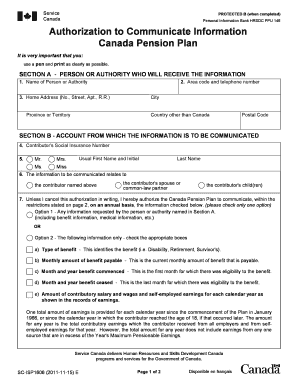
Authorization to Communicate Information Canada Pension Plan SC ISP1606 11 15 E Fnislp


What is the Authorization To Communicate Information Canada Pension Plan SC ISP1606 11 15 E Fnislp
The Authorization To Communicate Information Canada Pension Plan SC ISP1606 11 15 E Fnislp is a formal document that allows individuals to designate another person or organization to receive information regarding their Canada Pension Plan (CPP) benefits. This authorization is crucial for those who may need assistance in managing their pension-related matters, ensuring that the designated representative can act on their behalf. It is important to understand that this form is specific to the Canada Pension Plan and is used within the context of Canadian social security benefits.
How to use the Authorization To Communicate Information Canada Pension Plan SC ISP1606 11 15 E Fnislp
Using the Authorization To Communicate Information Canada Pension Plan SC ISP1606 11 15 E Fnislp involves completing the form accurately and submitting it to the appropriate authorities. The individual seeking to authorize another person must fill out their personal details, including their name, address, and CPP account number. They must also provide the details of the person or organization they wish to authorize. Once completed, the form should be signed and dated before submission to ensure it is legally binding.
Steps to complete the Authorization To Communicate Information Canada Pension Plan SC ISP1606 11 15 E Fnislp
Completing the Authorization To Communicate Information Canada Pension Plan SC ISP1606 11 15 E Fnislp involves several key steps:
- Obtain the form from a reliable source, ensuring it is the correct version.
- Fill in your personal information, including your full name, address, and CPP account number.
- Provide the details of the authorized representative, including their name and contact information.
- Sign and date the form to validate your authorization.
- Submit the completed form to the appropriate CPP office, either by mail or electronically if available.
Legal use of the Authorization To Communicate Information Canada Pension Plan SC ISP1606 11 15 E Fnislp
The legal use of the Authorization To Communicate Information Canada Pension Plan SC ISP1606 11 15 E Fnislp ensures that the designated individual can access and discuss your CPP information with the relevant authorities. This authorization must be completed in accordance with applicable laws to be considered valid. It is essential that the form is signed by the individual granting the authorization, as this signature signifies consent for the representative to act on their behalf.
Key elements of the Authorization To Communicate Information Canada Pension Plan SC ISP1606 11 15 E Fnislp
Key elements of the Authorization To Communicate Information Canada Pension Plan SC ISP1606 11 15 E Fnislp include:
- Personal Information: The form requires the individual's full name, address, and CPP account number.
- Authorized Representative Details: Information about the person or organization being authorized, including their contact information.
- Signature: The individual must sign and date the form to validate the authorization.
- Submission Instructions: Clear guidelines on how to submit the completed form to the appropriate authorities.
Examples of using the Authorization To Communicate Information Canada Pension Plan SC ISP1606 11 15 E Fnislp
Examples of using the Authorization To Communicate Information Canada Pension Plan SC ISP1606 11 15 E Fnislp include situations where individuals may need assistance managing their CPP benefits. For instance, a retiree may authorize a family member or financial advisor to discuss their pension details with the Canada Pension Plan office. This can help simplify communication and ensure that the authorized person can make informed decisions regarding the individual's benefits.
Quick guide on how to complete authorization to communicate information canada pension plan sc isp1606 11 15 e fnislp
Effortlessly Prepare Authorization To Communicate Information Canada Pension Plan SC ISP1606 11 15 E Fnislp on Any Device
Digital document management has become increasingly popular among organizations and individuals. It offers a fantastic eco-friendly alternative to traditional printed and signed documents, allowing you to obtain the necessary form and securely store it online. airSlate SignNow equips you with all the tools required to create, edit, and electronically sign your documents swiftly without delays. Manage Authorization To Communicate Information Canada Pension Plan SC ISP1606 11 15 E Fnislp on any platform using airSlate SignNow's Android or iOS applications and enhance any document-oriented process today.
How to Edit and Electronically Sign Authorization To Communicate Information Canada Pension Plan SC ISP1606 11 15 E Fnislp with Ease
- Find Authorization To Communicate Information Canada Pension Plan SC ISP1606 11 15 E Fnislp and click Get Form to begin.
- Utilize the tools we provide to fill out your form.
- Emphasize relevant sections of your documents or redact sensitive information with tools specifically designed for that purpose by airSlate SignNow.
- Create your electronic signature using the Sign tool, which takes seconds and has the same legal validity as a conventional wet ink signature.
- Verify all the details and click on the Done button to save your modifications.
- Select how you wish to share your form, whether by email, SMS, invite link, or download it to your computer.
Say goodbye to lost or missed files, tedious form searching, or errors that necessitate printing new document copies. airSlate SignNow addresses all your document management needs in just a few clicks from any device of your choice. Edit and electronically sign Authorization To Communicate Information Canada Pension Plan SC ISP1606 11 15 E Fnislp and ensure outstanding communication at every step of your form preparation process with airSlate SignNow.
Create this form in 5 minutes or less
Create this form in 5 minutes!
How to create an eSignature for the authorization to communicate information canada pension plan sc isp1606 11 15 e fnislp
How to create an electronic signature for a PDF online
How to create an electronic signature for a PDF in Google Chrome
How to create an e-signature for signing PDFs in Gmail
How to create an e-signature right from your smartphone
How to create an e-signature for a PDF on iOS
How to create an e-signature for a PDF on Android
People also ask
-
What is the 'Authorization To Communicate Information Canada Pension Plan SC ISP1606 11 15 E Fnislp'?
The 'Authorization To Communicate Information Canada Pension Plan SC ISP1606 11 15 E Fnislp' is a document that allows individuals to authorize third parties to access their Canada Pension Plan information. This form ensures secure communication of sensitive personal information, making it essential for those needing assistance with their CPP claims.
-
How can I obtain the authorization form for CPP?
You can obtain the 'Authorization To Communicate Information Canada Pension Plan SC ISP1606 11 15 E Fnislp' form directly from the Service Canada website or through their local offices. Simply fill out the required details to ensure proper processing of your authorization request.
-
Is airSlate SignNow compliant with the Canada Pension Plan regulations?
Yes, airSlate SignNow is designed to comply with various regulations, ensuring that your documents, including the 'Authorization To Communicate Information Canada Pension Plan SC ISP1606 11 15 E Fnislp', are managed securely and in accordance with legal standards. Our platform prioritizes data security and privacy.
-
What features does airSlate SignNow offer for document signing?
airSlate SignNow offers a range of features for document signing, including customizable templates, eSignature capabilities, and secure storage for documents like the 'Authorization To Communicate Information Canada Pension Plan SC ISP1606 11 15 E Fnislp'. These features streamline the signing process and enhance collaboration.
-
How much does it cost to use airSlate SignNow for document management?
The pricing for airSlate SignNow varies based on the plan you choose, with options suitable for individuals and businesses. Using our platform for managing documents such as the 'Authorization To Communicate Information Canada Pension Plan SC ISP1606 11 15 E Fnislp' can be a cost-effective solution given its extensive features and benefits.
-
Can I integrate airSlate SignNow with other applications?
Yes, airSlate SignNow offers various integrations with popular applications such as Google Drive, Salesforce, and more. This flexibility allows for seamless handling of documents like the 'Authorization To Communicate Information Canada Pension Plan SC ISP1606 11 15 E Fnislp' across different platforms.
-
What are the benefits of using airSlate SignNow for this authorization form?
Using airSlate SignNow for the 'Authorization To Communicate Information Canada Pension Plan SC ISP1606 11 15 E Fnislp' allows for a streamlined process, reducing time and increasing accuracy. Our platform ensures that you can easily manage and track the document, enhancing the overall efficiency of your workflow.
Get more for Authorization To Communicate Information Canada Pension Plan SC ISP1606 11 15 E Fnislp
- Hypothesis worksheet 2 answer key form
- Seu residing with relatives form
- Printable sign language form
- Please fill in the blanks and attach a copy of your abstract poster description invitation to a talk or other form
- Grade appeal form chemeketa community college chemeketa
- Student volunteer hours verification return this form to the houstonisd
- San diego attendance verification form
- Financial aid amp scholarship services reconsideration request form
Find out other Authorization To Communicate Information Canada Pension Plan SC ISP1606 11 15 E Fnislp
- eSign Ohio High Tech Letter Of Intent Later
- eSign North Dakota High Tech Quitclaim Deed Secure
- eSign Nebraska Healthcare / Medical LLC Operating Agreement Simple
- eSign Nebraska Healthcare / Medical Limited Power Of Attorney Mobile
- eSign Rhode Island High Tech Promissory Note Template Simple
- How Do I eSign South Carolina High Tech Work Order
- eSign Texas High Tech Moving Checklist Myself
- eSign Texas High Tech Moving Checklist Secure
- Help Me With eSign New Hampshire Government Job Offer
- eSign Utah High Tech Warranty Deed Simple
- eSign Wisconsin High Tech Cease And Desist Letter Fast
- eSign New York Government Emergency Contact Form Online
- eSign North Carolina Government Notice To Quit Now
- eSign Oregon Government Business Plan Template Easy
- How Do I eSign Oklahoma Government Separation Agreement
- How Do I eSign Tennessee Healthcare / Medical Living Will
- eSign West Virginia Healthcare / Medical Forbearance Agreement Online
- eSign Alabama Insurance LLC Operating Agreement Easy
- How Can I eSign Alabama Insurance LLC Operating Agreement
- eSign Virginia Government POA Simple