Participant Information Form IPSTC Ipstc


What is the Participant Information Form IPSTC
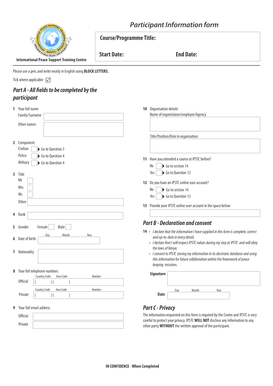
The Participant Information Form IPSTC is a crucial document designed to collect essential information from participants involved in various programs or activities organized by the International Peace Support Training Centre (IPSTC). This form serves to ensure that all necessary data is gathered for effective communication, planning, and execution of training programs. It typically includes personal details, contact information, and relevant background information pertinent to the participant's involvement.
How to use the Participant Information Form IPSTC
Using the Participant Information Form IPSTC involves filling out the required fields accurately and completely. Participants should carefully review each section to ensure that all information is current and relevant. Once completed, the form can be submitted electronically or printed and sent via traditional mail, depending on the specific instructions provided by IPSTC. This form is essential for facilitating smooth participation in training sessions and ensuring that all logistical arrangements are properly managed.
Steps to complete the Participant Information Form IPSTC
Completing the Participant Information Form IPSTC involves several straightforward steps:
- Read the instructions carefully to understand what information is required.
- Gather all necessary documents, such as identification and any relevant certifications.
- Fill out the form, ensuring all sections are completed with accurate information.
- Review the form for any errors or omissions before submission.
- Submit the form as directed, either digitally or via mail.
Key elements of the Participant Information Form IPSTC
The Participant Information Form IPSTC typically includes several key elements that are vital for effective processing:
- Personal Information: Name, address, and contact details.
- Background Information: Educational qualifications and previous experience related to the training.
- Emergency Contact: Details of a person to contact in case of emergencies.
- Health Information: Any medical conditions or special requirements that may need to be addressed during the training.
Legal use of the Participant Information Form IPSTC
The Participant Information Form IPSTC is used in compliance with relevant legal standards and regulations. It is important for participants to understand that the information provided may be subject to data protection laws, ensuring that personal data is handled with care and confidentiality. Participants should be aware of their rights regarding the information they provide and how it will be used by IPSTC.
Form Submission Methods
The Participant Information Form IPSTC can be submitted through various methods to accommodate different preferences:
- Online Submission: Participants can fill out the form digitally and submit it through the designated online portal.
- Mail Submission: For those who prefer a physical copy, the form can be printed, completed, and sent via postal service.
- In-Person Submission: Participants may also have the option to deliver the form directly to the IPSTC office during designated hours.
Quick guide on how to complete participant information form ipstc ipstc
Effortlessly Prepare Participant Information Form IPSTC Ipstc on Any Device
Online document management has gained traction among businesses and individuals alike. It serves as an excellent environmentally friendly alternative to traditional printed and signed papers, allowing you to obtain the appropriate form and safely store it online. airSlate SignNow provides you with all the tools necessary to create, edit, and eSign your documents quickly and without complications. Manage Participant Information Form IPSTC Ipstc on any device using the airSlate SignNow Android or iOS applications and enhance any document-focused process today.
The Easiest Way to Edit and eSign Participant Information Form IPSTC Ipstc with Ease
- Find Participant Information Form IPSTC Ipstc and click Get Form to begin.
- Utilize the tools we offer to fill out your form.
- Mark important sections of the documents or obscure sensitive information with tools specifically provided by airSlate SignNow for that purpose.
- Create your signature using the Sign tool, which takes just seconds and holds the same legal validity as a conventional wet ink signature.
- Review the details and click the Done button to save your modifications.
- Select how you wish to share your form, whether it's via email, text message (SMS), invite link, or by downloading it to your computer.
Say goodbye to lost or mislaid files, arduous form searches, or mistakes that necessitate printing new document copies. airSlate SignNow meets your documentation management needs in just a few clicks from any device you choose. Modify and eSign Participant Information Form IPSTC Ipstc and ensure excellent communication at every stage of your form preparation process with airSlate SignNow.
Create this form in 5 minutes or less
Create this form in 5 minutes!
How to create an eSignature for the participant information form ipstc ipstc
How to create an electronic signature for a PDF online
How to create an electronic signature for a PDF in Google Chrome
How to create an e-signature for signing PDFs in Gmail
How to create an e-signature right from your smartphone
How to create an e-signature for a PDF on iOS
How to create an e-signature for a PDF on Android
People also ask
-
What is the Participant Information Form IPSTC Ipstc?
The Participant Information Form IPSTC Ipstc is a digital document designed to collect essential information from participants in events or programs organized by IPSTC. It streamlines the data collection process, making it easier for both organizers and participants. With airSlate SignNow, you can easily create, send, and manage this form online.
-
How can I create a Participant Information Form IPSTC Ipstc using airSlate SignNow?
Creating a Participant Information Form IPSTC Ipstc with airSlate SignNow is straightforward and user-friendly. Simply select a template or start from scratch, customize it to fit your needs, and add any necessary fields for participant information. Once your form is ready, you can send it directly to participants for completion and e-signature.
-
What are the benefits of using the Participant Information Form IPSTC Ipstc?
Using the Participant Information Form IPSTC Ipstc offers numerous benefits, including streamlining the registration process and reducing paperwork. It allows you to gather accurate data quickly, enhances organization, and improves communication with participants. Moreover, digital forms eliminate manual errors and provide a secure way to store information.
-
Is the Participant Information Form IPSTC Ipstc customizable?
Yes, the Participant Information Form IPSTC Ipstc is highly customizable within airSlate SignNow. You can tailor the form’s fields, design, and layout to meet your specific requirements. This flexibility ensures that you can effectively gather all necessary information from participants in a format that best suits your event.
-
How does airSlate SignNow integrate with other tools for managing the Participant Information Form IPSTC Ipstc?
airSlate SignNow seamlessly integrates with various applications, allowing you to manage the Participant Information Form IPSTC Ipstc alongside other tools you may already use. You can connect it with CRM systems, email marketing platforms, and cloud storage solutions, ensuring a smooth workflow and enhancing data management.
-
Is there a mobile option for the Participant Information Form IPSTC Ipstc?
Absolutely! The Participant Information Form IPSTC Ipstc can be accessed and completed on mobile devices using airSlate SignNow’s mobile-friendly platform. This feature enables participants to fill out forms and e-sign documents conveniently, anytime and anywhere, increasing participation rates and overall efficiency.
-
What is the pricing for using the Participant Information Form IPSTC Ipstc with airSlate SignNow?
AirSlate SignNow offers various pricing plans that can accommodate your needs for using the Participant Information Form IPSTC Ipstc. The cost typically depends on the features and the number of users required. It's best to visit the pricing section on airSlate SignNow's website for detailed information on plans and what each includes.
Get more for Participant Information Form IPSTC Ipstc
- St johns first aid kit checklist form
- Usef entry agreement form
- Wfrmls 15067230 form
- Parking permit application form posted april hawaii
- American international college transcript request form
- Employer s statement of return to work reset ple form
- Brenda parkinson calgary form
- St benedict catholic secondary school registration form
Find out other Participant Information Form IPSTC Ipstc
- Sign Pennsylvania Courts Quitclaim Deed Mobile
- eSign Washington Car Dealer Bill Of Lading Mobile
- eSign Wisconsin Car Dealer Resignation Letter Myself
- eSign Wisconsin Car Dealer Warranty Deed Safe
- eSign Business Operations PPT New Hampshire Safe
- Sign Rhode Island Courts Warranty Deed Online
- Sign Tennessee Courts Residential Lease Agreement Online
- How Do I eSign Arkansas Charity LLC Operating Agreement
- eSign Colorado Charity LLC Operating Agreement Fast
- eSign Connecticut Charity Living Will Later
- How Can I Sign West Virginia Courts Quitclaim Deed
- Sign Courts Form Wisconsin Easy
- Sign Wyoming Courts LLC Operating Agreement Online
- How To Sign Wyoming Courts Quitclaim Deed
- eSign Vermont Business Operations Executive Summary Template Mobile
- eSign Vermont Business Operations Executive Summary Template Now
- eSign Virginia Business Operations Affidavit Of Heirship Mobile
- eSign Nebraska Charity LLC Operating Agreement Secure
- How Do I eSign Nevada Charity Lease Termination Letter
- eSign New Jersey Charity Resignation Letter Now