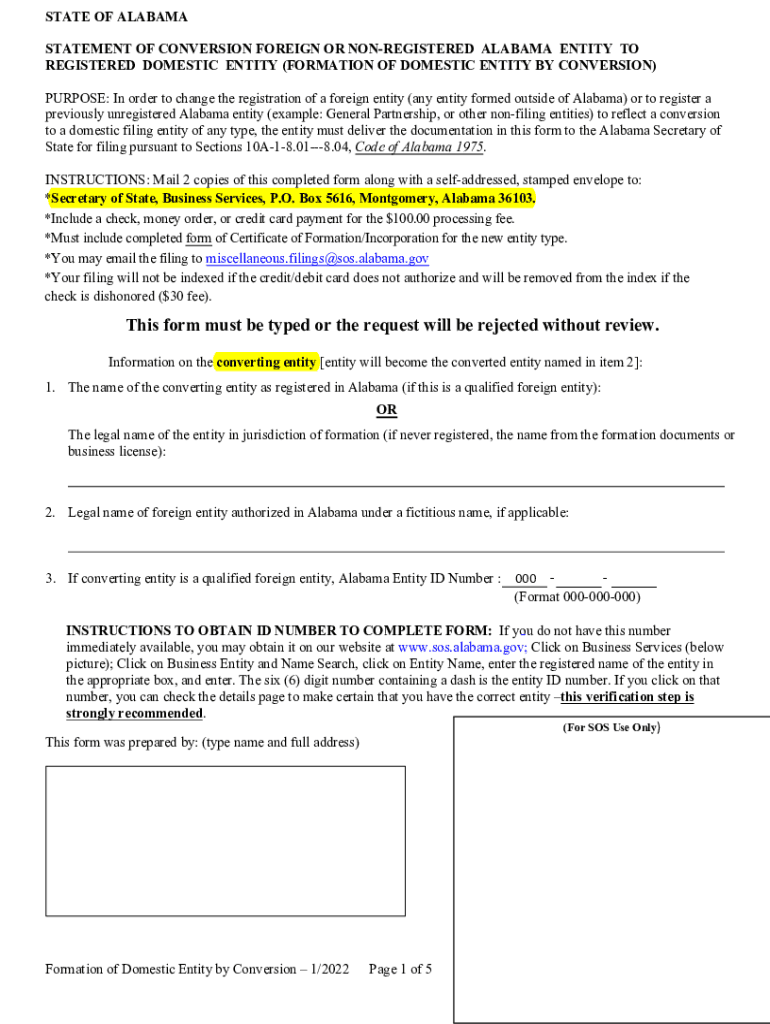
Statement of Conversion Foreign or Non Registered to Form


What is the Statement Of Conversion Foreign Or Non Registered To
The Statement Of Conversion Foreign Or Non Registered To is a legal document used to formally convert a foreign or non-registered entity into a recognized business entity within the United States. This document is essential for businesses seeking to establish legitimacy and comply with state regulations. It outlines the necessary details regarding the conversion process, ensuring that the entity adheres to local laws and requirements.
How to use the Statement Of Conversion Foreign Or Non Registered To
This statement serves as a formal declaration for entities transitioning from foreign or non-registered status to a recognized business form, such as a corporation or limited liability company (LLC). To use the statement effectively, businesses must fill it out accurately, providing all required information about the entity, including its name, address, and the state of registration. Once completed, it should be submitted to the appropriate state authority for processing.
Steps to complete the Statement Of Conversion Foreign Or Non Registered To
Completing the Statement Of Conversion Foreign Or Non Registered To involves several key steps:
- Gather necessary information about the entity, including its current status and details of the conversion.
- Fill out the form with accurate data, ensuring that all sections are completed as required.
- Review the document for any errors or omissions before submission.
- Submit the completed statement to the relevant state agency, either online or by mail, depending on state regulations.
Legal use of the Statement Of Conversion Foreign Or Non Registered To
The legal use of this statement is critical for ensuring compliance with state laws. It provides a clear record of the entity's transition and helps protect the interests of stakeholders. By filing the statement, the entity gains legal recognition, which is essential for conducting business, entering contracts, and fulfilling tax obligations within the state.
Key elements of the Statement Of Conversion Foreign Or Non Registered To
Key elements of the Statement Of Conversion Foreign Or Non Registered To include:
- The name and address of the entity.
- The jurisdiction where the entity was originally formed.
- The type of business entity being created.
- Details regarding the conversion process, including any changes to the entity's structure.
- Signature of authorized individuals certifying the information provided.
State-specific rules for the Statement Of Conversion Foreign Or Non Registered To
Each state may have specific rules and requirements regarding the Statement Of Conversion Foreign Or Non Registered To. It is important for businesses to research the regulations in their respective states, as these can affect the filing process, fees, and additional documentation required. Understanding state-specific rules ensures compliance and facilitates a smoother conversion process.
Quick guide on how to complete statement of conversion foreign or non registered to
Manage Statement Of Conversion Foreign Or Non Registered To seamlessly on any device
Digital document handling has become increasingly favored by businesses and individuals alike. It serves as an ideal eco-conscious alternative to traditional printed and signed paperwork, allowing you to access the necessary form and securely store it online. airSlate SignNow provides you with all the tools required to create, modify, and electronically sign your documents swiftly without delays. Handle Statement Of Conversion Foreign Or Non Registered To across any platform with airSlate SignNow Android or iOS applications and simplify your document-related tasks today.
How to modify and electronically sign Statement Of Conversion Foreign Or Non Registered To with ease
- Find Statement Of Conversion Foreign Or Non Registered To and click on Get Form to begin.
- Utilize the tools we offer to complete your document.
- Emphasize important sections of the documents or conceal sensitive information with tools that airSlate SignNow provides specifically for that purpose.
- Create your eSignature using the Sign feature, which takes seconds and carries the same legal validity as a traditional wet ink signature.
- Review all the details and click on the Done button to save your changes.
- Choose how you wish to send your form, via email, text message (SMS), or invitation link, or download it to your computer.
Eliminate concerns about lost or misplaced documents, tedious form searches, or mistakes that necessitate printing new document copies. airSlate SignNow fulfills your document management needs in just a few clicks from any device of your choice. Modify and electronically sign Statement Of Conversion Foreign Or Non Registered To and ensure clear communication at any stage of the form preparation process with airSlate SignNow.
Create this form in 5 minutes or less
Create this form in 5 minutes!
How to create an eSignature for the statement of conversion foreign or non registered to
How to create an electronic signature for a PDF online
How to create an electronic signature for a PDF in Google Chrome
How to create an e-signature for signing PDFs in Gmail
How to create an e-signature right from your smartphone
How to create an e-signature for a PDF on iOS
How to create an e-signature for a PDF on Android
People also ask
-
What is a Statement Of Conversion Foreign Or Non Registered To?
A Statement Of Conversion Foreign Or Non Registered To is a document that confirms the conversion of assets or entities from a foreign or non-registered status. This statement is crucial for legal and financial compliance, ensuring that your documents meet specific regulatory requirements.
-
How can airSlate SignNow help me with the Statement Of Conversion Foreign Or Non Registered To?
airSlate SignNow offers an easy-to-use platform for creating, sending, and eSigning your Statement Of Conversion Foreign Or Non Registered To. Our solution provides templates, customizable workflows, and secure storage, streamlining your document management process.
-
What features does airSlate SignNow offer for handling the Statement Of Conversion Foreign Or Non Registered To?
With airSlate SignNow, you can utilize eSignature capabilities, document templates, and integration with various applications to manage your Statement Of Conversion Foreign Or Non Registered To efficiently. Our platform enhances collaboration and ensures compliance with legal standards.
-
Is there a cost associated with generating a Statement Of Conversion Foreign Or Non Registered To?
airSlate SignNow offers various pricing tiers, allowing you to choose a plan that fits your needs for generating a Statement Of Conversion Foreign Or Non Registered To. We provide cost-effective solutions that deliver excellent value for businesses of all sizes.
-
Can I integrate airSlate SignNow with other software for my Statement Of Conversion Foreign Or Non Registered To?
Yes, airSlate SignNow seamlessly integrates with popular productivity tools and platforms, enhancing your experience in managing a Statement Of Conversion Foreign Or Non Registered To. This ensures that your workflow remains efficient and organized across different applications.
-
What are the benefits of using airSlate SignNow for my Statement Of Conversion Foreign Or Non Registered To?
Using airSlate SignNow for your Statement Of Conversion Foreign Or Non Registered To provides you with a user-friendly interface, secure document handling, and fast turnaround times. These benefits help you maintain compliance while streamlining your document workflow.
-
Is my data secure when using airSlate SignNow for the Statement Of Conversion Foreign Or Non Registered To?
Absolutely! At airSlate SignNow, we prioritize your data security. Robust encryption measures and compliance with industry standards ensure that your Statement Of Conversion Foreign Or Non Registered To is protected throughout the entire document lifecycle.
Get more for Statement Of Conversion Foreign Or Non Registered To
- Am pac short form manual boston university ebooks 162 220
- Mv82itp form
- Waiver and release exten rebdocx form
- Miller trust revised with successor trustee arkansas legal services form
- Designation of beneficiary form state of new jersey
- Cmr worksheet form
- Irs reasonable accommodation forms
- Form hhs 990 1 hhs workplace flexibilities agreement
Find out other Statement Of Conversion Foreign Or Non Registered To
- How To Electronic signature Missouri Lawers Job Description Template
- Electronic signature Lawers Word Nevada Computer
- Can I Electronic signature Alabama Legal LLC Operating Agreement
- How To Electronic signature North Dakota Lawers Job Description Template
- Electronic signature Alabama Legal Limited Power Of Attorney Safe
- How To Electronic signature Oklahoma Lawers Cease And Desist Letter
- How To Electronic signature Tennessee High Tech Job Offer
- Electronic signature South Carolina Lawers Rental Lease Agreement Online
- How Do I Electronic signature Arizona Legal Warranty Deed
- How To Electronic signature Arizona Legal Lease Termination Letter
- How To Electronic signature Virginia Lawers Promissory Note Template
- Electronic signature Vermont High Tech Contract Safe
- Electronic signature Legal Document Colorado Online
- Electronic signature Washington High Tech Contract Computer
- Can I Electronic signature Wisconsin High Tech Memorandum Of Understanding
- How Do I Electronic signature Wisconsin High Tech Operating Agreement
- How Can I Electronic signature Wisconsin High Tech Operating Agreement
- Electronic signature Delaware Legal Stock Certificate Later
- Electronic signature Legal PDF Georgia Online
- Electronic signature Georgia Legal Last Will And Testament Safe