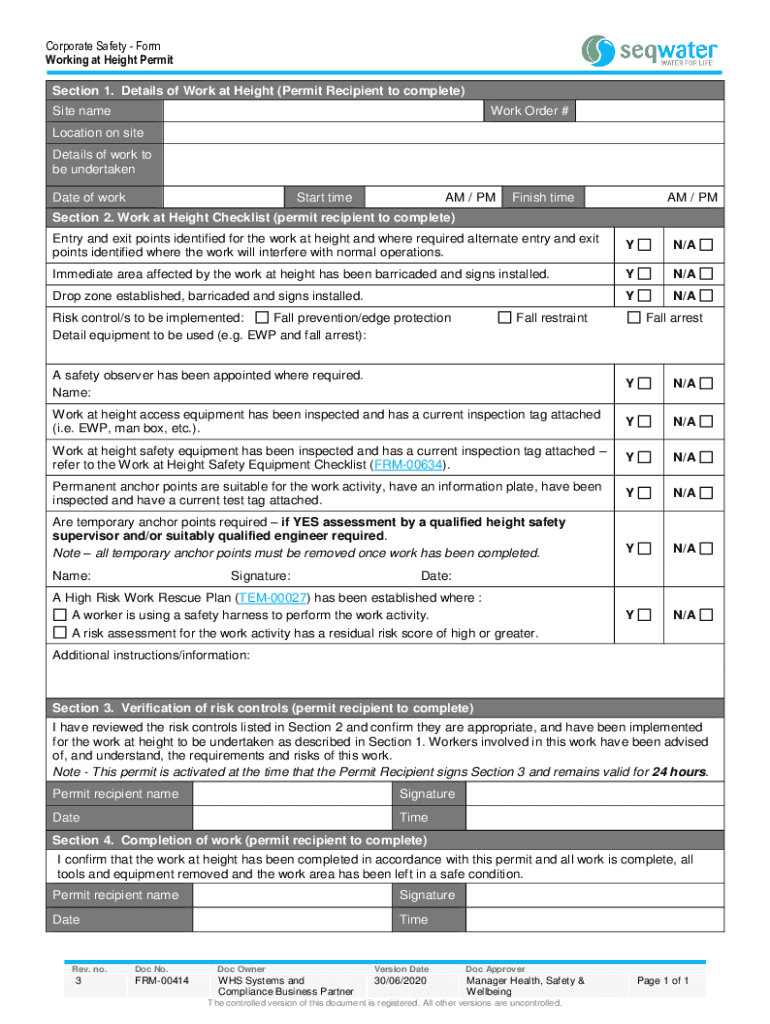
Corporate Safety Work at Height Permit Form


What is the Corporate Safety Work At Height Permit Form
The Corporate Safety Work At Height Permit Form is a crucial document designed to ensure safety protocols are followed when employees engage in work at elevated heights. This form serves as a formal request and approval mechanism, outlining the specific tasks to be performed, the safety measures in place, and the personnel involved. It is essential for compliance with Occupational Safety and Health Administration (OSHA) regulations, which mandate that employers provide a safe working environment for their employees. Properly completing this form helps minimize risks associated with working at heights, such as falls, injuries, and fatalities.
How to Use the Corporate Safety Work At Height Permit Form
Using the Corporate Safety Work At Height Permit Form involves several steps to ensure all safety measures are considered and documented. First, identify the specific work tasks that require elevation. Next, assess the risks associated with these tasks and outline the safety precautions that will be implemented. Once the necessary information is compiled, fill out the form accurately, detailing the location, equipment, and personnel involved. After completion, submit the form for approval from a designated safety officer or supervisor, who will review the information to ensure compliance with safety standards.
Steps to Complete the Corporate Safety Work At Height Permit Form
Completing the Corporate Safety Work At Height Permit Form involves a systematic approach:
- Identify the Task: Clearly define the work to be performed at height.
- Risk Assessment: Evaluate potential hazards associated with the task.
- Safety Measures: List the safety equipment and procedures that will be used.
- Personnel Details: Include names and qualifications of all workers involved.
- Approval Process: Submit the form to the appropriate authority for review and approval.
Key Elements of the Corporate Safety Work At Height Permit Form
The key elements of the Corporate Safety Work At Height Permit Form include:
- Task Description: A detailed account of the work to be performed.
- Location: Specific site where the work will take place.
- Risk Assessment: Identification of potential hazards.
- Safety Equipment: List of personal protective equipment (PPE) and tools required.
- Personnel Information: Names and roles of individuals involved in the work.
- Approval Signatures: Required signatures from supervisors or safety officers.
Legal Use of the Corporate Safety Work At Height Permit Form
Legally, the Corporate Safety Work At Height Permit Form is essential for compliance with federal and state regulations regarding workplace safety. Employers are required to maintain documentation of safety procedures and risk assessments to protect their employees. Failure to use this form appropriately can result in legal penalties, including fines and increased liability in the event of an accident. It is crucial for organizations to understand the legal implications of this form and ensure that it is used consistently and correctly.
Examples of Using the Corporate Safety Work At Height Permit Form
Examples of scenarios where the Corporate Safety Work At Height Permit Form is utilized include:
- Construction sites where workers need to use scaffolding or ladders.
- Maintenance tasks on rooftops or elevated structures.
- Installation of signage or lighting at height.
- Inspection of tall equipment or structures that require climbing.
Quick guide on how to complete corporate safety work at height permit form
Complete Corporate Safety Work At Height Permit Form effortlessly on any device
Online document management has become increasingly popular among businesses and individuals. It offers an ideal eco-friendly alternative to conventional printed and signed documents, as you can easily find the appropriate form and securely store it online. airSlate SignNow provides all the necessary tools to create, modify, and eSign your documents swiftly without delays. Manage Corporate Safety Work At Height Permit Form on any platform using airSlate SignNow's Android or iOS applications and enhance any document-related process today.
How to alter and eSign Corporate Safety Work At Height Permit Form without hassle
- Find Corporate Safety Work At Height Permit Form and click Get Form to begin.
- Utilize the tools available to complete your form.
- Emphasize pertinent sections of your documents or redact sensitive information using tools that airSlate SignNow specifically offers for that purpose.
- Create your eSignature with the Sign tool, which takes seconds and carries the same legal validity as a traditional ink signature.
- Review the details and click on the Done button to save your modifications.
- Choose how you would like to send your form, whether by email, SMS, invite link, or download it to your computer.
Eliminate the issues of lost or misplaced documents, tedious form searches, or errors that necessitate printing new copies. airSlate SignNow addresses all your document management needs within a few clicks from any device of your preference. Edit and eSign Corporate Safety Work At Height Permit Form and ensure excellent communication throughout your form preparation process with airSlate SignNow.
Create this form in 5 minutes or less
Create this form in 5 minutes!
How to create an eSignature for the corporate safety work at height permit form
How to create an electronic signature for a PDF online
How to create an electronic signature for a PDF in Google Chrome
How to create an e-signature for signing PDFs in Gmail
How to create an e-signature right from your smartphone
How to create an e-signature for a PDF on iOS
How to create an e-signature for a PDF on Android
Get more for Corporate Safety Work At Height Permit Form
- Athlete information sheet 5650110
- Training chfs ky gov child care preparedness html dcc 0 nulled form
- Domestic disturbance exam form
- Material withdrawal slip sample form
- Hoa improvement request form orgsitescom
- Fedex billable stamp how to fill out form
- Cs es119 form
- Yurok tribe increases services available to tribal citizens form
Find out other Corporate Safety Work At Height Permit Form
- Electronic signature Michigan Police Business Associate Agreement Simple
- Electronic signature Mississippi Police Living Will Safe
- Can I Electronic signature South Carolina Real Estate Work Order
- How To Electronic signature Indiana Sports RFP
- How Can I Electronic signature Indiana Sports RFP
- Electronic signature South Dakota Real Estate Quitclaim Deed Now
- Electronic signature South Dakota Real Estate Quitclaim Deed Safe
- Electronic signature Indiana Sports Forbearance Agreement Myself
- Help Me With Electronic signature Nevada Police Living Will
- Electronic signature Real Estate Document Utah Safe
- Electronic signature Oregon Police Living Will Now
- Electronic signature Pennsylvania Police Executive Summary Template Free
- Electronic signature Pennsylvania Police Forbearance Agreement Fast
- How Do I Electronic signature Pennsylvania Police Forbearance Agreement
- How Can I Electronic signature Pennsylvania Police Forbearance Agreement
- Electronic signature Washington Real Estate Purchase Order Template Mobile
- Electronic signature West Virginia Real Estate Last Will And Testament Online
- Electronic signature Texas Police Lease Termination Letter Safe
- How To Electronic signature Texas Police Stock Certificate
- How Can I Electronic signature Wyoming Real Estate Quitclaim Deed