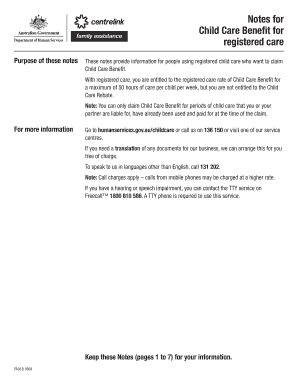
Notes for Child Care Benefit for Registered Care Humanservices Gov Form


What is the Notes For Child Care Benefit For Registered Care Humanservices Gov
The Notes For Child Care Benefit For Registered Care is a document provided by the Human Services Department that outlines essential information regarding the Child Care Benefit program. This program assists families in covering the costs associated with registered child care services. The notes include details about eligibility requirements, benefit amounts, and the application process, ensuring that families can access the financial support they need for child care services.
How to use the Notes For Child Care Benefit For Registered Care Humanservices Gov
To effectively use the Notes For Child Care Benefit, individuals should first review the document to understand the eligibility criteria and application procedures. It is important to gather all required documents, such as proof of income and child care expenses, as outlined in the notes. Families can then complete the application form accurately, ensuring all necessary information is included to avoid delays in processing. Once completed, the application should be submitted according to the instructions provided in the notes.
Steps to complete the Notes For Child Care Benefit For Registered Care Humanservices Gov
Completing the Notes For Child Care Benefit involves several key steps:
- Review the eligibility criteria to confirm you qualify for the benefit.
- Gather necessary documentation, including income verification and details of child care expenses.
- Fill out the application form accurately, ensuring all required fields are completed.
- Double-check the application for any errors or omissions before submission.
- Submit the application as directed in the notes, either online or via mail.
Eligibility Criteria
Eligibility for the Child Care Benefit is determined by several factors, including family income, the number of children in care, and the type of registered care being utilized. Families must demonstrate a financial need for assistance and provide documentation to support their application. Specific income thresholds and family size requirements may vary, so it is essential to refer to the notes for detailed information on eligibility.
Required Documents
To apply for the Child Care Benefit, applicants must provide several key documents, including:
- Proof of income, such as pay stubs or tax returns.
- Receipts or invoices from registered child care providers.
- Identification documents for both the applicant and the child receiving care.
- Any additional documentation specified in the notes that may be relevant to the application.
Form Submission Methods
Applicants can submit the Child Care Benefit application through various methods. These include:
- Online submission via the designated government portal.
- Mailing a completed paper application to the appropriate address listed in the notes.
- In-person submission at local Human Services offices, if available.
Key elements of the Notes For Child Care Benefit For Registered Care Humanservices Gov
The key elements of the Notes For Child Care Benefit include information on eligibility criteria, required documentation, application procedures, and benefit calculations. Additionally, the notes outline important deadlines for application submissions and provide guidance on how to appeal decisions if necessary. Understanding these elements is crucial for families seeking assistance with child care costs.
Quick guide on how to complete notes for child care benefit for registered care humanservices gov
Complete Notes For Child Care Benefit For Registered Care Humanservices Gov effortlessly on any device
Managing documents online has become increasingly popular among organizations and individuals. It offers an ideal eco-friendly alternative to traditional printed and signed documents, as you can locate the required form and securely save it online. airSlate SignNow provides all the tools necessary to create, modify, and eSign your documents swiftly without delays. Handle Notes For Child Care Benefit For Registered Care Humanservices Gov on any device using the airSlate SignNow Android or iOS applications and enhance any document-related process today.
How to modify and eSign Notes For Child Care Benefit For Registered Care Humanservices Gov with ease
- Locate Notes For Child Care Benefit For Registered Care Humanservices Gov and click Get Form to begin.
- Utilize the tools we provide to complete your document.
- Emphasize relevant sections of your documents or obscure sensitive information with tools that airSlate SignNow offers specifically for that purpose.
- Create your signature using the Sign tool, which takes seconds and holds the same legal validity as a conventional wet ink signature.
- Review all the details and then click on the Done button to save your changes.
- Select how you want to send your form, whether by email, text message (SMS), invitation link, or download it to your computer.
Eliminate concerns about lost or misplaced documents, time-consuming form searches, or errors that require printing new document copies. airSlate SignNow meets your document management needs in just a few clicks from any device you prefer. Modify and eSign Notes For Child Care Benefit For Registered Care Humanservices Gov and guarantee exceptional communication at every stage of your form preparation process with airSlate SignNow.
Create this form in 5 minutes or less
Create this form in 5 minutes!
How to create an eSignature for the notes for child care benefit for registered care humanservices gov
How to create an electronic signature for a PDF online
How to create an electronic signature for a PDF in Google Chrome
How to create an e-signature for signing PDFs in Gmail
How to create an e-signature right from your smartphone
How to create an e-signature for a PDF on iOS
How to create an e-signature for a PDF on Android
People also ask
-
What is the hardship program in Missouri?
The purpose of the Temporary Assistance Program is to provide assistance to needy families with children so they can be cared for in their own home and to reduce dependency by promoting job preparation, work and marriage.
-
How much is the child care subsidy in Missouri?
Sliding Fee Scale Transitional LevelFull DayPart Day Transitional Level 1 (151 to 185% poverty level) $7.50 full day $2.50 part day Transitional Level 2 (186 to 215% poverty level) $8.75 full day $2.90 part day Transitional Level 3 (216 to 242% poverty level) $10.00 full day $3.30 part day
-
Do I qualify for child care assistance in Missouri?
In order to qualify for child care assistance in Missouri, families must: Have a child birth to age 13, or a child with special needs or receiving protective services. Need child care to work, search for work, participate in job training, or attend school. Be at or below 150% of the federal poverty level.
-
What is the childcare tax credit in Missouri?
Child Care Contribution Tax Credit Act (Effective: Jan 1, 2025, to Dec 31, 2030): Taxpayers can claim a 75% tax credit against state liability for childcare contributions. Credit range: $100 to $200,000 per year.
-
What is a child care reimbursement account?
A dependent care flexible spending account (FSA) is a pretax benefit account used to pay for eligible dependent care services, such as preschool, summer day camp, before- or after-school programs, and child or adult daycare.
-
How much does DSS pay for babysitting in NY per?
The average Babysitter base salary at DSS is $15 per hour. The average additional pay is $0 per hour, which could include cash bonus, stock, commission, profit sharing or tips.
-
What is the income limit for child care assistance in MO?
As of April 2019, the income limit to qualify for assistance was increased to $29,448 (138 percent of poverty), and the exit eligibility limit was increased to $45,876 (215 percent of poverty), to adjust for the 2019 federal poverty level.
-
What is the phone number for hra child care vouchers nyc?
Need help? Please call the ACS Call Center at 212-835-7610, Mon-Fri 8:30am-5:30pm. Alternatively, you may choose to apply by mail. Printable application forms can be found on our Forms for Families page.
Get more for Notes For Child Care Benefit For Registered Care Humanservices Gov
- Load count sheet form
- Application for employment chappys deli form
- Berks local income tax form
- Rodan and fields termination form
- Blank voucher brazos valley area alumnae chapter of delta form
- Wedding musician contract template form
- Wedding officiant contract template 787756489 form
- Wedding music contract template form
Find out other Notes For Child Care Benefit For Registered Care Humanservices Gov
- Help Me With eSign Hawaii Healthcare / Medical Lease Termination Letter
- eSign Alaska High Tech Warranty Deed Computer
- eSign Alaska High Tech Lease Template Myself
- eSign Colorado High Tech Claim Computer
- eSign Idaho Healthcare / Medical Residential Lease Agreement Simple
- eSign Idaho Healthcare / Medical Arbitration Agreement Later
- How To eSign Colorado High Tech Forbearance Agreement
- eSign Illinois Healthcare / Medical Resignation Letter Mobile
- eSign Illinois Healthcare / Medical Job Offer Easy
- eSign Hawaii High Tech Claim Later
- How To eSign Hawaii High Tech Confidentiality Agreement
- How Do I eSign Hawaii High Tech Business Letter Template
- Can I eSign Hawaii High Tech Memorandum Of Understanding
- Help Me With eSign Kentucky Government Job Offer
- eSign Kentucky Healthcare / Medical Living Will Secure
- eSign Maine Government LLC Operating Agreement Fast
- eSign Kentucky Healthcare / Medical Last Will And Testament Free
- eSign Maine Healthcare / Medical LLC Operating Agreement Now
- eSign Louisiana High Tech LLC Operating Agreement Safe
- eSign Massachusetts Government Quitclaim Deed Fast