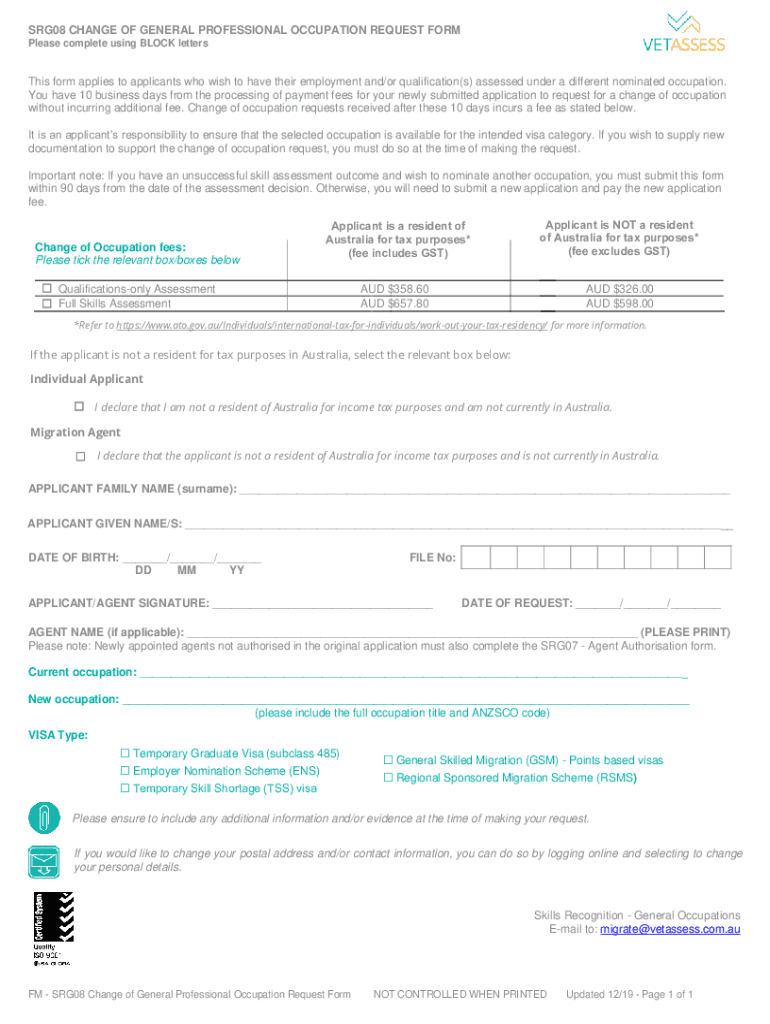
SRG 08 Vetassess Occupation Change Request Form


What is the SRG 08 Vetassess Occupation Change Request Form
The SRG 08 Vetassess Occupation Change Request Form is a crucial document used by individuals seeking to change their occupation under the Vetassess assessment process. This form is specifically designed for applicants who have previously submitted an application for skills assessment and wish to update their occupational details. It serves to provide the relevant authorities with updated information regarding the applicant's qualifications and work experience in relation to their new occupation.
How to use the SRG 08 Vetassess Occupation Change Request Form
Using the SRG 08 Vetassess Occupation Change Request Form involves several steps. First, ensure that you have the latest version of the form, which can typically be obtained from the official Vetassess website or relevant authority. Next, fill out the form accurately, providing all requested information about your previous occupation and the new occupation you are applying for. It is essential to include supporting documentation that verifies your qualifications and experience in the new field. Once completed, submit the form according to the specified submission guidelines.
Steps to complete the SRG 08 Vetassess Occupation Change Request Form
Completing the SRG 08 Vetassess Occupation Change Request Form requires careful attention to detail. Follow these steps:
- Download the form from the official source.
- Fill in your personal details, including your name, contact information, and reference number.
- Provide details of your previous occupation and the new occupation you wish to change to.
- Attach any necessary supporting documents, such as qualifications and work experience letters.
- Review the form for accuracy and completeness.
- Submit the form as instructed, either online or via mail.
Required Documents
When submitting the SRG 08 Vetassess Occupation Change Request Form, certain documents are required to support your application. These may include:
- Proof of identity, such as a passport or driver's license.
- Evidence of qualifications relevant to the new occupation.
- Letters from employers confirming your work experience in the new field.
- Any additional documentation specified in the form instructions.
Form Submission Methods
The SRG 08 Vetassess Occupation Change Request Form can be submitted through various methods. Applicants can choose to submit the form online via the Vetassess portal, or they may opt for traditional methods such as mailing the completed form to the designated address. In some cases, in-person submissions may also be accepted at specified locations. It is important to follow the guidelines provided to ensure timely processing of your request.
Eligibility Criteria
To successfully use the SRG 08 Vetassess Occupation Change Request Form, applicants must meet certain eligibility criteria. Generally, applicants should have a valid skills assessment for their previous occupation and demonstrate relevant qualifications and experience for the new occupation. It is advisable to review the specific requirements outlined by Vetassess to ensure compliance before submission.
Quick guide on how to complete srg 08 vetassess occupation change request form
Complete SRG 08 Vetassess Occupation Change Request Form effortlessly on any device
Digital document management has become increasingly popular among businesses and individuals. It offers an ideal eco-friendly alternative to traditional printed and signed documents, as you can access the correct form and securely store it online. airSlate SignNow provides all the tools you need to create, modify, and electronically sign your documents quickly without delays. Manage SRG 08 Vetassess Occupation Change Request Form on any device using airSlate SignNow's Android or iOS applications and enhance any document-driven process today.
How to modify and electronically sign SRG 08 Vetassess Occupation Change Request Form with ease
- Locate SRG 08 Vetassess Occupation Change Request Form and click on Get Form to begin.
- Make use of the tools we offer to complete your form.
- Emphasize relevant sections of your documents or conceal sensitive information with tools that airSlate SignNow provides specifically for that purpose.
- Generate your signature using the Sign tool, which takes seconds and holds the same legal value as a conventional wet ink signature.
- Review all the details and click on the Done button to save your changes.
- Select how you wish to submit your form, via email, text message (SMS), or invitation link, or download it to your computer.
Eliminate worries about lost or misplaced documents, tedious form searches, or mistakes that necessitate printing new document copies. airSlate SignNow addresses all your needs in document management in just a few clicks from any device of your choice. Edit and electronically sign SRG 08 Vetassess Occupation Change Request Form and ensure effective communication at every stage of the document preparation process with airSlate SignNow.
Create this form in 5 minutes or less
Create this form in 5 minutes!
How to create an eSignature for the srg 08 vetassess occupation change request form
How to create an electronic signature for a PDF online
How to create an electronic signature for a PDF in Google Chrome
How to create an e-signature for signing PDFs in Gmail
How to create an e-signature right from your smartphone
How to create an e-signature for a PDF on iOS
How to create an e-signature for a PDF on Android
People also ask
-
How do I get positive skill assessment from VETASSESS?
How to apply Find. Find the VETASSESS occupation that most closely fits your skills and experience. Match. Match your skills and experience to your chosen occupation. Prepare. Get ready to apply by preparing all the information and documents you need. Apply. Apply online when you're ready.
-
Can I apply for more than one skill assessment?
You can apply for more than one skills assessment with any number of assessing authorities, however, you can only nominate one occupation during your expression of interest and cannot change your nominated occupation once you are invited to apply for a Skilled Migration visa via SkillSelect.
-
Can skill assessment be renewed?
A positive full skills assessment outcome is usually valid for three years from its issue date. If you need a renewal of your skills assessment, you can apply at any time before your skills assessment is about to expire. If your skills assessment was issued over 3 years previously, it cannot be renewed.
-
What is the outcome letter for the VETASSESS skills assessment?
Your outcome letter will state the work experience that was considered towards meeting the criteria (qualifying period) and the employment post this that can be considered towards calculation of points.
-
How long does the VETASSESS skills assessment take to process?
The approximate time is 8 to 10 weeks once we have received all the documents required for the assessment. This may take longer depending on the complexity of the application. Priority Processing is available for Renewal applications.
-
How do I renew my EA skills assessment?
0:08 0:46 Once logged in proceed. To select MSA or stage 1 assessment to initiate the renewal process nextMoreOnce logged in proceed. To select MSA or stage 1 assessment to initiate the renewal process next navigate to view details on your previous application to continue with the renewal procedure.
-
Can I change my skill assessment?
If you receive a negative outcome for your skills assessment, you can apply for a reassessment with a change of occupation. To request a reassessment with a change of occupation, you must submit your application within 90 days from the date of the original assessment decision and pay the fee.
-
Can I update my skill assessment?
Yes. If you have additional documents to be assessed, you can submit a skills assessment update application. This will include paying the relevant fee and providing high-quality colour scans of your additional relevant documents.
Get more for SRG 08 Vetassess Occupation Change Request Form
- Standard work day and reporting resolution rs 2417 osc state ny form
- Child support worksheet csf 020910 form
- Amended income tax return mi 1040x 12 state of michigan michigan form
- Clienttrack project intake form for domestic violence in gov in
- Acsi science fair project approval form
- Veterinary services at belton veterinary clinic form
- Government travel card training answers form
- Friendship contract template form
Find out other SRG 08 Vetassess Occupation Change Request Form
- Sign Montana Lawers LLC Operating Agreement Free
- Sign Montana Lawers LLC Operating Agreement Fast
- Can I Sign Nevada Lawers Letter Of Intent
- Sign Minnesota Insurance Residential Lease Agreement Fast
- How Do I Sign Ohio Lawers LLC Operating Agreement
- Sign Oregon Lawers Limited Power Of Attorney Simple
- Sign Oregon Lawers POA Online
- Sign Mississippi Insurance POA Fast
- How Do I Sign South Carolina Lawers Limited Power Of Attorney
- Sign South Dakota Lawers Quitclaim Deed Fast
- Sign South Dakota Lawers Memorandum Of Understanding Free
- Sign South Dakota Lawers Limited Power Of Attorney Now
- Sign Texas Lawers Limited Power Of Attorney Safe
- Sign Tennessee Lawers Affidavit Of Heirship Free
- Sign Vermont Lawers Quitclaim Deed Simple
- Sign Vermont Lawers Cease And Desist Letter Free
- Sign Nevada Insurance Lease Agreement Mobile
- Can I Sign Washington Lawers Quitclaim Deed
- Sign West Virginia Lawers Arbitration Agreement Secure
- Sign Wyoming Lawers Lease Agreement Now