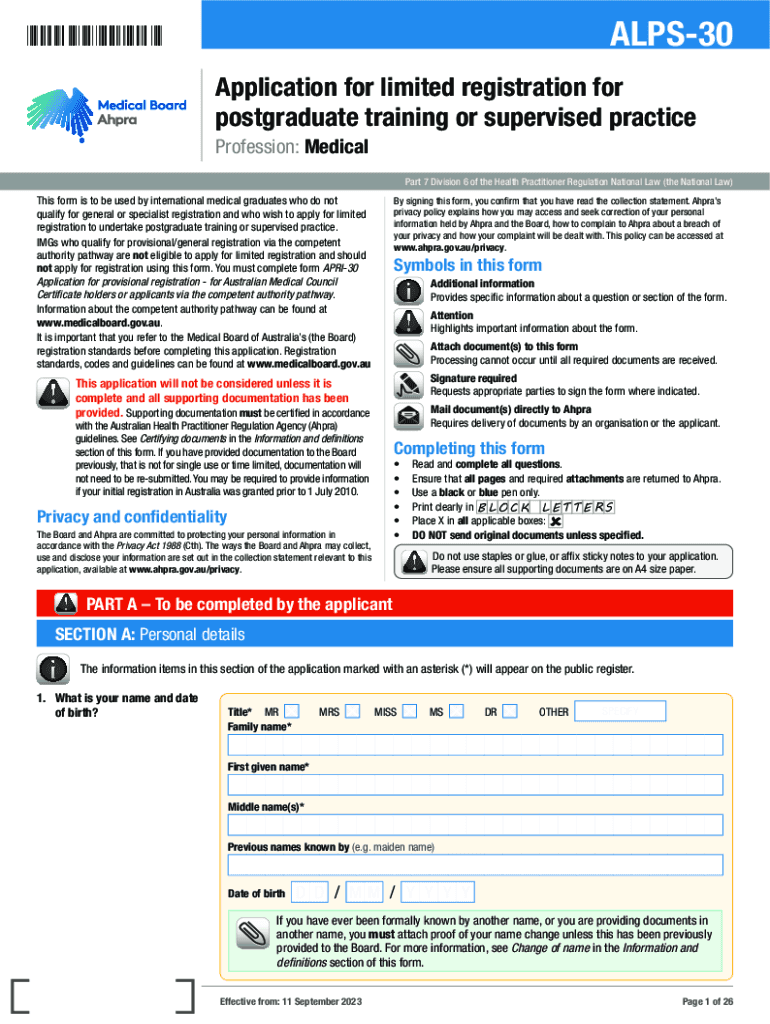
Application for Limited Registration for Postgraduate Training or Supervised Practice as a Medical Practitioner ALPS 30 Form


Understanding the ALPS 30 Application for Limited Registration
The ALPS 30 application is designed for individuals seeking limited registration for postgraduate training or supervised practice as medical practitioners. This registration allows qualified candidates to gain practical experience in a clinical setting while under supervision. It is essential for those who have completed their medical education but require additional training before obtaining full registration.
Steps to Complete the ALPS 30 Application
Completing the ALPS 30 application involves several key steps:
- Gather necessary documentation, including proof of medical qualifications and identification.
- Fill out the application form accurately, ensuring all sections are completed.
- Submit the application along with any required fees to the appropriate regulatory body.
- Await confirmation and any further instructions regarding your application status.
Key Elements of the ALPS 30 Application
The ALPS 30 application includes several critical components that applicants must address:
- Personal details, including contact information and identification.
- Educational background, detailing medical qualifications and training.
- Details of the proposed supervised practice, including the supervising practitioner’s information.
- Declaration of fitness to practice and any relevant health disclosures.
Eligibility Criteria for the ALPS 30 Application
To be eligible for the ALPS 30 application, candidates must meet specific criteria:
- Completion of an accredited medical degree.
- Demonstration of proficiency in English, if applicable.
- Provision of references from qualified medical practitioners.
- No prior disciplinary actions or legal issues related to medical practice.
Legal Use of the ALPS 30 Application
The ALPS 30 application is legally recognized and regulated by the appropriate medical boards. It is crucial for applicants to understand the legal implications of their registration, including the responsibilities and limitations associated with limited registration. Practicing without the proper registration can lead to severe penalties, including fines and loss of eligibility for future registration.
Obtaining the ALPS 30 Application
The ALPS 30 application can be obtained through the official website of the relevant medical regulatory authority. Applicants should ensure they are using the most current version of the form and follow any specific instructions provided for submission. Accessing the application online allows for easy completion and submission, facilitating a smoother application process.
Quick guide on how to complete application for limited registration for postgraduate training or supervised practice as a medical practitioner alps 30
Accomplish Application For Limited Registration For Postgraduate Training Or Supervised Practice As A Medical Practitioner ALPS 30 with ease on any device
Digital document management has become increasingly favored among companies and individuals. It offers an ideal environmentally-friendly substitute to traditional printed and signed documents, allowing you to access the necessary forms and securely archive them online. airSlate SignNow provides all the tools you require to create, edit, and electronically sign your documents swiftly and without hassle. Handle Application For Limited Registration For Postgraduate Training Or Supervised Practice As A Medical Practitioner ALPS 30 on any device using the airSlate SignNow Android or iOS applications and enhance any document-related process today.
How to edit and electronically sign Application For Limited Registration For Postgraduate Training Or Supervised Practice As A Medical Practitioner ALPS 30 effortlessly
- Locate Application For Limited Registration For Postgraduate Training Or Supervised Practice As A Medical Practitioner ALPS 30 and click on Get Form to begin.
- Utilize the tools available to finish your document.
- Highlight important sections of your documents or obscure sensitive details with tools that airSlate SignNow specifically provides for that purpose.
- Generate your electronic signature using the Sign tool, which takes just moments and holds the same legal significance as a conventional ink signature.
- Review the details and click on the Done button to save your changes.
- Choose your preferred method to send your form, via email, SMS, or an invitation link, or download it to your computer.
Forget about lost or misplaced documents, tedious form searches, or errors that necessitate printing new copies. airSlate SignNow meets your document management needs with just a few clicks from any device you prefer. Edit and electronically sign Application For Limited Registration For Postgraduate Training Or Supervised Practice As A Medical Practitioner ALPS 30 and ensure excellent communication at every stage of the form preparation process with airSlate SignNow.
Create this form in 5 minutes or less
Create this form in 5 minutes!
How to create an eSignature for the application for limited registration for postgraduate training or supervised practice as a medical practitioner alps 30
How to create an electronic signature for a PDF online
How to create an electronic signature for a PDF in Google Chrome
How to create an e-signature for signing PDFs in Gmail
How to create an e-signature right from your smartphone
How to create an e-signature for a PDF on iOS
How to create an e-signature for a PDF on Android
Get more for Application For Limited Registration For Postgraduate Training Or Supervised Practice As A Medical Practitioner ALPS 30
- Marion county section 8 form
- Burial society membership form 382501816
- U s air force form af2827 download
- Application for payment pem software systems form
- Patient information form pdf 390082893
- Rental agreement andor lease 247 real estate leasing form
- Valuation contract template form
- Value based contract template form
Find out other Application For Limited Registration For Postgraduate Training Or Supervised Practice As A Medical Practitioner ALPS 30
- How Can I Sign Idaho Charity Presentation
- How Do I Sign Nebraska Charity Form
- Help Me With Sign Nevada Charity PDF
- How To Sign North Carolina Charity PPT
- Help Me With Sign Ohio Charity Document
- How To Sign Alabama Construction PDF
- How To Sign Connecticut Construction Document
- How To Sign Iowa Construction Presentation
- How To Sign Arkansas Doctors Document
- How Do I Sign Florida Doctors Word
- Can I Sign Florida Doctors Word
- How Can I Sign Illinois Doctors PPT
- How To Sign Texas Doctors PDF
- Help Me With Sign Arizona Education PDF
- How To Sign Georgia Education Form
- How To Sign Iowa Education PDF
- Help Me With Sign Michigan Education Document
- How Can I Sign Michigan Education Document
- How Do I Sign South Carolina Education Form
- Can I Sign South Carolina Education Presentation