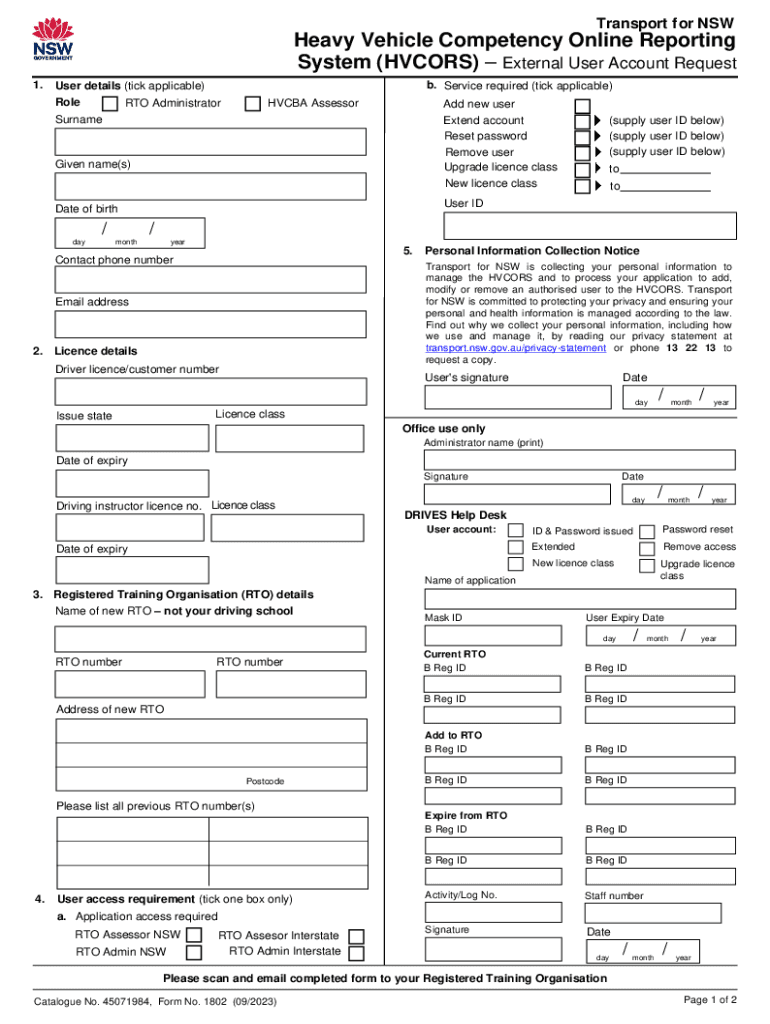
Heavy Vehicle Competency Online Reporting System HVCORS External User Account RequestCatalogue No 45071984 Form No 1802 Heavy Ve 2023-2026


Understanding the Heavy Vehicle Competency Online Reporting System (HVCORS)
The Heavy Vehicle Competency Online Reporting System (HVCORS) is designed to streamline the reporting process for heavy vehicle competency assessments. This system allows users to manage their accounts and access necessary documentation efficiently. HVCORS is particularly beneficial for organizations involved in heavy vehicle operations, ensuring compliance with relevant regulations and standards.
Steps to Access HVCORS
To access the HVCORS, users must first create an account. The process typically involves the following steps:
- Visit the HVCORS login page.
- Click on the registration link to create a new account.
- Provide the required personal and organizational information.
- Submit the application for review.
- Once approved, users will receive login credentials via email.
How to Use HVCORS Effectively
Utilizing HVCORS effectively involves understanding its features and functionalities. After logging in, users can:
- Submit competency assessments online.
- Track the status of submissions.
- Access historical data and reports.
- Update personal and organizational details as needed.
Familiarizing oneself with the platform's interface will enhance the user experience and facilitate smoother operations.
Legal Considerations for HVCORS Users
Users of the HVCORS must adhere to specific legal requirements. This includes ensuring that all submitted information is accurate and complies with federal and state regulations regarding heavy vehicle operations. Misreporting or failure to comply with these regulations can lead to penalties, including fines or operational restrictions.
Required Documentation for HVCORS Registration
When registering for HVCORS, users need to prepare several documents to facilitate the application process. Commonly required documents include:
- Proof of identity (such as a driver's license or passport).
- Business registration documents, if applicable.
- Any relevant certifications related to heavy vehicle operation.
Having these documents ready can expedite the registration process and ensure compliance with HVCORS requirements.
Common Scenarios for HVCORS Usage
HVCORS is utilized in various scenarios, including:
- Organizations needing to report competency assessments for their drivers.
- Fleet managers tracking compliance for heavy vehicle operations.
- Individuals seeking to maintain their certification status.
Understanding these scenarios can help users maximize the benefits of the HVCORS platform.
Quick guide on how to complete heavy vehicle competency online reporting system hvcors external user account requestcatalogue no 45071984 form no 1802 heavy
Complete Heavy Vehicle Competency Online Reporting System HVCORS External User Account RequestCatalogue No 45071984 Form No 1802 Heavy Ve effortlessly on any device
Digital document management has become increasingly favored by businesses and individuals alike. It offers an ideal eco-friendly alternative to traditional printed and signed documents, allowing you to locate the necessary form and securely save it online. airSlate SignNow provides all the tools you need to create, modify, and electronically sign your documents quickly and without delays. Handle Heavy Vehicle Competency Online Reporting System HVCORS External User Account RequestCatalogue No 45071984 Form No 1802 Heavy Ve on any platform using airSlate SignNow's Android or iOS applications and enhance any document-centered task today.
The easiest way to modify and electronically sign Heavy Vehicle Competency Online Reporting System HVCORS External User Account RequestCatalogue No 45071984 Form No 1802 Heavy Ve with ease
- Locate Heavy Vehicle Competency Online Reporting System HVCORS External User Account RequestCatalogue No 45071984 Form No 1802 Heavy Ve and then click Get Form to commence.
- Utilize the tools we offer to complete your document.
- Emphasize important sections of the documents or obscure sensitive information using tools that airSlate SignNow specifically offers for that purpose.
- Create your electronic signature with the Sign tool, which takes merely seconds and holds the same legal authority as a handwritten signature.
- Review all the details and click the Done button to save your modifications.
- Choose your delivery method for the form, via email, text message (SMS), or an invitation link, or download it to your computer.
Eliminate concerns over lost or misplaced files, tiring form searches, or errors that require new document copies. airSlate SignNow meets your document management needs in just a few clicks from your preferred device. Modify and electronically sign Heavy Vehicle Competency Online Reporting System HVCORS External User Account RequestCatalogue No 45071984 Form No 1802 Heavy Ve and ensure excellent communication at every stage of the form preparation process with airSlate SignNow.
Create this form in 5 minutes or less
Find and fill out the correct heavy vehicle competency online reporting system hvcors external user account requestcatalogue no 45071984 form no 1802 heavy
Create this form in 5 minutes!
How to create an eSignature for the heavy vehicle competency online reporting system hvcors external user account requestcatalogue no 45071984 form no 1802 heavy
How to create an electronic signature for a PDF online
How to create an electronic signature for a PDF in Google Chrome
How to create an e-signature for signing PDFs in Gmail
How to create an e-signature right from your smartphone
How to create an e-signature for a PDF on iOS
How to create an e-signature for a PDF on Android
People also ask
-
What is hvcors login and how does it work?
The hvcors login is a secure access point for users to enter the airSlate SignNow platform. By using hvcors login, you can easily manage your documents, send eSignatures, and collaborate with your team. This streamlined process ensures that your sensitive information remains protected while allowing for efficient document handling.
-
Is there a cost associated with using hvcors login?
Accessing the airSlate SignNow platform through hvcors login is part of our subscription plans. We offer various pricing tiers to accommodate different business needs, ensuring that you get the best value for your investment. Each plan includes features that enhance your document management experience.
-
What features are available with hvcors login?
With hvcors login, users can access a range of features including document templates, eSignature capabilities, and real-time collaboration tools. These features are designed to simplify the signing process and improve workflow efficiency. Additionally, users can track document status and receive notifications for completed actions.
-
How does hvcors login enhance document security?
The hvcors login provides robust security measures to protect your documents and personal information. With encryption and secure access protocols, your data remains safe from unauthorized access. This commitment to security ensures that you can confidently manage sensitive documents through airSlate SignNow.
-
Can I integrate other applications with hvcors login?
Yes, airSlate SignNow supports integrations with various applications, enhancing the functionality of your hvcors login experience. You can connect with popular tools like Google Drive, Salesforce, and more to streamline your workflow. These integrations allow for seamless document management across platforms.
-
What are the benefits of using hvcors login for my business?
Using hvcors login offers numerous benefits, including increased efficiency in document handling and improved collaboration among team members. The easy-to-use interface allows for quick access to essential features, saving time and reducing errors. Ultimately, this leads to a more productive work environment.
-
How can I reset my hvcors login password?
If you need to reset your hvcors login password, simply click on the 'Forgot Password?' link on the login page. You will receive an email with instructions to create a new password. This process ensures that you can regain access to your account quickly and securely.
Get more for Heavy Vehicle Competency Online Reporting System HVCORS External User Account RequestCatalogue No 45071984 Form No 1802 Heavy Ve
Find out other Heavy Vehicle Competency Online Reporting System HVCORS External User Account RequestCatalogue No 45071984 Form No 1802 Heavy Ve
- How To Sign Illinois Product Defect Notice
- Sign New Mexico Refund Request Form Mobile
- Sign Alaska Sponsorship Agreement Safe
- How To Sign Massachusetts Copyright License Agreement
- How Do I Sign Vermont Online Tutoring Services Proposal Template
- How Do I Sign North Carolina Medical Records Release
- Sign Idaho Domain Name Registration Agreement Easy
- Sign Indiana Domain Name Registration Agreement Myself
- Sign New Mexico Domain Name Registration Agreement Easy
- How To Sign Wisconsin Domain Name Registration Agreement
- Sign Wyoming Domain Name Registration Agreement Safe
- Sign Maryland Delivery Order Template Myself
- Sign Minnesota Engineering Proposal Template Computer
- Sign Washington Engineering Proposal Template Secure
- Sign Delaware Proforma Invoice Template Online
- Can I Sign Massachusetts Proforma Invoice Template
- How Do I Sign Oklahoma Equipment Purchase Proposal
- Sign Idaho Basic rental agreement or residential lease Online
- How To Sign Oregon Business agreements
- Sign Colorado Generic lease agreement Safe