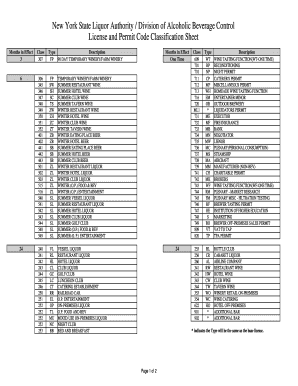
License and Permit Code Classifications July2015 Xlsx Sla Ny Form


Understanding New York License Classification
The New York license classification system categorizes various types of licenses and permits required for different professions and activities. Each classification is designed to ensure that individuals and businesses comply with state regulations. This system is essential for maintaining public safety and ensuring that licensed professionals meet specific standards. The classifications are regularly updated to reflect changes in laws and industry practices.
How to Use the License Classification Code
The License and Permit Code Classifications document serves as a reference for identifying the specific license type required for various professions in New York. Users can consult this document to determine the correct classification for their business or professional needs. By understanding the code, individuals can ensure they apply for the appropriate licenses, avoiding potential legal issues or penalties.
Obtaining the License Classification Code
To obtain the License and Permit Code Classifications, individuals can access the official state resources or relevant government websites. The document is typically available in downloadable formats, such as Excel or PDF, making it easy to reference. It is important to ensure that you are using the most current version to comply with the latest regulations.
Steps to Complete the License Classification Code
Completing the License Classification Code involves several steps:
- Identify the specific profession or activity for which you need a license.
- Consult the License and Permit Code Classifications document to find the appropriate classification.
- Gather any required documentation or information related to your application.
- Complete the application process as outlined for your specific license type.
Legal Use of the License Classification Code
Understanding the legal implications of the License Classification Code is crucial for compliance. Each classification corresponds to specific legal requirements that must be met by the licensee. Failure to adhere to these regulations can result in penalties, including fines or revocation of the license. It is advisable to stay informed about any changes to the classifications or legal requirements.
Key Elements of the License Classification Code
The key elements of the License Classification Code include:
- Classification numbers and descriptions for various licenses.
- Requirements for obtaining each type of license.
- Renewal and expiration information for licenses.
- Contact information for state agencies responsible for issuing licenses.
Quick guide on how to complete license and permit code classifications july2015 xlsx sla ny
Complete License And Permit Code Classifications July2015 xlsx Sla Ny effortlessly on any device
Digital document management has gained popularity among businesses and individuals. It offers a perfect environmentally friendly solution to traditional printed and signed paperwork, allowing you to access the necessary form and securely keep it online. airSlate SignNow provides all the resources you need to create, edit, and eSign your documents quickly without delays. Handle License And Permit Code Classifications July2015 xlsx Sla Ny on any device with airSlate SignNow Android or iOS applications and simplify any document-related task today.
How to modify and eSign License And Permit Code Classifications July2015 xlsx Sla Ny seamlessly
- Find License And Permit Code Classifications July2015 xlsx Sla Ny and click on Get Form to begin.
- Use the tools we offer to fill out your document.
- Select pertinent parts of the documents or redact sensitive information with tools that airSlate SignNow specifically provides for that purpose.
- Generate your eSignature using the Sign tool, which takes moments and holds the same legal validity as a traditional handwritten signature.
- Review all the details and click on the Done button to save your changes.
- Choose how you wish to send your form, via email, SMS, or an invite link, or download it to your computer.
Eliminate concerns about lost or misplaced documents, tiresome form searching, or mistakes that necessitate printing new document copies. airSlate SignNow addresses all your document management needs in just a few clicks from any device you prefer. Edit and eSign License And Permit Code Classifications July2015 xlsx Sla Ny and ensure outstanding communication at every stage of your form preparation process with airSlate SignNow.
Create this form in 5 minutes or less
Create this form in 5 minutes!
How to create an eSignature for the license and permit code classifications july2015 xlsx sla ny
How to create an electronic signature for a PDF online
How to create an electronic signature for a PDF in Google Chrome
How to create an e-signature for signing PDFs in Gmail
How to create an e-signature right from your smartphone
How to create an e-signature for a PDF on iOS
How to create an e-signature for a PDF on Android
People also ask
-
What is the new york license classification process?
The new york license classification process involves determining the appropriate license type based on your business activities. It is essential to understand the specific requirements for each classification to ensure compliance. airSlate SignNow can help streamline the documentation needed for this process.
-
How can airSlate SignNow assist with new york license classification?
airSlate SignNow provides an easy-to-use platform for managing and eSigning documents related to new york license classification. Our solution simplifies the paperwork process, allowing you to focus on your business. With our features, you can ensure that all necessary documents are completed accurately and efficiently.
-
What are the pricing options for airSlate SignNow?
airSlate SignNow offers flexible pricing plans tailored to meet the needs of businesses dealing with new york license classification. Our plans are designed to be cost-effective, ensuring you get the best value for your investment. You can choose from various tiers based on your document volume and feature requirements.
-
What features does airSlate SignNow offer for document management?
airSlate SignNow includes features such as customizable templates, secure eSigning, and real-time tracking, which are essential for managing documents related to new york license classification. These tools enhance efficiency and ensure that your documents are processed smoothly. Additionally, our platform is user-friendly, making it accessible for all team members.
-
Can airSlate SignNow integrate with other software?
Yes, airSlate SignNow offers integrations with various software applications that can assist in the new york license classification process. This includes CRM systems, project management tools, and cloud storage services. These integrations help streamline workflows and improve overall productivity.
-
What are the benefits of using airSlate SignNow for eSigning?
Using airSlate SignNow for eSigning provides numerous benefits, especially for new york license classification documents. It enhances security, reduces turnaround time, and eliminates the need for physical paperwork. This not only saves time but also contributes to a more environmentally friendly approach to business operations.
-
Is airSlate SignNow compliant with legal standards?
Yes, airSlate SignNow is compliant with all legal standards required for eSigning, including those relevant to new york license classification. Our platform adheres to the ESIGN Act and UETA, ensuring that your electronically signed documents are legally binding. This compliance gives you peace of mind when managing important business documents.
Get more for License And Permit Code Classifications July2015 xlsx Sla Ny
- Accretion of duties promotion certification gsa form
- If the answer to question 1 is yes move to the remaining questions to determine whether the form
- Than 23660 for learned professionals other than professional legal positions physician form
- Salary threshold the annual rate of basic pay for this position is equal to or greater form
- Factor evaluation system position gsa form
- Than 23660 form
- Federal wage system employees the employee is in a non supervisory form
- Hours of work in a given workweek in one or more exempt areas regardless of where form
Find out other License And Permit Code Classifications July2015 xlsx Sla Ny
- How Can I eSignature Wisconsin Orthodontists Word
- How Do I eSignature Arizona Real Estate PDF
- How To eSignature Arkansas Real Estate Document
- How Do I eSignature Oregon Plumbing PPT
- How Do I eSignature Connecticut Real Estate Presentation
- Can I eSignature Arizona Sports PPT
- How Can I eSignature Wisconsin Plumbing Document
- Can I eSignature Massachusetts Real Estate PDF
- How Can I eSignature New Jersey Police Document
- How Can I eSignature New Jersey Real Estate Word
- Can I eSignature Tennessee Police Form
- How Can I eSignature Vermont Police Presentation
- How Do I eSignature Pennsylvania Real Estate Document
- How Do I eSignature Texas Real Estate Document
- How Can I eSignature Colorado Courts PDF
- Can I eSignature Louisiana Courts Document
- How To Electronic signature Arkansas Banking Document
- How Do I Electronic signature California Banking Form
- How Do I eSignature Michigan Courts Document
- Can I eSignature Missouri Courts Document